Table of Contents
- Evaluation Framework: 10 Criteria That Matter in Real Projects
- Comparison of Common AI Website Builder Paths
- How to Apply This in Unicorn Platform
- Common Failure Modes and How to Fix Them
- FAQ
Most startup founders do not struggle to find website tools. They struggle to pick one tool that lets them launch quickly, maintain quality, and avoid expensive migration pain six months later. AI website builders with free tiers look attractive at first, but free does not always mean low risk.
Some tools limit exports. Some tools hide useful features behind credit systems. Some generate good-looking pages that still fail to convert because the structure and messaging are weak. If your team chooses a platform only by first impression, you often pay the real cost later in rewrites, broken workflows, and low-performing pages.
This guide is written for Unicorn Platform users and teams comparing alternatives. You will get a clear decision framework, practical comparisons, and an implementation plan you can apply immediately inside Unicorn Platform to ship pages that are fast, useful, and conversion-focused.
sbb-itb-bf47c9b
Key Takeaways
Choosing the Right AI Website Builder for Your Needs
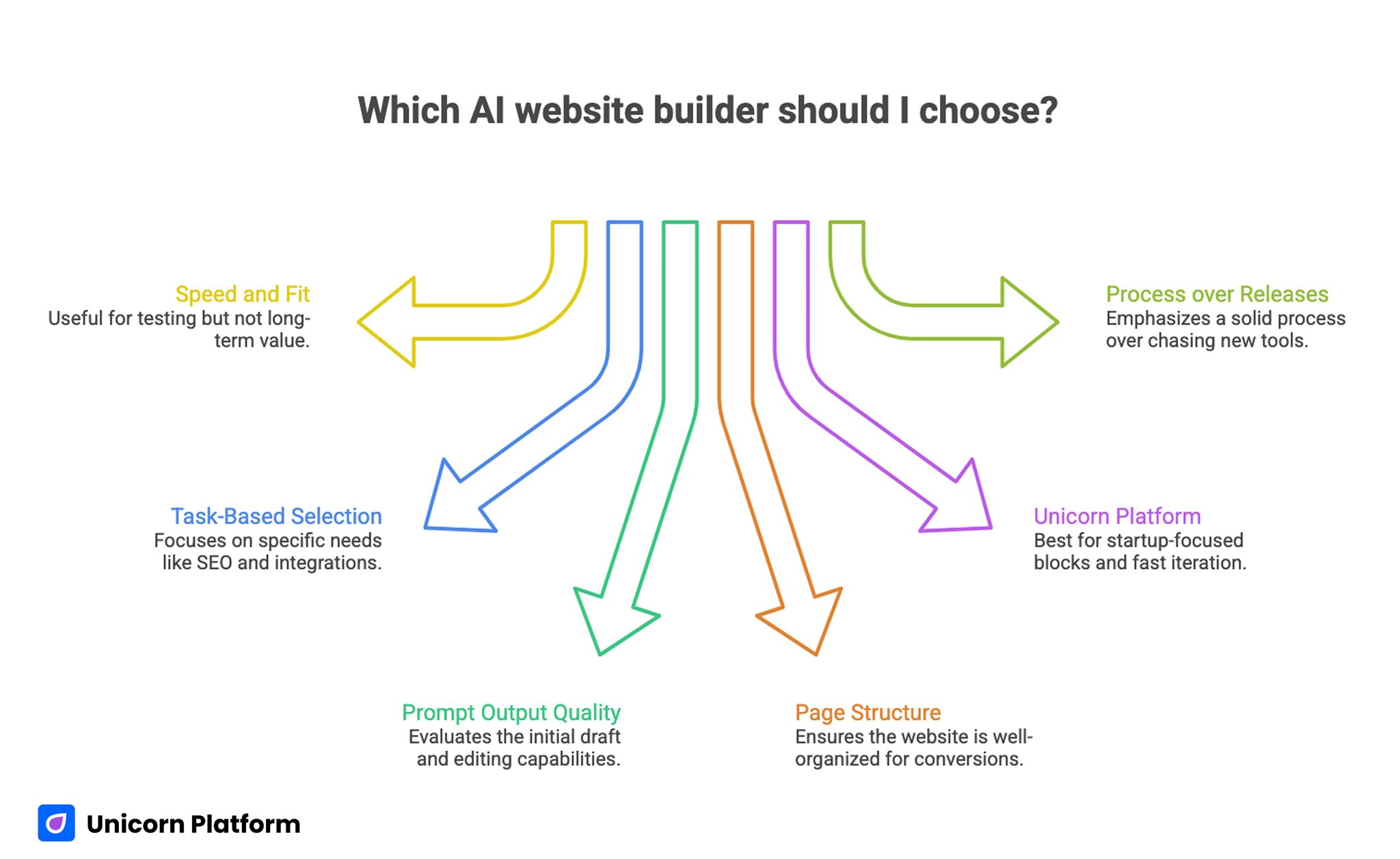
- Free AI website tiers are useful for testing speed and fit, not for judging long-term value by price alone.
- The best selection method is task-based: launch speed, edit control, SEO readiness, integration fit, and upgrade predictability.
- You should evaluate prompt output quality and post-generation editing quality separately.
- Tools that create pretty drafts but weak page structure can still hurt conversion outcomes.
- Unicorn Platform is strongest when you need startup-focused page blocks, fast iteration, and clean publishing workflows.
- The right process is more important than chasing every new AI builder release.
Why This Decision Is Harder Than It Looks
On paper, AI website builders solve the same problem: create a site quickly from a prompt. In practice, they optimize for very different users. Some are built for creators publishing content every week. Others are built for visual designers who want finer styling control. Others prioritize developer flexibility.
A founder launching an MVP needs different capabilities than an agency delivering branded client microsites. If you skip use-case fit and only compare feature checklists, you can end up with a platform that looks strong in demos but slows your real publishing cycle.
The core question is simple: can this tool help your team produce trustworthy, conversion-friendly pages with less effort over time.
What "Free" Usually Means in AI Site Builders
Free plans are useful, but you need to read limits as product behavior, not marketing copy. Most tools place constraints on domain connection, branding removal, export flexibility, AI usage volume, or advanced blocks.
These limits are not always bad. They are often sensible for trial use. The problem appears when teams build important pages before understanding those boundaries. If migration or upgrade friction appears at the wrong moment, launch plans slip.
Use free tiers as evaluation environments. Test output quality, editing speed, and operational fit before you commit to your long-term stack.
Evaluation Framework: 10 Criteria That Matter in Real Projects
AI Website Builder Evaluation Criteria
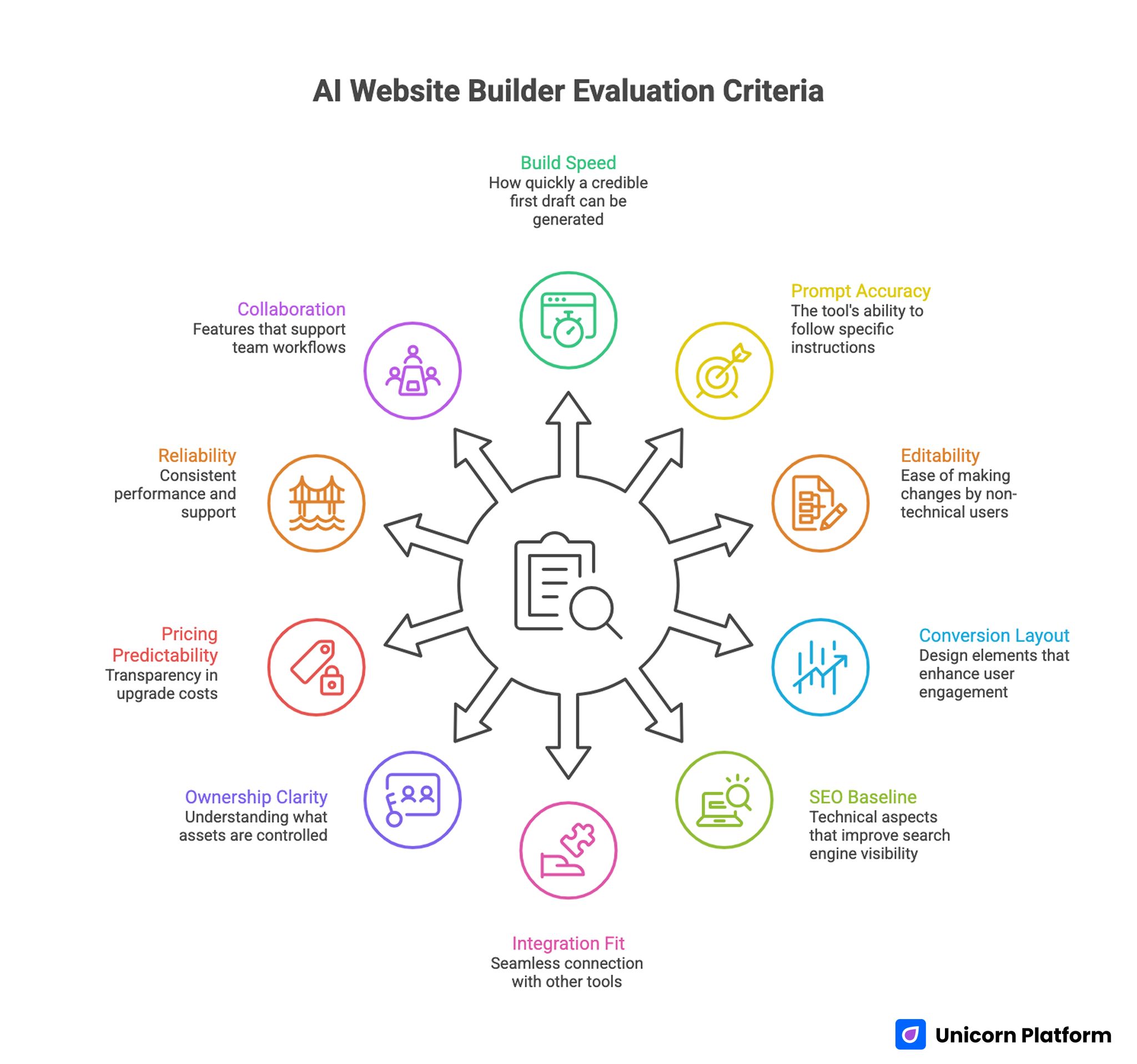
Use this framework to compare tools in a way that reflects real execution.
1. Build speed from a cold start
How fast can you get a credible first draft when you only have a basic brief? If it takes too many retries to get a clean structure, speed claims are less meaningful.
2. Prompt accuracy and instruction follow-through
Does the tool actually follow your constraints on audience, tone, sections, and outcomes? Strong prompt alignment saves heavy editing later.
3. Post-generation editability
Can non-technical teammates fix content, reorder sections, and update CTAs without friction? Editing quality matters more than generation novelty.
4. Layout quality for conversion
A page can look modern and still convert poorly. Review whether hero hierarchy, trust elements, offer clarity, and CTA flow are solid by default.
5. SEO and technical baseline
Check metadata control, heading structure, page speed behavior, and indexability basics. You do not need enterprise complexity, but you need a clean baseline.
6. Integration and workflow fit
Can you connect forms, analytics, email, and your existing tools without fragile workarounds? Friction here compounds quickly.
7. Export and ownership clarity
Know what you can export, what stays locked, and who controls key assets. Ownership clarity prevents future constraints.
8. Pricing predictability
Free entry is less important than upgrade transparency. Watch for unclear credit systems or steep jumps when traffic grows.
9. Reliability and support response
Early-stage teams need dependable publishing. If stability or support is inconsistent, launch risk increases.
10. Team collaboration practicality
If more than one person touches pages, permissions and workflow consistency become critical. Individual-friendly tools can break down at team scale.
Comparison of Common AI Website Builder Paths
No single platform wins every category. The right option depends on your operating model and the kind of pages you publish.
Unicorn Platform
Unicorn Platform is a strong fit for founders, startup marketers, and lean teams that want a fast page pipeline without heavy technical overhead. It supports practical landing-page architecture, clean visual editing, and quick content iteration.
For many startup teams, the biggest advantage is operational simplicity. You can move from idea to published page quickly while keeping the structure conversion-focused instead of design-first. That is useful when release speed and message clarity matter more than pixel-level experimentation.
Neo Sites
Neo Sites can be a useful option for teams that want very simple onboarding and fast early setup with minimal technical effort. It is easy for first-time builders and can help non-technical users publish quickly.
As with many lightweight builders, evaluate long-term flexibility before scaling core pages on top of it. If your roadmap includes richer integrations or more advanced structure control, confirm those needs early to avoid rework.
Wix and similar broad ecosystems
Large ecosystems are attractive because they include many templates, plugins, and app connections. They work well for teams that expect mixed needs and can tolerate a slightly steeper editor experience.
The tradeoff is complexity. You may gain breadth while losing some speed in day-to-day publishing if your team only needs a focused startup page workflow.
Design-heavy tools such as Framer or Webflow-style workflows
These tools are often strong for advanced visual control and polished interactive experiences. They are useful when brand expression is the top priority and design teams can invest in finer control.
For early-stage teams with limited bandwidth, the learning curve and setup overhead can outweigh benefits. If your core goal is fast launch and clear conversion flow, simpler page systems often perform better operationally.
AI-first code-generation paths
Some builders and assistants are strong at generating code-driven experiences from prompts. They can be powerful for technical teams who are comfortable validating output, hosting, and maintaining deployment workflows.
For non-technical operators, this path can introduce hidden complexity after generation. The page may exist quickly, but ongoing edits and publishing can become bottlenecks.
Practical Test Method You Can Run in One Day
Instead of relying on vendor pages, run a controlled comparison with one brief and three test scenarios.
Use one common brief:
- Product type and target audience
- Primary offer and CTA
- Required sections
- Tone and reading level
- Conversion goal
Then run three scenarios per tool:
- Initial generation from prompt
- Mid-cycle update request (new feature, changed CTA, adjusted positioning)
- Last-minute launch fix (headline rewrite, proof block update, mobile cleanup)
Score each scenario for speed, quality, and effort. This gives you a grounded view of day-to-day performance, not only first-run output.
What Startups Usually Miss During Tool Selection
Many teams compare what is visible and ignore what drives long-term execution quality.
They focus on visual demos instead of editing ergonomics. They compare monthly prices without checking upgrade triggers. They test one successful prompt and never test revision behavior. These gaps are small on day one and expensive by month three.
A better approach is to evaluate lifecycle fit: drafting, editing, publishing, updating, and performance monitoring. The platform that wins this lifecycle usually wins the business outcome.
How to Apply This in Unicorn Platform
This is the section that matters most if your goal is not just to choose a tool, but to ship better pages consistently.
Step 1: Build a reusable page blueprint
Create one baseline structure for your startup pages: hero with clear outcome, problem framing, solution blocks, social proof, FAQ, and focused CTA. Save this as your default starting architecture.
A stable blueprint reduces decision fatigue and keeps quality more consistent across releases.
Step 2: Use AI for block-level drafting, not full-page autopilot
Generate content section by section with clear constraints. Ask for one block at a time: hero options, benefit bullets, objection handling, and CTA variants.
This gives better control than generating an entire page in one pass, and it makes editorial QA much faster.
Step 3: Add trust and proof early
Before final polishing, insert concrete trust signals: short proof statements, implementation details, and realistic expectation language. Early trust blocks improve both clarity and conversion quality.
Do not wait until final review to add proof. It changes how readers interpret every section above and below it.
Step 4: Implement a simple QA pass before publish
Use a short review checklist:
- Does each section serve a clear decision purpose?
- Are claims specific and realistic?
- Is the CTA clear and consistent with the offer?
- Is mobile readability clean?
- Are headings skimmable and logically ordered?
This lightweight QA loop catches most quality failures without slowing your launch speed.
Step 5: Track update cadence, not only launch date
After publishing, schedule a monthly review and a quarterly deep update. Content quality decays when teams treat pages as one-time assets.
With Unicorn Platform, block-based editing makes refresh cycles manageable. Use that advantage to keep pages current rather than rewriting from scratch each time.
Step 6: Create role ownership for scaling teams
Assign clear ownership:
- One person for structure and conversion flow
- One person for content quality and tone
- One person for analytics and update triggers
Clear ownership reduces edit conflicts and keeps your publishing pipeline predictable.
Decision Matrix by Startup Stage
Different stages need different builder priorities.
Pre-seed and MVP stage
Focus on speed, clarity, and low setup burden. You need rapid iteration and enough flexibility to adjust positioning often.
Early traction stage
Prioritize conversion control, analytics readiness, and steady update workflows. Your page system should support repeated experiments without breaking structure.
Scaling stage
Add governance needs: permissions, consistency, and structured collaboration. At this stage, reliability and workflow discipline matter as much as creative flexibility.
Using the same criteria at every stage creates bad decisions. Match the tool to your current stage and near-term roadmap.
Common Failure Modes and How to Fix Them
Failure Mode 1: Template lock-in
Teams pick a tool because the first template looks polished, then struggle to adapt structure as messaging evolves.
Fix: run revision tests before committing. If the tool resists strategic edits, it will slow growth work later.
Failure Mode 2: Over-trusting generated copy
AI-generated copy often sounds complete while remaining generic. It can hide weak differentiation.
Fix: rewrite core value proposition blocks manually, then use AI for variants and supporting sections.
Failure Mode 3: Free-tier dependency
Some teams build core pages on free constraints that later block important updates.
Fix: identify likely upgrade triggers before launch and map costs to your growth plan.
Failure Mode 4: Broken ownership model
When everyone can edit anything at any time, quality drifts and page logic breaks.
Fix: assign section ownership and publish responsibilities clearly.
Failure Mode 5: No refresh rhythm
Launch momentum fades when no one owns post-publish updates.
Fix: set recurring review windows and define what triggers content refresh.
A 6-Week Rollout Plan for Unicorn Platform Users
Week 1: Baseline and selection
Define your page goals, create comparison criteria, and validate platform fit against real scenarios.
Week 2: Blueprint setup
Build your reusable page architecture in Unicorn Platform and document section purposes.
Week 3: Content production sprint
Draft two to three high-priority pages using section-based generation and editorial QA.
Week 4: Conversion polish
Refine CTAs, tighten proof blocks, and improve mobile readability where needed.
Week 5: Tracking and feedback
Review behavior data, collect sales or support feedback, and identify weak sections.
Week 6: Iteration loop launch
Implement updates from insights and lock your monthly and quarterly maintenance rhythm.
This rollout keeps execution practical for small teams and avoids over-engineering.
How to Keep Content Useful for Unicorn Platform Readers
Useful content is not only accurate. It must help readers make better implementation decisions quickly.
That means each major section should answer a practical question: what to choose, what to do next, what to avoid, and how to measure whether it worked. If a section cannot guide action, rewrite it.
For Unicorn Platform audiences, this practical lens matters because most readers are trying to launch or improve real pages under time pressure. Clear, actionable guidance consistently outperforms generic thought pieces.
Reusable Scoring Sheet You Can Use With Your Team
If multiple people are involved in selection, disagreements usually come from unclear scoring. One person values design polish, another values speed, and another values long-term cost. A shared scorecard reduces this noise and makes the final decision defensible.
Use a weighted model out of 100 points:
- Prompt accuracy and structure quality: 20 points
- Edit speed for non-technical users: 20 points
- Conversion readiness of generated layout: 15 points
- SEO and technical baseline controls: 10 points
- Integration and workflow compatibility: 10 points
- Pricing predictability and upgrade logic: 10 points
- Export and ownership flexibility: 10 points
- Reliability and support experience: 5 points
Run this scorecard after each tool test session. Keep comments short and specific, and avoid vague notes like "looks modern" or "felt good." You want observations that are useful when you review the data one week later.
Prompt Templates That Produce Better Drafts
Most weak outputs come from weak prompts, not weak tools. Instead of generic requests, use structured prompts with explicit constraints and expected section logic.
Try this homepage prompt format:
- Audience: who this page is for and what they are trying to solve.
- Offer: the core value statement in one sentence.
- Desired action: what visitor should do after reading.
- Required sections: hero, benefits, proof, FAQ, CTA.
- Tone and style: clear, practical, non-hype language.
- Constraints: avoid inflated claims, keep paragraphs readable, include concrete examples.
Then use separate prompts for revision passes. Ask for a tighter hero, clearer objection handling, or stronger CTA language one block at a time. This block approach produces cleaner outcomes than requesting full rewrites repeatedly.
For Unicorn Platform users, this prompt discipline aligns well with block editing. You can apply one refined section directly where it belongs, review context, and continue without losing control of page flow.
Migration and Lock-In Risk Checklist
Even if your first launch succeeds, future flexibility still matters. Many teams realize too late that their original tool cannot support new workflows, and migration becomes painful.
Before committing, confirm these points:
- Can you export what you need if strategy changes?
- Are core pages tied to proprietary widgets that are hard to replace?
- Will your current analytics setup remain intact after upgrades?
- Are collaboration permissions sufficient for your team structure?
- Do renewal terms and feature limits stay transparent as usage grows?
You do not need maximum portability for every project, but you need enough freedom to avoid strategic dead ends. A quick legal and operational review now can prevent major rework later.
Practical Conversion Checklist for AI-Generated Pages
AI-generated pages often look complete while missing conversion-critical details. Use this checklist before you publish any page draft.
Message clarity
The opening section should clearly identify audience, problem, and outcome in plain language. If readers cannot understand value quickly, they will not stay long enough to evaluate details.
Offer specificity
Strong pages describe what users get and when they get it. Generic statements like "improve your business" are too broad to build trust.
Proof quality
Proof can be simple and still effective: short outcome statements, implementation details, or realistic examples. Avoid vague credibility claims with no context.
CTA alignment
Your CTA should match reader readiness. If the page is educational, a hard sales CTA may underperform. If intent is transactional, overlong educational detours can reduce action rate.
Mobile readability
Many founders review pages on desktop and forget mobile hierarchy. Always validate spacing, section order, and button clarity on smaller screens before launch.
Editorial Workflow That Scales Beyond One Writer
Once content production grows, informal editing habits create quality drift. A lightweight operating system keeps output stable without heavy process overhead.
Use this three-pass workflow:
- Draft pass: create core sections with strict prompt constraints.
- Strategy pass: align structure, offer logic, and CTA path.
- QA pass: check clarity, factual caution, readability, and publishing readiness.
Each pass should have one owner and one clear deliverable. This keeps responsibility visible and reduces the "everyone edits everything" problem that slows teams and weakens consistency.
In Unicorn Platform, this model works well because block-level edits make role separation practical. Strategy owners can adjust structure while content owners refine language, then QA can finalize without restarting the page.
When to Keep, Upgrade, or Replace Your Current Builder
Use a simple decision rule:
- Keep: if current workflow supports fast updates, clear messaging, and stable publishing.
- Upgrade: if limits are slowing delivery but the platform still fits your team model.
- Replace: if core strategic needs are blocked and workarounds are now costing more than migration.
Do not replace tools based on trend cycles alone. Replace when you have repeated, evidence-based friction that blocks results.
For most startup teams, stability plus disciplined iteration beats frequent platform switching. The most durable advantage usually comes from better process, not constant tooling changes.
FAQ: AI Website Builders With Free Plans
1. Are AI website builders with free tiers good enough for a real startup launch?
They can be good enough for early launches if your requirements are simple and you validate upgrade limits in advance. Use the free tier for fit testing, then choose a paid path when core workflows depend on reliability.
2. What should I test first when comparing builders?
Test one real page brief across tools and score generation quality, revision quality, and publishing friction. Revision quality usually reveals the true long-term fit.
3. How many tools should a small team use at once?
Keep it lean. One primary platform plus one optional support tool is usually enough. Multiple overlapping systems create process debt quickly.
4. Is prompt quality really that important?
Yes. Clear constraints on audience, tone, and section goals dramatically improve output quality. Weak prompts produce vague pages that require heavy rewriting.
5. How do I avoid generic AI copy?
Start from your real product specifics: audience pain, implementation context, and measurable outcomes. Then edit generated sections for clarity and differentiation before publishing.
6. Should I prioritize visual design or conversion structure?
Prioritize conversion structure first, then polish visuals. Good design supports clarity, but structure drives reader decisions.
7. What is a strong update cadence for startup content pages?
A monthly light review and a quarterly deep refresh is practical for most teams. Increase cadence on pages tied to active campaigns.
8. Can non-technical teams run this process without developers?
Yes, in most cases. The key is choosing a platform with strong visual editing, clear section workflows, and predictable publishing behavior.
9. How do I know when it is time to upgrade from a free tier?
Upgrade when free limits start slowing core work: domain needs, branding control, AI quota exhaustion, collaboration friction, or blocked integrations.
10. What is the best way to keep pages aligned with Unicorn Platform users?
Keep every section practical and implementation-driven. Show concrete steps, likely pitfalls, and a clear next action so readers can apply guidance immediately.
Final Takeaway
The best AI website builder decision is not about the most features or the lowest entry price. It is about whether your team can repeatedly publish pages that are clear, credible, and conversion-ready with less effort over time. Use a practical comparison framework, validate revision behavior early, and run a structured workflow in Unicorn Platform so every new page becomes easier to ship and more useful for your audience.

