If you need a template for your podcast site, the most important question is not whether the page looks polished. It is whether the structure helps new listeners understand the show quickly, find the right episode, and subscribe without friction. Many podcast sites fail because they behave like generic creator homepages. They talk about the host, show a few links, and hope visitors figure out what to do next.
This template is stronger than that. It behaves more like an episode directory with a built-in discovery path. The live version includes searchable episode browsing, image-led episode cards, a direct route into individual episode pages, embedded platform content, and a clear Create website from this template path. That makes it a better fit for active shows that publish episodes regularly than for creators who only need one static landing page.
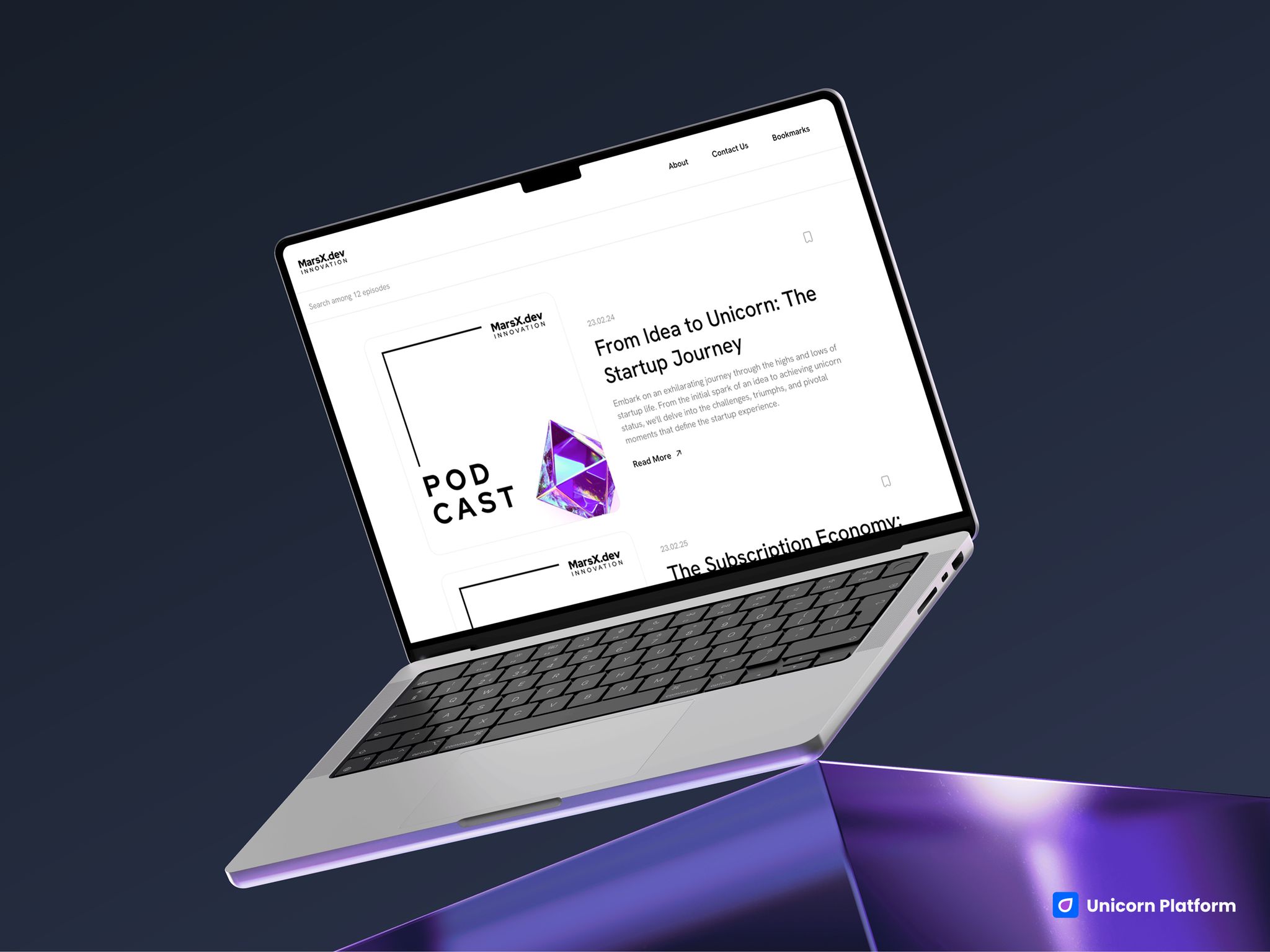
Podcast site design with show branding, searchable episode browsing, and episode cards
Quick Answer
This template is a strong fit if you want to launch:
- a creator-led podcast site
- an interview show website
- a branded show with recurring episodes
- a searchable episode hub
- a simple media property with clear listen and subscribe paths
It is a weaker fit if you need:
- a full podcast network site with many shows
- advanced membership or premium-content gating
- a heavy community platform
- deep editorial publishing workflows beyond a single show
- a highly custom media product with complex archive logic
So the core decision is simple: if your goal is to help listeners discover episodes and subscribe quickly, this template makes sense. If your goal is a bigger media platform, it should be treated as a starting point, not a full final system.
sbb-itb-bf47c9b
At a Glance: What This Template Does Well
The strongest parts of this template are easy to spot once you stop looking at it like a generic landing page and start looking at it like a listener journey.
- It presents episodes as a browsable catalog, not a hidden archive.
- It includes search, which makes the site feel useful right away.
-
It supports strong episode-card design with image, title, summary, and a
Read Morepath. - It uses embedded content and show metadata so episode pages can do real work.
- It works well for hosts who want the site to support discovery and repeat listening.
The biggest tradeoff is also clear:
- the template is more episode-directory-first than community-first
That means it is best for podcasts where the show itself is the core product. If your main goal is to build a membership business, gated education platform, or multi-show media brand, you will need more architecture than this template provides out of the box.
Who This Template Fits Best
This template is strongest for people who publish or plan to publish multiple episodes and need a site that helps listeners explore that catalog.
The best-fit use cases are:
- Solo podcast hosts who want a clean site that looks more substantial than a simple bio page.
- Interview-show creators who need clear episode navigation and discoverability.
- Branded podcasts that want a real destination page, not just platform links.
- Creator-led media projects that depend on recurring content and audience growth.
It is less ideal for creators who only need a one-page launch announcement or a lightweight link-in-bio style page. The real value here comes from the episode architecture.
How We Evaluated This Podcast Template
We evaluated the template like a podcast operator would, not like a visual designer hunting for inspiration.
The main questions were:
- Does the page help new listeners understand the show fast?
- Is episode discovery clear enough to reduce drop-off?
- Is the subscribe path obvious?
- Does the structure support repeat publishing?
- Does it feel more useful than a generic creator site?
- Where does it become too lightweight for a bigger media operation?
Those questions matter because a podcast site succeeds when it shortens the path from curiosity to listening. Strong visuals help, but episode clarity and action flow matter more.
Template Walkthrough
Podcast Template
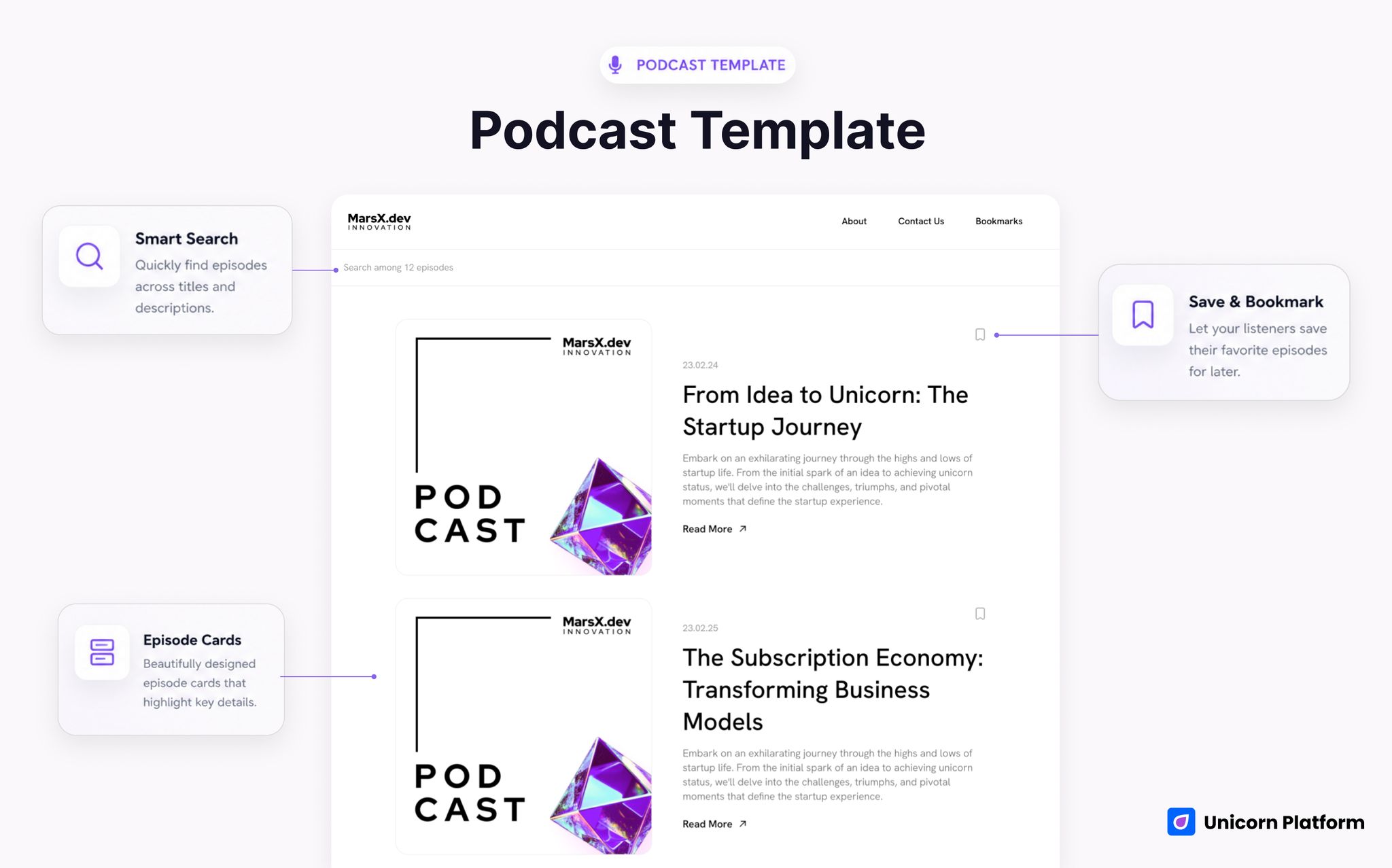
Podcast site template with a searchable episode grid and card-based show archive
- Best for: solo shows, interview podcasts, branded podcasts, and creator-led recurring series
- Style: clean, editorial, card-based, discovery-first
- Strongest sections: episode directory, search, individual episode routes, embedded episode support
- Listener journey strength: high
- Subscribe CTA strength: medium-high
- First customization priority: sharpen the top-of-page show promise and listener outcome
- Main limitation: not built for a complex multi-show or membership-heavy media business
The structure starts with a simple navigation and a strong directory-first layout. Instead of burying content in a generic homepage, the site immediately behaves like an archive people can use. That matters because new listeners often arrive with one question: Where should I start?
The search layer is one of the biggest advantages. The live template includes a searchable episode system with copy like Search among {{amount}} episodes. That small detail changes the feel of the page. It makes the site more useful than a static list because visitors can move toward relevance faster.
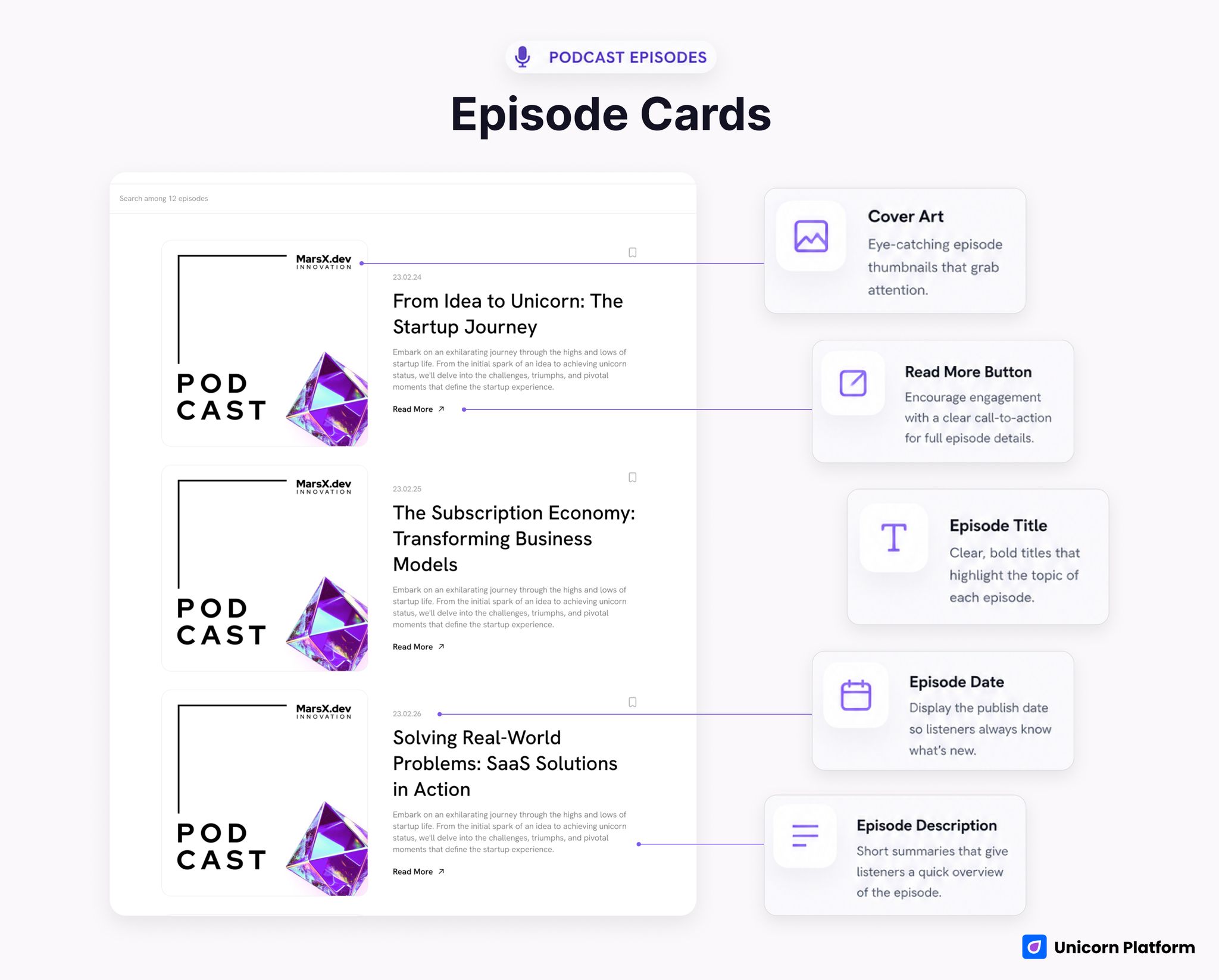
Episode cards with artwork, date, title, description, and read-more action
The episode cards also do real work. Each card includes visual artwork, a date, title, short description, and a Read More path. That is exactly the kind of structure podcast sites need. Listeners rarely choose only by episode number. They choose by promise, recency, topic clarity, and visual confidence.
The individual episode system is another useful part of the template. The live data shows support for embedded listening experiences like Spotify and Apple Podcasts. That is a strong sign that the page is designed to do more than announce a show. It can support actual listening decisions and platform handoff.
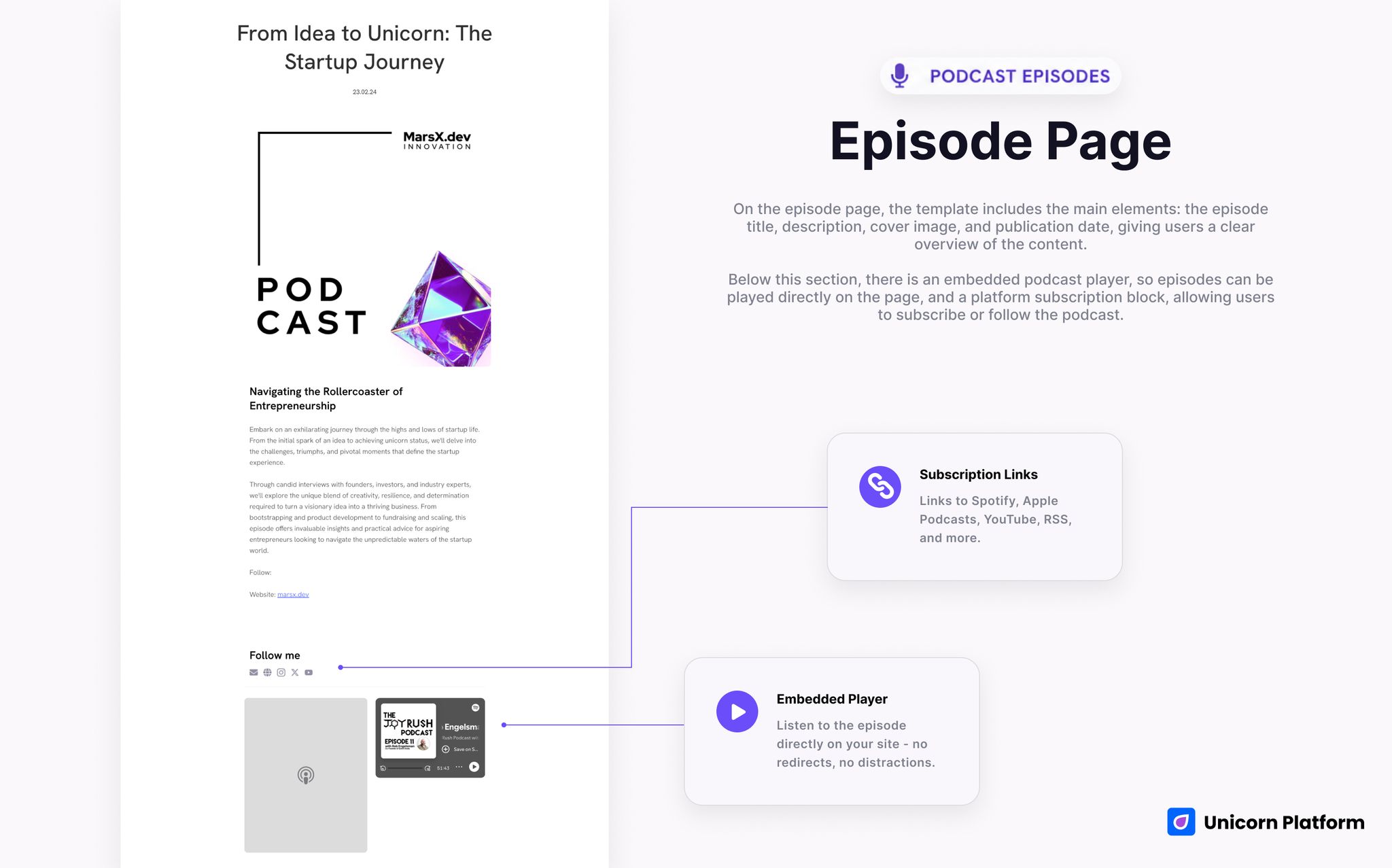
Embedded podcast player or platform subscription block within an episode page
What This Template Is Best At
The best thing about this template is that it respects the way podcast audiences actually behave.
People do not always arrive ready to subscribe immediately. Many need to:
- understand what the show is about
- scan episode options
- find a relevant topic
- confirm the host or brand is credible
- choose where to listen
This template supports that sequence better than a simple hero-plus-links page.
Its second major strength is repeatability. If you plan to publish episodes regularly, a card-based archive with search is much easier to sustain than a one-off creator page. It gives the site room to grow as the show expands.
Its third strength is that it works for both independent creators and branded shows. The embedded content, editorial layout, and directory logic are flexible enough to support either as long as the core experience stays focused on the show itself.
Best Fit by Use Case
1. Solo Podcast
This is one of the cleanest fits. A solo host often needs a site that feels more credible than a profile page but less complicated than a full media brand. This template covers that gap well because it lets the show itself take center stage.
2. Interview Show
This is also a strong fit. Interview podcasts benefit from clear episode cards and readable summaries because guests and topics often drive discovery. A searchable archive makes it easier for new listeners to jump into subjects they already care about.
3. Branded Podcast
This is a good fit if the brand wants a dedicated home for the show instead of relying only on distribution platforms. The directory-style structure helps the show feel like a real media asset rather than an add-on page.
4. Creator-Led Media Project
If the show is part of a broader creator business, this template still works well as long as the podcast remains the central content product. It is especially useful when the site’s job is to move people from interest to listening, then into newsletter or broader brand activity.
What To Customize First
If you use this template, do not begin with surface-level visual tweaks. Start with the message and episode pathway.
1. Rewrite the show promise at the top
The live template currently uses a startup-themed show example. Your strongest version will be more specific. A listener should understand:
- who the show is for
- what kind of insight it offers
- why it is worth subscribing
That clarity matters more than cosmetic changes.
2. Curate the episode ordering
If your archive grows, chronology alone is not enough. Use the strongest early episodes, topical relevance, or entry-point logic to guide new listeners. A good template becomes much better when it helps people find the right first episode.
3. Tighten platform and subscribe actions
Embedded platforms are helpful, but the site still needs a clear action hierarchy. Decide what the main conversion should be:
- listen now
- subscribe on Spotify
- subscribe on Apple Podcasts
- join the newsletter
Then build the page around that priority instead of treating every platform equally.
4. Add host credibility where needed
The template is content-forward, which is a strength, but some shows will need stronger trust around the host or production team. Add:
- host expertise
- guest quality signals
- publication cadence
- audience promise
5. Clarify the newsletter or off-platform retention path
The live example points to newsletter-style destinations. That can work well if you want the site to do more than push platform listens. Just make sure the page explains the benefit of joining, rather than dropping a generic subscription link into the flow.
Where This Template Falls Short
This is the part that matters most if you want relevant organic traffic instead of inflated but weak-fit traffic.
This template is not automatically strong for:
- multi-show podcast networks
- premium membership podcasts
- heavy community products
- advanced media archives with many topic taxonomies
- large publication workflows that mix podcasts, essays, and video equally
The largest limitation is that the structure is optimized for one clear show experience. That is a strength for many creators, but a limit for bigger media brands.
It is also more discovery-first than relationship-heavy out of the box. If your strategy depends on deep community, live events, or complex paid products, you will need more than episode cards and platform embeds.
Comparison Framework: Where It Wins and Where It Needs Help
| Decision area | How this template performs | Why it matters |
|---|---|---|
| Episode discovery | Strong | Search and card layout make the archive easy to explore |
| Subscribe path | Medium-high | The structure supports platform handoff well, but hierarchy should be customized |
| Show credibility | Medium | Good base, but some creators will need stronger host or guest proof |
| Repeat publishing support | Strong | The directory model scales better than a static creator page |
| Multi-show complexity | Weak | The template is best when one show is the main product |
| Speed to launch | Strong | A creator can get a real podcast site live quickly with the right top-level edits |
What Makes a Good Podcast Template
A good podcast template should help a first-time visitor do three things without confusion:
- understand the show
- pick an episode
- subscribe or listen
That sounds simple, but many podcast websites get one or more of those wrong. They over-explain the host, under-explain the show, or force too many equal-priority actions at once.
The best templates also support growth over time. They should still feel organized when you have:
- more episodes
- more guests
- more recurring themes
- more entry points from search and social
This template clears that bar better than most simple creator-site designs because it starts with content structure, not only branding.
When This Template Is Enough
This template is enough when:
- one show is the main focus
- episode discovery matters
- you want a searchable archive
- platform listening and subscription are the main conversion goals
- you want something stronger than a simple creator profile page
For many podcast creators, that is exactly the right scope.
When You Need More Than This Template
You will likely need more architecture if:
- you run several shows under one brand
- you sell paid memberships heavily through the site
- you need deeper editorial categorization
- you want a more advanced community layer
- your site combines podcasting with a larger content or education platform
Again, that does not make the template weak. It just means the template has a specific job, and it performs best when you respect that job.
Why Build This in Unicorn Platform
If your goal is to launch a podcast site quickly, Unicorn is useful because it gives you a clear structure without making you invent every content block from zero. That matters when the show is active and you need something workable now, not a long custom build process.
It is also a practical option if you want to validate the show’s website experience before investing in a more complex media stack. A template with searchable episodes, clean card design, and a visible platform path can get you to real feedback much faster.
If you want to explore the platform before choosing a template, start with the homepage or compare plans on pricing.
If your current focus is improving a show-specific landing experience rather than a full archive, this older Unicorn guide on building a podcast landing page is also a useful companion.
FAQ
Is this a good template for a solo host?
Yes. It is one of the clearest use cases because the structure gives solo creators a real content destination without forcing them into a more complex media setup.
Does the template help people discover episodes?
Yes. That is one of its biggest strengths. The searchable archive and episode-card layout help new listeners move toward a relevant episode faster.
Can I use it for an interview show?
Yes. Interview shows often benefit from a strong episode directory because guest names, topics, and summaries drive discovery. This template supports that pattern well.
Does it include embedded listening support?
Yes. The live structure shows support for embedded platforms like Spotify and Apple Podcasts, which helps the site do more than just send people away with a plain link list.
Is it strong enough for a branded podcast?
Usually yes, especially if the brand wants a dedicated show site with episode browsing and clear listener pathways. You may still want to strengthen trust and editorial framing at the top.
What should I customize first?
Start with the show promise, episode order, subscribe hierarchy, and host credibility. Those changes improve listener conversion more than visual polish alone.
Is this enough for a podcast network?
Probably not by itself. It is best when one show is the center of the experience. A network site usually needs more structure, navigation depth, and content architecture.
Does this work better than a generic creator landing page?
Yes, if you publish episodes regularly. The template is stronger because it treats the show as a browsable library, not just a brand statement with a few links.
Final Takeaway
If you want a template that helps listeners browse episodes, understand the show, and subscribe with less friction, this Unicorn template is a strong starting point.
Its real advantage is not just that it looks modern. It is that it behaves like a usable episode directory. Search, card-based browsing, and embedded listening support make it much more practical than a generic creator page.
That is exactly why this page can attract more relevant organic traffic when it is positioned honestly.
If your show depends on episode discovery and repeat listening, this template makes sense.
If your site needs network-level complexity, community depth, or premium content architecture, you should treat it as a base, not a complete final system.
If you want the fastest next step, open the template in Unicorn Platform and decide whether your podcast needs a discovery-first show site or a larger media build.
Related Blog Posts
- Say Goodbye to Coding: Create Your Website Visually with a Template Builder
- Podcast Show Pages in 2026: A Practical System for Turning Traffic Into Subscribers
- Real Estate Website Template: Best for Rentals, Listings, and Local Discovery
- Job Board Template: Best for Remote Hiring, Niche Talent Boards, and Curated Listings

