If you need a real estate website template, the first question is not whether the design looks polished. It is whether the structure matches the kind of property experience you want to publish. Some templates are best for broker teams. Others work better for single-property landing pages. This Unicorn template is strongest when you want to showcase multiple listings, help visitors browse by location or property type, and capture interest without building a full custom directory from scratch.
That distinction matters. The live template behind this page is not a generic agency homepage with a few property photos added later. It is closer to a rental and property-discovery template. It uses a searchable directory layout, a listing-card grid, badge-driven trust cues, and a Submit Your Property call to action. That makes it much more useful for rental operators, curated property directories, vacation-stay operators, and niche listing projects than for a traditional brokerage site that depends on agent bios, valuation funnels, and neighborhood sales pages.
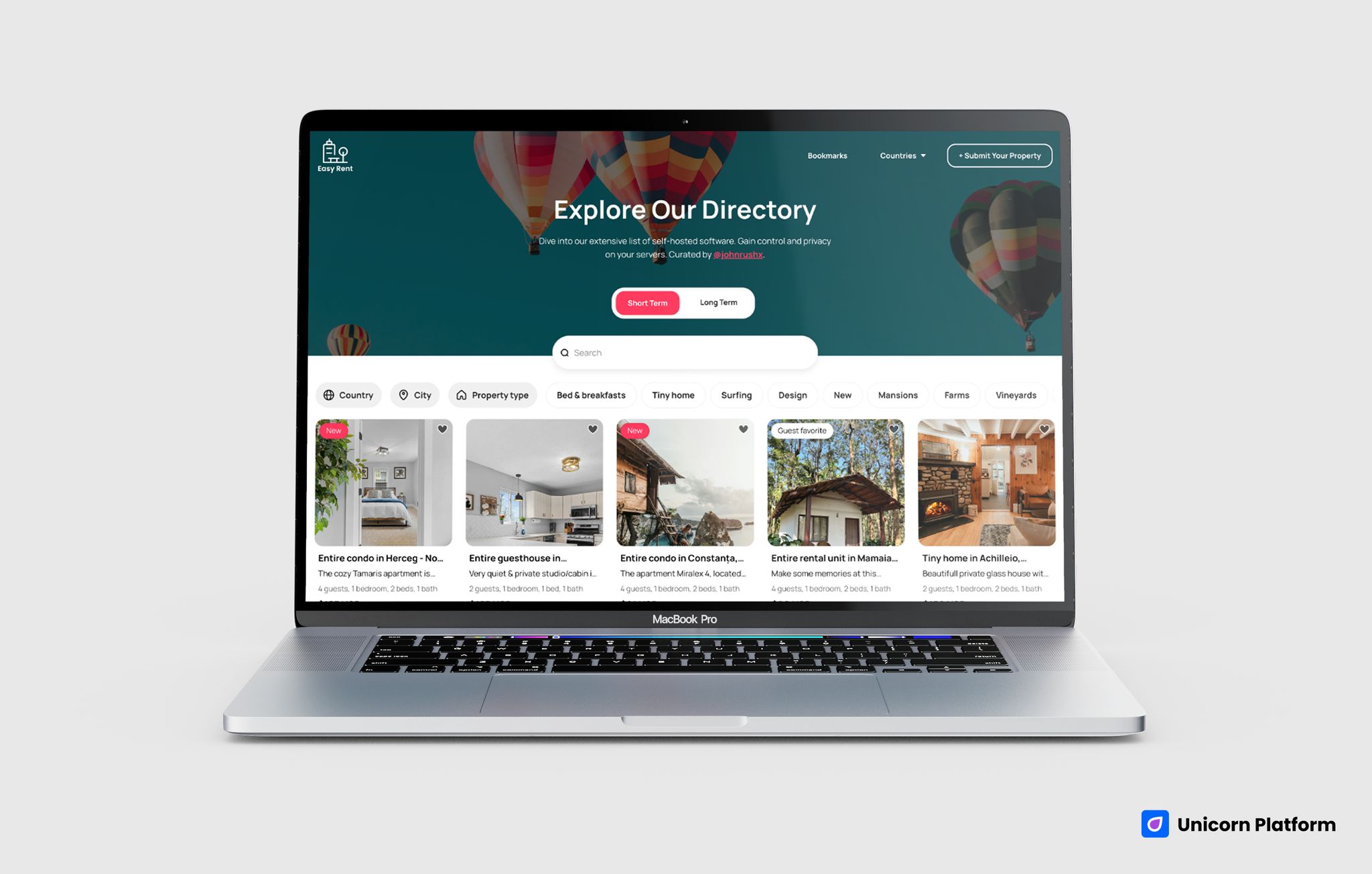
Real estate template with a directory-style hero, property-category toggles, search, and listing cards
Quick Answer
This template is a strong fit if you want to launch:
- a rental directory
- a property listing site
- a vacation-stay collection
- a local apartment showcase
- a curated accommodation marketplace
It is a weaker fit if you need:
- a broker-first website with heavy agent branding
- advanced IDX or MLS-style integrations
- deep map-search workflows
- property valuation funnels
- complex multi-role back-office functionality
In other words, this is a good template for discovery and inquiry. It is not a full real-estate platform replacement.
sbb-itb-bf47c9b
At a Glance: What This Template Does Well
Before going section by section, here is the practical read:
- It gives you a strong browse-first layout instead of a brochure-style homepage.
- It supports search and filtering, which makes the site feel useful immediately.
- It presents listings with visual cards, short descriptions, and trust-style badges.
- It gives you a built-in path for adding or submitting properties.
- It is especially good for rental, travel-stay, apartment, and property-directory use cases.
The biggest tradeoff is just as important:
- it does not look like a classic real-estate agent or brokerage site out of the box
So the core decision is simple: if your business depends on listing discovery, this template is promising. If your business depends on agent-centered trust and seller conversion, you will need heavier customization or a different starting point.
Who This Template Fits Best
This template is best for teams that want visitors to explore options rather than land on one rigid sales path. That usually means one of four profiles:
- Rental operators who need a cleaner way to present multiple units or stays.
- Property-directory founders building a niche discovery site for a location or category.
- Apartment, vacation-rental, or short-stay brands that want search and browse logic without a full custom build.
- Local real-estate projects that need a visual listing showcase before investing in a more complex product stack.
It can also work for an agent or brokerage, but only if the business model leans more toward showcasing inventory than telling a team story. If your main conversion goal is book a valuation, meet the team, or see recent transactions, this template will need a more significant repositioning.
How We Evaluated This Real Estate Template
We evaluated the template like a buyer would, not like a designer browsing inspiration.
The main questions were:
- Does the page help users discover listings quickly?
- Does it create enough trust for a property inquiry?
- Does the structure support local browsing and category filtering?
- Can a team launch something useful without rebuilding every section?
- Where does the template become limiting for more advanced real-estate workflows?
That matters because a template can look attractive and still fail the real launch test. For a property site, discovery flow and inquiry clarity are more important than visual polish alone.
Template Walkthrough
Real Estate Directory
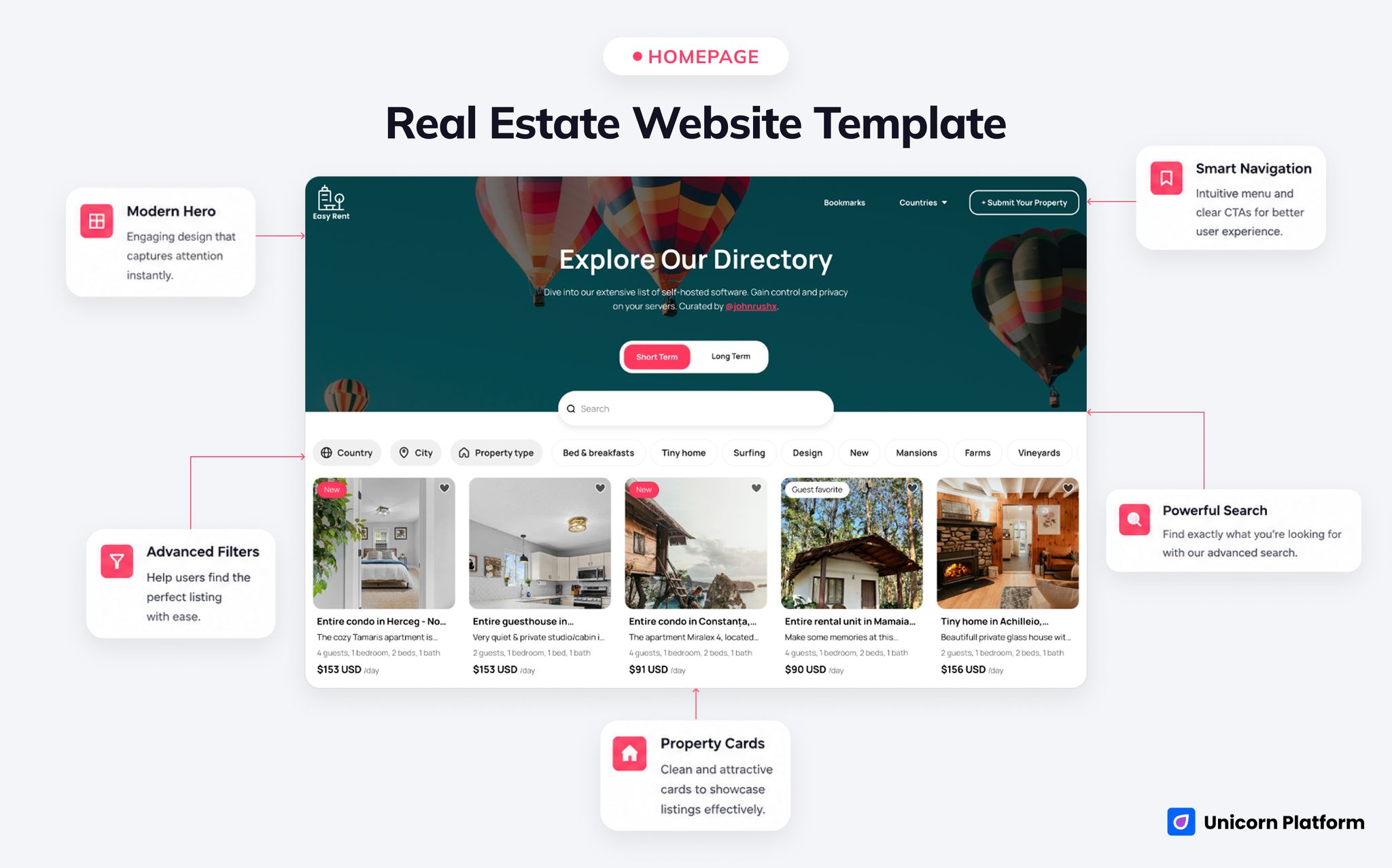
Property directory template with a large hero area, category toggles, search, filters, and listing cards
- Best for: rental directories, apartment collections, vacation rentals, and niche property discovery sites
- Style: clean, visual, browse-first, marketplace-influenced
- Strongest sections: hero, browse toggles, search bar, multi-filter directory grid, listing cards
- Browse/discovery strength: high
- Trust/contact strength: medium
- First customization priority: rewrite the hero and category labels around your market
- Main limitation: not broker-first or valuation-first out of the box
The hero is simple and useful. Instead of leading with a long brand pitch, it starts with a direct directory concept and quick category selection. In the live version, users can switch between short-term and long-term browsing paths. That is a strong real-estate move because it reduces confusion before the scroll even begins. If you adapt this for your own market, that top-of-page split can become one of the strongest conversion helpers on the site.
Under the hero, the page becomes even more valuable. It uses a searchable directory system with filters such as country, city, property type, and category-style tags. That is where this template separates itself from basic real-estate homepages. It gives visitors a sense that they can find something relevant, not just admire the design.
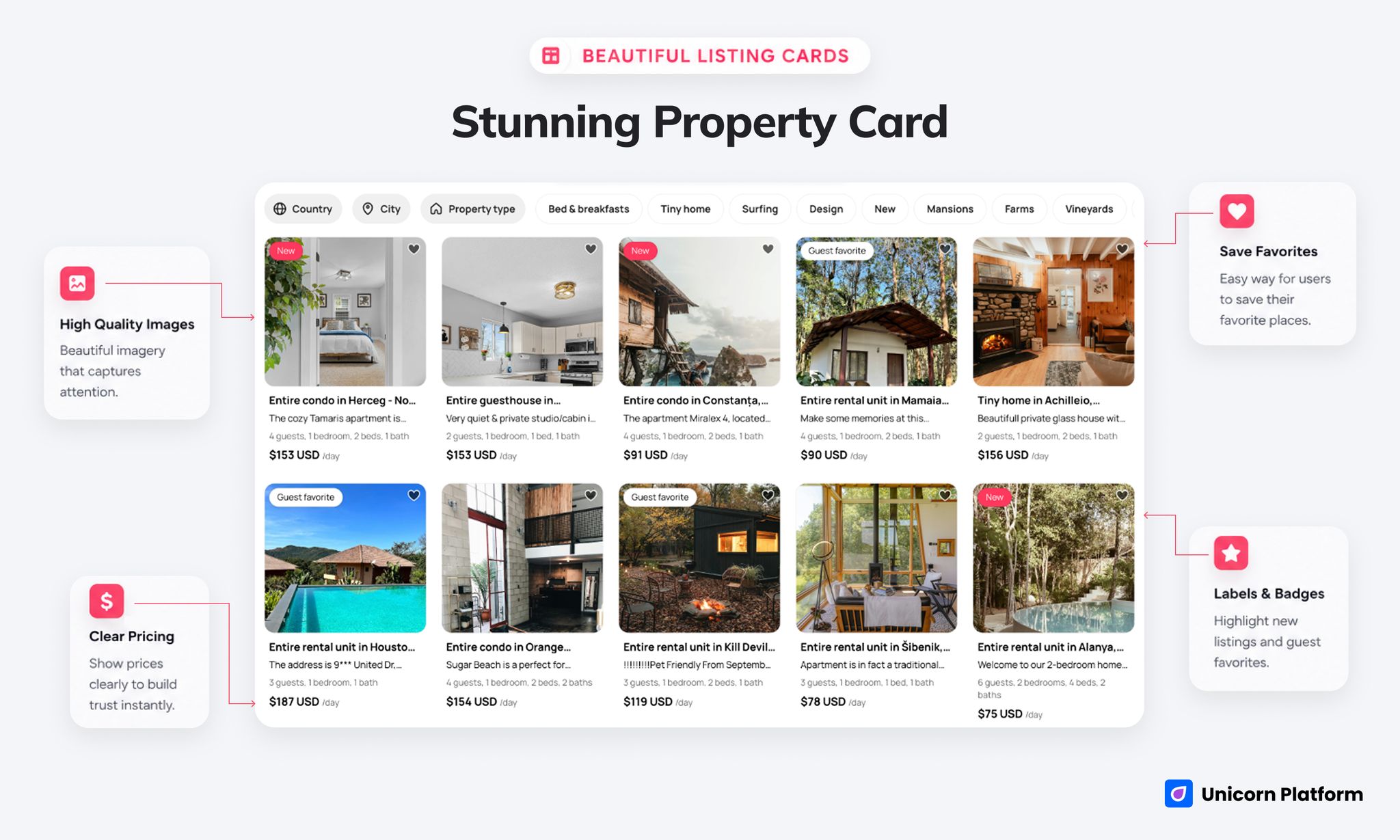
Listing cards with thumbnails, titles, badges, and short property descriptions
The listing cards themselves are also doing real work. Each item includes a visual thumbnail, a detailed title, status-style badges, and short supporting text. That combination helps users scan quickly. It also makes the site feel more credible than a plain card grid with only a photo and a button.
The trust layer is light but helpful. Badges like New, Guest favorite, and Superhost are simple cues, but they make listings feel active and differentiated. For rentals and hospitality-style real estate, that matters. For a brokerage targeting property buyers or sellers, the same badges may need to be replaced with more relevant trust signals.
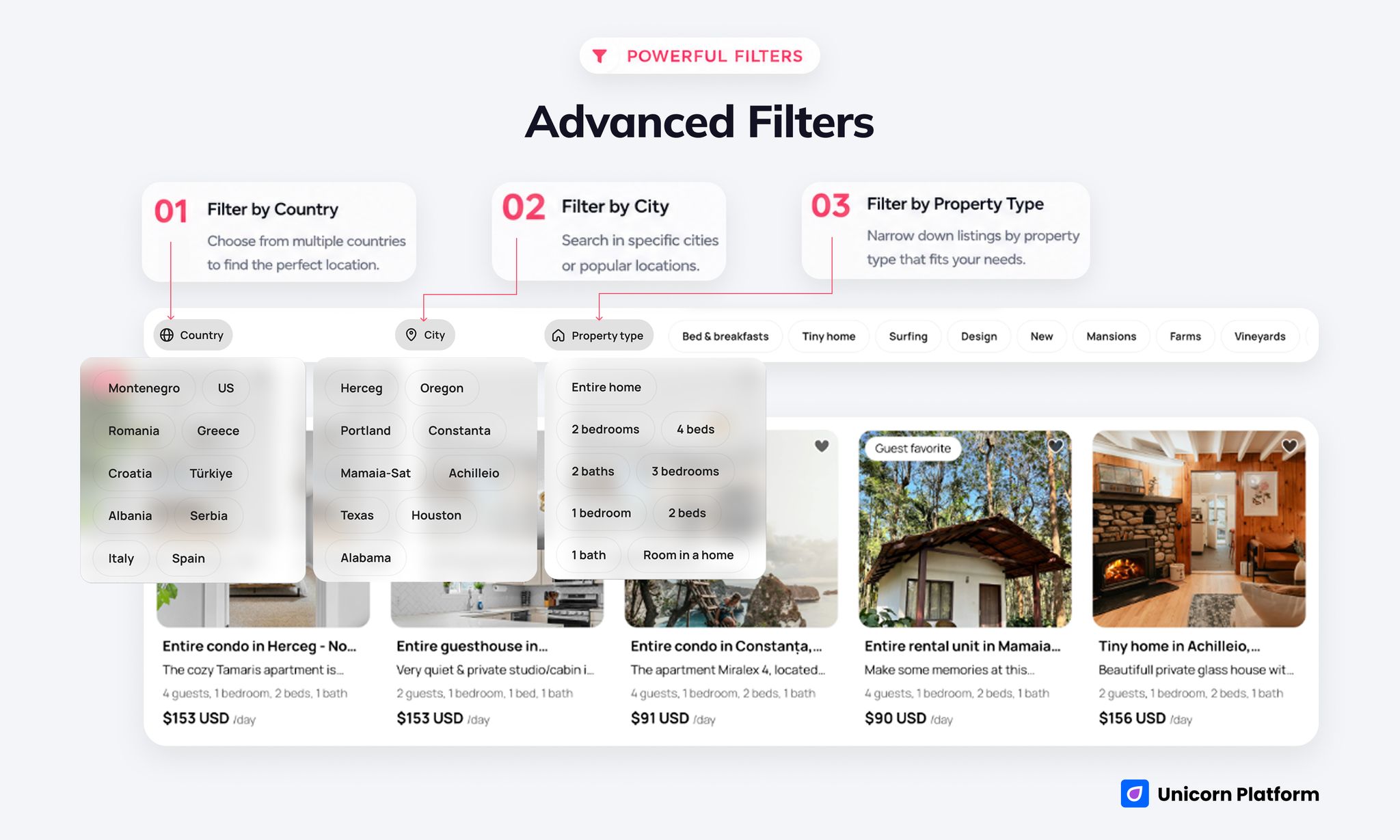
Search bar and dropdown filters for country, city, and property type
What This Template Is Best At
The strongest thing about this template is its discovery logic. It helps users browse by:
- place
- property type
- interest category
- stay-style or use-case path
That makes it a very strong starting point for:
- local rental collections
- apartment directories
- vacation property showcases
- niche property marketplaces
It also gives you a faster route to launch because much of the page structure already assumes multiple inventory items rather than one static offer. You do not need to invent a browse system from zero.
The second big advantage is visual clarity. Property websites live or die on scannability. A visitor should be able to understand the offer quickly from the card style, the listing hierarchy, and the browsing tools. This template gets that right.
The third advantage is that the page feels operationally useful. It is not just a lead-generation page with a pretty header. It behaves more like a lightweight product surface, which is why it is stronger for directory and listing use cases than for pure branding.
Best Fit by Use Case
1. Rental Directory
This is probably the cleanest fit. The directory logic, filter structure, and listing-card layout all support a browsing experience that rental users expect. If your goal is to help visitors compare multiple stays, units, or rental options, this template gives you a strong base.
2. Property Listing Site
This is also a good fit if your project focuses on inventory discovery rather than a high-touch agent funnel. A small local listing site, a curated property collection, or a themed property marketplace can work well here.
3. Local Real Estate Brand
This can work, but only if your local brand wants the site to behave more like a searchable property showcase than a personal brokerage page. You would need to add more team trust, area proof, and inquiry clarity to make it stronger for this use case.
4. Apartment Showcase
This is one of the most natural fits. The structure already supports multiple units, clear thumbnails, practical filters, and a visitor flow that favors exploration over hard selling.
What To Customize First
If you use this template, do not start by changing colors. Start with the conversion logic.
1. Rewrite the hero around your actual audience
The current directory framing is useful, but your best-performing version will be more specific. For example:
- furnished apartments in one city
- short-stay beach rentals
- student housing
- premium local listings
Specificity will do more for conversions than decorative changes.
2. Replace generic badge language if needed
If your site is about property sales or local real-estate expertise rather than hospitality-style stays, trust labels should shift. Superhost or Guest favorite may be less useful than:
- recently listed
- verified host
- premium area
- family-friendly
3. Tighten the inquiry path
The template is strong on discovery, but you should make sure the next step is just as clear. Add a visible inquiry action that matches your offer:
- request availability
- schedule a viewing
- ask about pricing
- submit your property
4. Rework filters to match your business model
The filters are one of the page’s best assets, but only if they reflect the real way users search your inventory. Country, city, and property type are a solid starting point. You may also want:
- neighborhood
- price band
- number of bedrooms
- long-term vs short-term
- pet-friendly
5. Add location trust and owner credibility
If the site supports real inquiries, visitors need to know who is behind the listings. Add:
- local operator credibility
- response-time expectations
- support or booking process clarity
- verification standards for listings
Where This Template Falls Short
This is the part that matters most if you want relevant traffic and better conversions.
This template is not automatically strong for:
- classic brokerage websites
- home valuation funnels
- high-trust luxury agency branding
- complex buyer and seller journeys
- heavy map-based browsing
That does not make it weak. It just means the page has a more specific job. If you force it into a use case it was not designed for, the article will overpromise and the site will underperform.
The biggest structural gap is agent-first storytelling. There is no strong built-in emphasis on:
- agent bios
- recent sales proof
- seller strategy
- financing guidance
- neighborhood authority content
If those are central to your business, you should treat this as a base to adapt, not a finished match.
Comparison Framework: Where It Wins and Where It Needs Help
| Decision area | How this template performs | Why it matters |
|---|---|---|
| Listing discovery | Strong | Search, filters, and card layout make browsing easy |
| Rental and directory fit | Strong | The page naturally supports multiple listings and categories |
| Inquiry readiness | Medium | Visitors can browse well, but the inquiry path should be sharpened |
| Local trust | Medium | You will likely need stronger owner, region, or operational proof |
| Brokerage fit | Weak to medium | It can be adapted, but it does not start as an agent-led template |
| Speed to launch | Strong | The structure is useful quickly if your inventory model is clear |
When This Template Is Enough
This template is enough when:
- your main goal is to publish and organize listings
- browsing matters more than a long brand story
- your users need search and filters early
- you can keep the site focused on discovery and inquiry
For many founders, rental operators, and niche directory builders, that is a very good starting point.
When You Need More Than This Template
You will probably outgrow this template if you need:
- deeper property detail pages with advanced comparison logic
- agent-side workflows and personal branding
- complex lead qualification funnels
- enterprise directory tools
- advanced booking or back-office systems
That is not a reason to avoid the template. It is just a reminder to match the site architecture to the business stage.
Why Build This in Unicorn Platform
If your goal is to launch a property-discovery site quickly, Unicorn is useful because it lets you move fast without starting from a blank canvas. That is especially helpful when the main value is clarity, page structure, and customization speed instead of a totally custom build from day one.
It is also a practical option when you want to test a local property concept, a rental category, or a directory idea before committing to a heavier product stack. A solid template with the right structure can get you to real user feedback faster than a full custom project.
If you want to explore Unicorn before choosing a template, start with the homepage or compare plans on pricing.
FAQ
Is this a good template for agents?
It can work for agents, but it is stronger for listing discovery than for agent-first trust building. If your site depends on personal branding, seller trust, and consultation funnels, you will need meaningful customization.
Is it better for rentals than for property sales?
Yes. Based on the current structure, it is a more natural fit for rentals, apartments, vacation stays, and property directories than for classic property sales workflows.
Does the template include search and filters?
Yes. That is one of its strongest advantages. The live structure includes a search bar and multiple filter paths, which makes it much more useful than a static brochure-style page.
Can I use it for a local apartment directory?
Yes. That is one of the clearest use cases. The card layout, property grouping, and browse-first design all support that format well.
Does it feel like a marketplace page?
More than a normal business homepage, yes. It behaves more like a lightweight directory or marketplace surface because users can explore multiple listings and categories quickly.
What should I customize first after choosing it?
Start with the hero message, your category logic, the inquiry path, and the trust cues. Those changes affect conversion quality much more than cosmetic edits.
Is this enough for a brokerage website?
Not by itself for most brokerages. It can be adapted, but it does not begin with the strongest agent, seller, or transaction-trust structure out of the box.
Is there a built-in FAQ or pricing structure?
The main strength is the directory and listing flow, not a pricing or FAQ-heavy layout. If your business needs those sections prominently, you should plan to add or reshape them.
Final Takeaway
If you want a template for rentals, listings, or property discovery, this Unicorn template is a strong starting point. Its real advantage is not generic design quality. It is the fact that it already thinks like a directory: browse first, filter fast, scan listings, then inquire.
That is exactly why it can bring more relevant organic traffic when the page is positioned honestly.
If your project is closer to a rental collection, apartment showcase, or local property directory, this template makes sense.
If your project is closer to a brokerage brand, a seller funnel, or a complex map-search platform, you should treat it as a base to adapt, not a finished solution.
If you want the fastest next step, explore the template inside Unicorn Platform and decide whether your users need a discovery-first site or a more agent-first experience.
