Table of Contents
- What a Good Personal Website Should Actually Do
- Common Technical and Editorial Mistakes
- 30-Day Personal Site Execution Plan
- Role-Based Workflow for Teams and Freelancers
- FAQ
A personal website is no longer optional for many builders, founders, and creators. It is your searchable profile, portfolio, and long-term home base that does not depend on social algorithms. The challenge is not whether to build one, but how to launch quickly without creating technical debt.
GitHub Pages remains one of the strongest paths for this goal. It gives you free hosting, version control, and a clean way to publish static content. At the same time, many first-time sites struggle with weak structure, generic content, poor visual consistency, and no maintenance plan.
This guide gives you a complete workflow from planning to launch to ongoing updates. It also explains how Unicorn Platform users can turn the same process into a faster publishing system for personal branding and portfolio growth.
sbb-itb-bf47c9b
Key Takeaways
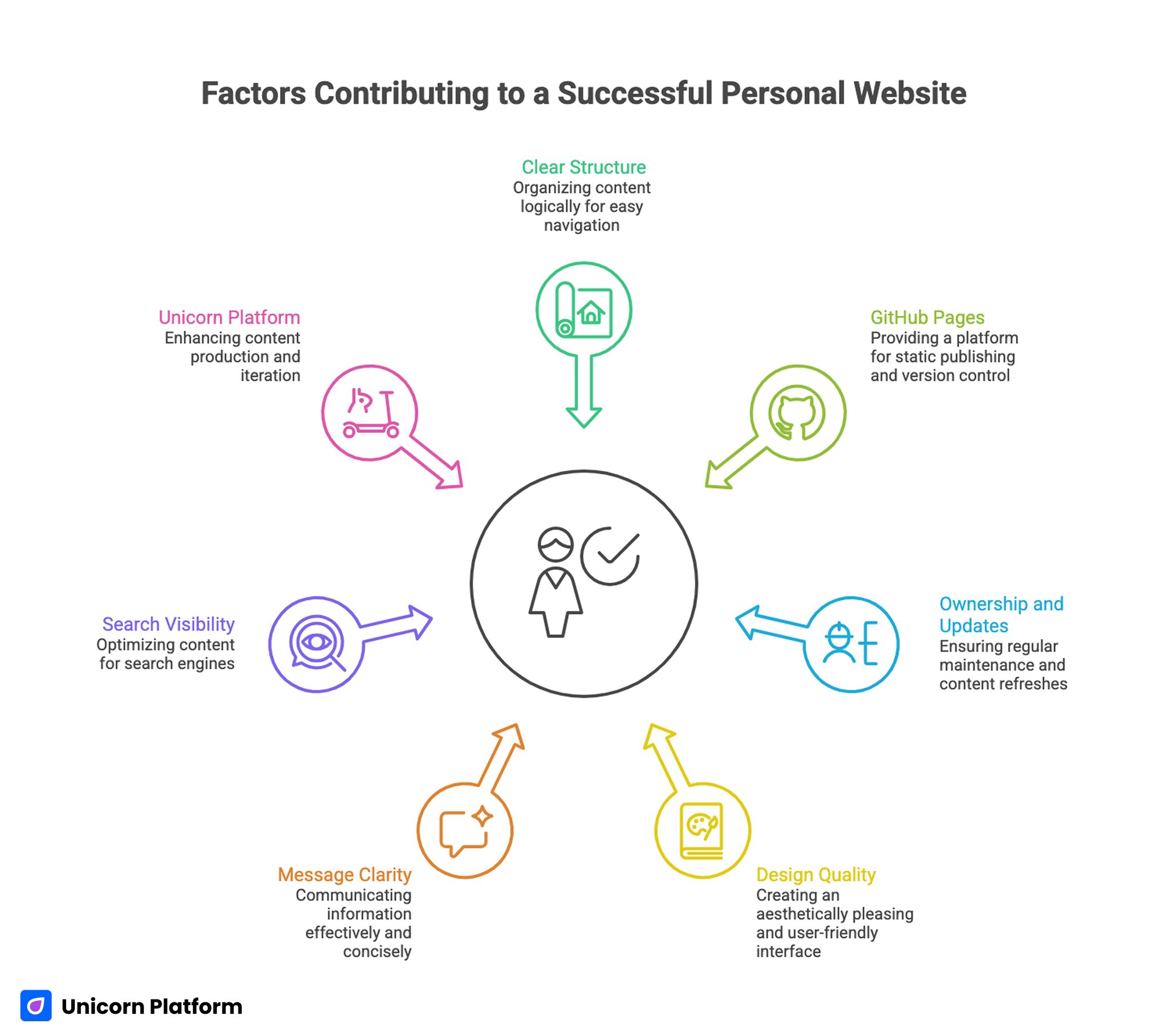
Factors Contributing to a Successful Personal Website
- A successful personal site starts with clear structure, not visual polish.
- GitHub Pages is excellent for static publishing, version control, and low-cost operation.
- Most failures happen after launch when no one owns updates.
- Design quality and message clarity matter as much as technical setup.
- Search visibility improves when content is useful, specific, and regularly refreshed.
- Unicorn Platform can complement GitHub workflows by speeding up content production and iteration.
What a Good Personal Website Should Actually Do
A strong personal website is a decision tool for the visitor. It should help someone quickly understand who you are, what you do, why your work matters, and how to contact you. If a reader has to search too hard for these answers, the page is underperforming.
Most high-performing personal sites share the same functional outcomes:
- Fast orientation in the first screen.
- Clear proof of work or expertise.
- Low-friction contact path.
- Consistent visual identity.
- Regular content freshness signals.
You do not need a large website to achieve this. You need clear intent and repeatable page discipline.
Foundation Setup: Account, Naming, and Security
The first step is still simple account setup at github.com. Use a professional username because it often becomes part of your public URL and first impression. Pick a name you will still like a year from now.
Before publishing anything, configure account security. Enable two-factor authentication and back up recovery methods. During setup, tools like a QR code generator can help when onboarding authenticator workflows or creating quick portfolio links for offline events.
Security should not be treated as an advanced task. For public profiles, it is part of launch readiness.
Repository and Deployment Structure
Create a dedicated repository for your site and keep project scope narrow at first. New builders often add too many sections in the first version, which slows launch and weakens clarity.
A practical v1 structure is enough:
- Home
- About
- Projects or portfolio
- Contact
From there, GitHub Pages deployment is straightforward. The official GitHub Pages documentation covers setup details and available publishing options. Keep initial deployment simple, then expand only when your core flow works.
Content Architecture That Works for Visitors
Many personal websites fail because sections are written from the owner’s perspective rather than the visitor’s decision path. The better approach is to map each block to one visitor question.
Use this question-based layout:
- Who are you?
- What problems do you solve?
- What proof supports that claim?
- What should I do next?
For implementation examples and default structures, pages.github.com is still useful as a starting reference. Avoid copying structure blindly, but use it to reduce setup friction.
Styling and Visual System Without Overengineering
Visual consistency matters because it signals quality and trust before anyone reads deeply. A personal site does not need complex interactions, but it does need stable typography, spacing, and hierarchy.
Begin with a lightweight theme and improve incrementally. A GitHub Pages theme can provide a fast baseline when you need to launch quickly. Add custom design only after your message and section structure are stable.
For teams who want more design control, Tailwind CSS can speed up utility-based styling without heavy component overhead. It helps maintain consistency when pages grow.
Color decisions should be intentional, not random. Tools like Coolors make it easier to create a constrained palette and keep visual language consistent across sections.
Content Quality: Why Many Sites Sound the Same
Fast publishing tools often produce pages that are technically fine but emotionally flat. Generic language reduces trust because it feels interchangeable.
To avoid this, review each paragraph against one simple rule: does it provide decision value to the reader? If the sentence only describes you without helping the reader evaluate fit, rewrite it.
Personal site content improves when you prioritize:
- Specific outcomes over broad claims.
- Real examples over abstract statements.
- Concrete next steps over passive wording.
This small shift usually improves both engagement and conversion.
SEO for Personal Sites: Practical, Not Overloaded
Search visibility for personal sites is mostly a consistency problem. Many pages launch once and stay unchanged for months, which weakens relevance and index signals over time.
Use a manageable SEO routine:
- Keep titles and headings intent-driven.
- Add useful internal links where context fits.
- Update project pages with real changes.
- Expand FAQ when new questions repeat.
- Track one growth metric and iterate monthly.
For baseline research and content strategy literacy, resources such as Moz remain valuable. For backlink and keyword exploration, Ahrefs is widely used by teams building long-term discovery systems.
The point is not to run every possible SEO task. The point is to build a repeatable loop that keeps your site useful.
Custom Domain and Brand Control
A custom domain adds credibility and long-term portability. It also reduces dependency on platform-specific URLs if you later move infrastructure.
GitHub provides direct guidance for setting up a custom domain. Configure DNS carefully and verify that redirects, HTTPS, and canonical signals are aligned.
Domain quality does not come from expensive naming. It comes from consistency, clarity, and stable updates tied to your public identity.
Maintenance Model: What Happens After Launch
The biggest gap in personal website strategy is post-launch ownership. Without a maintenance cycle, even strong pages become outdated quickly.
Use a lightweight cadence:
- Weekly: note updates worth publishing.
- Monthly: refresh top sections and proof blocks.
- Quarterly: review architecture and remove dead content.
This model keeps effort low while preserving quality. It also prevents major rewrite projects that drain time and momentum.
Common Technical and Editorial Mistakes
Mistake 1: Launching without a clear page objective
When the objective is unclear, the page becomes a resume dump. Fix this by defining one primary action for each major page.
Mistake 2: Overloading homepage content
A homepage should orient, not explain everything. Move deep details to secondary pages and keep the top-level experience clear.
Mistake 3: Ignoring mobile readability
Many personal pages are designed on large screens and break on phones. Check spacing, heading size, and CTA visibility on mobile before launch.
Mistake 4: Publishing generic portfolio descriptions
Project pages that only list technologies rarely convert interest. Add context: problem, approach, and outcome.
Mistake 5: No update owner
If no one owns edits, content ages rapidly. Assign one owner even for solo projects and schedule short recurring reviews.
How to Apply This in Unicorn Platform
Unicorn Platform users can use this guide to build a repeatable personal-brand publishing system rather than a one-off page. Start with one modular template for profile, proof, and contact flow, then duplicate it for new content types.
A practical Unicorn Platform process:
- Build one baseline layout for personal branding pages.
- Use AI assistance for first drafts of each content block.
- Run a manual specificity pass before publish.
- Add one conversion element per page.
- Schedule monthly refreshes for top sections.
This keeps publishing fast while preventing template fatigue.
If you are expanding beyond one page, Build Your Personal Website with GitHub Pages is a strong adjacent read for users combining GitHub hosting with Unicorn Platform content workflows.
30-Day Personal Site Execution Plan
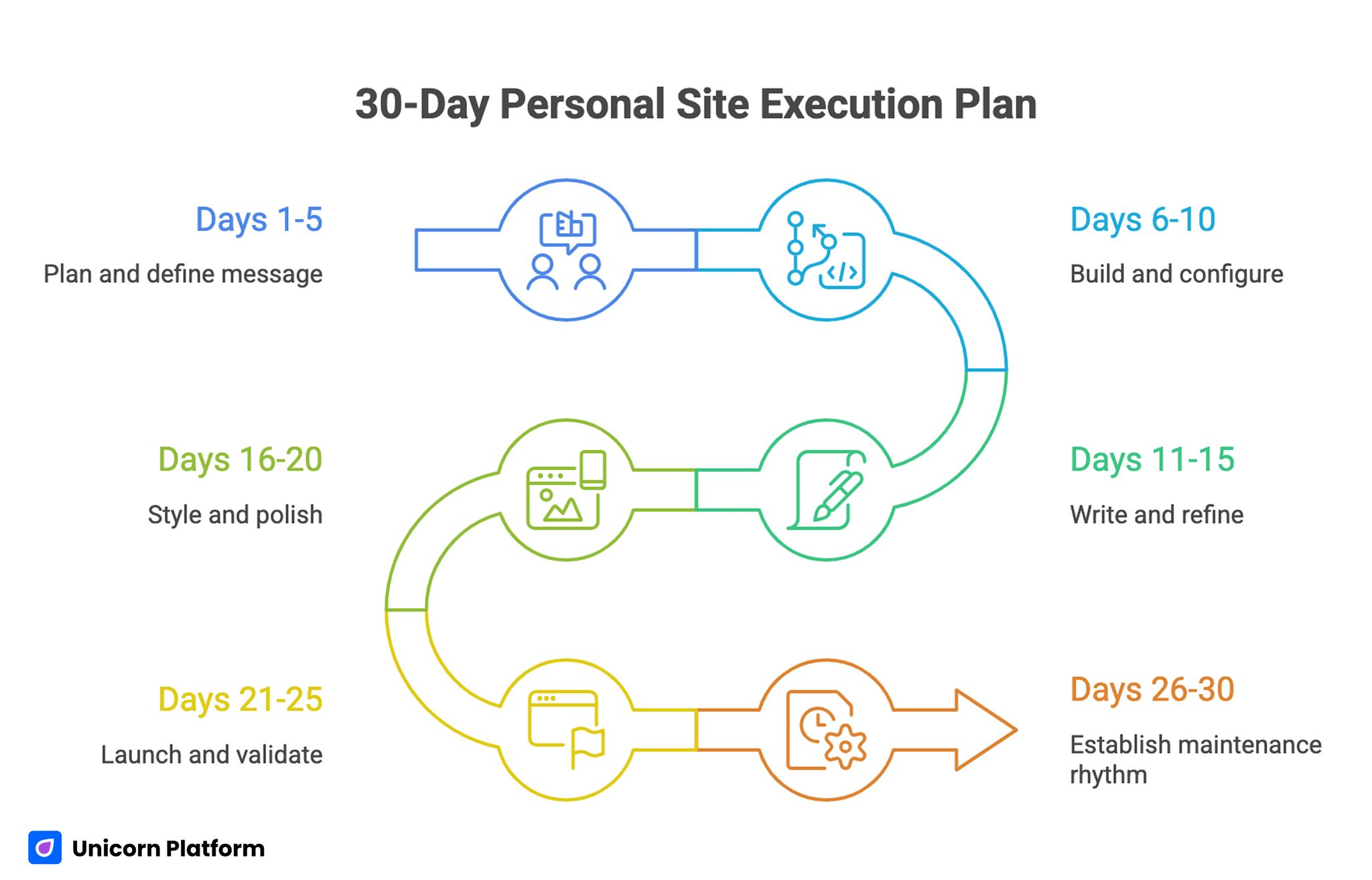
30-Day Personal Site Execution Plan
Days 1-5: Plan and define message
Set audience, objective, and core narrative. Decide the minimum page set and write section intent before touching visual details.
Days 6-10: Build and configure
Create the repository, configure deployment, and establish your initial page architecture. Keep everything lean so you can publish early.
Days 11-15: Write and refine
Draft content for homepage, about page, and one proof section. Remove generic language and ensure every block supports a visitor decision.
Days 16-20: Style and polish
Apply your visual system, check spacing and readability, and validate mobile behavior. Keep design decisions consistent across all pages.
Days 21-25: Launch and validate
Publish, test links, and confirm domain and indexing basics. Collect feedback from a small trusted group and fix clarity gaps quickly.
Days 26-30: Establish maintenance rhythm
Document what will be reviewed monthly and who owns updates. This turns launch into an operational system instead of a one-time event.
Role-Based Workflow for Teams and Freelancers
Even personal sites are often built with support from others. Clear role splits reduce rework.
Founder or owner role
Owns positioning, narrative direction, and proof priorities. Approves final message and CTA intent.
Content role
Owns clarity, readability, and editorial consistency. Maintains update cadence and section quality.
Design or implementation role
Owns layout consistency, responsiveness, and technical hygiene. Ensures updates do not break structure.
One clear owner per decision area prevents stalled publishing.
Discoverability and Growth Beyond Launch
Your personal site should support ongoing discovery, not only one-time visits. Growth usually comes from cumulative signals: updated proof, useful posts, and consistent internal linking.
Practical growth levers include:
- Short project case notes with outcomes.
- Quarterly page refreshes with visible update stamps.
- Focused articles answering recurring audience questions.
- Contextual linking between profile, projects, and contact.
This method is sustainable for solo builders and small teams.
Security and Reliability for Public Personal Sites
Personal websites are often treated like low-risk assets, but they still represent your identity and reputation. Public pages can be targeted through weak account hygiene, outdated dependencies, or careless repository practices.
Start with practical controls that do not add heavy process:
- Keep account protection strong with 2FA and verified recovery methods.
- Avoid storing secrets in repository files or commit history.
- Review third-party scripts and remove anything nonessential.
- Keep dependencies minimal and update intentionally.
- Check build settings after major platform changes.
Reliability is also operational, not only technical. Broken links, outdated project screenshots, and stale contact details reduce trust as quickly as security warnings. Add a small monthly reliability sweep to your calendar and validate core site paths end to end.
For teams combining GitHub hosting with no-code content operations, reliability improves further when one person owns both publishing QA and post-launch hygiene. That role can catch drift early and keep the site professional with low maintenance overhead.
QA Checklist Before Publishing Any Update
- The page has one clear objective.
- Opening section explains value quickly.
- Proof block includes specific evidence.
- Contact path is visible and low friction.
- Mobile readability is verified.
- Visual system remains consistent.
- External links are valid and relevant.
- Next review date is assigned.
Use this checklist every time. Consistency is more valuable than one perfect launch.
FAQ: Personal Website with GitHub Pages
Is GitHub Pages still a good choice for personal websites?
Yes. It is still a strong option for static sites, especially when you want low-cost hosting with version control.
Do I need coding skills to launch a personal site?
Basic skills help, but you can start with templates and simple structures. The bigger challenge is message clarity, not syntax.
How many pages should I publish first?
Start with three to four core pages and expand only when those pages are clear and useful.
Should I use a custom domain from day one?
It is not mandatory for v1, but adding one early improves brand consistency and long-term portability.
What is the most important section on a personal site?
Usually the opening section plus proof block. Visitors decide quickly whether to continue.
How often should I update my personal website?
A monthly light update and quarterly structure review is a practical baseline.
Can Unicorn Platform help if I host on GitHub Pages?
Yes. You can use Unicorn Platform to speed up content creation, structure updates, and iteration workflows.
What causes the biggest drop in site performance over time?
Stale content and unclear ownership. Pages decay when updates are irregular.
Is SEO worth investing in for personal sites?
Yes, but keep it practical. Focus on useful content, clear structure, and a repeatable refresh loop.
What should I track first after launch?
Track one primary conversion action, such as contact form submissions or demo requests, then iterate from there.
Final Takeaway
A personal website succeeds when it combines technical reliability with editorial clarity. GitHub Pages gives a strong infrastructure foundation, but long-term results come from structure, content quality, and steady updates.
For Unicorn Platform users, the best strategy is to build one repeatable publishing system and improve it monthly. That approach keeps your personal site useful, memorable, and aligned with real growth goals.