Table of Contents
- What Healthcare Teams Should Verify First
- Four Common Ways Teams Handle HIPAA-Sensitive Website Needs
- Decision Framework: Which Type of Setup Fits Best?
- How To Use Unicorn Platform More Safely for Healthcare Marketing Pages
- Common Mistakes When Choosing a HIPAA-Compliant Website Builder
- FAQ
No website builder is automatically HIPAA compliant just because it can publish a healthcare website.
That is the most important thing to understand before comparing tools. A healthcare site can look professional, load quickly, and still create real compliance risk if forms, analytics, chat, scheduling, file uploads, or routing workflows are not handled correctly.
So if you are searching for the best HIPAA-compliant website builder, the real job is not only choosing a builder. It is choosing a setup that matches your risk level, your workflows, and your team’s ability to maintain the site safely after launch.
This guide explains what actually makes a website setup HIPAA compliant, what healthcare teams should verify before choosing a builder, where general-purpose builders can still fit, and where Unicorn Platform makes sense as part of a safer marketing workflow.
Important note: this article is not legal advice. HIPAA compliance depends on your full workflow, vendor agreements, configuration, and internal operating process.
sbb-itb-bf47c9b
TL;DR Checklist
If you need the short version, do not choose a website builder until you can answer these questions clearly:
- Will the website collect or expose protected health information?
- Which forms, chat tools, calendars, uploads, analytics tools, and scripts touch that data?
- Which vendors are willing to sign a BAA where required?
- Can your team control who edits high-risk pages and forms?
- Can you separate low-risk marketing inquiries from sensitive patient workflows?
- Can you review and test the setup after every meaningful change?
If those answers are still vague, you are not choosing a builder yet. You are still defining the workflow that the builder will have to support.
What Makes a Website Setup HIPAA Compliant?
The safest way to think about HIPAA on a website is this:
Compliance is created by the full system, not by the page builder alone.
That system usually includes:
- hosting and storage
- forms
- scheduling tools
- chat tools
- analytics
- file uploads
- email routing
- access permissions
- vendor agreements
- staff process after submission
That is why the phrase HIPAA-compliant website builder can be misleading. Some vendors may support a compliant setup. Some may support part of one. Some may only be safe if the site avoids PHI entirely. The builder itself is rarely the whole answer.
A safer rule of thumb
Ask: "Can this builder be used in a HIPAA-safe workflow for the exact kind of data and patient interaction we plan to support?"
That question is much more useful than asking whether the builder is compliant in the abstract.
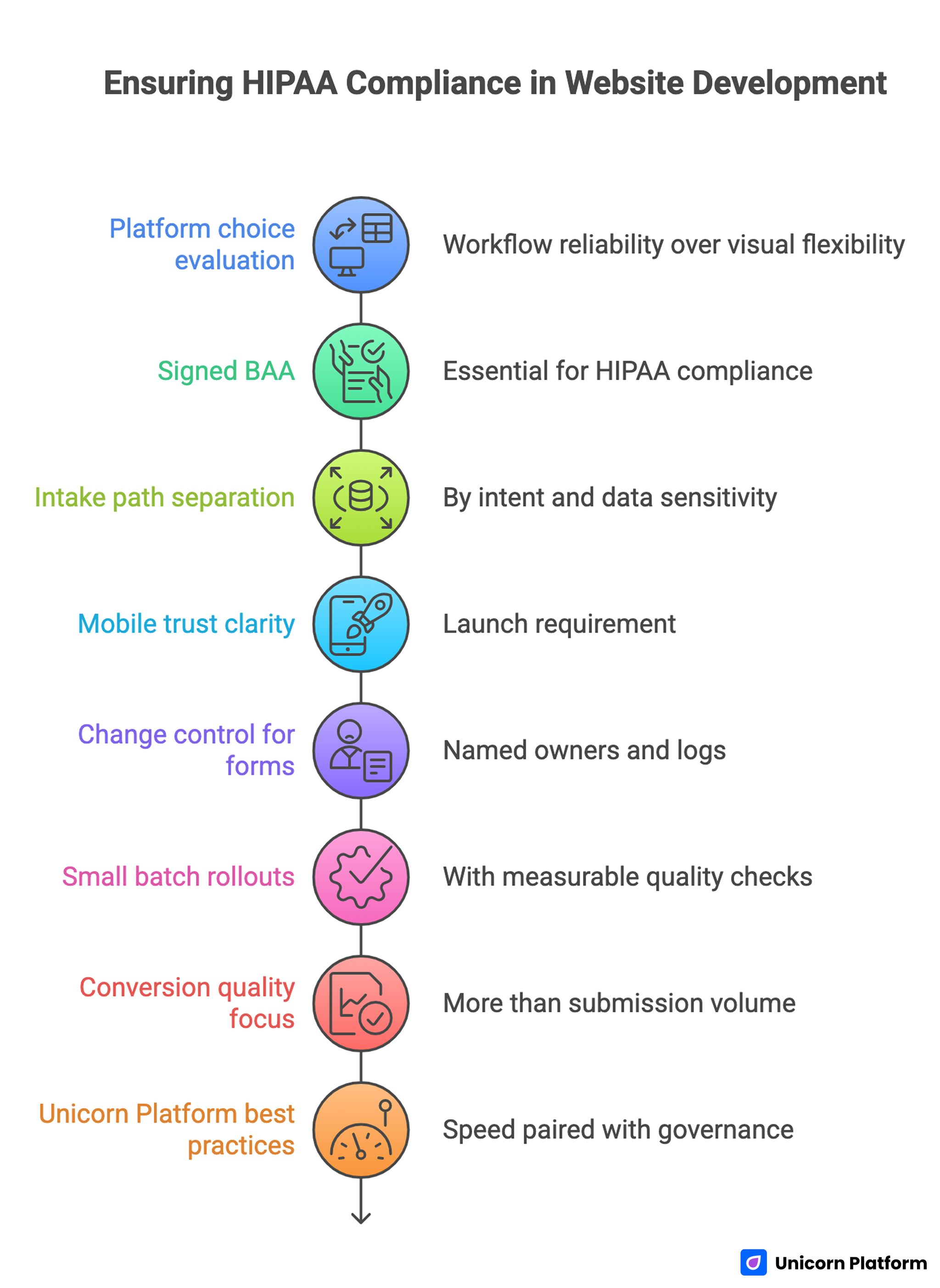
Ensuring HIPAA Compliance in Website Development
What Healthcare Teams Should Verify First
Before comparing vendors, get clear on the basics.
1. Will the website collect PHI?
If the site only offers marketing pages, a phone number, and a generic contact path that avoids PHI, your risk profile may be very different from a site with intake forms, appointment requests, file uploads, or patient messaging.
2. Which workflows are high risk?
The biggest risk usually does not come from the homepage. It comes from the tools connected to the high-intent action zones.
Examples:
- appointment requests
- patient intake forms
- symptom or treatment inquiries
- document uploads
- chat widgets
- patient portal or login flows
3. Which vendors are actually in the workflow?
A site might use one builder but still rely on a form vendor, analytics tools, call tracking, CRM software, scheduling tools, or email automations. If those tools are part of the data flow, they matter too.
4. Who owns edits after launch?
A safe setup can become a risky setup later if no one owns form changes, tool swaps, or script additions. That is why governance matters as much as vendor selection.
Four Common Ways Teams Handle HIPAA-Sensitive Website Needs
The best option usually depends on the type of website you are building, not just the software category.
1. Healthcare-first platforms
These are tools or stacks designed specifically for healthcare workflows or patient-facing services.
They may be the best fit when:
- the site needs scheduling, intake, or portal-like functionality
- the team wants more healthcare-specific controls built into the workflow
- operational complexity is high
Main advantage:
- better alignment with healthcare workflows
Main tradeoff:
- often narrower in design flexibility, broader site-building freedom, or ease of experimentation
2. Managed compliant hosting or CMS stacks
This model usually fits teams that want more control over the website layer, but still need a locked-down environment with stronger compliance review and infrastructure oversight.
Main advantage:
- more control over implementation
Main tradeoff:
- slower setup, more technical overhead, and more process to maintain
3. General website builders plus compliant external workflows
This is where many marketing teams start. The website builder handles public-facing pages, while higher-risk workflows are routed through separately reviewed systems.
This can work well when:
- the public website is mostly educational or marketing-focused
- the team can keep PHI collection out of the general site builder where appropriate
- higher-risk functions live in reviewed tools with their own controls
Main advantage:
- faster marketing execution
Main tradeoff:
- the boundary between low-risk and high-risk workflows must be very clear
4. Custom stack
This approach can make sense for organizations with unusual requirements, complex integrations, or dedicated technical ownership.
Main advantage:
- maximum flexibility
Main tradeoff:
- highest operational burden, highest implementation risk, and more room for mistakes if governance is weak
Decision Framework: Which Type of Setup Fits Best?
| Situation | Usually the better fit | Why |
| Marketing-focused healthcare site with low-risk contact flows | general builder plus carefully separated workflows | faster publishing and easier content updates |
| Site with sensitive intake, appointment requests, or patient communication | healthcare-first platform or managed compliant stack | stronger alignment with higher-risk workflows |
| Team with dedicated technical ownership and unusual requirements | custom or semi-custom stack | more flexibility when standard builders are not enough |
| Small clinic that needs a simple website but must avoid risky workflows on the public site | simple builder with strict boundary rules | easier to manage if PHI-heavy tasks are handled elsewhere |
This is why there is no universal best choice. The strongest setup is the one that matches the actual workflow, not the one with the broadest marketing claim.
What To Look For in a HIPAA-Safe Website Setup
Whether you are reviewing a healthcare-first platform or a general builder, these are the questions that matter most.
BAA availability and scope
If a vendor touches protected health information, ask whether it offers a BAA where needed and what exactly that BAA covers.
Form and intake boundaries
How do forms work? Where does the data go? What is submitted? Who receives it? What happens if something breaks?
Access control and editing permissions
Can you limit who edits sensitive workflows, form settings, or embedded tools?
Integration safety
How do scheduling tools, analytics scripts, CRMs, chat systems, and email automations fit into the workflow?
Operational maintainability
Will your real team still be able to run this safely six months later, after copy changes, staffing changes, and new campaigns?
That last point is easy to ignore and expensive to relearn.
Website Features That Commonly Create HIPAA Risk
Many healthcare sites do not fail at the design level. They fail where data moves.
Forms
Forms are one of the most common risk points because teams often use general form tools without rechecking what is collected, where it is stored, and who can access it.
Scheduling widgets
Appointment tools can be useful, but they also raise questions about data scope, storage, and follow-up handling.
Chat widgets
Live chat and chatbot tools often look harmless on the surface, but they can collect sensitive information quickly if prompts and routing are not carefully controlled.
File uploads
Uploads increase risk because they can contain much more than basic contact details.
Analytics and tracking scripts
Analytics can create problems when teams assume "marketing scripts" sit outside the compliance conversation. They do not always.
Email follow-up workflows
A safe-looking form can still create issues if the follow-up flow sends or stores information in the wrong place.
The lesson is simple: high-risk workflows should be designed on purpose. They should not be inherited accidentally from a generic marketing stack.
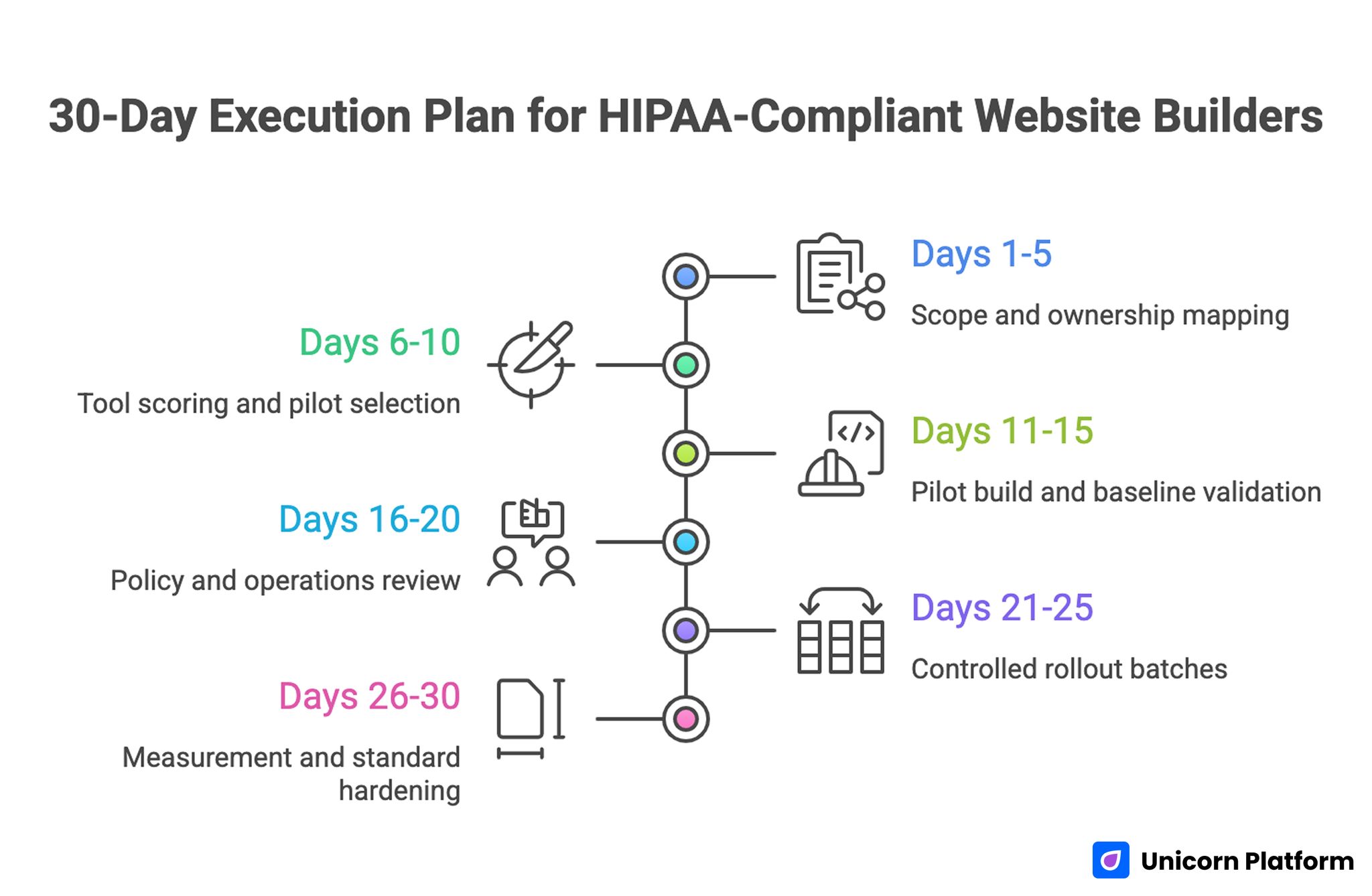
30-Day Execution Plan for HIPAA-Compliant Website Builders
Where Unicorn Platform Fits Best
Unicorn Platform is a good fit when the website is primarily a healthcare marketing site and the team wants fast publishing, easier content updates, and a cleaner no-code workflow.
It is strongest when:
- the public-facing site needs to explain services, products, specialties, or offers clearly
- the team wants landing pages, service pages, or campaign pages live quickly
- the organization can keep higher-risk workflows intentionally separated and reviewed
It is not the right answer if the team assumes the builder alone will solve compliance for patient intake, sensitive uploads, or complex healthcare workflow handling.
In practical terms, Unicorn Platform fits best when:
- marketing pages need to launch quickly
- the team wants easier editing without constant developer support
- the site needs clear landing pages, service pages, or product pages
- PHI-heavy workflows are handled through separately reviewed tools and processes
Where caution is needed
- embedded third-party forms
- chat widgets
- booking tools
- analytics scripts
- anything that changes what data is collected or where it is routed
That does not make Unicorn Platform a poor choice. It just means the builder should be evaluated as one part of the workflow rather than the whole compliance decision.
How To Use Unicorn Platform More Safely for Healthcare Marketing Pages
If your team uses Unicorn Platform, a practical approach looks like this:
- Define whether the page is marketing-only or part of a higher-risk workflow.
- Keep general marketing pages separate from patient-intake logic where possible.
- Review every embedded form, scheduler, and script before launch.
- Limit who can change high-impact pages and integrations.
- Re-test after every meaningful update.
This model gives you the speed benefits of a builder without pretending that speed replaces process.
If your team is also improving healthcare conversion pages, this related guide can help:
A Simple Launch Checklist for Healthcare Teams
Use this before publishing any high-intent healthcare page:
- Confirm whether the page collects PHI directly or indirectly.
- Confirm which vendors are in the workflow.
- Confirm which agreements are required before launch.
- Confirm form fields only collect what is necessary.
- Confirm the response path after submission is clear.
- Confirm mobile users can understand trust cues and next steps.
- Confirm analytics, chat, and third-party scripts were reviewed.
- Confirm named owners for content, workflow, and QA.
- Confirm rollback steps if a form or embed breaks.
- Confirm the post-release check will happen within 24 to 48 hours.
Healthcare teams usually move faster when this checklist is short and mandatory than when they rely on memory and last-minute judgment.
Common Mistakes When Choosing a HIPAA-Compliant Website Builder
Mistake 1: Treating the builder like the whole compliance solution
The builder matters, but the workflow matters more.
Mistake 2: Evaluating design first and data flow later
A beautiful page can still create expensive operational problems if the intake path is unclear.
Mistake 3: Using one generic form for every type of request
This creates messy triage and increases the chance of collecting more than the workflow is ready to handle.
Mistake 4: Forgetting about embedded tools
Scheduling tools, analytics, chat, and scripts can change the risk profile of a page quickly.
Mistake 5: No one owning changes after launch
Even a careful setup can drift if nobody owns form edits, embeds, or review gates.
FAQ: Best HIPAA-Compliant Website Builders in 2026
Is there really such a thing as a HIPAA-compliant website builder?
Not by itself. A builder may support a compliant setup, but compliance depends on the full workflow, configuration, vendor coverage, and how your team operates the site.
Can a general website builder still be used for a healthcare site?
Yes, in some cases. It can be a good fit for public-facing marketing pages if higher-risk patient workflows are clearly separated and handled through reviewed systems.
Is a BAA enough to make a website workflow safe?
No. A BAA is important, but it does not replace form design, access control, integration review, or post-launch governance.
What website features usually create the most risk?
Forms, chat, scheduling widgets, file uploads, analytics scripts, and follow-up routing are usually the biggest risk points.
Should every healthcare site avoid collecting information through the website?
Not necessarily. The right answer depends on the workflow, but the team should be intentional about what is collected, why it is collected, and where it goes next.
Can a small clinic use a builder safely?
Yes, often more easily than a heavy custom stack, but only if the clinic keeps the workflow simple, defines clear boundaries, and reviews the connected tools carefully.
Where does Unicorn Platform fit for healthcare teams?
It fits best for healthcare marketing sites, landing pages, and service pages where the team wants speed and easier content updates, while handling higher-risk workflows through separately reviewed tools and processes.
What should we verify before we publish?
Verify the data flow, vendor coverage, form behavior, trust cues, permissions, analytics scripts, and rollback path before launch.
Is this legal advice?
No. This is an implementation guide. Legal and compliance review should still happen where required.
Claims That Require Manual Verification Before Publish
Before publishing a live article or page that names a specific builder or workflow as compliant, manually verify:
- whether the vendor offers a BAA where needed
- what products or features that BAA actually covers
- where submitted data is stored and processed
- whether forms, chat, scheduling, or upload tools are included in the reviewed scope
- whether analytics or third-party scripts change the risk profile
- whether support for self-hosting, managed hosting, or healthcare-specific workflows is current
- whether any claim about encryption, patient portals, or scheduling integrations is still accurate
- whether your own internal process matches the assumptions in the article
Final Takeaway
The best HIPAA-compliant website builder is not simply the most healthcare-branded tool or the most flexible website builder.
It is the option that matches your actual workflow, keeps data boundaries clear, supports the agreements and controls you need, and still allows the team to operate the site safely after launch.
For many teams, the smartest decision is to separate the marketing website from the higher-risk workflow, then choose a builder that makes the public-facing site easy to manage without pretending the builder alone solves compliance.