Table of Contents
- How to Choose App-Landing-Page Templates by Objective
- Common Failure Modes and Fixes
- 30-Day Implementation Plan
- FAQ
Most teams do not struggle to find a template. They struggle to turn a template into a reliable conversion system. The layout ships quickly, but performance stays inconsistent because message fit, trust flow, and post-click continuity are not engineered with the same discipline.
That problem is common in mobile growth programs. Teams launch campaign pages fast, then patch copy and visuals week by week without a stable architecture. Over time, the page looks modern but behaves unpredictably across channels and devices.
A template is not a shortcut to conversion. It is a starting framework that must be aligned to audience intent, product mechanics, and action quality. When that alignment is done correctly, templates increase speed without sacrificing performance.
This guide shows how to do that in a repeatable way. It gives a full framework for choosing, adapting, and optimizing app-focused templates in Unicorn Platform while keeping quality standards high.
sbb-itb-bf47c9b
Key Takeaways
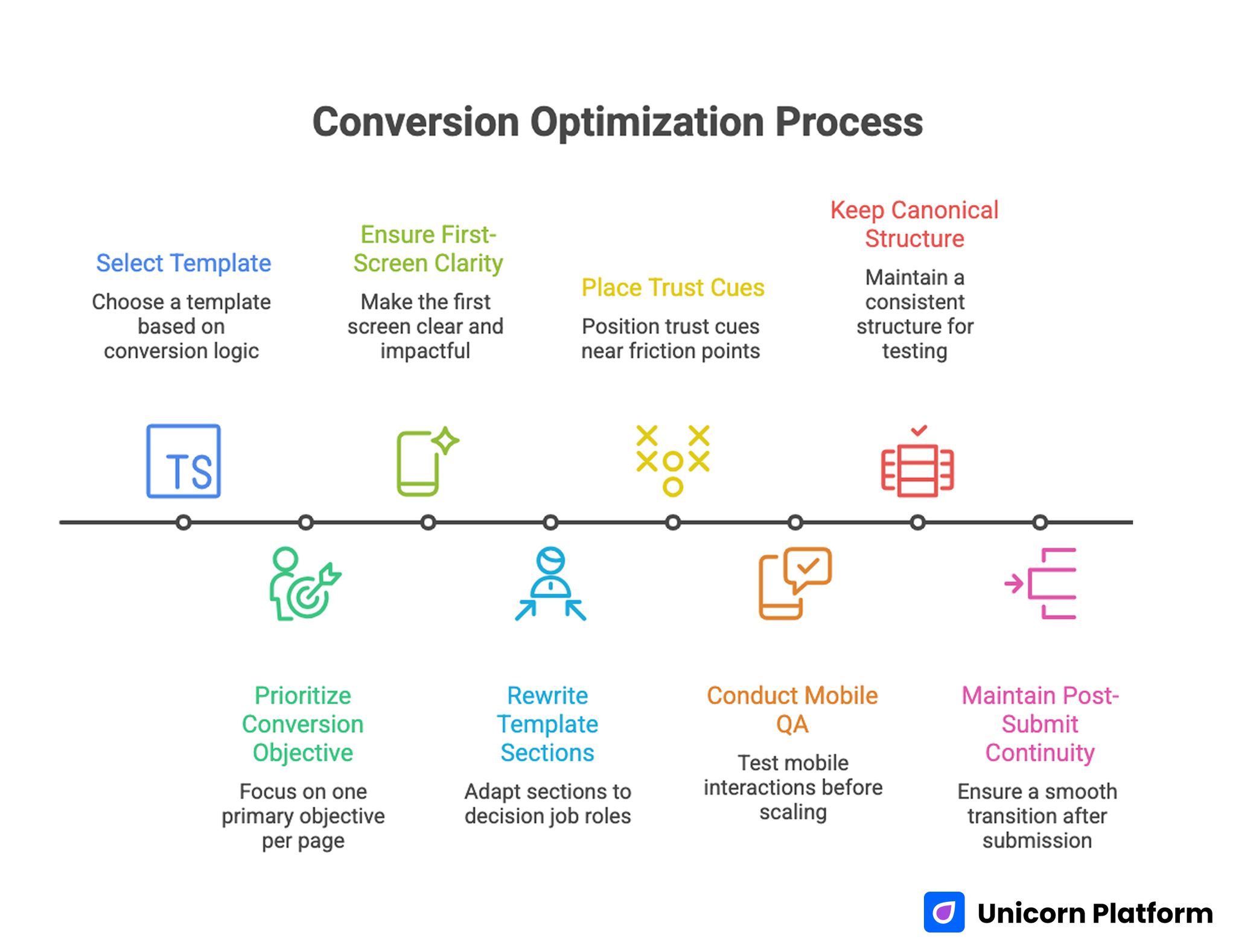
Conversion Optimization Process
- A template should be selected for conversion logic fit, not visual style alone.
- One page should prioritize one primary conversion objective per cycle.
- First-screen fit clarity has higher impact than decorative complexity.
- Template sections should be rewritten by decision job, not by surface wording.
- Trust cues should be placed near friction points, not grouped at the end.
- Mobile interaction QA should be mandatory before scaling traffic.
- Variant testing should keep one canonical structure and one major variable per cycle.
- Post-submit continuity is part of conversion quality, not a separate task.
Why Template-Based Pages Underperform
Template pages usually fail for structural reasons, not because templates are inherently weak. The common pattern is simple: a team selects a visually appealing layout, adds product screenshots, updates a few headings, and launches before defining what conversion behavior should change.
Without a clear conversion objective, sections compete with each other. The hero says one thing, feature blocks say another, and the CTA asks for an action that the narrative has not justified yet. Visitors perceive the mismatch and leave.
Another issue is template drift. Multiple contributors edit separate sections without shared rules, so proof, claims, and route logic become inconsistent over time. This is especially risky in app funnels where channel context changes quickly.
The final issue is weak handoff design. Pages can collect form submissions or store clicks but still produce poor activation quality if expectation language is vague. In those cases, the template did its visual job but failed its operational job.
What App-Landing-Page Templates Must Do
High-performing templates should reduce uncertainty in a predictable sequence. They should establish relevance, clarify value, reduce risk, and guide one clear next step. If that sequence is broken, conversion quality degrades even when traffic quality is good.
A practical template should answer five questions before commitment. These checks keep selection tied to decision behavior rather than visual preference.
- Who is this product for right now?
- What specific outcome can users expect first?
- How does the product deliver that outcome?
- Why should users trust this process?
- What happens immediately after the click or submit?
When templates are evaluated through this lens, selection decisions become much clearer and optimization work becomes easier to prioritize. Teams also spend less time debating style choices that do not affect route quality.
How to Choose App-Landing-Page Templates by Objective
The right template depends on campaign intent stage. A template designed for broad awareness usually underperforms when used for decision-stage traffic, and the reverse is also true.
Start by mapping campaign objective to primary user action. If the goal is install, template emphasis should favor proof and action continuity. If the goal is demo or waitlist, template emphasis should favor qualification clarity and response expectations.
Use this objective matrix. It helps teams align structure with funnel stage before they start redesigning sections.
- Awareness objective: prioritize fit clarity and low-friction exploration paths.
- Evaluation objective: prioritize mechanism explanation and trust depth.
- Decision objective: prioritize route certainty and action confidence.
Selecting with this matrix prevents teams from forcing one generic template into every traffic context. It also makes cross-campaign performance comparisons more reliable.
Template Selection Checklist
- Is the hero structure built for one clear action?
- Can proof modules be moved near high-friction decisions?
- Does the default layout support mobile-first reading flow?
- Are form and CTA blocks easy to simplify for speed?
- Can sections be reused across variants without structural drift?
A template that passes these checks is usually a stronger long-term asset than one that only looks visually impressive in static preview. Operational flexibility usually outperforms visual novelty over multiple test cycles.
Rewriting Template Sections by Decision Job
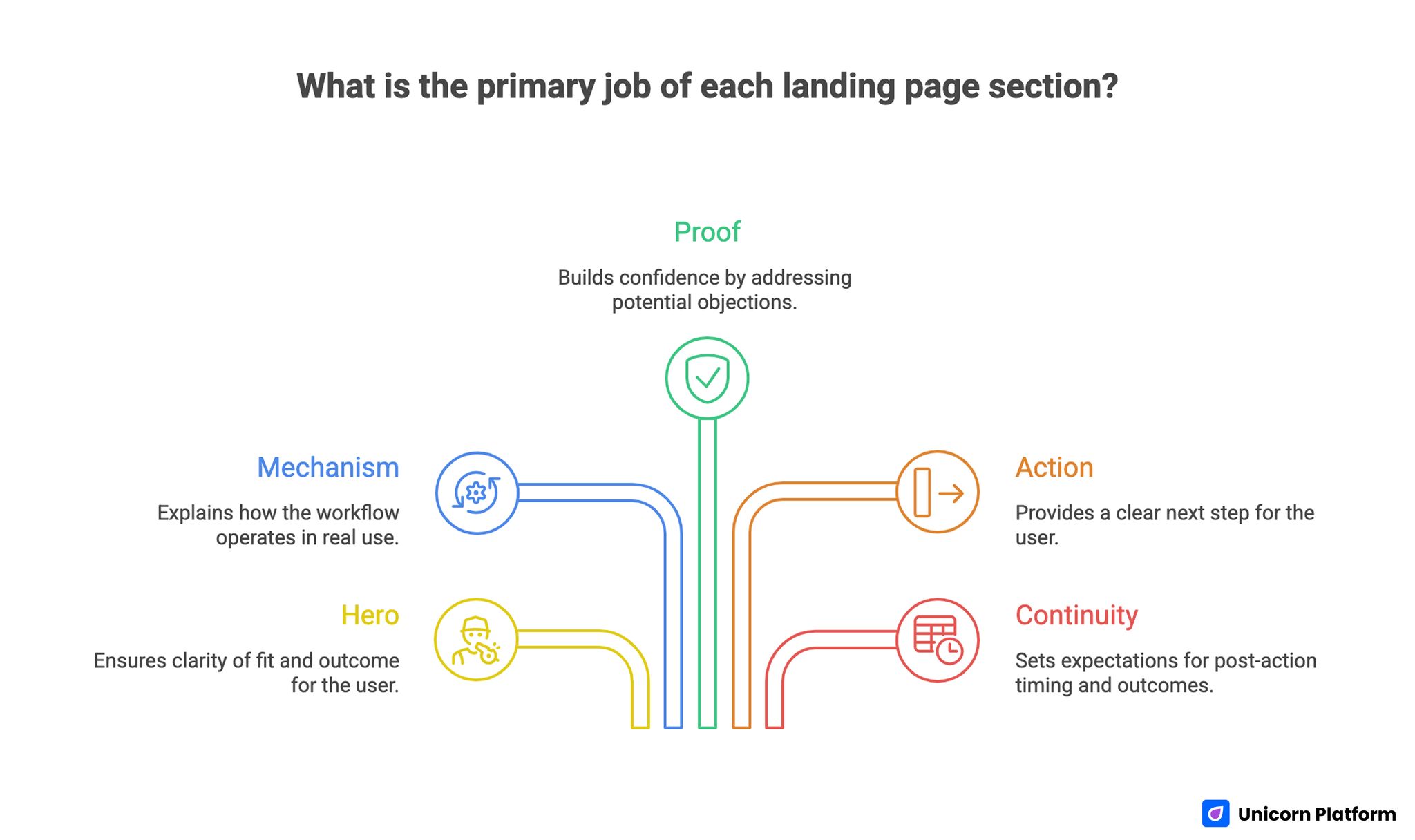
Landing Page Template Section Roles for Conversion-Focused Structure
Teams often copy template section headings and only replace product names. That approach keeps surface consistency but rarely improves performance because section purpose stays generic.
A better approach is section-job rewriting. Assign one decision job to each module, then rewrite copy and visuals to serve that job only.
Typical section jobs are listed below. Each one should be explicit in your editing brief before copy work starts.
- Hero: fit and outcome clarity.
- Mechanism: how the workflow works in real use.
- Proof: confidence for likely objections.
- Action: clear next step by readiness.
- Continuity: post-action expectation and timing.
When each section has one job, test results are easier to interpret and updates are easier to govern. This clarity reduces noisy changes during high-velocity campaign windows.
If your team needs a reusable structure framework while rewriting templates, this landing page architecture guide is useful for locking section order before detailed copy work. It is especially helpful when several contributors are editing the same template.
Copy Framework for Template Customization
Template customization should begin with message logic, not color changes. Strong copy establishes relevance first, then introduces mechanism and proof in sequence.
A practical copy framework is listed below. Use it as a checklist during rewrites so every section supports the same narrative.
- Audience and context statement.
- Concrete first-value outcome.
- Mechanism summary in plain language.
- Confidence cue tied to likely risk.
- One action path with clear expectation.
This order helps visitors decide quickly without overloading cognitive effort. It also keeps message consistency stable across traffic sources.
Copy Constraints That Improve Quality
- Avoid broad claims without operational context.
- Keep first-screen language specific and low-hype.
- Pair every major promise with nearby confidence support.
- Use CTA labels that describe next-step outcome.
- Add short boundary language for non-fit users.
Boundary language is often ignored, but it reduces low-intent conversions and improves downstream efficiency. Clear non-fit cues help both conversion quality and sales handoff speed.
Visual and Interaction Adaptation Rules
A template visual style should support comprehension, not compete with it. Motion, gradients, and rich blocks can help, but only when they reinforce decision flow.
The most reliable visual adaptation pattern is progressive disclosure. Show the first-value interaction clearly, then layer deeper feature detail as users scroll. This matches how people evaluate product risk in limited attention windows.
Interaction design should prioritize friction-free action zones. Form fields, CTA spacing, and proof readability should remain stable across breakpoints and network conditions.
Visual QA Priorities
- Hero readability on first viewport.
- Screenshot relevance to headline promise.
- Proof visibility near action blocks.
- CTA contrast and tap comfort on mobile.
- Fast rendering of decision-critical content.
When these basics are strong, design polish has a much higher chance of improving conversion instead of distracting users. Without these basics, extra visual complexity usually adds noise.
Mobile-First Template Adaptation
Many template pages are designed on desktop first and only checked on mobile near launch. That sequence causes avoidable losses because layout compression can hide crucial trust or action elements. This is a growing risk because mobile behavior dominates modern web traffic. According to research from Google, more than half of global web traffic now comes from mobile devices, making mobile-first usability a critical factor for landing page performance and user engagement.
Mobile-first adaptation should validate both text and interaction order. The first screen must preserve fit and outcome clarity, and the first action path must remain obvious without excessive scrolling.
Run real-device QA for keyboard behavior, input labels, submit reliability, and confirmation continuity. Emulators are useful, but real devices expose practical friction patterns that matter for conversion quality.
For deeper guidance on device-consistent conversion behavior, this responsive landing-page workflow helps align section hierarchy and action clarity across breakpoints. Use it when mobile drop-off patterns are growing faster than desktop drop-offs.
Template Libraries vs Custom Build Decisions
Teams often ask whether they should keep using template libraries or move to fully custom page design. The practical answer depends on maturity stage and governance quality.
Template libraries are usually stronger for fast iteration when architecture and QA rules are clear. Custom builds are stronger when unique interaction needs or strict brand constraints outweigh iteration speed.
A pragmatic decision model is shown below. Keep the criteria explicit so future template choices remain consistent.
- Use templates when you need speed, modularity, and testable consistency.
- Use custom builds when template constraints block critical UX behavior.
- Reassess quarterly based on conversion quality and maintenance effort.
Most teams should remain template-first longer than expected, provided they treat templates as structured systems rather than static skins. This approach usually reduces maintenance load while improving test speed.
Measurement Model for Template Performance
Template performance should be measured beyond top-line conversions. Volume can improve while quality declines if route clarity and post-click continuity are weak. Industry benchmarks show how large this quality gap can be. Research indicates that the average landing page conversion rate across industries is around 4–6%, while top-performing pages frequently exceed 10%, highlighting how structural improvements in page flow and messaging can dramatically affect results.
Use a quality-aware metric stack. Measuring only volume can hide route-quality regressions for weeks.
- Conversion completion rate by source.
- Qualified action quality by segment.
- First-session activation behavior.
- Follow-up engagement consistency.
- Route-level dropout points by device.
Each optimization cycle should define one primary metric and one guardrail metric. This avoids local improvements that hurt downstream funnel quality.
Example Metric Pairing
- Primary: qualified conversion completion.
- Guardrail: first-week activation consistency.
This pairing provides a more realistic view of business impact than raw volume alone. It also creates clearer rollback rules when experiments produce mixed outcomes.
Governance Process for Template-Based Teams
Fast template iteration requires stable review discipline. Without clear ownership, teams introduce silent regressions through small edits that seem harmless in isolation.
A lightweight governance model uses three lanes. These ownership lanes keep quick releases from becoming uncoordinated edits.
- Messaging owner for fit and offer coherence.
- Workflow owner for route logic and form behavior.
- QA owner for device reliability and tracking integrity.
This model should be paired with short release gates before traffic scaling. Teams should treat these gates as mandatory quality controls, not optional reviews.
- First-screen fit and value clarity pass.
- Proof placement and trust coherence pass.
- CTA hierarchy and route logic pass.
- Form/submit/confirmation behavior pass on real devices.
- Event tracking verification pass.
A 24-48 hour post-release check should always follow major updates. Early verification catches quality drift before it compounds across campaigns.
Common Failure Modes and Fixes
Failure Mode 1: Template chosen for style, not conversion fit
Teams select layouts by aesthetic preference and then struggle to retrofit route clarity. As a result, page structure fights the campaign objective from day one.
Fix by mapping campaign objective first, then selecting templates that support that objective structurally. Selection decisions should be based on route logic and section order, not static screenshots.
Failure Mode 2: Section cloning without section-job rewrite
Templates are customized by replacing words only, while decision logic stays generic. This creates polished pages that still fail to guide user decisions.
Fix by assigning one job per section and rewriting each module for that job explicitly. This makes later tests easier to interpret because section purpose stays stable.
Failure Mode 3: Too many equal-priority CTAs
Visitors see multiple action options without hierarchy, which slows decisions and lowers action quality. Conflicting CTAs also make route attribution harder for the team.
Fix by keeping one primary route and one secondary route that serves a different readiness state. Clear CTA hierarchy usually improves both completion confidence and funnel analysis.
Failure Mode 4: Late trust placement
Confidence cues appear after major action prompts, so users are asked to commit before risk is reduced. This ordering is especially costly on mobile where attention windows are shorter.
Fix by moving trust modules closer to the first high-intent action area. Pair each claim with nearby evidence so users do not need to scan for validation.
Failure Mode 5: Mobile QA done too late
Desktop-ready pages ship with mobile friction that was never tested under realistic conditions. Hidden interaction issues then suppress conversion quality after launch.
Fix by running device-first QA early and treating mobile reliability as a launch gate. Real-device checks should include form behavior, CTA visibility, and confirmation continuity.
Failure Mode 6: Variant sprawl without governance
Teams create many page variants with different structures, making learning noisy and maintenance costly. Structural variance also slows onboarding for new contributors.
Fix by enforcing one canonical template and limiting variant changes to defined high-impact surfaces. Stable structure with scoped variation is usually the fastest path to compounding improvements.
30-Day Implementation Plan
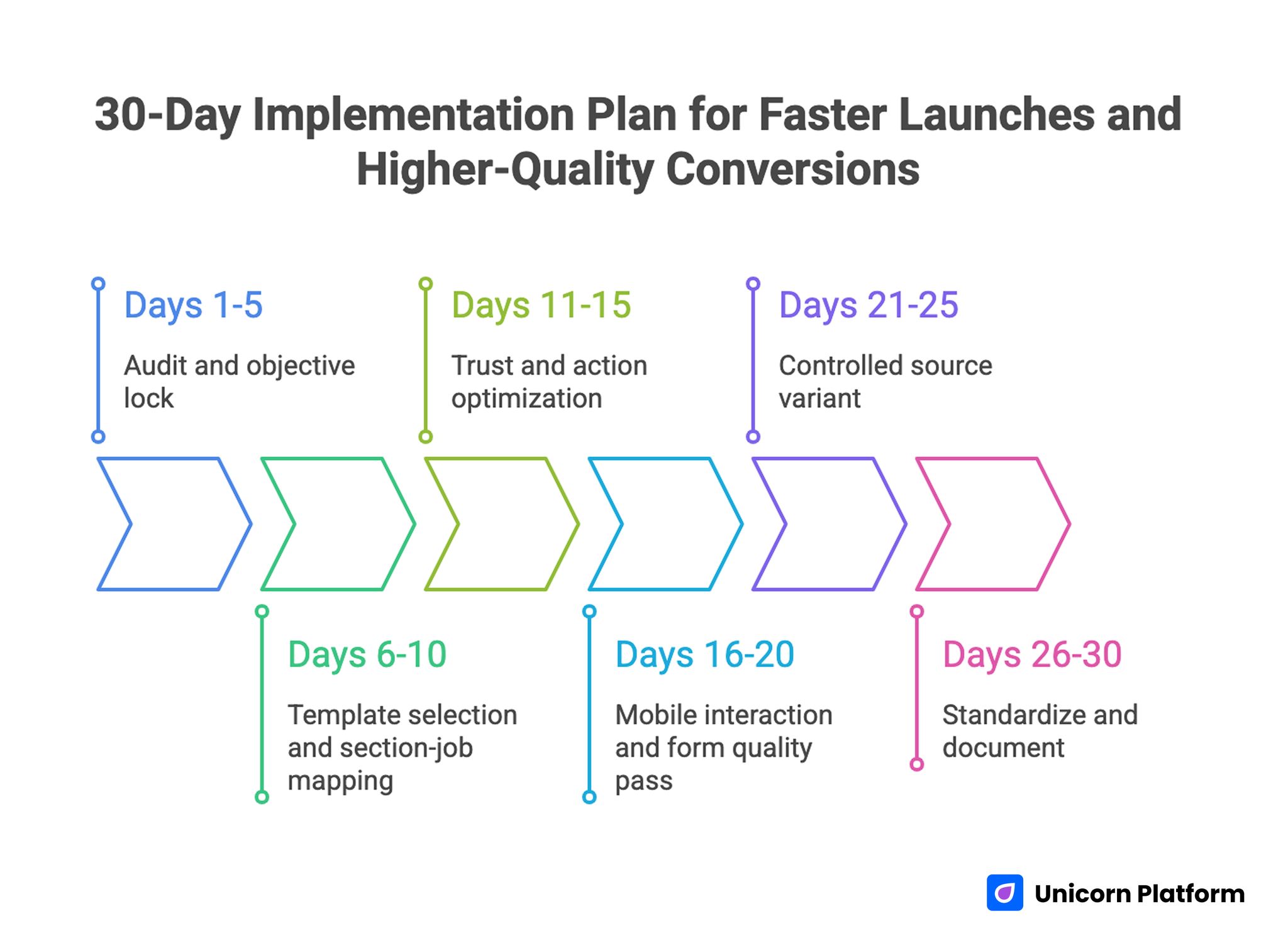
30-Day Implementation Plan for Faster Launches and Higher-Quality Conversions
Days 1-5: Audit and objective lock
Review current template performance across source and device. Define one primary objective and one guardrail metric for the next cycle.
Days 6-10: Template selection and section-job mapping
Choose one template using objective-fit criteria. Assign section jobs and rewrite first-screen value language before design-level changes.
Days 11-15: Trust and action optimization
Reposition trust blocks near action zones and simplify CTA hierarchy. Validate route logic with real user paths.
Days 16-20: Mobile interaction and form quality pass
Run full real-device QA, improve form behavior, and verify confirmation continuity. Fix friction points before traffic scaling.
Days 21-25: Controlled source variant
Launch one source-specific variant from the same template and test one major variable only. Compare against baseline with pre-defined decision rules.
Days 26-30: Standardize and document
Promote winning blocks into shared defaults, retire weak variants, and update release checklists for repeatability. This step prevents teams from reintroducing known weak patterns in later campaigns.
90-Day Scale Plan
A 30-day cycle improves immediate performance. A 90-day plan turns those wins into a durable operating system.
Month 1: Stabilize core architecture
Lock one canonical template, clean route hierarchy, and baseline quality metrics. Remove low-value variation points that create noise.
Month 2: Expand controlled variants
Create source-level variants with stable structure and targeted message adjustments. Maintain strict test scope and document keep/revert decisions.
Month 3: Operationalize governance
Formalize release gates, event validation standards, and handoff rules. Ensure post-conversion workflows receive clean context for better activation quality.
By month three, success should be measured by consistency and quality of outcomes, not isolated spikes. Durable systems outperform occasional wins when campaign pressure increases.
Running This Template System in Unicorn Platform
Unicorn Platform works especially well for this model because reusable sections can be updated quickly while preserving structural consistency. Teams can move fast without losing control when section jobs and QA rules are explicit.
Use one canonical app-template architecture, then run controlled variations for source and intent stage. Keep governance lightweight but mandatory, and ensure every release includes device and tracking checks.
For teams adding AI-assisted drafting to speed up template iteration, this AI landing-page workflow is useful when combined with strict manual review for clarity and claim quality. Automation should speed drafting, while human review should protect decision quality.
FAQ: App-Landing-Page Templates
How should app-landing-page templates be selected for campaigns?
Select templates based on conversion objective and route logic fit, not only visual style. A template that supports your primary action flow will outperform a prettier template that fights your funnel design.
Are app-landing-page templates better than custom builds?
For most teams, templates are better for speed and consistency when governance is strong. Custom builds are best when essential UX behavior cannot be achieved within template constraints.
How many CTAs should a template page include?
Use one primary CTA and one clearly secondary path for adjacent readiness. More equal-priority actions usually reduce clarity and lower conversion quality.
What sections are mandatory for app-template performance?
At minimum: fit-focused hero, mechanism explanation, trust proof near action, clear route block, and post-action continuity guidance. Without these sections, template pages usually lose clarity under optimization pressure.
How often should template-based pages be reviewed?
Weekly checks are practical during active campaigns, with monthly structural reviews for proof freshness, route performance, and mobile interaction quality. This cadence keeps fast updates from creating unnoticed quality drift.
Should we remove navigation from template pages?
For focused acquisition campaigns, minimizing exits usually helps. If navigation is needed for trust context, keep it clearly secondary to the main action flow.
How do we improve quality without increasing form friction?
Start with better fit messaging and clearer value framing. When the right users understand relevance faster, quality improves before form changes are needed.
What is the biggest mistake in template customization?
Treating templates as fixed design assets instead of editable decision systems. Copy swaps alone rarely solve structural conversion issues.
How can small teams run this process consistently?
Keep ownership explicit, checklists short, and tests scoped to one major variable. Consistency in process beats complexity in tooling.
What is the fastest high-impact update for weak template performance?
Rewrite first-screen fit and outcome language, then move proof closer to the primary action block. This often improves quality in one cycle.
Final Takeaway
App-focused template pages perform best when teams treat them as structured conversion systems, not quick design artifacts. Clear section jobs, clear route hierarchy, and clear continuity signals create more reliable outcomes than visual tweaks alone.
With Unicorn Platform, this approach can be executed quickly and repeatedly. The result is faster launches with better conversion quality and stronger activation consistency over time.