Table of Contents
- Six High-Value Assistant Use Cases for Growth Teams
- Conversation Design by Intent Stage
- 30-Day Implementation Plan
- Common Failure Patterns and Fast Corrections
- FAQ
Adding an assistant to a website is easy. Making it useful, safe, and commercially effective is harder.
Many teams launch assistant features quickly and see early engagement, but pipeline quality does not improve. Users ask questions, spend more time on page, and still fail to progress toward meaningful next actions. The issue is rarely "assistant availability." The issue is assistant design and operating discipline.
A strong assistant experience is not just a conversational UI. It is a decision layer integrated with page narrative, trust architecture, and stage-appropriate calls to action.
In 2026, winning teams treat assistant behavior as part of their core conversion system: clear scope, clear boundaries, clear escalation, and clear measurement.
This guide explains how to implement that model in Unicorn Platform. You will learn how to define assistant roles, avoid common security failures, design conversations by intent stage, and run a repeatable optimization process without bloating complexity.
If your team is still establishing UX governance for AI-led interactions, this perspective on how AI is changing UX roles is useful for clarifying where automation helps and where human judgment stays critical.
sbb-itb-bf47c9b
Quick Strategic Takeaways
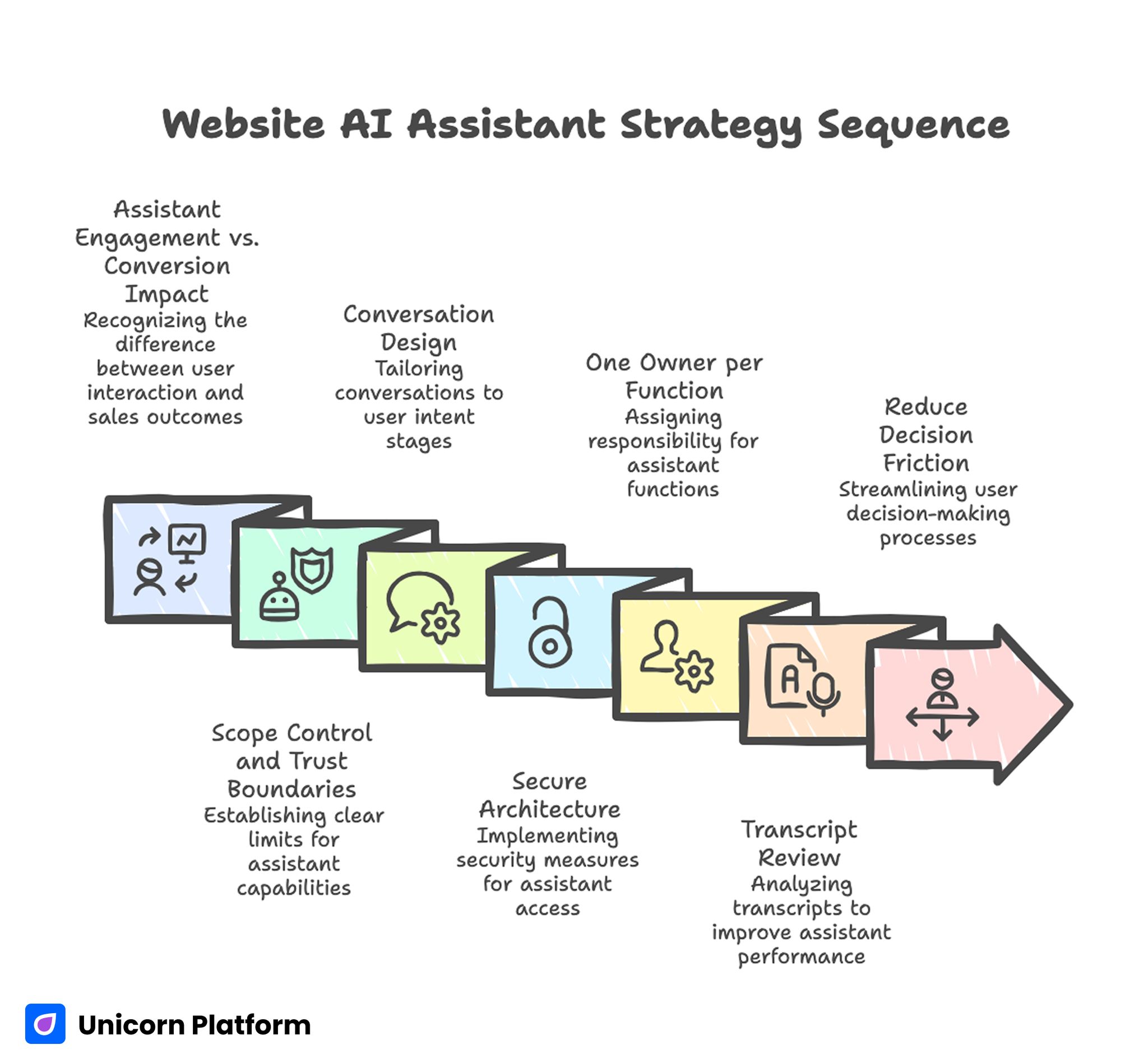
Website AI Assistant Strategy Sequence
- Assistant engagement is not the same as conversion impact.
- Scope control and trust boundaries matter more than feature breadth.
- Conversation design should match user intent stage, not generic FAQ logic.
- Secure architecture requires constrained tool access and response guardrails.
- One owner per assistant function improves speed and consistency.
- Transcript review should drive page and prompt updates weekly.
- Assistants should reduce decision friction, not increase interface noise.
Why Assistant Implementations Underperform
Most weak implementations fail for predictable reasons. The assistant has broad language ability but weak context alignment. It can answer many questions superficially and cannot reliably guide high-intent decisions.
A second failure pattern is page detachment. The assistant says one thing while the page says another. Visitors detect this inconsistency quickly and trust drops.
A third pattern is conversion disconnect. The assistant answers questions but does not route users to the right next action by readiness stage.
A fourth pattern is operational blindness. Teams track chat volume and ignore whether assistant interactions improve qualified actions, activation quality, or support reduction.
These failures are solvable when assistant design is treated as a product workflow instead of a standalone feature.
Assistant vs Agent: Why the Difference Matters
Teams often mix these terms and create implementation confusion.
A website assistant is usually a guided interaction layer focused on user understanding, qualification, and navigation. It should stay constrained, transparent, and predictable.
An agent is typically more autonomous and task-executing. It may call external tools, coordinate workflows, or make recommendations with broader operational context.
For most website conversion flows, constrained assistant behavior is safer and more effective than broad agent autonomy. Visitors need accurate guidance and confidence, not open-ended experimentation.
Use autonomous behaviors only where tooling, permissions, and audit controls are mature.
Six High-Value Assistant Use Cases for Growth Teams
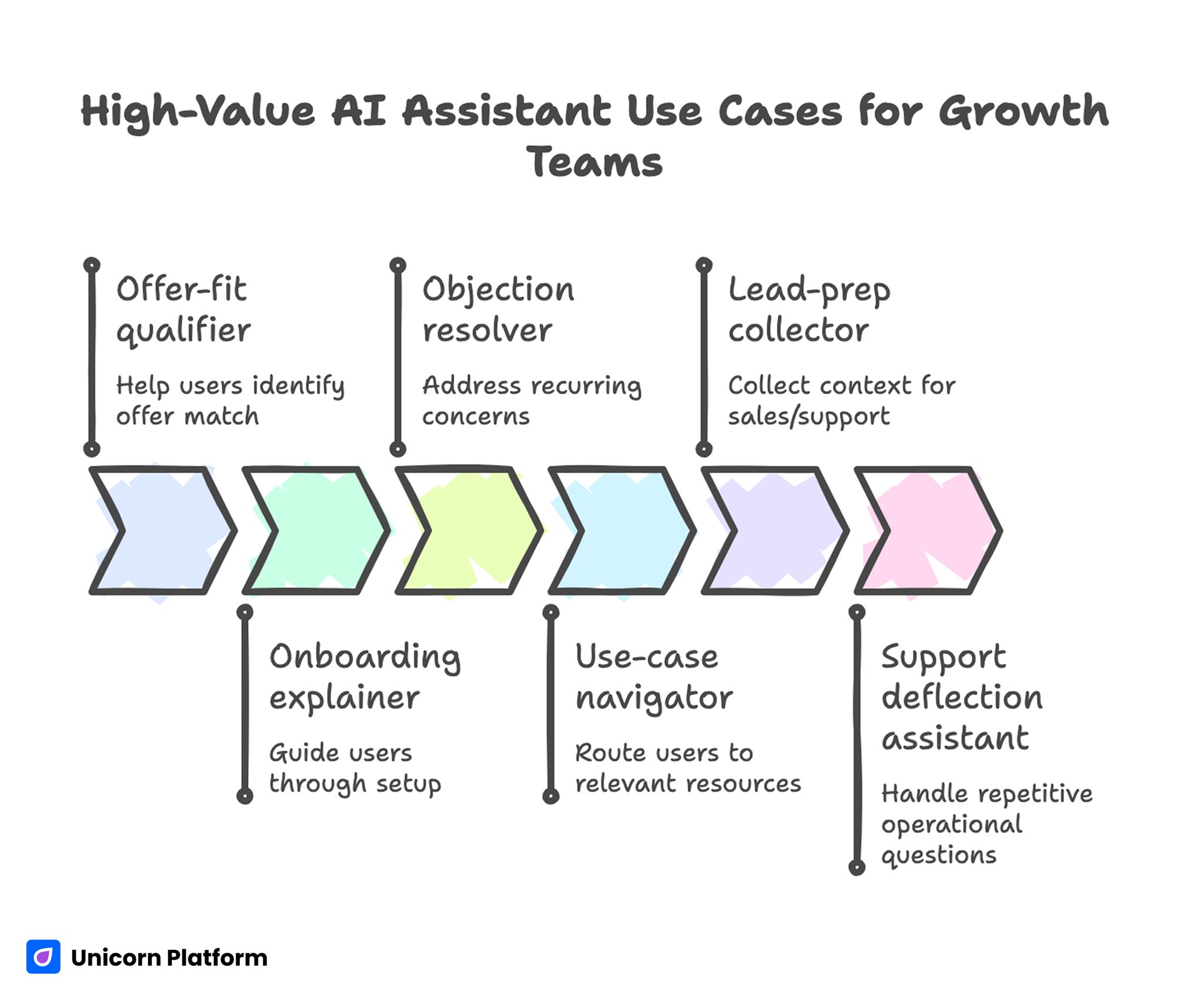
High-Value AI Assistant Use Cases for Growth Teams
Not every assistant use case is equally valuable. Prioritize the ones that reduce real decision friction.
1) Offer-fit qualifier
Help users identify whether your offer matches their context before they submit a form or book time. This reduces low-fit conversations and improves downstream pipeline efficiency.
2) Onboarding explainer
Guide users through setup expectations, required inputs, and first-value milestones. Clear onboarding guidance usually lowers early churn and support pressure.
3) Objection resolver
Address recurring concerns about scope, reliability, effort, and implementation timelines. Objection clarity helps users decide with less uncertainty and fewer comparison loops.
4) Use-case navigator
Route users to the most relevant page section or resource based on role and intent. Better routing improves comprehension speed and keeps sessions decision-focused.
5) Lead-prep collector
Collect lightweight context that improves handoff quality for sales or support teams. Better context at handoff increases response relevance and reduces repetitive qualification questions.
6) Support deflection assistant
Handle repetitive operational questions so human support can focus on higher-value issues. This improves team capacity without reducing user confidence.
These use cases usually generate stronger business impact than generic "ask anything" chat patterns.
Security-First Architecture for Assistant Systems
Convenience-first assistant builds often introduce avoidable risk. Secure design should be planned from day one.
A practical threat model should consider three common risk sources:
- untrusted input that attempts prompt or policy manipulation
- over-privileged tool access with weak execution boundaries
- insufficient output validation before user-facing response
When these risks combine, assistant behavior becomes difficult to trust at scale.
Core security controls
- least-privilege tool permissions
- explicit allowlists for callable actions
- input sanitation and prompt hardening layers
- output filters for policy and data-leak boundaries
- clear escalation path to human handling for uncertain cases
Security should not be hidden only in backend policy docs. User-facing trust language should reflect these controls in plain terms.
A Practical Assistant Architecture You Can Operate
A maintainable assistant system usually includes five layers:
- intent detection layer
- scoped retrieval/context layer
- response policy layer
- action/CTA routing layer
- logging and evaluation layer
This layered model improves reliability because each failure can be diagnosed and fixed without rewriting the whole experience.
It also supports incremental improvement. Teams can refine intent handling or CTA routing independently while keeping stable trust rules and security boundaries.
Conversation Design by Intent Stage
Conversation quality improves when prompts and response patterns map to user readiness.
Early stage: exploration intent
Goal: clarify fit quickly. Responses should be concise, explanatory, and non-committal, so users can self-qualify before deeper evaluation.
Middle stage: evaluation intent
Goal: reduce uncertainty. Responses should explain mechanism, limitations, and practical setup expectations, so comparison-stage visitors can make informed tradeoffs.
Late stage: decision intent
Goal: guide to action confidently. Responses should route users to stage-matched CTAs with transparent commitment expectations and clear next-step preparation.
When all three stages are handled with one generic response style, conversion quality typically declines.
Page Narrative and Assistant Alignment in Unicorn Platform
In Unicorn Platform, assistant behavior should reinforce the same conversion spine as the page.
If the hero promise is outcome-focused, assistant prompts should help users validate whether they can reach that outcome in their context. If the page emphasizes fast onboarding, assistant responses should provide setup clarity and preparation guidance.
Misalignment between page and assistant creates trust friction even when each component looks strong independently.
For teams improving baseline structure before advanced assistant routing, this guide on how to create AI landing pages can help stabilize core section flow.
Trust Modules That Improve Assistant Adoption
Assistant interactions carry additional trust burden because users interpret conversational tone as guidance authority.
High-impact trust modules include:
- clear statement of what the assistant can and cannot do
- plain-language summary of how responses are produced
- response-confidence cues for uncertain outputs
- explicit human handoff path for complex cases
Place trust cues near first interaction points and high-commitment CTAs. Delayed trust information often causes silent drop-off.
CTA Branching for Better Lead Quality
Assistant experiences should support branching action paths, not force one hard conversion ask.
Example branch structure:
- exploration path: "See use-case walkthrough"
- evaluation path: "Compare setup options"
- decision path: "Start guided trial" or "Book implementation call"
Branching improves lead quality because users self-select by readiness rather than being pushed to premature commitment.
Use one primary branch per page variant to preserve clean attribution signals.
Mobile Experience Standards for Assistant Interfaces
Assistant usability often breaks on mobile due to cramped overlays, poor scroll behavior, and obstructive interaction patterns.
Mobile standards should include:
- compact entry state that does not block key page content
- readable response cards with clear hierarchy
- tap-safe quick actions and dismiss states
- low-latency response behavior under constrained networks
- verified keyboard and form interactions
Mobile QA must be part of release gates, not post-launch cleanup.
Measurement Hierarchy: Beyond Chat Volume
A useful assistant measurement model should track business-relevant progression.
Layer 1: interaction quality
Are users receiving relevant, context-correct responses?
Layer 2: progression quality
Do interactions move users toward useful next steps?
Layer 3: conversion quality
Do assistant-influenced users convert at higher quality?
Layer 4: downstream outcome quality
Do those users activate, retain, or progress through pipeline stages more reliably?
Tracking all four layers prevents vanity optimization and keeps teams focused on outcomes.
30-Day Implementation Plan
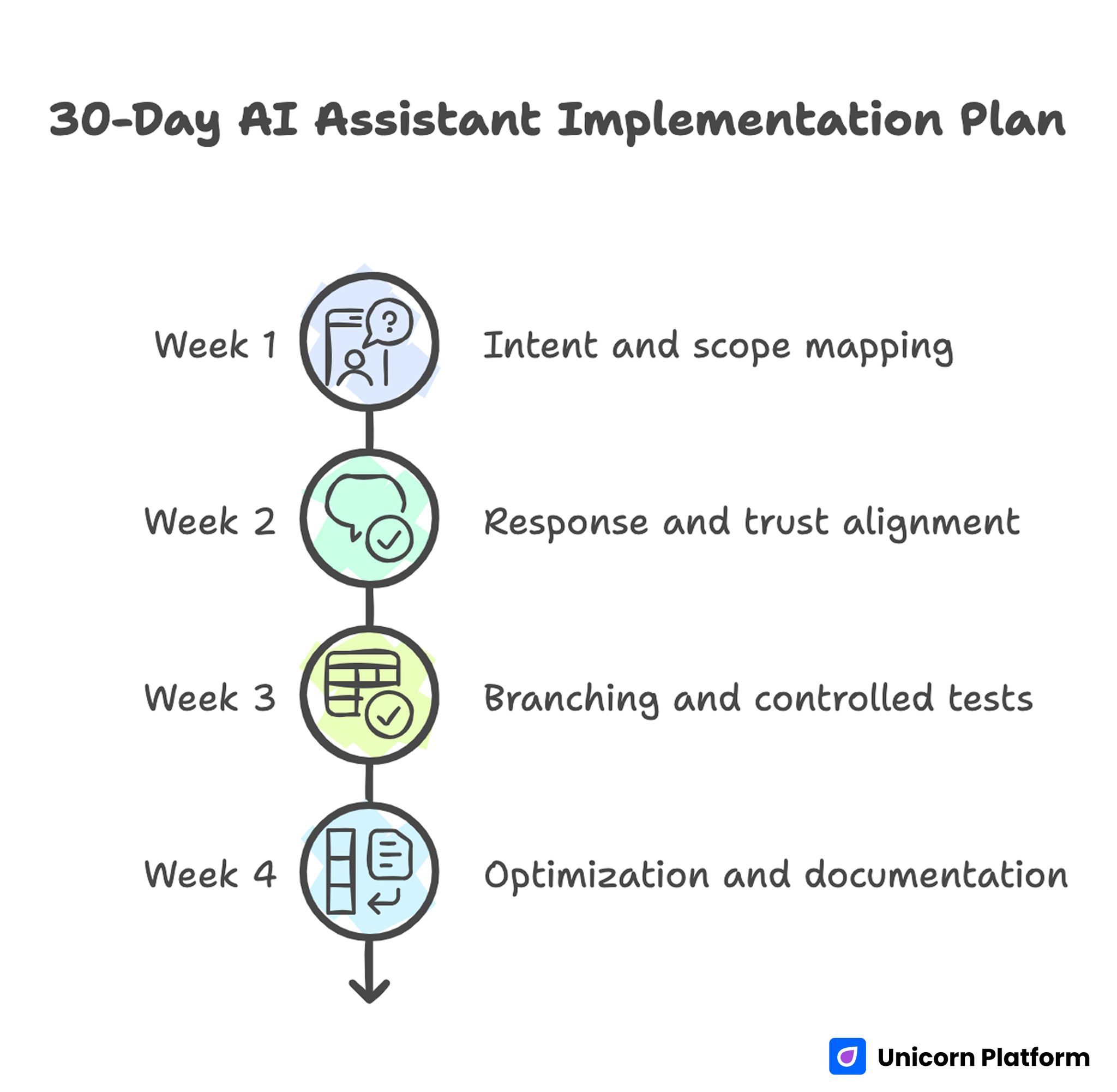
30-Day AI Assistant Implementation Plan
Week 1: intent and scope mapping
Identify top recurring user questions and map assistant scope boundaries. Define escalation rules for uncertainty and high-risk topics.
Week 2: response and trust alignment
Align assistant responses with page narrative and add trust modules near key interaction points.
Week 3: branching and controlled tests
Implement intent-stage CTA branches and run one major conversation test with clear success criteria.
Week 4: optimization and documentation
Archive weak response paths, expand winning prompts, and publish updated operating notes for contributors.
This cycle keeps implementation practical for lean teams while creating measurable learning.
90-Day Scale Roadmap
Month 1: stabilize reliability
Improve accuracy consistency, strengthen trust messaging, and validate stage-appropriate routing. This month should focus on removing known failure modes before any expansion.
Month 2: expand by segment
Add segment-specific prompt variants for your highest-value audiences and monitor branch-level conversion quality. Keep the core narrative stable while adapting only segment-critical guidance.
Month 3: operationalize governance
Formalize release gates, proof refresh cadence, and assistant variant ownership for long-term quality control. Governance at this stage prevents quality drift as page and variant volume grows.
Scale should follow reliability, not precede it.
Common Failure Patterns and Fast Corrections
Failure pattern: long chats, weak qualified actions
Correction: redesign response endings to include clearer stage-matched next steps. Every response should either resolve uncertainty or guide a practical decision action.
Failure pattern: generic responses with low trust
Correction: narrow scope, strengthen context retrieval, and add clear capability boundaries. Overly broad answers should be replaced with scoped guidance and escalation paths.
Failure pattern: repeated support confusion
Correction: update both assistant prompts and page content from transcript insights weekly. Shared updates prevent the same confusion from repeating across channels.
Failure pattern: conflicting messages across teams
Correction: maintain one source-of-truth messaging sheet and validate assistant responses against it before release. Alignment checks should be part of every publish gate.
Failure pattern: interactive clutter
Correction: remove low-value novelty interactions and prioritize utility-focused flows. Interactions that do not improve progression quality should be simplified or removed.
Teams that review these patterns monthly usually improve faster because mistakes become reusable learning, not recurring incidents.
Operating Notes Standard for Scalable Programs
Maintain one concise note per assistant variant:
- target segment and intent scope
- approved response boundaries
- trust and compliance statements
- branch CTA map
- expected quality metrics
- latest test outcome and decision
This documentation standard improves onboarding speed and reduces drift when contributor count grows.
It also makes audits easier because behavior rationale is visible rather than implicit.
For teams scaling structured site operations, this practical guide on AI website builder workflows for startups can support reusable governance patterns across assistant-driven pages.
Advanced Evaluation Loop for Mature Teams
Once baseline quality is stable, mature teams should run a stage-based backlog for assistant optimization.
Suggested backlog categories:
- intent classification quality
- objection-handling precision
- trust statement clarity by segment
- branch-CTA conversion efficiency
- handoff quality to human teams
Use one major experiment per category per cycle. Keep changes isolated to preserve interpretation quality.
Weekly experiment report template
- hypothesis and targeted bottleneck
- segments and pages involved
- primary metric and guardrails
- result confidence and caveats
- keep/revise/archive decision
- next recommended test
This structure keeps optimization cumulative and reduces repetitive debate.
FAQ: Website Assistant Operations in 2026
What is the best first use case for a new assistant?
Start with fit qualification and onboarding clarification. These use cases usually provide fast, measurable value because they reduce immediate decision friction.
Should assistant responses be fully open-ended?
Not for conversion-critical flows. Constrained scope with clear boundaries usually performs better, is safer, and is easier to optimize.
How do we know if assistant interactions are helping business outcomes?
Track progression and conversion quality, not just interaction volume. Assistant influence should be visible in qualified actions and downstream outcomes, not only engagement spikes.
What is the biggest security mistake in assistant design?
Over-privileged tool access combined with weak input and output controls. Least-privilege architecture is essential to reduce high-impact failure paths.
How often should prompts and responses be updated?
Review weekly for active campaigns and monthly for stable pages. Transcript insights should drive updates so content and assistant behavior evolve together.
Can small teams run assistant programs effectively?
Yes, if scope is narrow, ownership is clear, and release gates are enforced consistently. Lean teams often outperform larger teams when decision paths are explicit.
How many CTA branches are ideal?
Usually one primary branch per intent stage is enough. Too many branches create confusion, dilute intent signals, and increase reporting noise.
Should we prioritize interactivity or clarity?
Clarity first. Interactivity should only be added when it improves decision speed and confidence for a defined user intent.
What if engagement rises but leads stay weak?
This usually indicates progression failure. Rework branch logic, qualification prompts, and proof placement to support faster self-qualification.
How do we scale without losing quality?
Use reusable templates, strict operating notes, and stage-based experiment governance. Scale process, not randomness, so growth does not create quality decay.
Final Takeaway
Assistant features become growth assets only when they are designed and operated as decision infrastructure. Reliable outcomes come from scope discipline, trust clarity, secure architecture, and measurable branching logic.
With Unicorn Platform, teams can implement this model quickly and sustainably: align conversation flow with page narrative, enforce release quality gates, and improve weekly using transcript-driven evidence instead of guesswork.


