Table of Contents
- Unicorn Platform Workflow: From Brief to Published Page
- SEO Operations That Stay Practical for Small Teams
- Common Mistakes and How to Fix Them
- 30-Day Execution Plan for a Startup Team
- FAQ
Most founders do not struggle with ideas. They struggle with shipping. They know what they sell, they know who they serve, but the website still stays in draft mode for weeks because design, copy, and optimization happen in separate tools with separate owners.
A free AI website builder only creates real value if it reduces that gap between idea and launch. It should help you create pages quickly, improve your message with clear edits, and keep everything maintainable once traffic starts coming in.
This guide is built for Unicorn Platform users who need a practical system, not generic claims. You will learn what to expect from a free AI workflow, where teams usually waste time, and how to set up a reliable publishing process that stays effective after launch.
sbb-itb-bf47c9b
Key Takeaways
Launch Page Best Practices
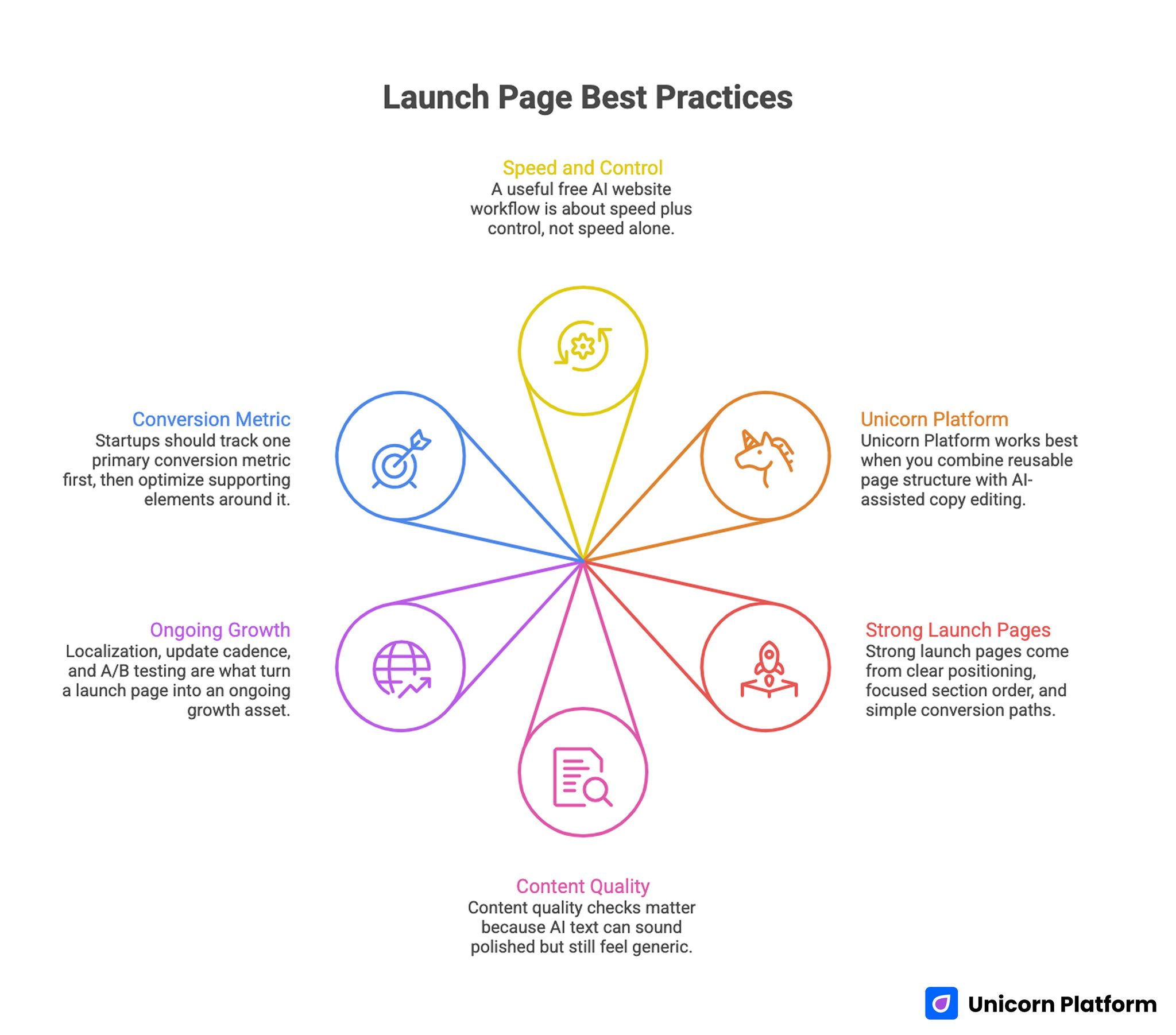
- A useful free AI website workflow is about speed plus control, not speed alone.
- Unicorn Platform works best when you combine reusable page structure with AI-assisted copy editing.
- Strong launch pages come from clear positioning, focused section order, and simple conversion paths.
- Content quality checks matter because AI text can sound polished but still feel generic.
- Localization, update cadence, and A/B testing are what turn a launch page into an ongoing growth asset.
- Startups should track one primary conversion metric first, then optimize supporting elements around it.
What "Free" Should Mean in an AI Website Builder
Free access is only helpful if it lets you complete a real publish cycle. Many tools allow experimentation but block practical outputs, which forces teams to restart elsewhere. A stronger free workflow lets you move through ideation, editing, publishing, and early optimization without friction.
For startup teams, the minimum practical scope includes page generation, section-level edits, responsive output, and basic conversion blocks. If those are missing, the free tier becomes a demo instead of a working channel.
You should also evaluate whether free usage helps with maintenance, not only first-time creation. The long-term cost of website work is usually in updates, not initial build effort.
The Real Job of AI in Website Creation
AI should not replace product understanding. It should accelerate the parts that consume time but do not need weeks of custom production. Good use cases include first-draft copy, variation generation, structure suggestions, and language cleanup.
The highest leverage point is decision support. AI can quickly generate options, but teams still need to choose based on audience fit and business goals. That means your workflow should include a short evaluation loop after each major AI output.
When teams skip that loop, pages may look complete but fail to convert because the message does not match user intent.
Unicorn Platform Workflow: From Brief to Published Page
Unicorn Platform Workflow: From Brief to Published Page
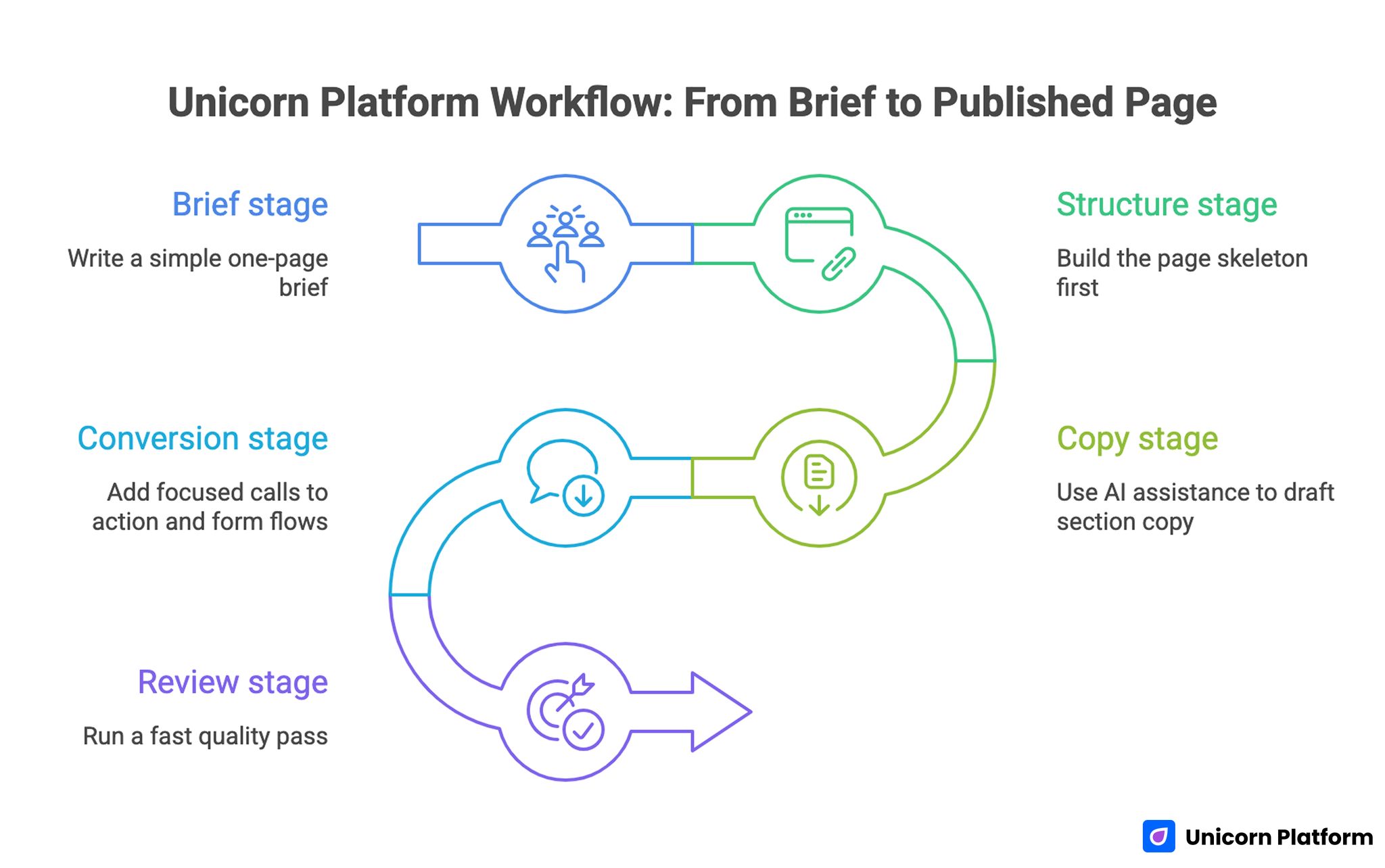
A reliable page workflow in Unicorn Platform can be split into five stages: brief, structure, copy, conversion, and review. This keeps teams aligned and prevents endless edits.
1) Brief stage
Write a simple one-page brief: target audience, primary outcome, pain point, and desired action. Keep this brief visible while editing blocks. It reduces drift when multiple people touch the page.
2) Structure stage
Build the page skeleton first: headline block, proof block, offer block, FAQ block, and CTA block. Do not polish language before structure is complete. Good section order solves many conversion problems early.
3) Copy stage
Use AI assistance to draft section copy, then manually remove vague statements. Replace broad claims with clear, outcome-based language that fits your audience sophistication.
4) Conversion stage
Add focused calls to action and form flows that match user readiness. Early-stage visitors may need a demo request, while warm traffic may be ready for signup.
5) Review stage
Run a fast quality pass: clarity, consistency, trust signals, and action path. Publish only when each section supports the same core promise.
Designing High-Converting Sections Without Design Debt
The fastest way to lose momentum is to over-design before message-market fit is clear. Unicorn Platform helps teams avoid that by working from structured blocks rather than custom layout from scratch.
Use a block order that mirrors buyer decisions:
- Problem recognition.
- Solution framing.
- Evidence and trust.
- Offer details.
- Friction removal.
- Next action.
This order works because readers can self-qualify quickly. It also makes editing easier because each block has one job. If a page underperforms, you can isolate the weak block instead of rewriting everything.
AI-Assisted Copy: Fast Drafts, Human Judgment
AI can generate headlines, benefit bullets, and section intros quickly. The main risk is sameness. Many AI drafts use similar rhythm and abstract language, which reduces credibility for technical or decision-focused audiences.
Use a three-step copy quality routine:
- Keep the first draft broad and fast.
- Run one pass for specificity and remove filler.
- Run one pass for tone consistency and action clarity.
When editing, ask one question per paragraph: does this help the reader decide, or is it just adding words? If it does not improve a decision, shorten or remove it.
Content Authenticity Layer for AI-Assisted Pages
AI-generated text can sound clean while still feeling synthetic. That can reduce trust, especially on pricing, product positioning, or comparison pages.
A practical approach is to apply a short authenticity loop before publishing. First, review copy for real examples and clear outcomes. Next, refine awkward sections to sound natural and audience-specific. Tools can help with this process, including options that let you humanize machine-like copy where needed.
Then run a detection sanity check to spot passages that still read as artificial. A quick validation step with a top AI detector for identifying artificial content can help teams catch low-trust phrasing before it reaches users.
The goal is not to hide AI use. The goal is to publish writing that sounds responsible, clear, and genuinely useful.
SEO Operations That Stay Practical for Small Teams
Most startup teams do not need a complex SEO stack to improve page discovery. They need consistent structure, clear headings, and steady updates tied to real user questions.
Start with these fundamentals:
- One primary intent per page.
- Clear heading hierarchy.
- Direct benefit statements near the top.
- FAQ section for recurring objections.
- Clean internal linking to next relevant content.
When you publish AI-assisted pages in Unicorn Platform, treat SEO as an editorial workflow rather than a separate department. This keeps velocity high and prevents over-optimization.
A useful supporting read for this topic is The Best AI Based Websites: The Future is Here, especially if you want additional context around practical AI site patterns.
Localization and Global Reach Without Heavy Overhead
Many startups delay translation because they assume it requires a large team. In practice, the bigger problem is governance, not translation mechanics. You need consistent source copy, ownership, and a review checklist.
Unicorn Platform users can treat localization as a layered process:
- Keep one canonical English source page.
- Translate high-impact sections first.
- Validate key terms and CTA wording by market.
- Recheck forms, legal text, and metadata before publishing.
This approach helps teams expand market reach without breaking page consistency.
Ongoing Updates: Where Most Pages Win or Fail
A launch page is never finished. The teams that outperform usually run lightweight update loops instead of waiting for full rewrites.
Set one monthly review for messaging and one quarterly review for structure. Monthly updates should focus on clarity, objections, and offer framing. Quarterly updates should revisit section order, social proof strategy, and conversion flow.
Track edits in a simple changelog block near the end of your internal draft document. This reduces repeated debates and helps new team members understand why the page looks the way it does.
A/B Testing Without Turning the Page Into a Lab
Testing is useful when it answers one clear question at a time. It becomes noise when many elements change at once.
Start with a focused test sequence:
- Headline promise.
- Primary CTA wording.
- Proof format.
- Offer framing.
Keep each test long enough to gather directional confidence, then roll insights into the main version. Avoid endless parallel experiments unless you have stable traffic and clear statistical discipline.
If you want deeper context around platform-side AI generation and design logic, this related guide can help: Unicorn Platform: Which AI Creates Website Design.
Cost and Team Bandwidth: When Free Is Not Enough
Free workflows are excellent for early validation, MVP launches, and low-risk experiments. They become limiting when teams need advanced integrations, strict governance, or heavy content operations across many pages.
A practical decision rule is to upgrade only when operational friction appears repeatedly. Examples include blocked integrations, team permission constraints, or limits that slow high-priority experiments.
Until then, the better investment is process quality. Most performance gains come from clearer messaging, stronger section logic, and disciplined updates, not from paying for more features too early.
How to Apply This in Unicorn Platform
Use your Unicorn Platform setup like a publishing system, not a single page. Build one reusable architecture for all key landing pages, then adapt message blocks by audience segment. This keeps your team fast and your brand consistent.
Use this implementation sequence:
- Create a reusable baseline template with fixed section order.
- Add AI-assisted draft prompts for each section type.
- Add an editorial QA pass focused on clarity and trust.
- Add one conversion review pass before every publish.
- Schedule monthly updates and quarterly deep reviews.
This creates a stable operating model. Your pages improve over time without needing complete rebuilds.
When you need additional practical examples for AI-driven website creation inside the same ecosystem, this page is useful as a follow-up read: Unicorn AI Builds You a Website.
Common Mistakes and How to Fix Them
Mistake 1: Publishing AI text with minimal editing
This usually creates polished but generic copy. Fix it by adding audience-specific examples, clear outcomes, and a tighter CTA path.
Mistake 2: Overloading the page with features
Feature-heavy pages often hide the core value. Fix it by assigning one job to each section and keeping supporting details in expandable formats or secondary pages.
Mistake 3: No ownership after launch
Without a clear owner, updates stop and the page decays. Fix it by assigning one decision-maker for content quality and one calendar for update cadence.
Mistake 4: Testing too many elements at once
Broad tests produce unclear signals. Fix it by isolating one variable per test and documenting results before the next iteration.
Mistake 5: Treating localization as copy-paste translation
Direct translation without context often breaks conversion. Fix it with market-aware review for headlines, offers, and forms.
30-Day Execution Plan for a Startup Team
30-Day Execution Plan for a Startup Team
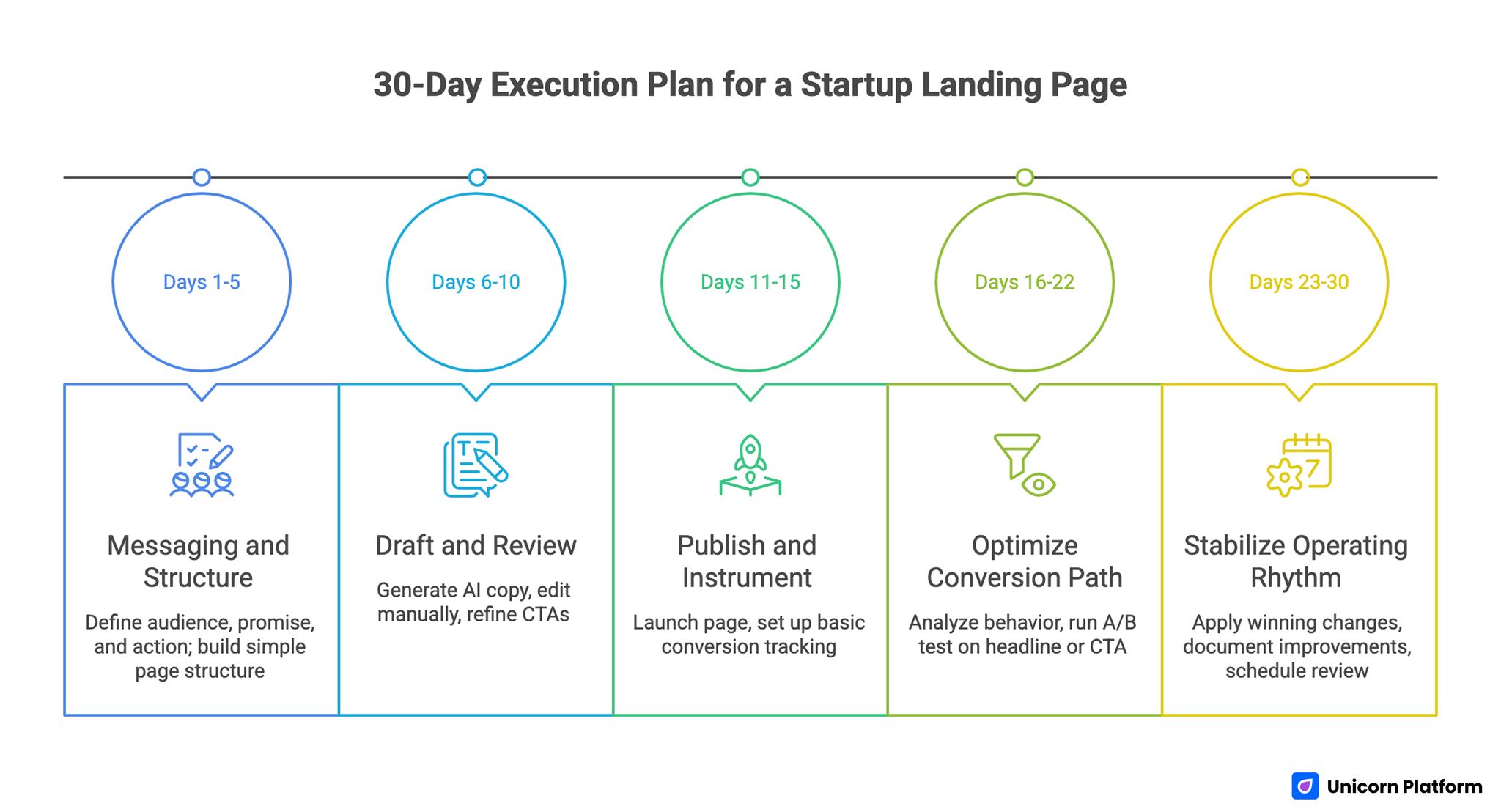
Days 1-5: Messaging and structure
Define audience segment, core promise, and primary action. Build the first page structure in Unicorn Platform and keep the design simple while message alignment is still evolving.
Days 6-10: Draft and review
Generate first-pass copy with AI support, then run a manual editing pass for specificity. Remove vague language and tune CTA blocks to reflect real user readiness.
Days 11-15: Publish and instrument
Publish the first version and set up basic tracking for conversion events. Keep one dashboard focused on one primary outcome to avoid analysis noise.
Days 16-22: Optimize conversion path
Review session behavior, form completion, and CTA performance. Run one headline or CTA test based on observed friction.
Days 23-30: Stabilize operating rhythm
Apply winning changes, document what improved performance, and schedule the next monthly review. At this point, the page should shift from launch mode to managed growth mode.
Role-Based Playbooks for Small Teams
Many startup teams share page ownership across founders, marketers, and product people. That can work well when roles are clear and editing rights are tied to specific responsibilities. Without that clarity, pages become inconsistent because every update changes structure, tone, and priorities.
Use this simple role split to keep quality stable while preserving speed.
Founder role: positioning and offer decisions
The founder should own the core promise, offer scope, and business priority of each page. This includes the headline direction, the primary value statement, and the main conversion action. Founder input is most valuable at decision points, not at sentence-level edits.
If founder time is limited, use a short weekly review rhythm: approve headline direction, approve offer language, reject unclear claims. Keep everything else delegated to the page operator.
Marketer role: message clarity and conversion path
Marketing ownership should focus on section flow, objections, and CTA alignment. The marketer decides whether the page reads clearly for the intended audience and whether the action path matches user readiness.
A practical rule: every block should answer one user question and move the reader toward a single next step. If a section cannot do either, it likely belongs on a different page.
Product role: feature accuracy and implementation truth
Product stakeholders should verify that every functional statement is precise. AI-assisted copy often expands claims beyond real capability, especially for automation, integrations, and optimization outcomes. Product review prevents this drift.
Use a short product checklist: feature exists, limits are understood, and setup effort is described honestly. This protects trust and reduces support burden later.
Content operator role: publishing hygiene and consistency
The content operator maintains structure consistency, quality checks, and update logs. This role keeps the page readable across devices, validates links, and ensures that historical edits do not break flow.
When teams skip this role, pages often become a patchwork of good ideas with weak coherence. A single operator keeps execution disciplined.
Free Plan to Growth Plan: Upgrade Decision Triggers
Not every team should upgrade early. The right time is when repeated friction blocks meaningful progress, not when a new feature looks attractive.
Use these trigger conditions to decide:
- You need advanced integrations that free usage cannot support.
- Team collaboration requires stronger roles and permission controls.
- You are running many active tests and need deeper operational visibility.
- Multi-language operations demand a more formal content governance setup.
If these triggers are not present, keep building on the free workflow and improve process quality first. Better execution usually drives bigger gains than plan changes.
Practical Measurement Model After Launch
A simple measurement model helps teams avoid vanity reporting. Start with one primary conversion metric and two supporting behavior signals.
Recommended baseline:
- Primary metric: completed signup, demo request, or lead form submit.
- Supporting signal 1: click-through rate on primary CTA.
- Supporting signal 2: scroll depth to proof and offer blocks.
Review this data in a short weekly session. Decide one change, apply it, and record the result. Continuous small adjustments outperform occasional full rewrites for most startup teams.
QA Checklist Before Every Publish
Use this checklist to keep quality consistent:
- The headline states one clear outcome.
- Every section supports the same core promise.
- Proof is specific and easy to scan.
- Primary CTA is visible without scrolling too far.
- Form friction is low and fields are minimal.
- AI-assisted copy has been edited for natural tone.
- Localization-sensitive blocks were reviewed manually.
- Internal links point to directly relevant next steps.
- The update owner and next review date are defined.
This short process prevents most common launch issues without slowing the team.
FAQ: Unicorn Platform Free AI Website Builder
Is a free AI website workflow enough for an early-stage startup?
Yes, if it supports full publish-and-update cycles. Early-stage teams usually need speed, clear messaging, and lightweight optimization more than enterprise controls.
How quickly can I launch a page with Unicorn Platform?
A focused team can usually build and publish a solid first version in days, not weeks. The exact pace depends on decision speed around positioning and offer clarity.
Does AI-generated copy hurt trust?
It can, if left unedited. Trust stays high when teams refine tone, add concrete outcomes, and remove generic statements.
Should I optimize SEO before or after launch?
Do core on-page structure before launch, then improve based on real traffic and user behavior. That keeps effort aligned with actual demand.
What is the first element I should A/B test?
Start with the headline or primary CTA. These usually have the strongest effect on conversion direction.
How many sections should a startup landing page have?
Enough to support a decision, but not so many that focus is lost. Most pages perform better with clear, purposeful blocks than with long feature catalogs.
Is localization worth it for small teams?
Yes, if you prioritize markets and translate high-impact sections first. A phased approach gives reach without creating operational chaos.
How often should I update AI-assisted pages?
A monthly light refresh and quarterly deep review is a practical baseline for most teams.
Can non-technical founders maintain pages effectively?
Yes. With structured blocks and a repeatable review checklist, non-technical teams can keep pages accurate and conversion-ready.
What is the biggest mistake after launch?
Assuming launch equals completion. The strongest results come from ongoing edits, focused tests, and disciplined update ownership.
Final Takeaway
A free AI builder becomes a serious growth tool when you combine fast drafting with disciplined editing and regular optimization. Unicorn Platform gives teams a practical way to do that without heavy technical overhead.
Think of each page as a living product asset, not a one-time design deliverable. When you follow a repeatable workflow, your website improves with every cycle and keeps delivering value to both new visitors and your internal team.