Table of Contents
- Why Browser Hijackers Still Matter for Modern Startup Operations
- Triage Model: Classify Incident Severity Fast
- Validation Criteria: How to Confirm Recovery
- 30-60-90 Day Implementation Plan
- Common Failure Patterns and Practical Fixes
- FAQ
Browser hijackers still create expensive interruptions for startups. The technical issue may begin as a search redirection symptom, but the operational impact spreads quickly into analytics reliability, campaign execution, account security, and team confidence.
Search Marquis incidents are usually treated as one-off desktop problems. That framing is too narrow for organizations that depend on browser-based systems for publishing, ad management, CRM administration, and customer communication.
A better approach is to run a structured incident workflow. Teams that follow containment, evidence capture, eradication, verification, and prevention as separate stages recover faster and avoid repeat infections.
When remediation is complete, teams often discover broader workflow weaknesses that were hidden during normal operations. The strategic lens in aligning website optimization with your business goals: a strategic approach can help connect security fixes to operational stability.
sbb-itb-bf47c9b
Quick Takeaways
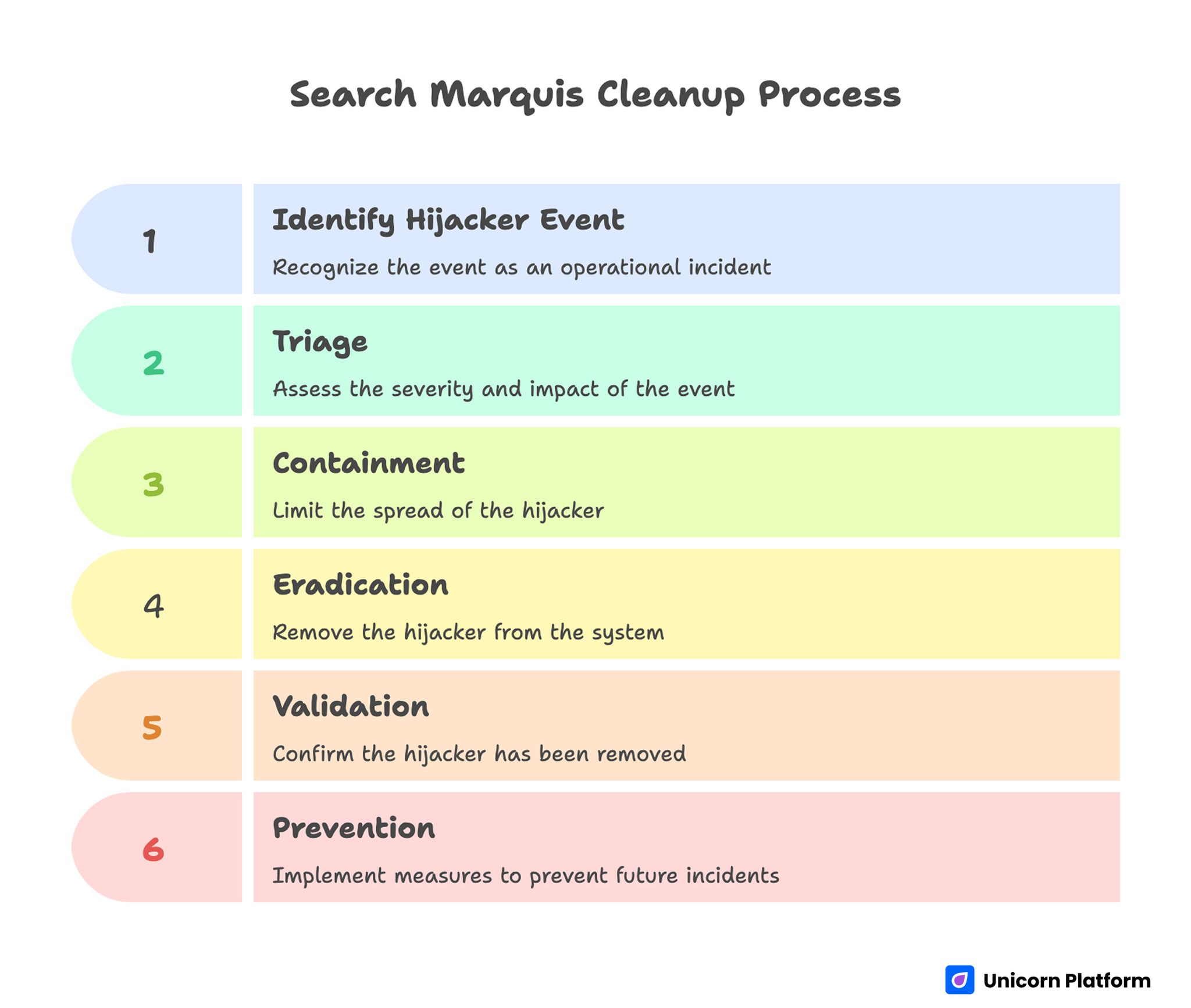
Search Marquis Cleanup Process
- Handle hijacker events as operational incidents, not only endpoint annoyances.
- Separate response into five stages: triage, containment, eradication, validation, prevention.
- Document symptoms before cleanup to improve root-cause analysis.
- Reset high-value credentials after confirmed browser compromise.
- Use profile segmentation for privileged workflows.
- Standardize macOS and browser hardening baselines across the team.
- Run short recurring security drills so response becomes routine.
Why Browser Hijackers Still Matter for Modern Startup Operations
Many teams assume browser redirection malware is low risk compared with ransomware or account takeover threats. In practice, hijackers can degrade decision quality and increase exposure to secondary compromise paths, especially when users continue working through abnormal browser behavior.
Growth teams may publish content from infected sessions, RevOps staff may access CRM tools through compromised profiles, and paid-media operators may authenticate to ad platforms under unstable extension states. Even without direct credential theft, that environment increases the probability of risky clicks, spoofed prompts, and unauthorized configuration changes.
For companies that move quickly, the biggest cost is usually operational drift. People start improvising temporary workarounds, quality control weakens, and incident memory disappears after urgent deadlines pass.
What Search Marquis Activity Usually Looks Like
Symptoms generally begin with involuntary search routing, homepage overrides, and new-tab page replacements. Users may also observe unexpected default engine changes, extension reappearance after manual deletion, and performance slowdowns tied to ad-heavy intermediary pages.
Additional indicators include altered browser policies, unknown configuration profiles, suspicious login items, and modified launch agents in user library paths. These artifacts suggest persistence mechanisms that simple extension removal will not address.
A critical signal is recurrence after reboot. If behavior returns after seemingly successful cleanup, persistence is still active and response should shift from browser-only remediation to system-level analysis.
Infection Paths Teams Should Assume First
Most incidents originate from bundled installers, deceptive update prompts, unofficial download mirrors, and utility tools that hide additional payloads inside setup flows. Time pressure amplifies risk because users skip provenance checks when they need immediate functionality.
Contractor devices and BYOD endpoints increase uncertainty further. Even if company-managed devices are hardened, shared credentials and browser sessions can extend exposure from less-controlled environments into critical systems.
Affiliate software sites, free converter utilities, cracked application packages, and fake browser optimization tools remain common entry points. Incident playbooks should explicitly list these channels as default high risk.
Triage Model: Classify Incident Severity Fast
A practical triage model helps teams allocate effort quickly. Low severity can mean isolated redirection on one profile with no privileged account use. Medium severity can mean repeated persistence or multiple affected browsers on one device. High severity includes signs of policy tampering, suspicious account activity, or multiple affected endpoints.
Severity should dictate response scope. Low severity may be handled by guided self-remediation plus verification, while medium and high severity require supervised cleanup, credential resets, and temporary access restrictions for sensitive systems.
Do not wait for complete technical certainty before containment steps. Early restriction of privileged actions reduces downside if deeper compromise is later confirmed.
Stage One: Containment Before Cleanup
Containment limits blast radius while forensic signals are still intact. Pause high-privilege browser tasks on affected machines, including ad account management, billing changes, admin console modifications, and production publishing.
Move urgent workload to known-clean endpoints with verified profiles. This keeps business continuity intact while reducing pressure to rush risky cleanup steps.
A short internal alert should define affected users, suspected symptoms, temporary restrictions, and expected update cadence. Clear communication prevents silent spread and duplicated effort.
Stage Two: Evidence Capture and Incident Notes
Capture evidence before deleting artifacts. Screenshot redirection sequences, suspicious extension lists, altered homepage/search settings, and any unexpected policy lock screens.
Log basic endpoint context: macOS version, browser versions, recent installed software, and timeline of first symptom observation. This information is often enough to identify shared infection paths across multiple users.
Teams that skip this stage lose root-cause visibility. Without evidence, repeated incidents look unrelated, and prevention actions become generic instead of targeted.
Stage Three: macOS-Level Persistence Checks
System-level review should begin with configuration profiles, login items, launch agents, launch daemons, and recently modified files in user library locations tied to startup behavior. Unknown entries deserve investigation before deletion.
Look for patterns such as random-looking file names, unexpected executable paths, and profile descriptions that do not map to known enterprise tooling. Persistence objects may reapply browser settings after every restart.
Cleanup should be deliberate. Remove suspicious entries one change set at a time and record each action in incident notes so rollback and audit review remain possible.
Stage Four: Browser-Specific Remediation
After persistence review, process each browser profile separately. Remove unknown extensions, restore default search and homepage settings, clear site data where appropriate, and verify policy controls are no longer forcing unauthorized values.
Browser sync can reintroduce bad settings if the cloud profile itself is compromised. During recovery, pause sync temporarily or validate synced artifacts before re-enabling.
Profile-by-profile treatment is usually more reliable than full browser reinstall alone. Reinstallation without persistence and sync checks often leads to fast reinfection.
Safari Cleanup Focus Points
Safari incidents commonly involve homepage/search substitution and extension persistence through local settings or profile controls. Check extension inventory, startup behavior, and default search preferences after each remediation step.
Validate that security and privacy controls are still configured as expected. Unapproved website permissions and notification settings can continue risky prompt exposure even after routing symptoms disappear.
If enterprise policies are used, confirm policy source integrity. Legitimate policy tools should be identifiable, documented, and consistent with IT ownership.
Chrome and Chromium Cleanup Focus Points
Chromium-based browsers often expose the problem through extension IDs, managed policy entries, and startup URL manipulation. Review extension permissions carefully and remove items with unclear provenance or unnecessary broad access.
Check shortcut targets and launch parameters where applicable. Some hijacker families modify startup behavior outside normal preference panes.
Verify profile health with fresh session tests. A clean profile baseline can help isolate whether residual behavior is tied to the original profile state or deeper endpoint persistence.
Firefox Cleanup Focus Points
Firefox incidents frequently surface as search engine override plus homepage retention across restarts. Validate add-ons, startup preferences, and search provider settings in one pass.
When enterprise policies exist, confirm they originate from approved configuration channels. Unknown policy files can silently enforce undesirable settings and defeat user-level changes.
Complete remediation with restart and retest cycles. Behavior that survives multiple restarts usually indicates unresolved persistence outside browser-only settings.
Credential and Session Security After Eradication
Any confirmed browser hijack should trigger targeted credential hygiene. Prioritize accounts with administrative power or financial impact, including email, identity providers, ad platforms, analytics tools, CRM systems, and billing dashboards.
Revoke active sessions that originated from affected endpoints and rotate credentials with MFA validation. Shared team credentials require immediate replacement and distribution through managed secret channels.
Token-based access should also be reviewed. API keys, OAuth grants, and app-specific tokens can persist beyond password changes if left untouched.
Protecting Business-Critical Workflows During Recovery
Security events should not fully halt operations. The goal is controlled continuity, where high-risk activities move to verified-safe endpoints while remediation proceeds in parallel.
Define a temporary workflow split: clean devices handle production changes, affected devices enter remediation queue, and incident owner approves return-to-service status after validation checks pass.
Teams running frequent page launches can keep velocity by leaning on standardized publishing processes. The operating structure in landing-page development made simple is useful when security conditions require predictable handoffs.
Validation Criteria: How to Confirm Recovery
Recovery is not complete when redirects disappear once. Validation should include multi-restart checks, repeated search tests, extension inventory review, and confirmation that settings stay stable over 24 to 72 hours.
Perform account activity review during the same window. Look for unexplained sign-ins, permission changes, or anomalous automation behavior in high-value SaaS systems.
Use explicit return-to-service criteria so teams know when endpoint restrictions can be lifted. Clear criteria reduce premature re-entry and repeated incident churn.
Root-Cause Analysis That Produces Actionable Changes
Post-incident reviews should answer four specific questions: where the payload entered, which control failed, why detection lag occurred, and what policy change will reduce recurrence probability.
Avoid blame-focused retrospectives. Incident improvement depends on system design changes, not on individual memory of one mistaken click.
Good outputs include updated software source allowlists, revised extension policies, improved installer verification steps, and user-facing warning examples drawn from the real incident timeline.
Device Hardening Baseline for macOS Teams
A resilient baseline typically includes current OS patching cadence, restricted install privileges, extension source controls, startup item monitoring, and periodic profile audits. Controls should be documented in one clear operational standard.
Standardization matters because mixed endpoint posture creates uneven risk across shared accounts. Attackers and low-grade malware paths usually exploit the weakest operational link.
Baseline controls only work when validation is recurring. Quarterly spot checks and automated inventory snapshots can reveal drift before incidents emerge.
Browser Profile Segmentation for Privileged Tasks
Use separate browser profiles for administrative and everyday activities. Privileged profiles should run minimal extensions, hardened settings, and dedicated session hygiene rules.
General browsing profiles can remain more flexible without exposing critical account access pathways. Segmentation limits the impact when one profile becomes compromised.
This approach also simplifies incident response because investigators can isolate affected contexts faster and avoid broad resets across all team activity.
Contractor and BYOD Security Conditions
External collaborators and personal devices are common in startup workflows, but uncontrolled endpoint variance increases threat surface. Define minimum standards for any device that accesses critical systems.
Minimum standards can include current OS patch level, approved browser versions, enforced MFA, extension limitations for privileged sessions, and mandatory reporting of abnormal browser behavior.
Access scope should reflect device assurance level. High-risk or unmanaged endpoints should receive least-privilege access until compliance checks are complete.
Communication Templates for Fast, Calm Response
Incidents escalate when communication is slow or ambiguous. Prepare concise templates for initial alert, status update, and recovery confirmation so stakeholders get consistent guidance without delay.
Good alerts include what happened, who is affected, what to stop doing immediately, where to report additional symptoms, and when the next update arrives.
Customer-facing communication is not always needed, but draft language in advance for cases where service impact or account security concerns cross external boundaries.
Security Awareness Training That Actually Sticks
Short, scenario-based training is more effective than annual slide decks. Teach users how deceptive installers look, how fake update prompts behave, and when to escalate instead of self-fixing silently.
Tie training examples to incidents your team already experienced. Familiar context improves recall and increases reporting speed.
Reinforce training with lightweight monthly reminders. Small repetition beats one large compliance session for practical behavior change.
Monitoring Signals for Early Detection
Monitor reports of sudden search engine changes, homepage resets, extension churn, and unexpected browser slowdown tied to advertising redirects. Patterns across multiple users are especially important.
Centralize intake through one channel so incident owner visibility stays high. Fragmented reporting across chat threads and email usually delays coordinated response.
Where feasible, pair user reports with endpoint telemetry and login risk signals. Correlation improves confidence in triage decisions.
Operational Metrics for Browser-Hijack Readiness
Track metrics that reflect true resilience: time to detect, time to contain, time to validated recovery, percentage of incidents with documented root cause, and repeat-incident rate by entry vector.
Include workflow impact metrics as well, such as publishing delay hours, campaign disruption count, and support ticket load during security events. These numbers help leadership prioritize prevention investment.
Metrics should drive decisions, not vanity dashboards. If repeat incidents stay high, baseline controls and training need redesign.
Policy Framework for Software and Extension Governance
Policy should define allowed software sources, extension approval criteria, update verification expectations, and prohibited installer categories. Keep policy language practical so non-technical users can apply it quickly.
Enforcement can be lightweight at first, but exceptions should require clear owner approval and expiration dates. Temporary exceptions often become permanent risk if left unreviewed.
Policy without feedback loops becomes stale. Review exceptions and incident links quarterly to refine controls based on real evidence.
Integrating Security Hygiene With Web Operations
Security programs often fail when they are isolated from production workflows. For teams managing custom integrations and web operations, control design should match actual process dependencies.
If browser compromise repeatedly interrupts connected systems work, the implementation discipline in best practices for linking your WMS to a custom-built website can inform stronger dependency mapping and safer change control.
The practical objective is stable execution under pressure. Security controls should support delivery velocity instead of competing with it.
30-60-90 Day Implementation Plan
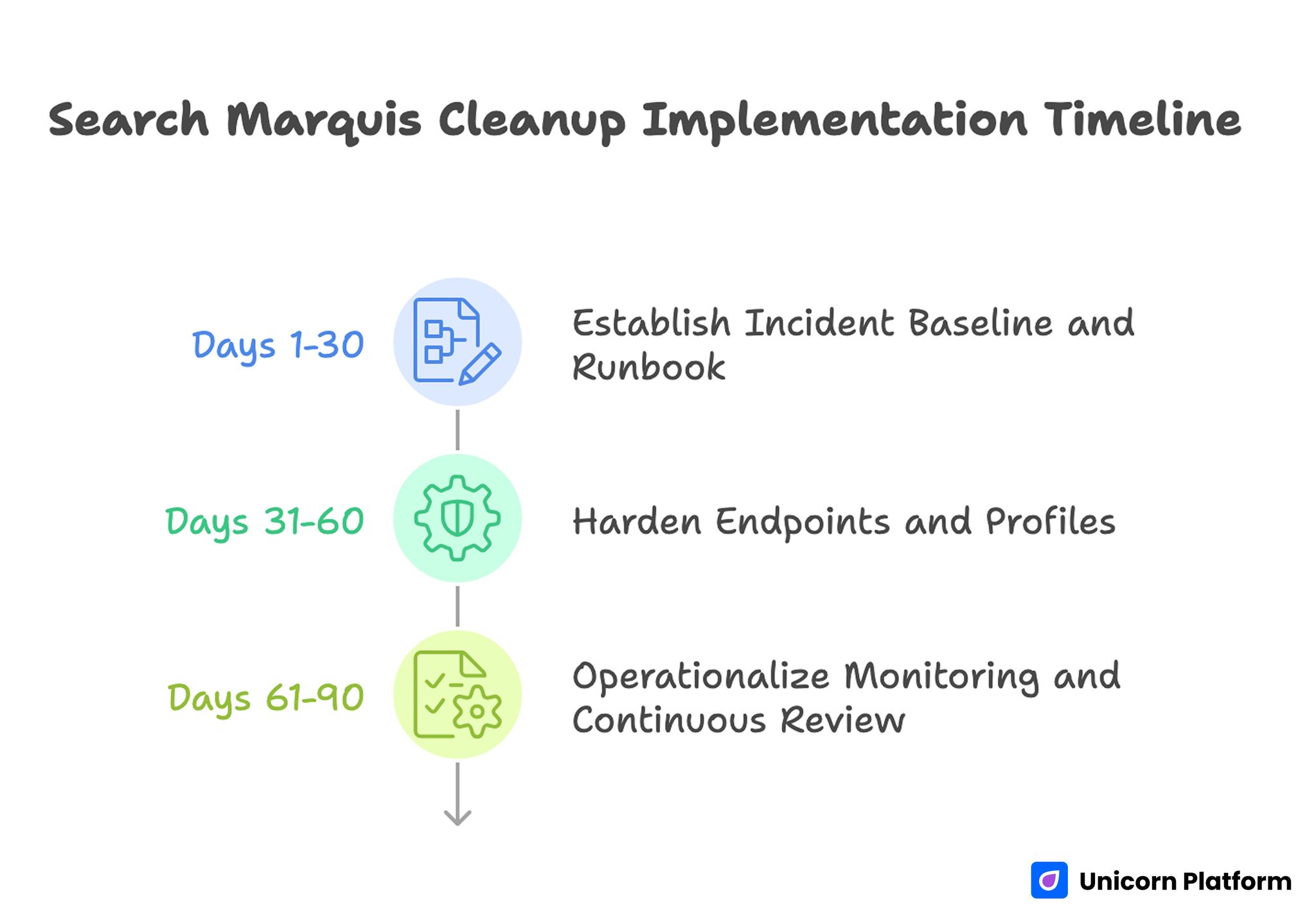
Search Marquis Cleanup Implementation Timeline
Days 1-30: Establish Incident Baseline and Runbook
Document current response flow, known infection paths, and ownership model. Build a concise runbook that includes triage levels, containment actions, cleanup checks, and validation gates.
Run one tabletop exercise to verify role clarity and communication pace. Capture gaps immediately and update the runbook before a live incident occurs.
Days 31-60: Harden Endpoints and Profiles
Deploy baseline controls for install permissions, extension governance, profile checks, and update cadence. Segment privileged browser usage into hardened profiles.
Introduce credential impact matrix procedures so post-incident resets are fast and consistent. Validate that identity and SaaS owners can execute rotation steps quickly.
Days 61-90: Operationalize Monitoring and Continuous Review
Launch recurring hygiene checks, monthly awareness refreshers, and quarterly incident trend reviews. Track readiness metrics and publish concise leadership summaries.
At this stage, focus on reducing recurrence, not only shortening cleanup time. Prevention maturity is the long-term performance driver.
Common Failure Patterns and Practical Fixes
Failure: Browser-Only Cleanup
Teams remove visible extensions and stop there. Fix this by mandatory persistence checks at OS and profile layers before closing the incident.
Failure: No Evidence Capture
Without screenshots and timeline notes, root cause remains guesswork. Fix this with pre-cleanup evidence checklist and required incident ticket fields.
Failure: Credential Hygiene Skipped
Users continue with existing sessions after compromise. Fix this by automated prompt to rotate critical credentials and revoke active sessions.
Failure: Recovery Declared Too Early
One successful browser test is treated as closure. Fix this by multi-day validation gates with restart and setting-persistence checks.
Failure: Training Detached From Real Risks
Generic training does not change behavior. Fix this by scenario drills using actual internal incident patterns and decision moments.
Failure: Policy Too Vague or Too Heavy
Users either ignore policy or bypass it under pressure. Fix this by concise, operationally realistic controls with clear exception process.
Incident Command Structure for Small Teams
Even small organizations benefit from explicit incident command roles. During browser compromise events, confusion usually comes from unclear ownership rather than from missing technical skill. A simple structure with an incident lead, technical responder, communications owner, and business continuity owner is enough for most startup environments.
The incident lead sets scope, severity, and timeline. The technical responder executes containment and eradication steps while maintaining action logs. The communications owner keeps stakeholders informed on restrictions and recovery progress. The continuity owner keeps critical campaigns and publishing work moving through clean fallback paths.
Role clarity also improves handoff quality after recovery. Lessons, policy updates, and tooling actions can be assigned immediately instead of becoming unresolved follow-up items.
Forensic Retention and Compliance Considerations
Not every hijacker case requires full forensic escalation, but teams should still preserve minimum investigative artifacts. Retaining evidence makes it easier to prove remediation quality and respond to compliance or client inquiries when operational integrity is questioned.
Useful retention artifacts include symptom screenshots, timeline records, endpoint metadata, suspicious file paths, profile changes, and security actions taken. Keep these records in an access-controlled repository with defined retention period and ownership.
If regulated customer data or privileged account systems were exposed during the event window, involve legal and compliance stakeholders early. Fast notification of the right internal parties reduces downstream reporting risk and prevents accidental evidence loss.
Tooling Selection Matrix: Manual, Assisted, or Hybrid
Teams often argue about whether cleanup should be manual or automated. The practical answer depends on incident scale, endpoint diversity, staff capability, and required recovery speed. A tooling matrix makes this choice predictable.
Manual workflows are strongest for transparency and learning. They help teams understand persistence paths and improve long-term controls. Tool-assisted workflows are stronger for speed and consistency when multiple devices are affected or when technical staff is limited.
Hybrid workflows usually work best in growing teams. Analysts run manual triage and validation while trusted tools accelerate scan, artifact discovery, and post-cleanup verification. Documenting when each path is chosen prevents reactive decision-making under pressure.
Rebuild Decision Criteria for High-Risk Cases
Sometimes remediation uncertainty remains high even after thorough cleanup. Recurrent persistence, unexplained policy behavior, and signs of broader compromise can justify full device rebuild instead of additional incremental fixes.
A rebuild decision should follow objective criteria. Inputs can include incident severity, confidence in root cause, affected account sensitivity, and time cost of repeated remediation attempts. If repeated cycles consume more effort than a rebuild, restoring from a trusted baseline can be the safer and faster option.
Rebuild playbooks should include data backup rules, application restore checklist, profile hardening steps, and post-rebuild validation gates. Without this structure, rebuild actions create new inconsistency and hidden risk.
Functional Playbooks by Team Type
Different functions face different incident priorities. Marketing teams need campaign continuity and ad platform safety. RevOps teams need CRM integrity and routing reliability. Product and engineering teams need repository, deployment, and admin-console confidence. A single generic checklist rarely serves all of them.
Team-specific playbooks can share a common core and add role-targeted actions. Marketing playbooks may emphasize ad-account session revocation, tracking verification, and content QA after recovery. RevOps playbooks may emphasize credential resets for CRM integrations and automation tools. Product playbooks may focus on privileged environment access, deployment key review, and incident communication with engineering leadership.
This model improves response quality because each team sees steps that match its real work. It also reduces response hesitation during urgent timelines.
Fallback Publishing and Campaign Continuity Model
Security incidents should not block all customer-facing updates. A fallback model allows essential work to continue through trusted endpoints and approved operators while affected devices are remediated.
Define fallback tiers before incidents happen. Tier one can cover critical fixes and legal updates. Tier two can include high-priority campaign launches. Tier three can defer non-urgent experiments until full recovery. Predefined tiers prevent ad hoc decisions that increase risk.
Operational continuity depends on controlled approvals. Every fallback publication should include fast QA verification, route-level ownership, and explicit rollback plan if post-incident anomalies appear.
Monthly Security Hygiene Review Template
A monthly review keeps prevention work active between incidents. The meeting should be short, evidence-based, and tied to concrete action items. Avoid broad status discussions that end without decisions.
Core agenda can include recent anomalies, resolved incidents, repeat-vector analysis, control drift findings, and training completion trends. For each topic, capture one decision, one owner, and one due date.
A practical scorecard might track extension policy compliance, unmanaged endpoint count, median detection time, and percent of incidents with completed root-cause closure. Over time, this scorecard shows whether the program is improving resilience or only reacting to new incidents.
Tabletop Drills and Readiness Testing
Written runbooks are necessary but not sufficient. Teams need periodic drills to verify that response speed, communication quality, and role ownership work under realistic pressure.
Start with short scenario drills every quarter. Simulate a browser hijack on a high-privilege marketing endpoint, require containment decisions in real time, and evaluate whether business continuity and credential hygiene steps are executed correctly.
After each drill, produce a concise after-action report. Record what was delayed, what was ambiguous, and what automation or policy change can remove the same bottleneck in a real incident. Continuous drill feedback is one of the fastest ways to increase maturity without adding heavy process overhead.
Automation Opportunities That Reduce Response Time
Once the core workflow is stable, selective automation can reduce detection and containment delay without replacing human judgment. The strongest automation targets repetitive checks, standardized notifications, and evidence collection steps that do not require interpretation.
Useful candidates include scheduled extension inventory snapshots, profile-change alerts, startup item diff reports, and templated incident ticket creation when abnormal browser behavior is reported. These controls create faster signal flow and reduce manual overhead during early triage.
Automation should also support credential hygiene workflows. For high-severity incidents, triggers can open predefined reset tasks for identity admins, SaaS owners, and team leads, ensuring session revocation and key rotation are not missed when response pressure is high.
Guardrails are important. Automated actions that delete artifacts or alter system settings without review can destroy investigative context and create new risk. A safer pattern is automation for detection and task orchestration, with human approval for destructive or high-impact changes.
Teams should audit automation quarterly for false positives, response usefulness, and ownership clarity. Unmaintained automation becomes noise and can delay real incidents rather than accelerating recovery.
Executive Reporting and Security Investment Prioritization
Leadership visibility improves when incident reports translate technical findings into operational impact. Security teams should summarize not only what was removed, but also how the event affected revenue activity, campaign timelines, and customer-facing execution quality.
A practical executive update includes incident count, median response duration, recurrence rate, and disruption cost estimate. It should also list top entry vectors and the specific controls being implemented to reduce future incidents.
Budget discussions are easier when prevention actions are tied to measurable outcomes. If extension governance lowers recurrence, or contractor onboarding checks reduce detection-to-containment time, those gains should be reported as performance improvements rather than abstract security wins.
Prioritization should follow risk concentration. Investments that protect privileged workflows, shared credentials, and high-frequency publishing systems usually deliver the highest operational return. Lower-value controls can remain deferred until core pathways are stable.
Consistent reporting creates accountability across teams. Marketing, RevOps, IT, and leadership all see the same trend lines, which makes cross-functional security improvements easier to fund and sustain.
FAQ: Search Marquis Cleanup on macOS in 2026
1) Is Search Marquis only a nuisance issue?
No. Even when direct payload severity looks low, hijacker behavior can increase exposure to riskier phishing and malware paths while degrading workflow reliability.
2) Should affected users keep working during cleanup?
They can continue low-risk tasks, but privileged actions should move to clean endpoints until validation is complete. Controlled continuity is safer than full outage or uncontrolled continuation.
3) Do teams need paid security tools every time?
Not always. Many incidents can be handled with disciplined manual workflow and trusted scanning tools, but tool-assisted analysis is useful for speed and consistency at scale.
4) How long should post-cleanup monitoring last?
A 24-hour window is minimal, while 48 to 72 hours is safer for persistence confirmation. High-severity cases may require extended monitoring and broader account review.
5) What is the fastest prevention improvement?
Restricting software sources and extension permissions usually reduces incident frequency quickly. Pair that with user reminders about deceptive installer prompts.
6) How do we handle contractor device risk?
Set minimum security standards, limit privileged access for unmanaged endpoints, and require fast anomaly reporting. Access scope should reflect assurance level.
7) Should we wipe the whole device after every incident?
Full rebuild is not always required, but it can be justified for high-severity or recurrent compromise where persistence origin is uncertain. Decision should follow documented severity criteria.
8) What metrics prove readiness is improving?
Lower repeat-incident rate, faster containment, and fewer workflow disruption hours are strong indicators. Better root-cause closure quality is another key signal.
9) Can browser sync cause reinfection?
Yes. Synced settings and extensions can reintroduce harmful state if profile integrity is not validated. Temporary sync controls during recovery can reduce this risk.
10) How often should runbooks be updated?
Update after every meaningful incident and at least quarterly. Runbooks degrade quickly if they are not tied to current tools, roles, and policy rules.
Before closing any incident, confirm that every corrective action is reflected in operating documentation, owner assignments, and next review dates. Teams that skip this final governance pass often resolve the immediate symptom but preserve the same structural weaknesses that caused recurrence. Closing the loop between technical remediation and process ownership is what turns response effort into lasting resilience.
Final Takeaway
Search Marquis incidents are best handled as repeatable operational events, not ad hoc technical chores. Teams that pair disciplined remediation with measured prevention protect both security posture and execution velocity.
When macOS endpoints, browser profiles, credential governance, and team workflows are aligned, hijacker events become manageable disruptions instead of recurring operational drag.# Markdown syntax guide
Related Blog Posts
- HIPAA-Compliant Website Builders in 2026: A Practical Selection and Implementation Guide
- Clear Website Data on iPhone: A Practical Guide for Faster, Cleaner Browsing
- Digital Accessibility Operations in 2026: A Startup Playbook for Inclusive Growth and Trust
- Warehouse-to-Web Integration in 2026: A Practical Reliability Playbook for Commerce Teams