Table of Contents
- The Best Website Builders for Nonprofits
- Must-Have Trust Signals on Nonprofit Donation Pages
- Donation Page Examples: Useful Structures to Copy
- Common Mistakes Nonprofits Make When Choosing a Builder
- FAQ
Nonprofits do not just need a website builder. They need a builder that makes donation pages easy to trust, easy to use, and easy to update.
That is why this topic is bigger than design alone. A builder can look impressive in a demo and still create friction when you try to publish a campaign quickly, update impact numbers, embed a donation form, or make the page feel credible on mobile.
This guide compares the main builder options for nonprofits and then shows what high-converting donation pages usually include. The goal is practical selection, not abstract fundraising theory.
sbb-itb-bf47c9b
Quick Answer
If you want the fast version:
- Unicorn Platform is one of the best website builders for nonprofits running focused campaign pages, donation pages, or lightweight mission sites.
- Wix is strong if you want an all-in-one nonprofit website builder with donation-focused features and broad built-in tools.
- Squarespace is a good fit for nonprofits that care a lot about polished storytelling and brand presentation.
- WordPress.com is strong for content-heavy nonprofits that may need more flexibility through themes and plugins.
- Webflow is useful for nonprofits that want a more custom site and have the capacity to manage a more structured design workflow.
- Framer is strong for visually polished campaign pages and nonprofit landing pages.
- Dorik is a practical no-code choice for smaller teams that want a simpler website workflow with AI help.
The best builder depends on what you are really publishing: a full nonprofit website, a donation campaign page, an emergency fundraising page, or a longer-term content and advocacy site.
Quick Comparison Table
| Builder | Best for | Donation-page strength | Main advantage | Main tradeoff |
| Unicorn Platform | campaign pages, startup-style nonprofit sites, fast launches | strong for simple focused donation pages | fast publishing and easy updates | less suited to highly custom multi-system builds |
| Wix | all-in-one nonprofit websites | strong native nonprofit/donation workflow | broad feature set and built-in marketing tools | can feel broader than necessary for very simple campaigns |
| Squarespace | polished nonprofit sites and storytelling-heavy pages | good for polished donation and cause pages | strong visual presentation | less operationally flexible than more modular setups |
| WordPress.com | content-heavy nonprofit sites | strong when paired with donation plugins | flexible publishing ecosystem | donation setup is often more plugin-dependent |
| Webflow | custom nonprofit sites with more design control | good with embedded or integrated donation workflows | strong structure and custom design potential | more setup depth and workflow complexity |
| Framer | beautiful campaign pages and focused fundraising sites | good for fast high-polish campaign pages | visual polish and modern page design | donations often rely on embeds or external tools |
| Dorik | smaller teams needing a simple no-code site | good for straightforward donation pages | easy builder plus AI assistance | lighter ecosystem than bigger all-in-one platforms |
The Best Website Builders for Nonprofits
1. Unicorn Platform
Unicorn Platform works especially well for nonprofits that need to launch focused pages quickly: donation campaigns, fundraising landing pages, advocacy pages, waitlists for events, or lean mission sites.
That matters because many nonprofit teams do not need a large custom platform first. They need a page they can publish, update, and trust under real campaign pressure.
Best for
- donation campaign pages
- cause-specific landing pages
- volunteer or event signup pages
- smaller nonprofit teams that need speed
Why it stands out
- fast no-code publishing
- simple page structures that are easy to keep clear
- useful for short campaign cycles and quick updates
- built-in startup-style page logic that also works well for focused nonprofit messaging
Watch-outs
If the organization needs a very large content ecosystem or a highly custom design system, a more layered platform may be a better long-term fit.
2. Wix
Wix is one of the most complete nonprofit-specific options in the market right now. Its nonprofit pages emphasize donations, recurring giving, forms, SEO, and community engagement in one environment.
That makes it a strong fit for nonprofits that want one central builder rather than a more modular stack.
Best for
- nonprofits that want one platform for site plus donation workflows
- small to mid-sized organizations
- teams that want built-in tools rather than a more custom setup
Why it stands out
- nonprofit-specific builder positioning
- donation-focused workflows
- recurring-donation support and form tools
- broad marketing and SEO support
Watch-outs
The biggest advantage is breadth, but that can also mean the platform feels heavier if you only need a very simple single-campaign page.
3. Squarespace
Squarespace is a strong choice for nonprofits that care deeply about presentation, storytelling, photography, and brand credibility. That can matter a lot for organizations where emotional clarity and trust are central to donor decisions.
Its nonprofit positioning focuses on helping causes create a professional presence that supports lasting impact.
Best for
- visually polished nonprofit websites
- storytelling-heavy organizations
- nonprofits with strong brand and editorial priorities
Why it stands out
- polished design quality
- good fit for mission storytelling
- strong presentation for campaigns, causes, and community messaging
Watch-outs
Squarespace usually works best when the organization values brand clarity highly. Teams that need deeper operational flexibility may prefer a more modular system.
4. WordPress.com
WordPress.com stays strong for nonprofits that expect their website to become a real publishing system. It is useful when the site includes ongoing articles, program pages, resource libraries, reports, updates, and donation workflows that may evolve over time.
It also benefits from a broad plugin ecosystem for donation forms and fundraising tools.
Best for
- content-heavy nonprofits
- advocacy organizations
- nonprofits with many resource pages or ongoing publishing needs
- teams that want room to expand the site later
Why it stands out
- powerful publishing base
- broad theme and plugin ecosystem
- strong fit for organizations that need more than a campaign page
- donation plugins can extend fundraising workflows significantly
Watch-outs
WordPress.com is flexible, but the donation experience often depends on choosing and managing the right plugin setup rather than relying on one tightly packaged workflow.
5. Webflow
Webflow is a strong option for nonprofits that want a more custom website and have the capacity to manage a more structured build workflow. Its nonprofit templates and cloneable examples show that it can support mission sites, campaign pages, and cause-focused designs well.
It is usually most useful when design control matters more than speed alone.
Best for
- nonprofits with a stronger design requirement
- custom campaign or mission websites
- teams working with designers or agencies
Why it stands out
- strong layout and structure control
- good long-term site architecture potential
- nonprofit templates and examples already exist in its ecosystem
Watch-outs
Webflow can do a lot, but it asks for more builder discipline. For lean teams, that added complexity can slow down routine updates.
6. Framer
Framer is strongest when the nonprofit page needs to feel modern, clear, and visually polished without becoming a huge build project. Its nonprofit and charity templates show that it can handle campaign storytelling and donation-oriented design effectively.
That makes it especially useful for focused fundraising pages, cause launches, or brand-forward nonprofit campaigns.
Best for
- visually polished donation campaigns
- cause-specific landing pages
- nonprofits that want strong design with a relatively lightweight page workflow
Why it stands out
- high visual quality
- strong campaign-page feel
- nonprofit template availability
- useful for single-campaign pages and clear supporter journeys
Watch-outs
Framer is often best for design-led pages rather than a broad all-in-one nonprofit operating stack.
7. Dorik
Dorik is a practical option for smaller nonprofit teams that want a simple builder with AI assistance and a low-friction no-code workflow. It is less nonprofit-specific than Wix, but it is still useful when the team cares about ease and speed.
Best for
- smaller organizations
- simple nonprofit websites
- teams that want AI help and easy editing
Why it stands out
- easy no-code builder
- AI-assisted site creation
- approachable for non-technical teams
- practical for straightforward pages that need to go live quickly
Watch-outs
Dorik is strong for simplicity, but large organizations may outgrow it sooner than more ecosystem-heavy platforms.
What Donation Pages Need to Convert
A strong nonprofit website builder still needs the right page structure.
Donation pages usually convert better when they answer five questions quickly:
- what cause is this supporting
- why this matters now
- why this organization is credible
- what my donation actually helps do
- what happens when I click donate
If any of those answers are vague or buried, support intent drops.
Must-Have Trust Signals on Nonprofit Donation Pages
Trust is the center of donation conversion.
The strongest trust elements usually include:
Clear mission statement
Users should understand the cause quickly, not after several scrolls.
Specific impact explanation
Examples work better than abstract promises:
- $25 helps fund one meal kit
- $100 supports one school-supply package
- $500 covers one emergency support cycle
Real organizational identity
Show:
- organization name
- real team or founder context when relevant
- contact details
- location or service area
- links to supporting information about the nonprofit
Financial and process clarity
Donors want to understand where money goes and how the giving process works.
Social proof
This can be testimonials, partner logos, volunteer evidence, community recognition, or supporter quotes if used honestly and clearly.
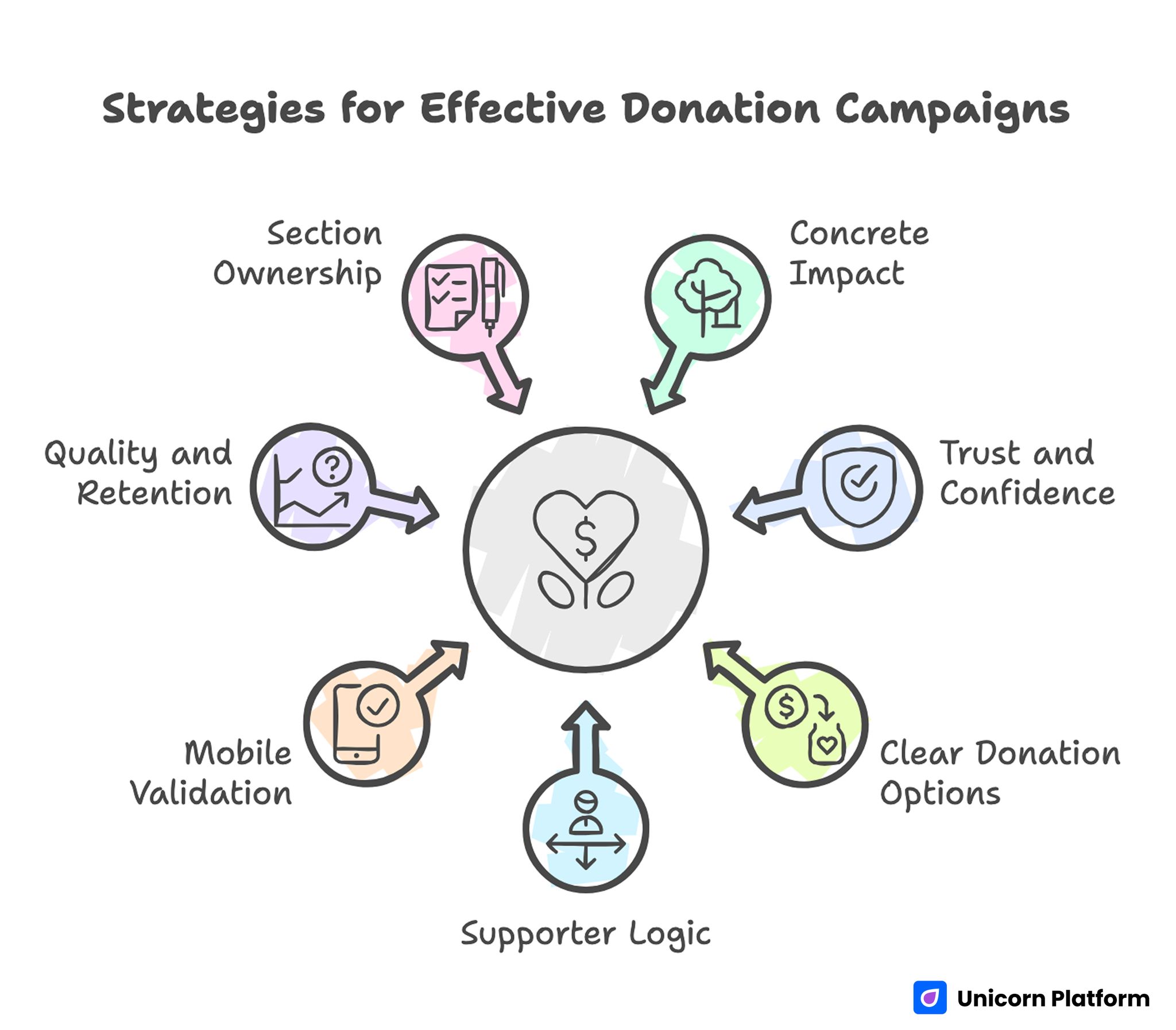
Strategies for Effective Donation Campaigns
Donation Page Examples: Useful Structures to Copy
Nonprofit teams do not need one universal template. They need the right page structure for the type of giving moment.
Example 1: Evergreen donation page
Best for:
- general nonprofit giving
- year-round fundraising
- established organizations
Useful structure:
- mission-first hero
- short impact explainer
- donation form or donate CTA
- trust block
- impact proof
- FAQ
Example 2: Time-sensitive campaign page
Best for:
- emergency fundraising
- campaign deadlines
- seasonal drives
- event-linked donation pushes
Useful structure:
- urgent but specific headline
- why this matters now
- visible progress or time context if appropriate
- donation CTA above the fold
- short impact mapping
- trust and proof block
Example 3: Program-specific giving page
Best for:
- education programs
- scholarship funds
- food, housing, health, or local support campaigns
Useful structure:
- program explanation
- beneficiary story or context
- donation amounts tied to outcomes
- FAQ around eligibility, use of funds, or timeline
- repeated donate CTA
Template and Form Guidance for Nonprofit Teams
A builder can make page creation easy, but form friction still kills donations.
What donation forms should do well
Keep the ask simple
Do not overload the form with too many fields too early.
Offer clear giving amounts
Preset amounts help reduce hesitation, especially when they are tied to impact.
Support recurring giving clearly
If recurring donations matter, the option should be visible and easy to understand.
Reduce uncertainty near the form
Helpful support copy near the form can explain:
- how funds are used
- whether gifts are one-time or recurring
- payment security or processing reassurance
- whether donors receive confirmation or updates
A simple nonprofit donation page template
A reliable structure looks like this:
- headline tied to mission and outcome
- short impact explanation
- donation form or donate CTA
- impact mapping by amount
- trust block
- proof or story section
- FAQ
- repeated CTA
This is not flashy, but it works because it reduces uncertainty in the right order.
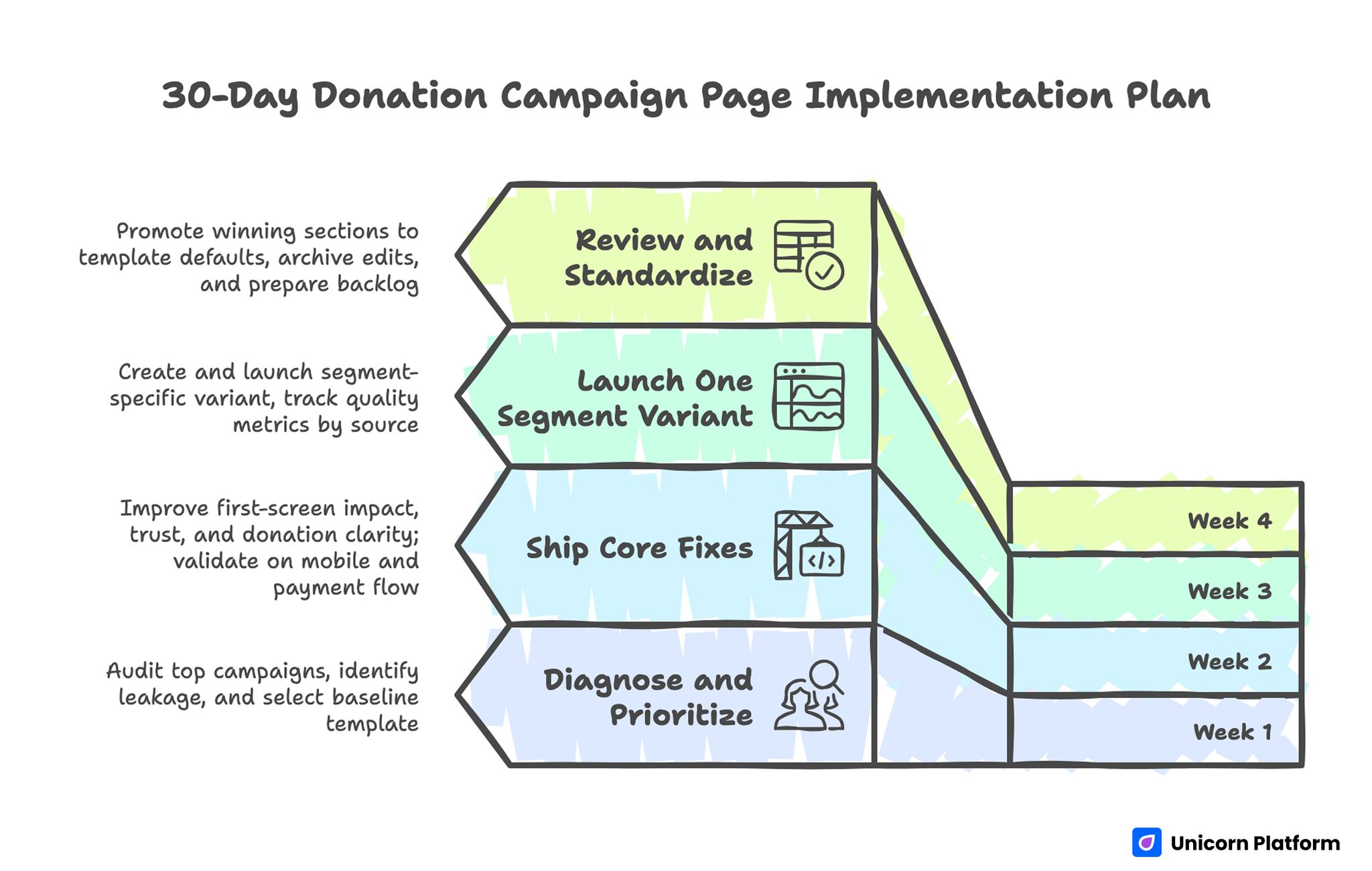
Donation Campaign Page Implementation Plan
Common Mistakes Nonprofits Make When Choosing a Builder
Choosing the builder before defining the page type
A campaign page, a full organization website, and an advocacy content hub do not need the same setup.
Focusing on templates more than trust flow
Pretty design does not fix a weak donation experience.
Ignoring update speed
Many nonprofit teams need to change numbers, wording, campaign dates, and proof quickly. If updates feel slow, the page becomes stale fast.
Making the donation page too emotional and not practical enough
Emotion matters, but donors also need clarity and trust.
Treating builder selection and donation flow as separate problems
They are connected. The best builder is the one that helps the donation page stay clear, credible, and easy to maintain.
How to Apply This in Unicorn Platform
Unicorn Platform works especially well when the nonprofit team needs a focused donation page, campaign landing page, or simple mission site that can be updated quickly without developer support.
A good working pattern is:
- start with one campaign page and one primary donation action
- keep the hero simple and specific
- place trust and impact blocks above the fold or soon after
- keep the donation form or CTA path obvious
- repeat the main ask after proof and FAQ
If you want a deeper breakdown of fundraising page structure, The Ultimate Guide to Creating a Fundraising Landing Page Template is the best companion to this article.
FAQ: Best Website Builders for Nonprofits in 2026
What is the best website builder for nonprofits?
There is no single best option for every nonprofit, but Unicorn Platform, Wix, Squarespace, WordPress.com, Webflow, Framer, and Dorik are all strong depending on the organization type and donation workflow.
Which builder is best for nonprofit donation pages?
For focused donation and campaign pages, Unicorn Platform, Wix, and Framer are especially strong because they make it easier to create clear high-converting pages.
Should a nonprofit use WordPress.com?
Yes, especially if the nonprofit expects the site to grow into a larger publishing system with donation plugins, blog content, and many program pages.
Is Wix good for nonprofits?
Yes. Wix is one of the most direct nonprofit-focused options because it combines website building with donations, forms, and broader marketing features.
What matters more, the builder or the donation page structure?
Both matter, but the structure usually decides conversion. A good builder only helps if it makes the donation page easier to trust and easier to use.
What should a nonprofit donation page include?
It should include a clear mission, impact explanation, trust signals, an easy donation action, and enough transparency to reduce hesitation.
Do nonprofits need recurring-donation support?
Often yes. If recurring giving is part of the fundraising model, the option should be easy to find and simple to explain.
Is Webflow good for nonprofits?
Yes, especially for organizations that want a more custom site and have the capacity to manage a more design-structured workflow.
Is Framer good for nonprofit campaigns?
Yes. It is especially useful for visually strong single-campaign or cause-specific pages.
What is the biggest mistake when choosing a nonprofit website builder?
The biggest mistake is choosing based on appearance alone instead of testing how well the builder supports trust, donation flow, and easy updates.
Final Takeaway
The best website builders for nonprofits are the ones that support trust, clarity, and action at the same time.
That usually means choosing a builder not only for templates or brand style, but for how well it helps the team publish donation pages, update campaigns quickly, explain impact clearly, and reduce friction for donors.
When the builder choice and donation-page structure work together, support intent becomes much easier to turn into completed giving.