Table of Contents
- Core Page Stack for a Full Web Presence
- 30-Day Optimization Plan
- Common Mistakes and Practical Fixes
- FAQ
Building a website without coding is no longer a competitive advantage by itself. The advantage comes from building a web presence that looks credible, communicates clearly, and helps visitors take meaningful action.
Many teams launch quickly with drag-and-drop builders but still struggle to get results. The usual problems are predictable: unclear messaging, weak trust signals, and pages that look polished but do not guide user decisions.
A strong web presence fixes those problems with structure. It combines clear positioning, practical page architecture, and a repeatable optimization process. This guide explains exactly how to build that system with simple drag-and-drop workflows.
sbb-itb-bf47c9b
Key Takeaways
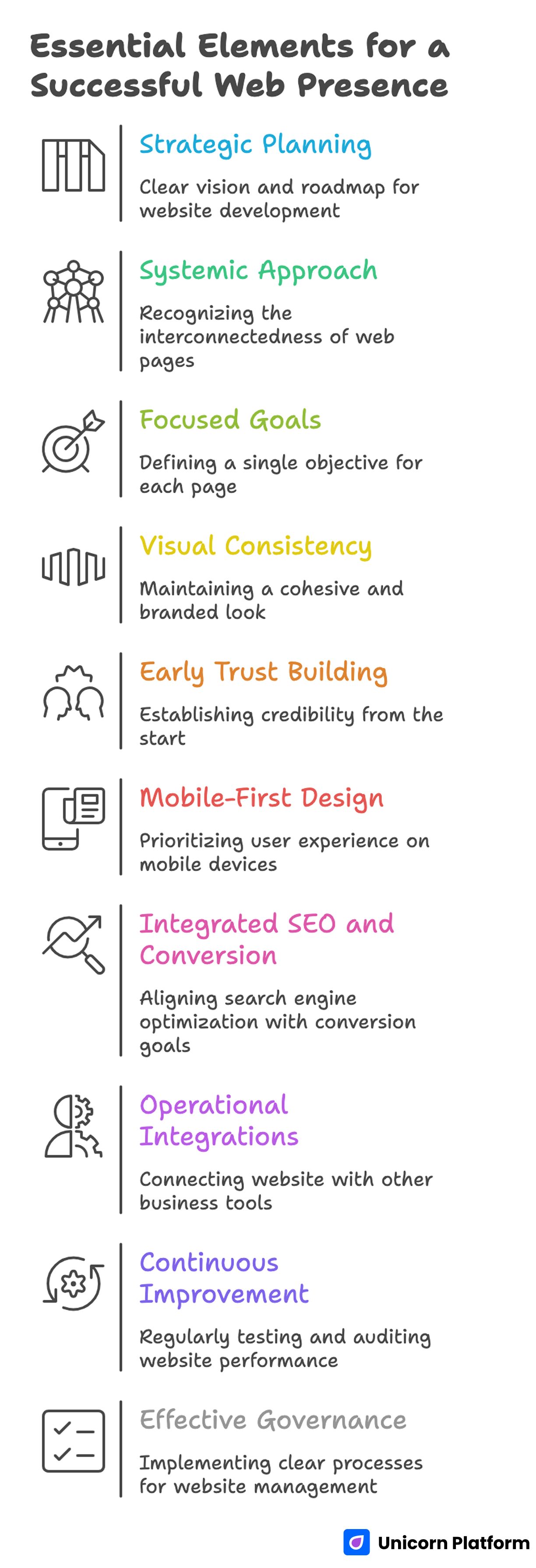
Essential Elements for a Successful Web Presence
- Drag-and-drop speed is useful only when strategy and structure are clear.
- A web presence is a system of pages, not one isolated homepage.
- One primary goal per page improves user clarity and conversion quality.
- Visual consistency matters more than visual complexity.
- Proof and trust should appear early, not only at the bottom.
- Mobile behavior should be treated as a primary user path.
- SEO and conversion planning should happen together.
- Integrations turn websites into operational growth assets.
- Weekly experiments and monthly audits keep performance moving.
- Small teams win when governance and QA are explicit.
What “Web Presence” Actually Means
A web presence is broader than a live URL. It is the combined experience users get across your core pages, discovery channels, follow-up workflows, and brand signals.
At minimum, a useful web presence should do four jobs:
- explain what you offer and who it is for
- provide enough trust for users to continue
- make the next step clear and low-friction
- support discovery through search, social, and referrals
If any of those jobs are weak, traffic quality and conversion quality both decline.
Why Drag-and-Drop Builders Work for Lean Teams
Drag-and-drop tools reduce technical dependence and speed up production. That is especially valuable when messaging changes frequently and campaigns need fast iteration.
For startups and small teams, the main gains are operational:
- faster launch cycles
- lower dependency on developer queues
- easier cross-functional edits
- cheaper testing of headlines, layouts, and offers
These gains are real only when teams avoid random publishing and use a consistent framework.
Where Teams Usually Fail With No-Code Websites
Most failures are not technical. They are strategic and editorial.
Common failure patterns include:
- choosing a template before defining audience and page goal
- writing generic copy that could fit any business
- stacking too many CTAs with no clear priority
- placing trust content too late in the page
- skipping measurement setup before launch
The fix is a sequence-driven workflow where strategy decisions happen before design customization.
Tool Selection Framework: Pick by Workflow, Not Hype
Tool demos often overemphasize visual features. Long-term results depend more on editing speed, integration reliability, and team adoption.
Score each builder on these criteria:
- ease of use for non-technical teammates
- conversion-ready template structure
- mobile preview and editing control
- SEO settings and metadata support
- integrations for analytics, CRM, and email
- publishing reliability and change management
- scalability as content volume grows
Run one real-page pilot before committing. Practical execution reveals limitations that feature lists hide.
For teams comparing no-code stacks from a conversion perspective, build your startup website without coding is a helpful reference for mapping tools to business outcomes.
Define the Core Before You Touch Design
Strong pages start with message decisions, not visual effects. Before selecting sections, define these inputs:
- who the page is for
- what problem is most urgent for that audience
- what outcome your offer creates
- what proof validates that outcome
- what action the visitor should take now
These five inputs become the backbone for copy, layout, and CTA choices. Without them, page edits become guesswork.
Core Page Stack for a Full Web Presence
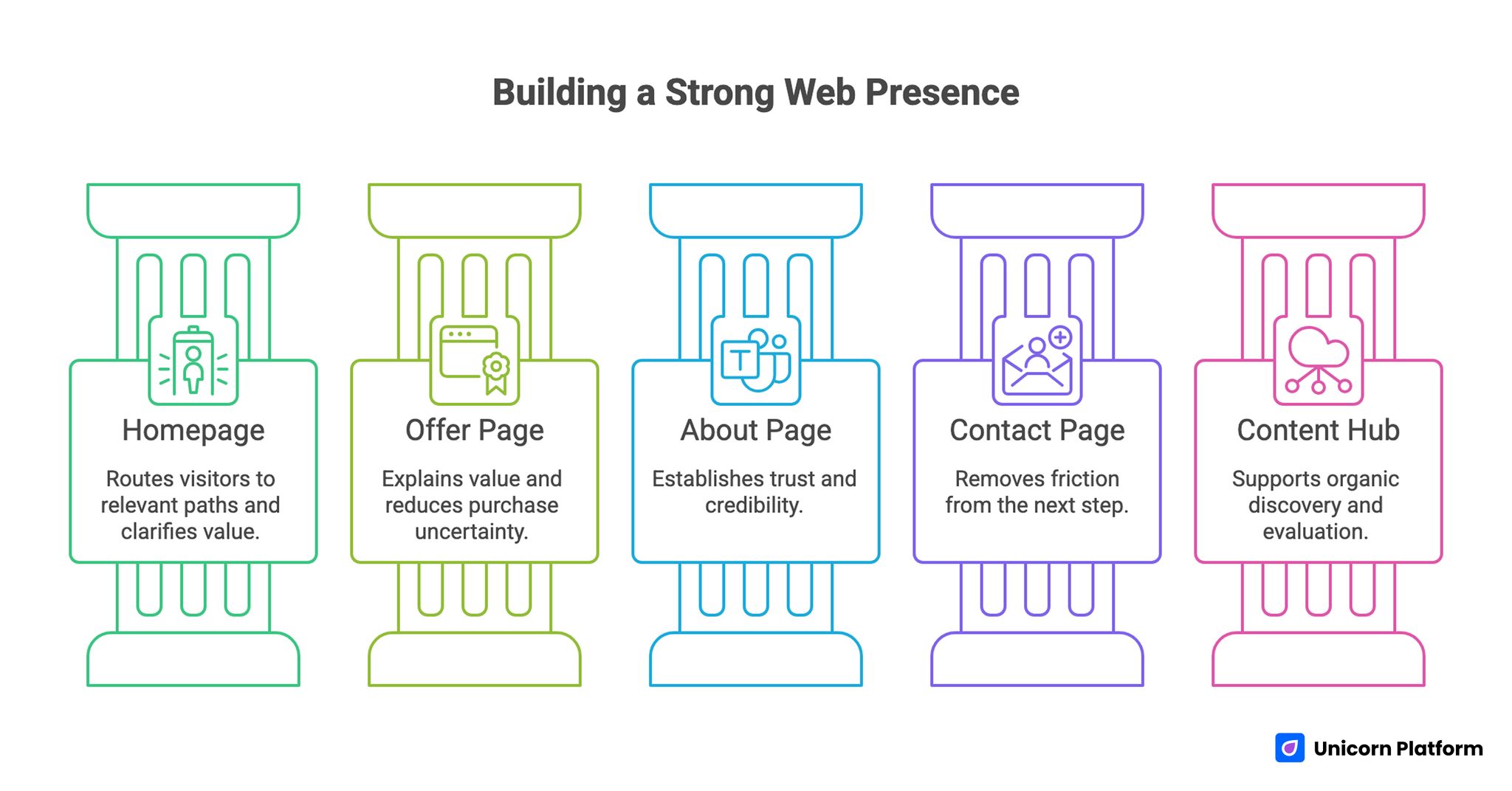
Core Page Stack for a Full Web Presence
Many teams try to launch too many pages at once. A better approach is a focused stack that covers discovery, trust, and action.
Page 1: Homepage
Job: route visitors quickly to relevant paths. Keep the top section clear about who you help and what result users can expect.
Page 2: Offer or product page
Job: explain value in practical terms and reduce purchase or signup uncertainty.
Page 3: About and credibility page
Job: establish who is behind the offer, why they are trustworthy, and how they work.
Page 4: Contact or conversion page
Job: remove friction from the next step and set expectations for response timing.
Page 5: Optional content hub
Job: support organic discovery and help users evaluate fit before direct action.
This stack is enough for most early-stage launches and can be expanded as demand patterns become clear.
Conversion Architecture for Drag-and-Drop Pages
A consistent section sequence improves both readability and conversion outcomes. If you need a detailed framework for section ordering, the model in a step-by-step guide to a high-converting landing page structure is a strong baseline.
A practical section flow looks like this:
- Hero with audience-specific outcome and clear CTA
- Context block that frames the current friction
- Benefit blocks tied to real user value
- Trust block with proof near decision points
- Offer and next-step clarity
- FAQ that answers practical objections
- Final CTA with confidence reinforcement
Every section should have one job. Blended sections with mixed intent usually lower page clarity.
Design System That Keeps Pages Beautiful and Consistent
A simple design system prevents pages from feeling like disconnected templates.
Define standards for:
- heading scale and line length
- body text rhythm and spacing
- section padding and background rules
- card styles for features and proof
- primary and secondary CTA styles
- color contrast and emphasis behavior
Consistency improves professional feel and helps teams publish faster without quality drift.
Complex visual effects are optional. Clear hierarchy and stable rhythm are essential.
Copy Framework for Better Message Precision
Copy quality drives conversion more than most teams expect. Generic language is one of the fastest ways to lose user confidence.
Use a four-part flow:
- Problem: what currently slows the user down
- Promise: what outcome your offer creates
- Proof: why that claim is believable
- Path: what the user should do next
Weak copy example: "Create your digital presence quickly."
Stronger copy example: "Launch a conversion-ready site in days, test your message weekly, and improve lead quality without developer bottlenecks."
Specificity reduces doubt and improves action intent.
Building Trust Without Overloading the Page
Trust should be distributed across the journey, not isolated in one "social proof" section.
High-impact trust elements include:
- customer outcomes with context
- testimonials from relevant user types
- process transparency and response expectations
- clear policy or guarantee language
- visible support and contact paths
Users decide faster when claims and evidence appear close together.
Research from the Stanford Web Credibility Project shows that users often judge a site’s credibility within seconds based on design clarity and trust signals, reinforcing the need for proof elements to be visible near key decision points.
Mobile-First QA Standards
Mobile traffic is often the dominant path for first-touch visits. A desktop-perfect page can still fail if mobile interactions are slow or unclear.
Mobile checks should include:
- first-screen readability without zoom
- visible CTA in early scroll depth
- comfortable tap targets and spacing
- compressed media with preserved clarity
- short and easy-to-complete forms
Run checks on real devices and mixed network conditions before traffic scale.
SEO and Discoverability for No-Code Pages
No-code pages can rank well when structure and intent are aligned.
Core SEO principles:
- one primary intent per page
- semantic subtopics that match user questions
- clear heading hierarchy
- optimized metadata and media size
- internal links that help decision flow
Build SEO into content architecture from the start. Retrofitting keywords later usually creates awkward copy and weaker user experience.
According to Google Search Central best practices, aligning title elements, heading hierarchy, and semantic structure with user intent improves search relevance and ranking potential, which supports planning SEO alongside content architecture from the start.
When prioritizing post-launch edits, the behavior framework in user behavior tips to optimize landing pages helps teams focus on the sections that actually block conversion.
Traffic Activation Playbook After Launch
Publishing a strong page is only the first milestone. The next challenge is activating traffic sources that match page intent instead of sending mixed audiences that produce noisy data.
Start with two or three channels that align with the offer. A B2B page may perform best with targeted search and outbound traffic, while a creator page may respond better to community and newsletter traffic. Focused channel selection makes early diagnostics far more useful.
Message continuity from channel to landing page is critical. If acquisition copy promises one outcome but the first screen presents a different angle, users lose confidence before they reach proof sections. Keeping continuity usually improves engagement without any design changes.
Define a simple source map before scaling spend. For each channel, document expected intent, likely objections, and desired action. This map creates a practical baseline for weekly decisions.
During the first traffic cycle, prioritize quality signals over raw volume. Review CTA progression, form completion, and bounce behavior by source. If one channel drives clicks but weak completion, the issue is often message fit or trust clarity.
Scale channels one by one instead of all at once. Controlled expansion improves learning quality and protects conversion efficiency as volume grows.
Integrations That Make the Site Operational
A strong web presence should connect directly to business workflows.
Minimum stack:
- analytics for behavior and attribution
- CRM for lead routing and ownership
- email automation for follow-up and nurture
- booking tools where consultation is the goal
- payment tools where direct conversion is required
Set naming standards for events and sources before launch. Clean tracking speeds up decision-making and avoids reporting confusion.
14-Day Build Sprint
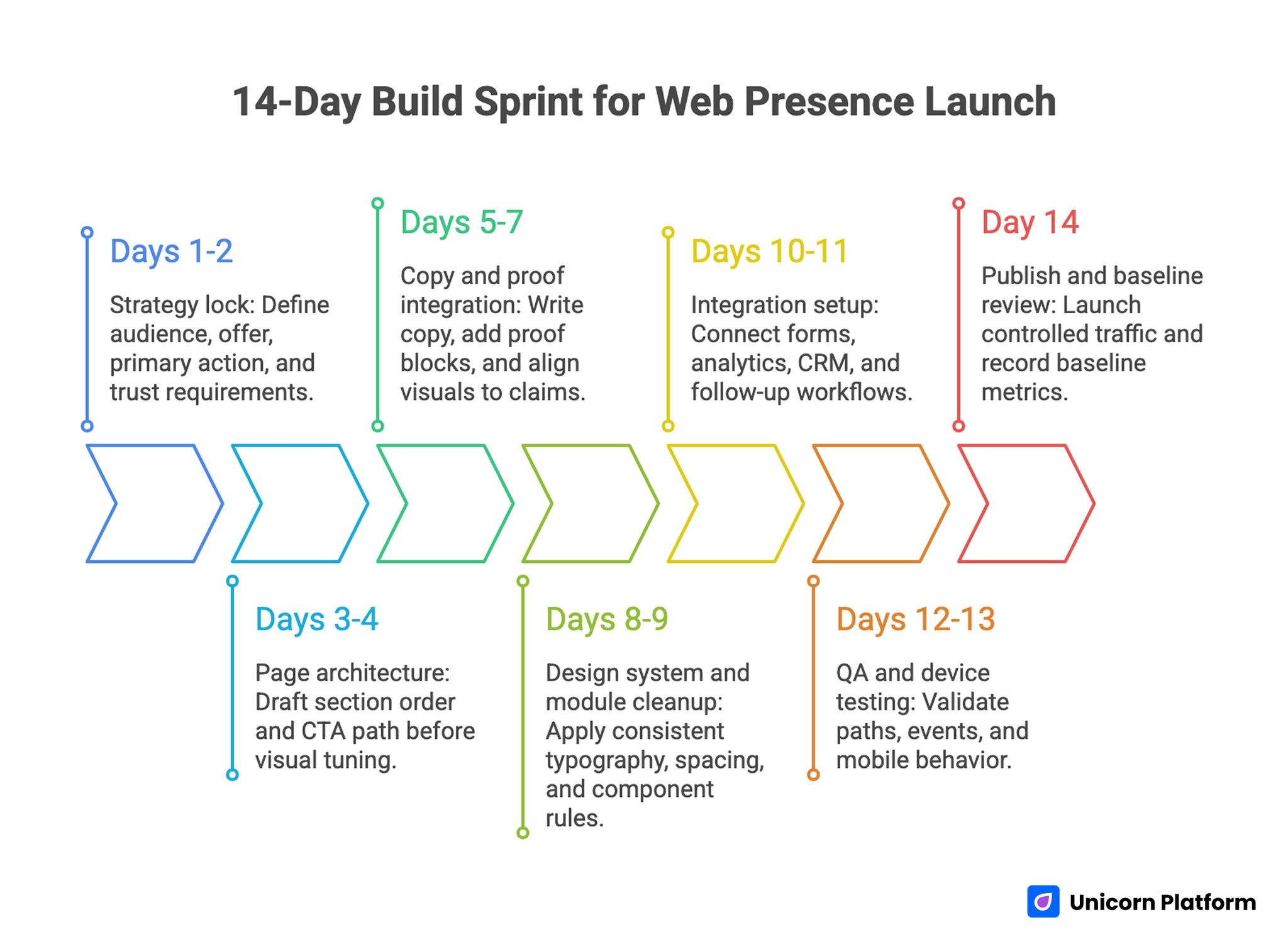
14-Day Build Sprint for Web Presence Launch
A short sprint can launch a strong first version when steps are sequenced clearly.
Days 1-2: Strategy lock
Define audience, offer, primary action, and trust requirements.
Days 3-4: Page architecture
Draft section order and CTA path before visual tuning.
Days 5-7: Copy and proof integration
Write copy, add proof blocks, and align visuals to claims.
Days 8-9: Design system and module cleanup
Apply consistent typography, spacing, and component rules.
Days 10-11: Integration setup
Connect forms, analytics, CRM, and follow-up workflows.
Days 12-13: QA and device testing
Validate paths, events, and mobile behavior.
Day 14: Publish and baseline review
Launch controlled traffic and record baseline metrics.
30-Day Optimization Plan
After launch, focus on one primary improvement target each week.
Week 1: Baseline diagnostics
Measure first-screen engagement, CTA clicks, form starts, and completion quality by source.
Week 2: Message improvements
Test one headline variant and one CTA variant.
Week 3: Trust and friction improvements
Test proof placement and reduce form complexity.
Week 4: Section sequencing improvements
Adjust order of value and proof blocks where drop-off is highest.
Keep experiments isolated. Multiple major changes at once make learning unreliable.
60-Day and 90-Day Scaling
By day 60, teams usually know which modules and message patterns perform best. Scaling should preserve those validated elements.
Days 31-60 priorities:
- build one segment-specific variant
- compare conversion quality by source
- standardize winning modules
Days 61-90 priorities:
- add one additional segment page
- improve funnel handoff from page to follow-up
- optimize for qualified outcomes, not only volume
Maintain one experiment log with hypothesis, change, result, and next action. This documentation turns isolated wins into repeatable process.
Governance for Ongoing Quality
No-code velocity can decline when multiple contributors edit pages without shared standards. A lightweight governance model keeps quality high.
Assign clear owners:
- message owner for copy and positioning
- analytics owner for measurement reliability
- launch owner for QA compliance
Run a weekly review with fixed questions:
- What changed by channel this week?
- Where did conversion friction increase?
- Which single change should ship next?
- Which metric confirms the result?
This process keeps optimization evidence-based and prevents random redesign cycles.
Monthly Maintenance Checklist
Performance can decay quietly when pages are not refreshed. Offers change, screenshots become outdated, and audience objections evolve over time. A monthly maintenance pass keeps your web presence aligned with current market reality.
Review first-screen relevance against active campaigns, refresh proof elements with recent outcomes, and verify every key form and follow-up path. Then audit event tracking to ensure reporting still reflects real user behavior after layout or integration changes. Small maintenance cycles like this protect conversion quality and keep future experiments reliable.
Common Mistakes and Practical Fixes
1. Template-first workflow
Fix: lock audience, outcome, and action before selecting design.
2. Generic message across all segments
Fix: create variant pages for major intent differences.
3. Too many competing CTAs
Fix: maintain one dominant action path per page.
4. Trust content too late
Fix: place proof near early claims and action points.
5. Mobile checks postponed to the end
Fix: treat mobile QA as part of every major edit.
6. Weak event and attribution setup
Fix: define naming standards before launch.
7. Launch-and-forget behavior
Fix: schedule weekly optimization and monthly audits.
FAQ: Building a Web Presence With Drag-and-Drop
Can drag-and-drop websites look professional enough for serious brands?
Yes. Professional quality depends on message clarity, trust structure, and consistency more than coding method.
How many pages should I launch first?
Start with a focused core stack, then expand based on behavior and demand signals.
Should I build one page for all audiences?
Usually no. Segment variants improve relevance when audience intent differs.
How quickly can a team launch a solid first version?
A structured two-week sprint is realistic for most small teams.
What should I optimize first after launch?
Start with first-screen relevance and CTA clarity, then improve trust placement and form friction.
Are free plans good enough for testing?
For early validation, often yes. Upgrade when advanced integrations and scale controls are required.
How do I avoid a generic template look?
Use a consistent design system, specific copy, and clear section jobs.
Which metrics matter most early on?
Track first-screen engagement, CTA progression, form completion, and qualified outcomes by source.
How often should I update pages?
Weekly focused edits with monthly structural review usually perform best.
What is the fastest path to better conversions?
Improve message specificity and align trust evidence with the action path.
Final Takeaway
You can create a strong web presence with simple drag-and-drop tools, but tools alone are not the strategy. Performance comes from clear positioning, conversion-focused structure, trust-first design, and consistent optimization.
No-code gives teams speed. A disciplined operating model turns that speed into durable growth.


