Table of Contents
- How to Access ChatGPT in 2026
- Core Capability Areas and How to Use Them Correctly
- Common Output Failure Modes and Fast Fixes
- 30-60-90 Day ChatGPT Adoption Plan for Unicorn
- Risk Register: What Can Go Wrong and How to Prevent It
- FAQ
Most people open ChatGPT, type one question, and judge the tool by that first response. That is usually the wrong way to evaluate it. The real value appears when ChatGPT is used as a workflow component, not as a one-off chatbot.
For founders, marketers, and operators working inside Unicorn Platform, the central question is not "Is ChatGPT smart?" The useful question is: where in my content and operations flow does ChatGPT save time without reducing quality?
This guide answers that question in practical terms. It explains where to access ChatGPT, what free and paid usage actually changes, how to use model capabilities without over-trusting outputs, and how to implement AI-assisted workflows on Unicorn Platform pages and teams.
sbb-itb-bf47c9b
Key Takeaways
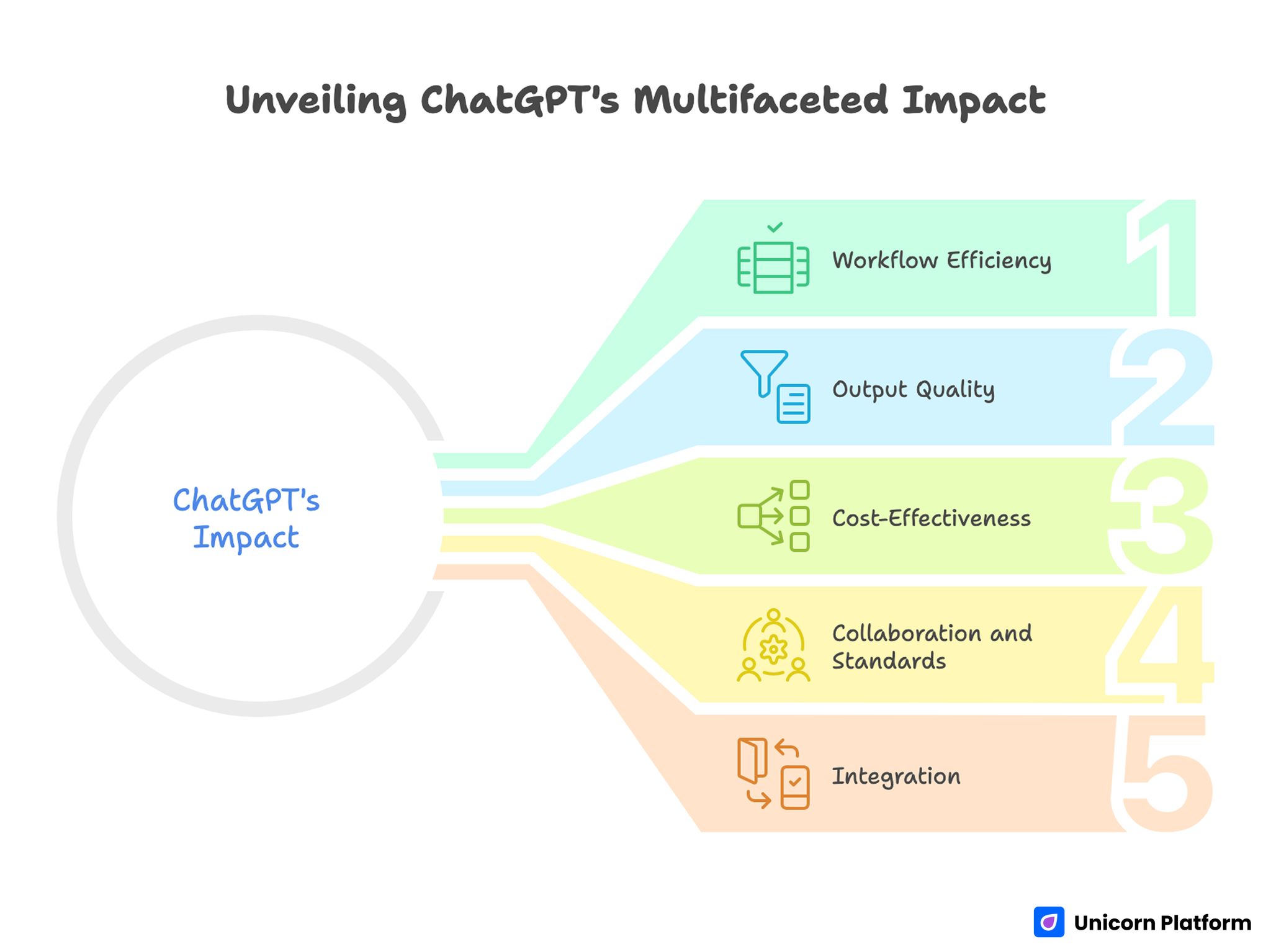
Unveiling ChatGPT’s Multifaceted Impact
- ChatGPT is most useful as a structured assistant for recurring workflows, not random Q&A.
- Access path, model choice, and prompt structure strongly affect output quality.
- Free use is enough for many experiments; paid tiers matter when speed, consistency, or advanced features become operational needs.
- Strong results come from prompt clarity, revision loops, and human review standards.
- Teams should define clear usage rules for accuracy, brand voice, and sensitive data handling.
- Unicorn Platform users can integrate ChatGPT into page production, FAQ support, and update workflows without making content sound robotic.
What the ChatGPT Website Actually Is
At a basic level, the ChatGPT website is a conversational interface to large language models that can generate, revise, summarize, and reason across text-based tasks. In practical business use, it acts like a drafting and thinking partner for writing, support design, brainstorming, and structured analysis.
The interface feels simple, but output quality depends on inputs, constraints, and review discipline. Users who treat it like a search engine often get shallow results. Users who define context, role, format, and quality criteria usually get much better outcomes.
A useful mental model is this: ChatGPT accelerates first drafts and structured thinking, while human review protects factual quality, business relevance, and brand consistency.
How to Access ChatGPT in 2026
Access is straightforward, but teams should standardize their entry path and account practices.
Web access
Most users start in the browser interface, which is ideal for prompt iteration, long-form drafting, and workflow experimentation.
Account and workspace setup
Set up usage with intentional account structure from day one. Individual experimentation can start quickly, but production workflows should use shared conventions for naming, prompt templates, and review states.
Mobile access
Mobile is useful for quick ideation, not full editorial control. For publishing workflows and high-stakes copy, desktop review remains the safer default.
Free vs Paid Usage: What Changes in Real Work
A lot of confusion comes from feature lists. The practical difference is operational reliability and workflow depth.
Free usage is often enough for early validation
If you are testing ideas, drafting outlines, or exploring messaging variants, free usage can be sufficient. Many teams prove value before paying.
Paid usage matters when AI becomes operational
Once your team depends on AI output for weekly content production, support workflows, or structured research, higher consistency and advanced capabilities become more important. At that point, paid access often improves throughput and predictability.
Decision rule
Start free, define concrete performance checkpoints, then upgrade only when time savings and output quality justify recurring cost.
Core Capability Areas and How to Use Them Correctly
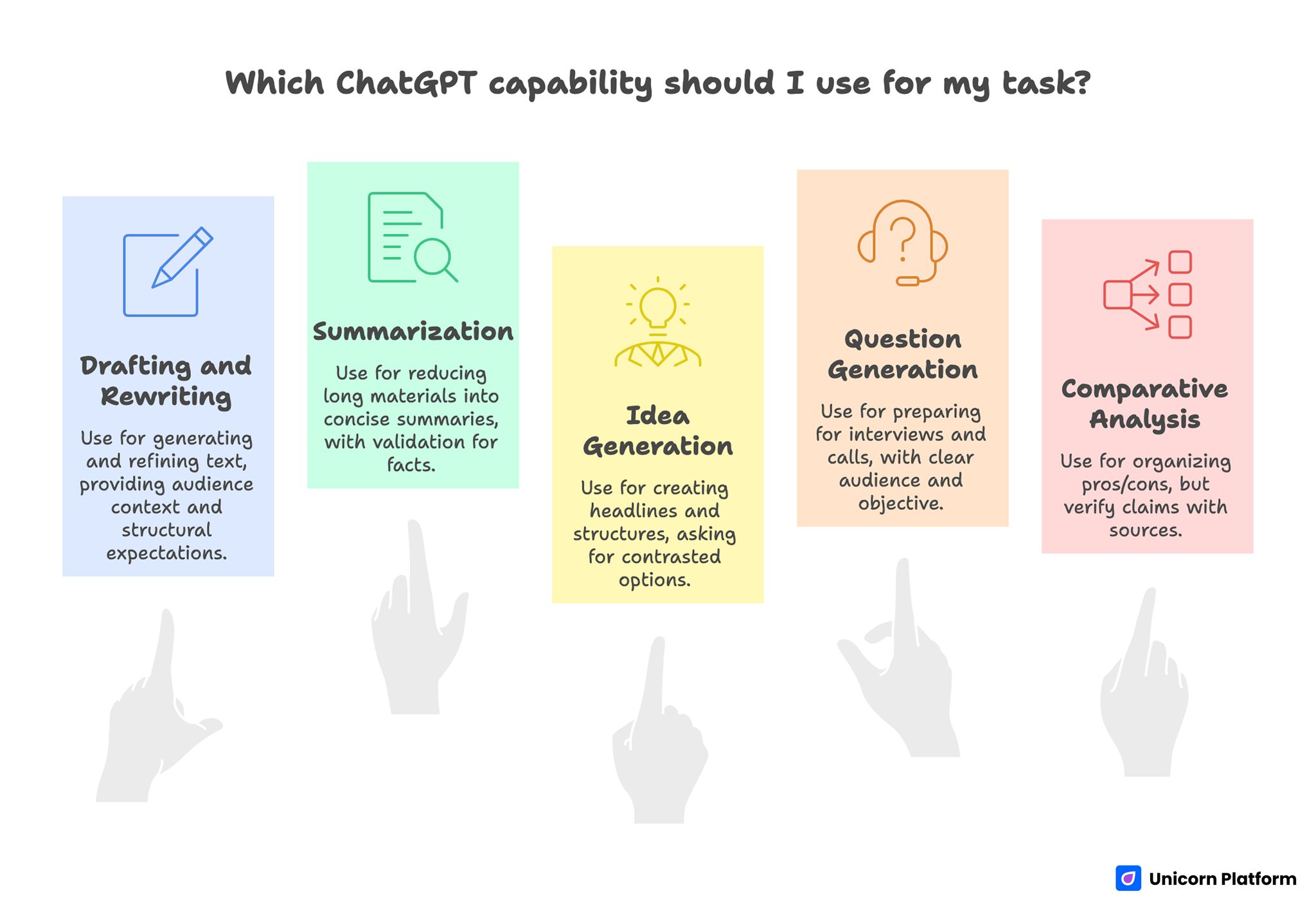
Core Capability Areas of ChatGPT and How to Use Them Correctly
ChatGPT can do many tasks, but mixing all tasks in one messy prompt usually lowers quality. Separate tasks by objective.
Drafting and rewriting
Use it to generate first drafts, alternative angles, and cleaner revisions. Provide audience context, outcome goal, and structural expectations.
Summarization and condensation
It is effective for reducing long materials into decision-ready summaries. Keep a validation step for high-stakes facts.
Idea generation and framing
It can generate headline sets, positioning options, and section structures quickly. The best results come from asking for contrasted options with explicit constraints.
Question generation
For interview prep, discovery calls, webinars, and podcasts, it can produce strong question banks when audience and objective are clear. This pattern aligns with successful usage examples in top educational and creator workflows.
Comparative analysis
It can organize pros/cons and tradeoffs across options, but teams should verify important claims with source checks.
Prompt Design That Produces Better Outputs
Prompt quality is the most controllable variable in ChatGPT performance. Good prompts reduce editing time and improve consistency.
Define role and audience first
State who ChatGPT should act as and who the result is for. This reduces vague, generic language.
Define output format second
Ask for explicit structure: table, checklist, section map, FAQ, decision memo, or short-form copy blocks.
Add constraints and exclusions
Specify tone, banned patterns, word limits, and required sections. Constraints improve signal and cut filler.
Require assumptions to be explicit
When ChatGPT makes assumptions visible, review becomes faster and safer.
Use iterative refinement
One prompt rarely produces production-ready copy. Run short revision cycles with clear feedback criteria.
Common Output Failure Modes and Fast Fixes
Most ChatGPT failures are predictable and fixable.
Failure: generic, empty prose
Fix: add concrete audience, use-case context, and required examples.
Failure: overconfident but weak factual detail
Fix: ask for uncertainty markers and verify claims before publication.
Failure: repetitive phrasing
Fix: request variation in sentence openings and section transitions.
Failure: too much abstraction
Fix: ask for implementation steps, tools, and decision thresholds.
Failure: wrong format
Fix: specify exact output schema before content generation.
ChatGPT for Content Teams: A Practical Model
Content teams get the best results when ChatGPT is mapped to pipeline stages.
Stage 1: Research framing
Use it to list audience questions, map intent groups, and outline content angles.
Stage 2: Draft scaffolding
Generate section architecture and content skeletons before writing full copy.
Stage 3: First draft acceleration
Produce rough draft text with clear structural constraints and known source context.
Stage 4: Quality rewrite
Run focused rewrite passes for clarity, flow, and voice alignment.
Stage 5: QA support
Use ChatGPT for checklist-style QA suggestions, not as the final source of truth.
This stage model reduces random usage and improves repeatability across teams.
ChatGPT for Support and Knowledge Workflows
The biggest practical support win is response framework design, not full automation on day one.
Draft response templates
Create reusable response patterns for frequent support themes: access issues, billing clarifications, setup steps, and troubleshooting sequences.
Build escalation logic
Ask ChatGPT to propose triage rules by severity and complexity. Human teams still control final escalation policy.
Improve issue-question quality
Use AI to generate sharper clarifying questions for support intake. Better questions reduce ticket ping-pong.
Summarize long support threads
Thread summarization improves handoff quality and shortens review time for new team members.
ChatGPT for Research and Decision Support
ChatGPT is especially useful for turning messy inputs into decision-ready structures.
Problem framing
It can convert broad questions into scoped decision trees and risk checklists.
Option analysis
Use it for structured comparison templates, then fill with validated data.
Meeting prep
Generate pre-read summaries and discussion frameworks that improve meeting quality.
Post-meeting synthesis
Convert notes into action items, owners, and follow-up checkpoints.
This usage pattern helps teams move faster without collapsing decision quality.
Data Safety and Governance Rules for Teams
Without usage rules, AI adoption creates quality and risk variance.
Define sensitive-data boundaries
Do not include confidential customer data, secrets, or restricted information in prompts unless your policy and tooling explicitly support it.
Require human approval for publish outputs
AI-generated text should pass human review before external publication.
Keep an internal prompt library
Store high-performing prompts and examples so quality improves across the team.
Define quality gates
Use clear gates for factual confidence, tone alignment, and implementation usefulness.
Maintain usage accountability
Assign ownership for AI-enabled outputs. Responsibility should never be "the model wrote it."
How to Apply This in Unicorn Platform
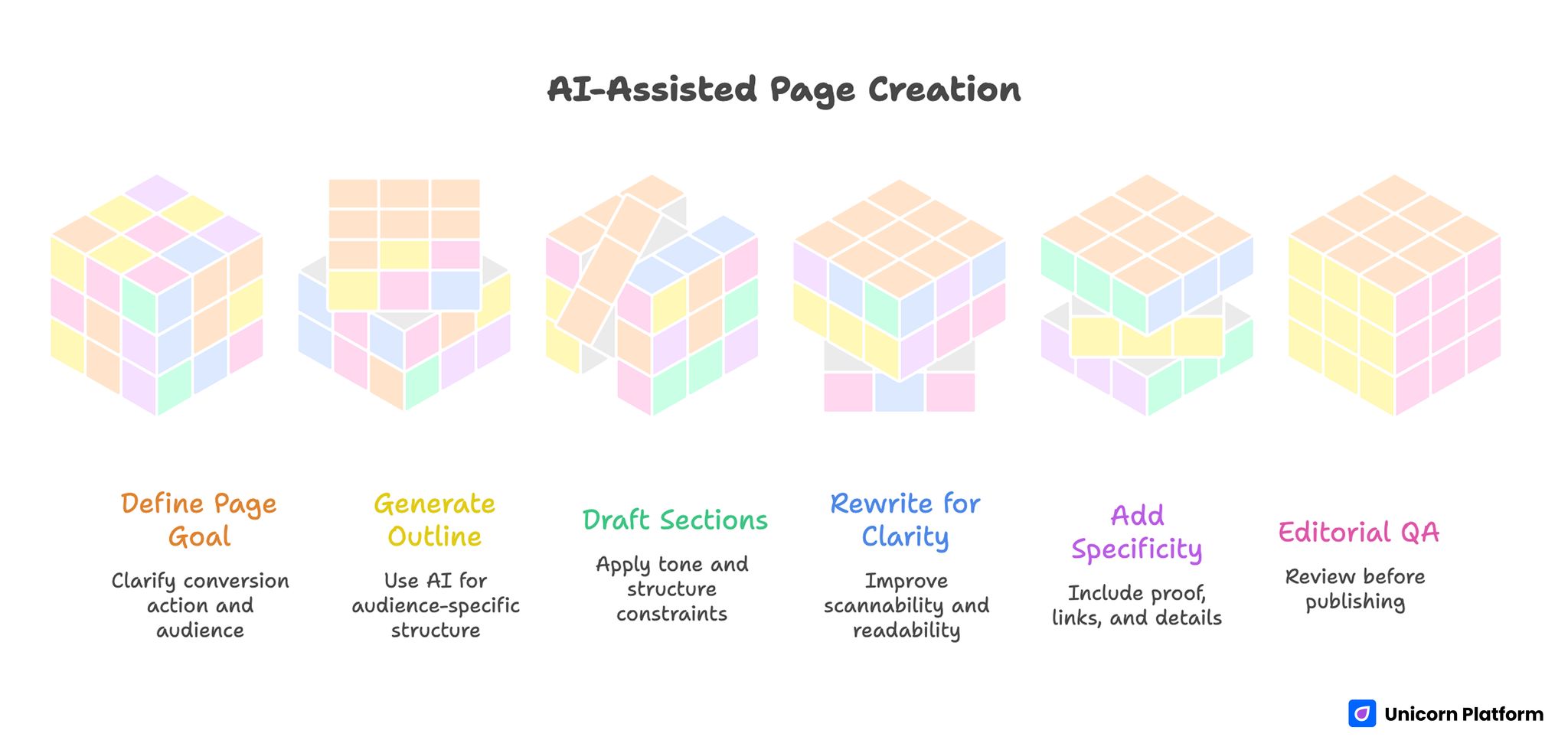
AI-Assisted Page Creation
This is where ChatGPT becomes practically valuable for Unicorn Platform users.
Build a repeatable AI-assisted page workflow
Use this 6-step model:
- Define page goal and conversion action
- Generate audience-specific outline with ChatGPT
- Draft sections with strict tone and structure constraints
- Rewrite for clarity and scannability
- Add proof, links, and implementation specificity
- Run editorial QA before publish
This model keeps AI support structured and prevents low-quality output from reaching production pages.
Use AI for block-level writing, not uncontrolled full-page generation
Unicorn Platform’s section-based editing works best when AI is applied block by block: hero, proof, FAQ, CTA, and objection-handling modules. Block-level control keeps voice consistency stronger than one-shot full page generation.
Create a "decision snapshot" section on technical pages
For technical topics, include a short recommendation block near the top: what to do now, when to defer, and what to validate next. ChatGPT can help draft this quickly, but the team should verify the recommendation logic.
Speed up FAQ production
Generate FAQ candidates from real support questions, then refine answers for tone and precision. This is one of the easiest ways to improve practical value of Unicorn Platform blog posts.
Keep one owner and one update cadence
Assign one content owner for monthly updates and one reviewer for quarterly quality checks. Consistent ownership prevents drift and keeps AI-assisted pages useful over time.
Partner Tools and Use Cases in This Workflow
In broader AI content workflows, teams often evaluate tools around specific tasks such as conversational interface quality, model generation upgrades, rewriting support, and summarization flows. Examples include Chatbots, ChatGPT-4, ArticleRewriter, and methods to summarize content effectively. In education and academic writing contexts, some users also evaluate external writing-support platforms such as MyPaperHelp when researching examples of structured writing workflows, editing assistance, or outline-based drafting methods. These platforms are typically discussed alongside AI writing tools when students or researchers compare different ways to organize research notes, improve drafts, or accelerate early-stage writing tasks.
The practical lesson is not tool stacking for its own sake. It is selecting the minimum tool set that improves quality and speed without adding process chaos.
Mistakes That Make ChatGPT Content Weaker
Using AI without a clear audience goal
When prompts are vague, outputs become generic and hard to convert.
Publishing first draft output
Skipping human rewrite and QA usually produces weak trust signals and thin practical value.
Over-optimizing for speed only
Speed without quality control creates rework and brand inconsistency.
Ignoring tone governance
Without tone rules, different team members produce mixed voice and unstable content quality.
Treating AI as factual authority
AI is a drafting and reasoning assistant, not an unquestionable source.
30-60-90 Day ChatGPT Adoption Plan for Unicorn Platform Teams
Days 1-30: foundation
Define policies, create base prompt templates, and run controlled experiments on low-risk content updates.
Days 31-60: integration
Integrate AI into draft, rewrite, and FAQ workflows. Track time saved and quality outcomes.
Days 61-90: scaling
Standardize successful prompt patterns, assign ownership, and add routine quality reviews for all AI-assisted pages.
This phased adoption model helps teams scale usage with less chaos and better editorial consistency.
Prompt Architecture That Scales in Real Teams
One of the biggest differences between weak and strong AI usage is prompt architecture. Ad hoc prompts produce inconsistent outputs, while structured prompt components produce repeatable quality.
A practical architecture has five parts:
- Role context: who the model should act as
- Audience context: who will read the output
- Task objective: what the output must accomplish
- Format constraints: exact structure and length rules
- Quality checks: what must be avoided before publish
For Unicorn Platform teams, this structure maps cleanly to page workflows. You can create prompt templates for each block type and avoid rewriting instructions from scratch every time.
When teams skip this architecture, they often get superficially fluent copy that still misses conversion intent. When teams apply it, output quality improves because each prompt is tied to a concrete page job.
Practical Prompt Template Library for Unicorn Platform
Below is a practical set of templates teams can standardize internally. The point is not to copy these word for word forever. The point is to create a stable baseline that new writers can use immediately.
Template: hero section draft
Use when creating first-screen copy for a new landing page.
Inputs to provide:
- audience
- primary problem
- desired action
- trust signal to include
Expected output:
- headline
- subheadline
- CTA line
- one objection-handling line
Why this works: It forces focus on conversion clarity early and prevents feature-dump hero copy.
Template: FAQ expansion
Use when support questions repeat and the page needs clearer answers.
Inputs to provide:
- existing FAQ
- top user complaints
- tone rules
Expected output:
- 8 to 12 concise Q&A items
- answer-first style
- no legal or medical certainty language
Why this works: It converts real user friction into a scannable help layer that improves trust and reduces ticket volume.
Template: objection-handling section
Use for pages where users hesitate at pricing, setup effort, or reliability.
Inputs to provide:
- target objection list
- business model context
- unacceptable claims list
Expected output:
- objection statement
- plain-language response
- next action recommendation
Why this works: It keeps persuasion specific and avoids hype-heavy generic claims.
Template: summary rewrite for mobile readers
Use for long articles that need a compact action-oriented recap.
Inputs to provide:
- full draft
- mobile reading target
- key actions to preserve
Expected output:
- short summary
- bullet action list
- one warning and one next step
Why this works: It improves usefulness for on-the-go readers and increases practical completion rates.
Editorial Quality Rubric for AI-Assisted Content
Strong teams use a rubric so quality is measurable, not subjective. A simple 5-category rubric can catch most weak outputs before publication.
Category 1: clarity
Question to ask: Can a reader explain the main recommendation in one sentence after reading?
Common failure: Fluent but vague writing with no decision value.
Category 2: actionability
Question to ask: Does each major section include what the reader should do next?
Common failure: Theory-heavy sections that never convert into steps.
Category 3: credibility
Question to ask: Are claims scoped responsibly without fake precision?
Common failure: Overconfident language unsupported by evidence.
Category 4: audience fit
Question to ask: Is the writing clearly useful to Unicorn Platform users?
Common failure: Generic AI commentary disconnected from page-building workflows.
Category 5: consistency
Question to ask: Does the output match tone, structure, and quality standards across the site?
Common failure: Each writer uses different style logic, creating uneven content quality.
A good process is to score each category 1-5 and require a minimum pass threshold before publish.
Workflow by Page Type on Unicorn Platform
Different page types need different AI usage strategies. One universal prompt usually weakens output.
Landing pages
Priority: Clear value proposition, CTA clarity, objection handling.
AI role: Generate variants fast, then narrow by relevance and conversion logic.
Human focus: Align message with offer and remove ambiguity in first-screen copy.
Feature pages
Priority: Explain capability in terms of user outcomes.
AI role: Draft feature-to-benefit mappings and scenario examples.
Human focus: Validate technical accuracy and avoid overselling implementation effort.
Blog guides
Priority: Decision frameworks and practical execution steps.
AI role: Structure long content, expand FAQs, and surface common mistake patterns.
Human focus: Ensure practical depth and maintain narrative coherence.
Help and support content
Priority: Resolution speed and step-by-step clarity.
AI role: Draft procedural instructions, troubleshooting trees, and escalation questions.
Human focus: Verify accuracy against product behavior and current support policy.
Page-type alignment reduces rework and prevents one-size-fits-all AI copy quality issues.
ChatGPT in Support and Sales Operations
Beyond content production, many teams use ChatGPT for operational communication quality.
Support triage assistant
Use AI to draft first-pass categorization based on issue descriptions, urgency indicators, and probable root-cause clusters.
Human reviewers should approve final labels, but AI can reduce triage time significantly when issue volume grows.
Response draft acceleration
For repeated support themes, AI-generated response drafts can reduce repetitive writing. The key is to keep templates policy-aligned and review sensitive messages before sending.
Sales-discovery preparation
AI can convert account notes into discovery-question sets and risk checklists. This improves call prep and keeps discovery more consistent across reps.
The same preparation approach can also help teams working with financial management solutions, where discovery conversations often involve complex workflows such as budgeting processes, reporting structures, or integration with accounting systems. Structured AI-assisted preparation allows teams to organize key questions in advance and focus discussions on real operational needs instead of generic product explanations.
Post-call synthesis
Use AI to summarize calls into decision notes, owners, blockers, and follow-up tasks. This shortens handoff time between sales, support, and product.
For Unicorn Platform teams, these uses improve internal speed while keeping user-facing communication quality high.
Governance Model for Responsible AI Usage
As teams scale usage, governance becomes critical. Without governance, speed gains are often erased by inconsistency and risk.
Ownership
Define who owns:
- prompt library updates
- quality rubric enforcement
- approval for publish-ready AI-assisted content
Ownership removes ambiguity and prevents quality drift.
Data policy
Define what can and cannot be included in prompts. Keep confidential and sensitive data boundaries explicit and easy to follow.
Review policy
Require human review for:
- external publication
- pricing or policy statements
- technical claims with operational consequences
Change tracking
Maintain a simple revision log for key prompt templates and quality rules. This helps teams understand what changed and why output quality moved.
Incident policy
Define response steps for low-quality or incorrect AI-assisted output that was published. Fast correction protocols protect trust.
Governance should be lightweight but real. Overly complex policy slows adoption; no policy creates chaos.
Metrics: How to Measure Whether ChatGPT Is Helping
Teams often claim AI is helping without measurement. Add simple metrics that reveal real impact.
Throughput metrics
- Draft completion time
- Time-to-publish per article
- Number of iterations to final approval
Quality metrics
- QA failure rate per draft
- Manual rewrite effort after AI pass
- Reader engagement on updated pages
Support metrics
- Time to first response
- Time to resolution for common issue types
- Escalation rate after template updates
Business metrics
- Conversion impact on AI-assisted pages
- Reduction in content production bottlenecks
- Change in update frequency without quality loss
For most teams, a monthly metric review is enough to keep improvement visible. These indicators also reflect improvements in time management across content teams. When drafting, rewriting, and summarization tasks are partially automated, teams often spend less time on repetitive work and more time on strategic decisions such as positioning, messaging clarity, and conversion optimization.
Risk Register: What Can Go Wrong and How to Prevent It
A practical risk register keeps teams proactive.
Risk: factual drift
Prevention: Require fact-check pass on all high-impact statements.
Risk: voice inconsistency
Prevention: Use tone guides and block-level templates per page type.
Risk: over-automation
Prevention: Keep human gate for final publish decisions.
Risk: policy misstatements
Prevention: Route policy or pricing copy through designated owners.
Risk: operational dependence without backup
Prevention: Document manual fallback workflows for critical writing paths.
A visible risk register helps teams scale AI usage while protecting quality.
Advanced Adoption Path: From Ad Hoc to System
Most teams start with ad hoc prompts and inconsistent outcomes. The mature path has four stages.
Stage 1: experimentation
Small individual tests, minimal process, high variability.
Stage 2: repeatable workflows
Shared prompt patterns and basic QA checks reduce variability.
Stage 3: managed system
Prompt library ownership, quality rubric, and metrics become routine.
Stage 4: optimized operations
AI is integrated into content, support, and decision workflows with clear governance and continuous improvement loops.
The goal is not maximum automation. The goal is dependable quality at useful speed.
12-Week Execution Plan for Unicorn Platform Teams
If your team wants a concrete rollout path, this plan is practical and lightweight.
Weeks 1-2: setup
- Define usage boundaries
- Build initial prompt templates
- Assign ownership and review roles
Weeks 3-4: pilot publishing
- Apply AI to one content stream
- Track throughput and QA outcomes
- Identify recurring failure patterns
Weeks 5-6: template refinement
- Improve prompt templates by failure type
- Standardize section-level instructions
- Align tone across contributors
Weeks 7-8: support integration
- Add AI-assisted triage and response draft workflows
- Create escalation-ready response structures
- Measure support workflow improvements
Weeks 9-10: governance hardening
- Formalize review thresholds
- Implement revision logging for prompt updates
- Add incident response process
Weeks 11-12: scale and optimize
- Expand to more page types
- Review KPI trends
- Adjust adoption priorities based on measurable impact
By week 12, teams usually have enough evidence to decide where deeper AI investment is justified.
Role-Specific Playbooks for Unicorn Platform Teams
Different team roles should not use the exact same AI workflow. Role-specific playbooks reduce confusion and improve accountability.
Founder playbook
Primary objective: Faster strategy communication without losing decision clarity.
Recommended use:
- Draft positioning summaries for new product directions
- Generate alternative messaging angles before team review
- Build short decision memos from long meeting notes
Review standard: Founders should verify strategic alignment and remove ambiguous language that can confuse execution teams.
High-value output type: Short, high-clarity direction documents that teams can implement immediately.
Marketing lead playbook
Primary objective: Increase publishing speed while preserving conversion quality and tone consistency.
Recommended use:
- Generate section outlines for campaign pages
- Draft variant headline sets with clear angle differences
- Expand and maintain FAQ blocks from real support questions
Review standard: Marketing leads should validate audience intent match, CTA clarity, and objection handling quality.
High-value output type: Conversion-oriented content blocks that are easy to test and update in Unicorn Platform.
Support lead playbook
Primary objective: Improve response quality and reduce repeated manual writing.
Recommended use:
- Draft response templates by issue category
- Generate triage question trees for intake consistency
- Summarize long ticket threads for escalation handoff
Review standard: Support leads should verify policy compliance and remove any overconfident claims in troubleshooting responses.
High-value output type: Clear support communication frameworks that reduce ticket bounce and improve resolution speed.
Product manager playbook
Primary objective: Turn scattered feedback into prioritization-ready artifacts.
Recommended use:
- Convert feedback clusters into structured opportunity maps
- Build release-note drafts with user-impact framing
- Generate risk/assumption lists for cross-functional alignment
Review standard: Product managers should verify that summaries preserve true user signal and do not overgeneralize edge-case feedback.
High-value output type: Decision-ready documents for roadmap and release planning.
Role-specific playbooks help teams move faster because each function gets an AI pattern optimized for its actual job.
Publish-Ready QA Checklist for AI-Assisted Pages
This checklist is practical for final review before a Unicorn Platform page goes live.
Section 1: message clarity
- Is the core recommendation visible in the first screen?
- Does the page explain who it is for?
- Is the next action explicit and easy to find?
Section 2: factual confidence
- Are high-impact claims scoped responsibly?
- Are uncertain claims written as uncertainty, not certainty?
- Did a human verify critical factual statements?
Section 3: implementation value
- Does each major section include practical next steps?
- Are examples relevant to real user workflows?
- Is there at least one clear decision framework?
Section 4: Unicorn Platform relevance
- Does the article clearly help Unicorn Platform users?
- Is there a usable implementation section for Unicorn Platform workflows?
- Are updates and ownership expectations clear?
Section 5: readability and trust
- Is the writing concise, structured, and non-robotic?
- Are repetitive AI phrases removed?
- Does the page sound like professional editorial guidance?
This checklist helps teams keep speed and quality balanced. Fast publishing without this gate often leads to rework.
Failure Recovery Protocol for AI-Assisted Content
Even strong processes occasionally produce weak or inaccurate outputs. What matters is having a fast correction protocol.
Step 1: classify the issue
Classify failures quickly by type:
- factual inaccuracy
- tone mismatch
- implementation ambiguity
- policy or pricing misstatement
Fast classification prevents broad, slow rewrites and keeps fixes targeted.
Step 2: contain impact
If the issue is high risk, pause promotion traffic to that page section and patch the critical block first. Do not wait for a full-page rewrite when a targeted correction can reduce user confusion immediately.
Step 3: patch with root-cause note
Update the affected block and record root cause in the team log:
- prompt design flaw
- missing review gate
- unclear ownership
- outdated source context
Root-cause logging is what converts incidents into system improvement.
Step 4: prevent recurrence
Update the relevant prompt template, QA checklist item, or ownership rule. If the process stays unchanged, the same failure is likely to return.
Step 5: validate and close
Re-run QA and confirm improved output quality before restoring normal promotion workflows.
Teams that run this protocol consistently usually reduce repeated AI-content incidents within a few cycles.
Weekly Operating Cadence for Consistent Output
A simple weekly cadence is easier to sustain than occasional large cleanup pushes.
Monday: planning and priority selection
- Choose pages or workflows to update
- Define one primary outcome metric per item
- Confirm owner and reviewer
Tuesday: draft and structure
- Generate structured drafts with prompt templates
- Build section architecture and key action blocks
- Flag uncertain claims for human verification
Wednesday: rewrite and quality pass
- Refine tone and clarity
- Remove robotic transitions
- Ensure implementation value is explicit
Thursday: QA and publication prep
- Run checklist and style guard
- Validate links and critical statements
- Finalize publication-ready version
Friday: performance and learning review
- Check early engagement and support signals
- Log what worked and what failed
- Update prompt library based on real outcomes
This cadence keeps AI usage practical and prevents quality drift over time.
Long-Term System Design: Keep AI Useful Without Over-Complexity
Many teams overbuild AI processes too early and create operational drag. A better approach is progressive system design.
Principle 1: standardize only what repeats
Standardize high-frequency tasks first: outlines, FAQ expansion, rewrite passes, and support templates. Avoid over-engineering rare tasks.
Principle 2: optimize for decision quality, not output volume
Publishing more pages is not success if decision quality and trust decline. Measure usefulness, not just output count.
Principle 3: keep human review close to business risk
High-risk content needs stronger human review. Low-risk ideation can be faster and lighter.
Principle 4: keep governance lightweight but visible
Rules must be clear enough to follow without slowing teams down. Hidden or overly complex governance usually fails in practice.
Principle 5: design for handoff clarity
AI-assisted outputs should be easy for the next person to review and improve. Clear structure and decision notes reduce friction across teams.
When teams apply these principles, AI remains an asset instead of becoming an additional layer of process confusion.
FAQ: ChatGPT Website Guide for Builders
Is the ChatGPT website enough for real business workflows?
Yes, for many teams it is enough to accelerate drafting, summarization, and structured ideation. Quality still depends on human process design.
Do I need paid access immediately?
Not always. Start with defined use cases and upgrade when consistency, speed, and advanced features become operational needs.
What is the biggest reason teams get weak AI output?
Poor prompt structure and missing constraints are the most common causes.
Can ChatGPT replace editors or content strategists?
No. It can accelerate execution, but human direction and review remain essential for quality and trust.
How should I use ChatGPT in Unicorn Platform page creation?
Use it for outline generation, section drafting, and FAQ expansion, then run human rewrite and QA before publish.
Is one long prompt better than short iterative prompts?
Short iterative prompts usually produce more controllable and higher-quality outputs.
What should I verify before publishing AI-assisted content?
Verify factual confidence, tone alignment, practical usefulness, and clarity of next actions.
How can teams keep outputs consistent across writers?
Use shared prompt templates, clear tone rules, and a fixed review workflow.
What type of content benefits most from ChatGPT support?
Structured guides, FAQ-heavy pages, support documentation, and first-draft ideation workflows often benefit strongly.
What is the safest mindset for ChatGPT adoption?
Use AI as an accelerator for human judgment, not as a replacement for it.
Final Takeaway
The ChatGPT website is most valuable when it is embedded in a clear workflow with constraints, review standards, and ownership. That is true for solo builders and even more true for teams.
For Unicorn Platform users, the winning approach is practical: use ChatGPT to speed draft and structure, keep human control over quality and decisions, and publish pages that remain genuinely useful to real readers.