Table of Contents
- The 4-Layer Conversion Spine for No-Code Teams
- A Complete Build Workflow for Teams Without Developers
- Page Blueprints by Intent Type
- 30-Day Execution Plan
- Common Failure Patterns and Fixes
- FAQ
Fast publishing is no longer the hard part of web execution. Most teams can launch a page in hours. The real challenge is building pages that stay clear, credible, and conversion-ready after multiple edits by multiple people.
That is why non-technical website work needs an operating system, not just a builder. A team that can publish quickly but lacks structure will create inconsistent pages, noisy data, and weak optimization loops.
Unicorn Platform gives teams speed, but speed creates value only when it is paired with stable page architecture, disciplined review rules, and clear ownership. This guide shows exactly how to run that system from first launch to scale.
sbb-itb-bf47c9b
Quick Takeaways
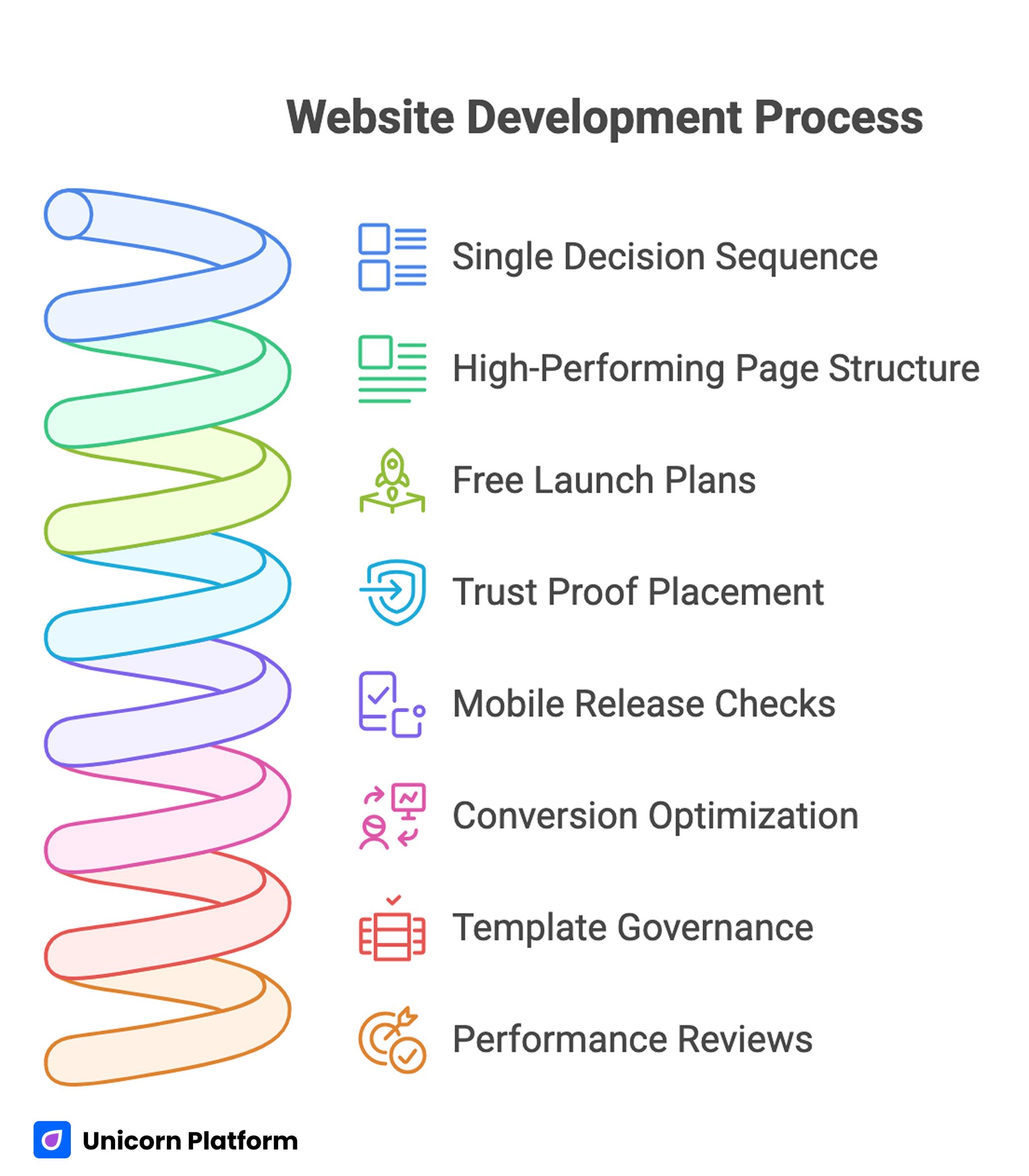
Website Development Process
- Publishing without code works best when each page follows one decision sequence.
- A high-performing page should answer relevance, mechanism, confidence, and action in that order.
- Free launch plans are useful, but quality gates still need to be strict.
- Trust proof should be placed near claims, not collected in one block at the bottom.
- Mobile release checks should be mandatory, not optional.
- Conversion optimization should focus on one major change at a time.
- Template governance is what keeps quality stable as more contributors join.
- Performance reviews should track qualified outcomes, not only raw submissions.
Why Most Non-Technical Website Projects Stall
The first month often looks great. Pages go live quickly, the team feels momentum, and there is visible progress. The second and third month is where problems usually appear.
The common issue is structural drift. One editor changes a hero block. Another rewrites a trust section. A third adds links and secondary CTAs. None of the edits are individually wrong, but together they break narrative flow and decision clarity.
A second issue is tool confusion. Teams stack multiple apps for forms, popups, analytics, and personalization before they have a clean baseline. This creates operational overhead that consumes time better spent on message quality and user intent fit.
A third issue is role ambiguity. When no one owns structure, proof quality, and measurement hygiene, pages become shared spaces with no decision authority. In that environment, optimization becomes guesswork.
What Winning Pages Do Differently
High-performing no-code pages are not usually the most complex. They are the most coherent. Their structure is predictable, their message is specific, and their action path is easy to understand.
These pages also reduce cognitive load. Visitors do not need to interpret abstract claims, hunt for proof, or decode vague CTA language. Each section answers one practical question and then advances the reader to the next decision. Each section answers one practical question and then advances the reader to the next decision. Research from Nielsen Norman Group shows that users typically scan web pages rather than read them word by word, which makes structured, clearly prioritized content critical for comprehension and conversion
Strong teams treat each page as a conversion system, not a design artifact. They run updates with intention, validate outcomes with a clear metric hierarchy, and archive changes that do not improve qualified results.
When a team needs a simple starting framework before deeper optimization, the practical flow in create your web presence with simple drag-and-drop is useful for setting an early operational baseline. It helps teams move from idea to first release with less procedural friction.
The 4-Layer Conversion Spine for No-Code Teams
Every page in your portfolio should keep one stable sequence. This does not mean every page should look the same. It means the logic of user decisions should remain consistent.
1. Relevance
Visitors first ask, "Is this for me?" Relevance answers this with audience-specific wording, concrete outcomes, and contextual framing tied to the traffic source.
Weak relevance language is broad and generic. Strong relevance language identifies who the page serves, what problem it solves, and why the solution matters now.
2. Mechanism
Once relevance is clear, users ask, "How does this work?" This section explains delivery logic, process steps, or product experience in plain operational terms.
Mechanism quality improves when teams avoid feature dumping and focus on outcome paths. Users should see how value is created, not only what components exist.
3. Confidence
At this stage, users ask, "Why should I trust this?" Confidence sections should map proof directly to claims. If you claim speed, show process reliability. If you claim outcomes, show context-rich evidence.
Proof quality is about specificity. Concrete, current, and relevant proof beats high-volume generic social proof every time.
4. Action
The final question is, "What should I do next?" The action section should provide one dominant path and one optional low-friction path, both with explicit outcome language.
The strongest no-code teams keep this spine constant and run experiments inside it. When the spine changes every week, test results become hard to interpret.
For deeper section-order guidance that aligns with this model, a step-by-step guide to a high-converting landing page structure is a useful reference. It is especially helpful when teams are aligning multiple editors on one shared narrative flow.
Builder Selection: Choose for Operations, Not Demos
Teams often pick tools based on first impressions. Beautiful templates and long feature lists can be compelling, but they rarely predict long-term execution quality.
Choose your builder by scoring real operational requirements:
- Can your team preserve section logic without technical bottlenecks?
- Can templates encode rules so quality does not drift across contributors?
- Can you run clean analytics around trust interaction and CTA progression?
- Can your workflow support fast edits without breaking governance?
- Can the team maintain performance and mobile quality at scale?
A fast pilot method works well. Build one identical test page in each shortlisted tool using the same copy structure, trust blocks, and CTA logic. Then compare based on measurable outcomes after real traffic.
This removes opinion bias and forces decision-making around operational evidence. It also makes procurement and tool adoption conversations easier to resolve internally.
A Complete Build Workflow for Teams Without Developers
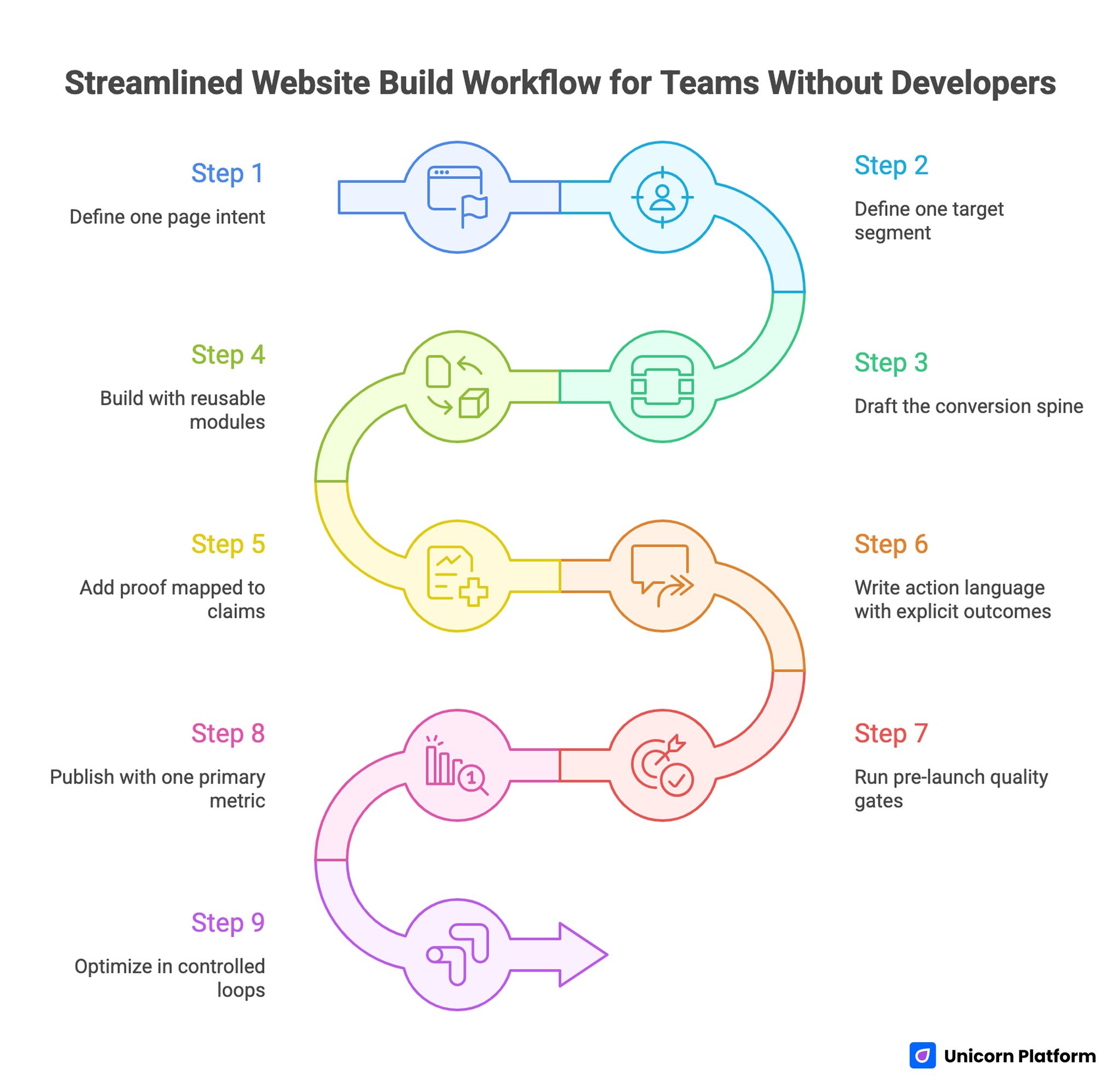
Streamlined Website Build Workflow for Teams without Developers
The workflow below is designed for teams that need reliable outputs quickly. It balances launch speed with editorial quality and post-launch learning.
Step 1: Define one page intent
Each page should have one primary intent, such as lead capture, demo request, consultation booking, or trial start. Mixed intent creates unclear messaging and weak conversion behavior.
Document the intent in one sentence and keep it visible through the entire build cycle. Teams that skip this step usually drift into mixed messaging.
Step 2: Define one target segment
Do not write for "everyone." Define one segment with practical specificity: role, use case, context, and urgency level.
Segment precision improves headline clarity, proof relevance, and CTA fit. It also helps the team reject edits that are off-strategy for the target audience.
Step 3: Draft the conversion spine
Map relevance, mechanism, confidence, and action blocks before styling. This keeps the page user-first and prevents surface-level edits from controlling strategy.
At this stage, focus on logical sequence, not visual polish. Visual tuning is easier and more effective after structure is stable.
Step 4: Build with reusable modules
Use templates and reusable sections to reduce production friction. Reuse should not create generic pages; it should preserve strategic structure while copy and proof adapt to each segment.
A clean module library typically includes hero variants, mechanism blocks, proof blocks, FAQ clusters, and CTA modules.
Step 5: Add proof mapped to claims
Place proof where uncertainty appears. If you claim easy setup, show onboarding evidence nearby. If you claim performance, show context around outcomes.
Never isolate all proof at the bottom and expect users to connect it back to earlier claims.
Step 6: Write action language with explicit outcomes
CTA labels should describe what happens next. Vague action text lowers intent quality and increases friction in downstream qualification.
Strong CTA language sets expectation clearly and helps sales or success teams receive better-fit inquiries.
Step 7: Run pre-launch quality gates
Before publishing, run hard checks for structure clarity, proof accuracy, CTA consistency, mobile behavior, load stability, and analytics integrity.
If one release gate fails, delay launch and fix it. This discipline prevents noisy data and protects brand trust.
Step 8: Publish with one primary metric
Every launch needs one primary success metric and one guardrail metric. Without this, teams misread early movement and overfit to vanity signals.
Primary metric examples include qualified form completion rate, booked call rate, or trial activation rate.
Step 9: Optimize in controlled loops
Run one major variable change per cycle. Keep test windows consistent and maintain a changelog with hypothesis, implementation notes, and observed impact.
This converts no-code velocity into repeatable learning. Without this discipline, teams ship often but learn slowly.
For teams that need a rapid, low-friction launch sequence before this full workflow, launch your site in 3 steps with Unicorn's free builder is a practical baseline.
Free Launches Without Quality Debt
Many teams begin with limited budget and need to ship quickly. Free tooling or low-cost plans can be a strong starting point when expectations are realistic and process quality stays high.
The key is separating launch economics from quality standards. Budget constraints are valid. Quality shortcuts are expensive later.
A free launch should still include:
- audience-specific first-screen clarity
- one trust signal near the first major claim
- one clear primary CTA
- one mobile-focused QA pass
- one measurement plan tied to qualified outcomes
Use the free phase for validation rather than permanent architecture. Once intent and message fit are validated, invest in governance, module expansion, and deeper measurement.
Content Strategy for Non-Technical Teams
No-code environments make publishing easier, which can lead to volume-driven content decisions. High output is useful only when each page has a clear strategic role.
A practical content model uses three page types:
- intent capture pages for specific actions
- education pages that reduce objections and clarify value
- support pages that reinforce trust and onboarding readiness
Each type should have a different depth profile and CTA strategy. Intent capture pages should be concise and decision-focused. Education pages can go deeper into frameworks and implementation guidance.
Content quality improves when teams establish editorial standards for specificity, readability, and proof relevance. Generic wording should be treated as a QA failure, not a stylistic preference.
When teams want to improve design clarity while maintaining no-code speed, the practical examples in build beautiful websites without coding can help align visual choices with user decision flow.
Trust Architecture: Design for Decision Risk
Trust should be engineered based on risk moments. Users need different proof at different points in the page.
Early in the page, they need confidence that the offer is real and relevant. Mid-page, they need confidence that implementation is reliable. Near the CTA, they need confidence about next-step expectations.
A useful trust mapping system includes:
- claim type: speed, reliability, expertise, support
- proof type: outcomes, process visuals, customer quotes, policy detail
- placement: next to the claim that creates uncertainty
Refresh trust assets on a schedule. Outdated testimonials, old screenshots, or vague references reduce confidence even when the offer is strong.
Trust blocks should also include boundaries. Honest limitation language can improve conversion quality by helping the wrong users self-select out.
Form Design and Lead Quality Control
No-code forms are easy to build and easy to overuse. Many teams default to shortest possible forms, then struggle with low-fit leads and expensive follow-up.
A stronger approach is progressive qualification. Ask only what is needed for the current step, but include one or two routing-critical questions that improve downstream handling.
Form strategy should be tied to sales or success workflows. Every field should have a clear purpose:
- routing to the correct owner
- personalization of follow-up
- qualification of urgency or use case
If a field does not change what happens next, consider removing it. Lean forms are easier to complete and easier to optimize.
CTA and form copy should also reduce ambiguity. Replace broad labels with clear next-step outcomes so users understand commitment level.
Mobile-First Release Rules
Most teams still review pages primarily on desktop. That creates blind spots. Mobile users often see a compressed version where hierarchy and trust sequencing break down.
A strict mobile release checklist should include:
- first-screen headline readability at common device widths
- visible trust signal before deep scroll
- tap target comfort for primary actions
- form input flow with mobile keyboard behavior
- image and component performance under typical network constraints
Run each item as a pass/fail gate. Mobile quality cannot be a preference-based discussion when conversion and trust are at stake.
If you need implementation ideas for small-screen conversion flow and message clarity, creating a high-converting mobile app landing page provides useful execution patterns.
Performance and Accessibility as Business Constraints
Performance and accessibility are often considered technical details. In practice, they are conversion and trust constraints.
Slow pages increase abandonment near decision points. Poor contrast, unclear focus states, or inaccessible forms reduce completion rates and create hidden exclusion.
A practical no-code performance and accessibility baseline:
- compress and prioritize media assets
- keep component count intentional
- verify heading hierarchy and semantic clarity
- ensure sufficient contrast and readable typography
- confirm keyboard and screen reader usability for forms and navigation
These checks should be integrated into release reviews, not treated as occasional audits. The goal is consistent quality, not periodic cleanup.
Measurement System: From Activity to Outcomes
Teams without developers can still run strong measurement systems if they keep metrics layered and decision-oriented.
Use a four-level model:
- Clarity metrics: engagement with first-screen and mechanism sections.
- Interaction metrics: trust block engagement, CTA click progression.
- Conversion metrics: qualified submission or booking outcomes.
- Business metrics: progression to pipeline, revenue, retention, or successful onboarding.
The goal is not collecting more dashboards. The goal is preserving causality between what changed and what improved.
Set reporting cadence by decision speed. Weekly metrics reviews are usually enough for active pages, while monthly strategic reviews are useful for cross-page pattern analysis.
Experimentation Framework for No-Code Teams
Experimentation should be simple, documented, and tied to one hypothesis at a time.
Use a standard test card:
- hypothesis statement
- variable being changed
- expected behavior shift
- primary metric and guardrail metric
- start and end dates
- result summary and decision
Common high-impact variables include first-screen positioning, mechanism framing, proof placement, and CTA wording.
Do not run overlapping major changes on the same page. Even if velocity feels high, interpretation quality falls when multiple variables move at once.
If your team needs a behavior-first perspective when planning tests, 10 user behavior tips to optimize landing pages can help connect hypotheses to real interaction patterns.
Governance Model for Growing Teams
No-code quality drops fastest when team size increases without governance updates. Add structure before problems appear.
A practical governance model has four owners:
- Structure owner: preserves conversion spine and section logic.
- Trust owner: manages proof quality and claim accuracy.
- Analytics owner: validates event tracking and interpretation discipline.
- Release owner: enforces QA gates and final publish approval.
One person can hold multiple roles in smaller teams, but responsibilities should remain explicit. Clear ownership reduces conflict and speeds release decisions.
Use a lightweight change log for every significant edit. Record what changed, why it changed, and what happened after release. This compounds into a high-value internal learning system.
Page Blueprints by Intent Type
Non-technical teams move faster when they do not start from a blank canvas for every page request. Intent-based blueprints keep strategy clear while still allowing copy and proof to adapt by audience.
Blueprint A: Lead-generation service page
This page type is for users who already understand the problem and need confidence that your team can solve it. The structure should prioritize specificity and credibility over extensive education.
Recommended section order is direct relevance statement, process mechanism, trust proof tied to outcomes, and one clear consultation CTA. Objection handling can be concise, but it should cover timeline, cost framing, and expected collaboration model.
Blueprint B: Product trial or demo page
This page type is for users who want to evaluate experience quickly. The mechanism section should be more interactive and show how the product fits common workflows.
Keep friction low for the first action, but include one qualification signal so downstream teams can prioritize follow-up correctly. Trust should focus on reliability and adoption evidence, not only brand logos.
Blueprint C: Educational conversion page
This page type supports visitors with lower readiness who need a practical understanding before taking action. It should include deeper explanation sections, comparison logic, and realistic implementation guidance.
Use a mid-page soft CTA and a final high-intent CTA to match different readiness levels. Education pages often become high-performing conversion pages when they maintain decision flow instead of turning into generic long-form content.
Blueprint D: Offer or campaign page
Campaign pages need strong message match from source click to first-screen promise. Consistency between ad copy, email narrative, and on-page framing is often the biggest conversion lever.
These pages should remove optional navigation noise and keep action paths obvious. Proof should be concise, targeted, and directly connected to campaign claims.
Blueprint E: Pre-launch validation page
Pre-launch pages are useful for early demand capture, but they should still communicate value with precision. Vague "coming soon" language often attracts low-intent signups that are difficult to activate later.
Use concrete outcomes, simple qualification fields, and explicit follow-up expectations. This improves both list quality and post-launch conversion potential.
Migration Playbook: From Messy Pages to Controlled Systems
Teams often inherit legacy pages built quickly with mixed standards. Fixing this does not require full redesigns first. It requires controlled migration.
Phase 1: Audit and classify
Group pages by business importance and intent. Identify high-impact pages that need immediate structural fixes and lower-impact pages that can wait.
Phase 2: Lock the baseline template
Define one default structure for each major intent category. Lock section order and mandatory trust modules before visual customization.
Phase 3: Rewrite for clarity
Prioritize first-screen relevance, mechanism clarity, and CTA intent alignment. Remove decorative copy that does not support user decisions.
Phase 4: Rebuild proof logic
Map each core claim to one nearby proof element. Remove generic testimonial walls and replace them with contextual evidence.
Phase 5: Establish release gates
Require mobile, performance, trust accuracy, and analytics checks before each migrated page goes live.
Phase 6: Scale with documented standards
Once the system works on high-impact pages, apply the same process to adjacent page families.
This phased model lowers risk and preserves learning quality while improving outcomes.
30-Day Execution Plan
Week 1: Foundation
- define one intent category to prioritize
- select a control template and lock section sequence
- rewrite first-screen relevance for top pages
- set one primary metric and one guardrail metric
Week 2: Trust and action quality
- map claims to proof elements
- improve CTA wording for next-step clarity
- refine forms for better qualification
- run mobile release checks for every updated page
Week 3: Measurement and testing
- launch one major test per page family
- maintain change logs and test cards
- review outcomes against qualification and progression metrics
- archive changes that increase submissions but lower lead fit
Week 4: Standardization
- publish an internal module guide
- assign role ownership and QA responsibilities
- scale winning patterns to related pages
- schedule monthly review cadence
This first month should produce not only better pages, but also a repeatable operating model.
90-Day Operating Model
Month 1: Stabilize
Focus on structural consistency, trust alignment, and clear CTA hierarchy.
Month 2: Optimize
Run controlled tests on high-impact variables and tighten qualification logic.
Month 3: Scale
Expand validated modules, retire weak components, and standardize governance across the team.
By day 90, success should look like predictable outcomes with lower editing chaos, not just higher publishing volume.
Common Failure Patterns and Fixes
Failure 1: Fast publishing, weak interpretation
Teams publish many updates but cannot explain why outcomes changed. This usually means too many variables changed at once, so attribution is unclear. Reduce concurrent changes, document hypotheses, and tie every release to a primary metric.
Failure 2: High conversion volume, low quality
The page attracts submissions that do not match your service or product fit. In most cases, message framing is too broad and the CTA does not set expectation clearly. Tighten audience framing, clarify CTA expectations, and add one routing-critical qualification field.
Failure 3: Visually polished pages, low action rate
Design quality is high, but decision clarity is low. Users can appreciate the page while still feeling uncertain about value and next steps. Simplify hierarchy, make mechanism easier to understand, and reposition trust near key claims.
Failure 4: Team growth, quality drift
New contributors introduce inconsistent structure and inconsistent proof standards. This is a governance problem more than an individual editing problem. Enforce template governance, role ownership, and release gate compliance.
Failure 5: Mobile drop-off despite desktop success
Desktop reviews hide mobile friction in readability and interaction flow. Teams often discover this only after traffic costs and lost opportunities accumulate. Make mobile QA pass/fail mandatory before launch.
FAQ: Build and Scale a Website Without Coding
Can a non-technical team build a professional website that converts?
Yes. The deciding factor is process quality, not coding ability. Teams that use stable structure, strong proof mapping, and disciplined QA can compete effectively.
How long should a no-code page take to launch?
Simple pages can launch quickly, but high-quality pages still need planning, review, and measurement setup. Speed is useful only when clarity and trust remain strong.
Should we start free and upgrade later?
That approach is practical for validation. Just keep quality gates strict so you do not create expensive cleanup work after early traction.
What is the most important section to get right first?
First-screen relevance is usually the highest leverage change. If users cannot quickly identify fit and value, deeper sections matter less.
How many internal links should a page include?
Add links only when a reader genuinely needs deeper guidance. Relevance and context matter more than quantity.
How often should we update proof and testimonials?
A monthly review cadence is a good baseline. Update sooner when offers, outcomes, pricing, or audience concerns change.
What metrics should we track beyond conversion rate?
Track qualified submissions, progression quality, and downstream business outcomes. These reveal whether conversion improvements are commercially useful.
Should every traffic source have a separate page variant?
Not always. Start with one core spine and create variants only where intent differences justify unique messaging emphasis.
How do we prevent quality decline as more people edit pages?
Use template governance, clear role ownership, and release gates. Without these, quality drift is almost inevitable.
What is the best first test for underperforming pages?
Test first-screen message clarity and CTA specificity before deeper experiments. These variables often move both conversion and quality metrics.
Do we need advanced analytics tools to run this system?
No. You need reliable event tracking, a clear metric model, and disciplined interpretation. Tool complexity is secondary to decision quality.
How do we know when to stop testing a page?
Stop when changes no longer produce meaningful qualified improvement and focus shifts to new opportunities. Keep maintenance reviews active to catch drift.
Final Takeaway
Building without coding is no longer a novelty. It is a serious execution model for teams that combine speed with disciplined operations.
When Unicorn Platform is used with a stable conversion spine, contextual proof strategy, strict release gates, and measurable optimization loops, non-technical teams can launch faster and still improve business outcomes over time.
The long-term advantage is not just faster publishing. It is reliable learning and repeatable performance.