Table of Contents
- What High-Performing No-Code Websites Do Better
- The 10-Block Architecture for a Custom No-Code
- Copy Frameworks That Improve No-Code Website Performance
- Applied Scenarios for Real No-Code Teams
- Common Failure Modes and Fixes
- FAQ
A custom website used to mean long timelines, expensive development cycles, and heavy coordination across multiple specialists. For some products, that model is still appropriate. For most startups, creators, consultants, and service businesses, it is often more process than progress.
Today, the real competitive edge is not whether you can ship a website. It is whether you can ship a high-quality website quickly, then improve it continuously as you learn from user behavior. That is where no-code workflows create strategic value.
Building without code does not mean lowering standards. It means reducing production bottlenecks so your team can focus on what actually drives outcomes: message clarity, trust positioning, page structure, and conversion flow.
This guide shows you how to build a custom no-code website that looks professional, communicates clearly, and performs like a growth asset, not a static brochure. It is built for teams that want practical execution steps rather than abstract theory.
sbb-itb-bf47c9b
Key Takeaways Before You Build
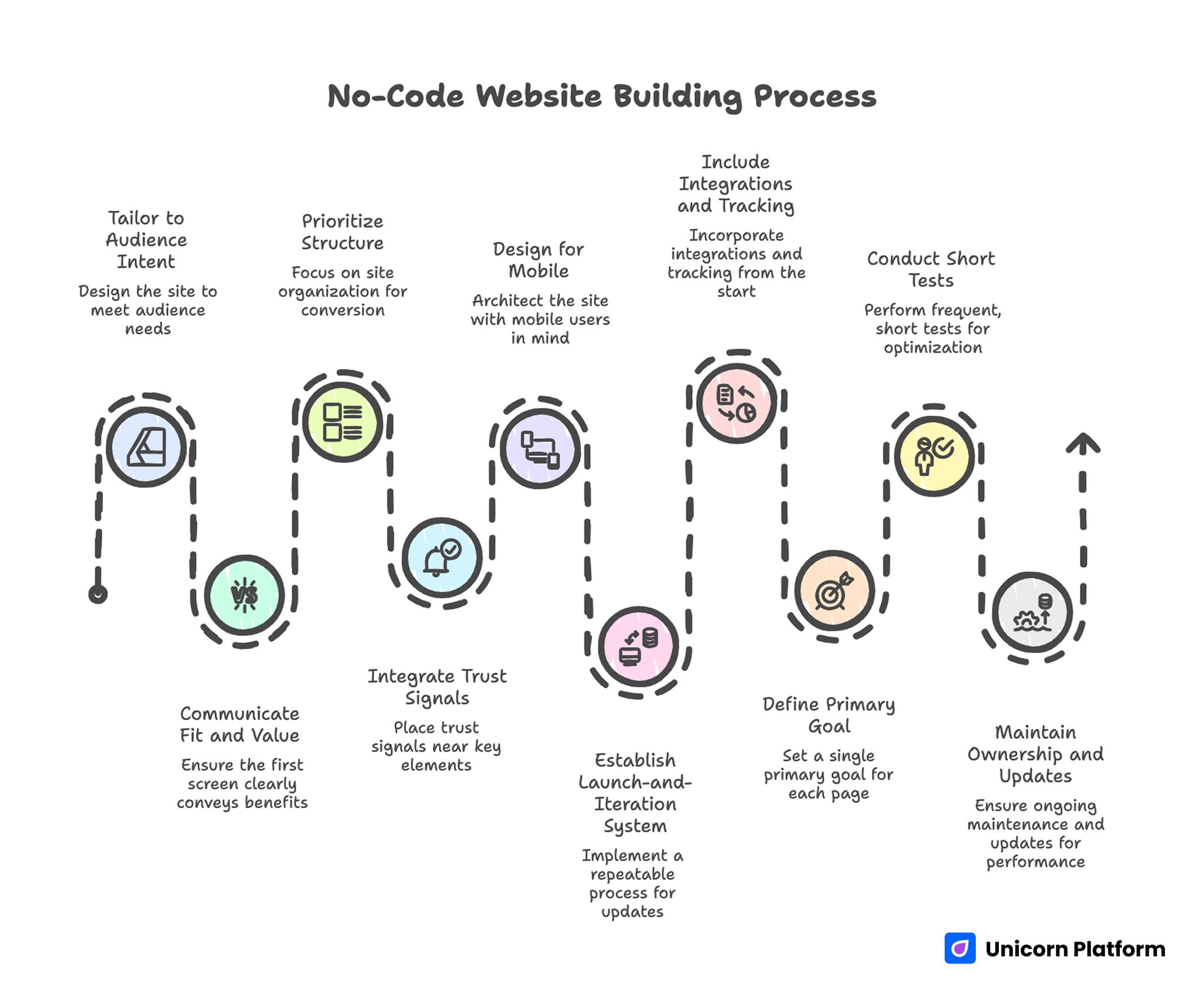
Essential Takeaways before Creating a High-Converting No-Code Website
- A custom no-code site should be tailored to audience intent, not only branded visually.
- The first screen must communicate fit, value, and next action in seconds.
- Structure usually has more impact on conversion than decorative design effects.
- Trust signals should appear near claims and action points, not in one isolated block.
- Mobile behavior should shape architecture from day one, not at final QA.
- Strong no-code execution depends on a repeatable launch-and-iteration system.
- Integrations and tracking are part of conversion design, not post-launch extras.
- One primary goal per page improves action quality and reduces user confusion.
- Short, controlled tests outperform frequent full-page redesigns.
- Ownership and update cadence determine whether performance compounds or decays.
Why No-Code Websites Still Underperform in Many Teams
No-code tools are powerful, but poor process can still produce weak results. The most common issue is that teams treat templates as finished strategy. They publish quickly, but the page remains generic because core messaging and decision flow were never customized.
Another issue is narrative mismatch. Ad copy promises one outcome, the landing page opens with broad brand language, and users lose confidence because the continuation of intent is broken. Even strong traffic underperforms when message continuity is weak.
A third issue is shallow trust design. Pages may include testimonials or logos, but they are often detached from decision moments. Trust works best when it appears where users naturally hesitate, such as near offer choices and CTA zones.
Finally, teams skip measurement discipline. Without clear tracking and test cadence, improvements become opinion-driven. No-code speed is useful only when linked to structured learning.
What High-Performing No-Code Websites Do Better
1. They confirm relevance immediately
Winning pages make audience fit obvious in the first screen. Users should know who the offer is for and why it matters before they start scrolling through deeper details.
Winning pages make audience fit obvious in the first screen. Users should know who the offer is for and why it matters before they start scrolling through deeper details. Research from the Baymard Institute on ecommerce UX shows that early clarity and relevance cues significantly reduce hesitation and improve conversion.
2. They simplify decisions, not just layouts
Strong pages reduce cognitive load by giving each section one clear job. Visitors can scan quickly, find what they need, and move forward with confidence.
3. They pair claims with evidence
Top-performing pages do not separate persuasion from proof. They place supporting evidence close to key promises so confidence builds continuously.
4. They design for operational change
No-code sites that perform over time are built for frequent updates. Teams can adjust sections, offers, and messaging without rebuilding from scratch.
5. They treat launch as phase one
High-performing teams publish strong first versions, then run controlled weekly improvements. Continuous optimization is part of the website strategy, not an optional step.
The 10-Block Architecture for a Custom No-Code Website
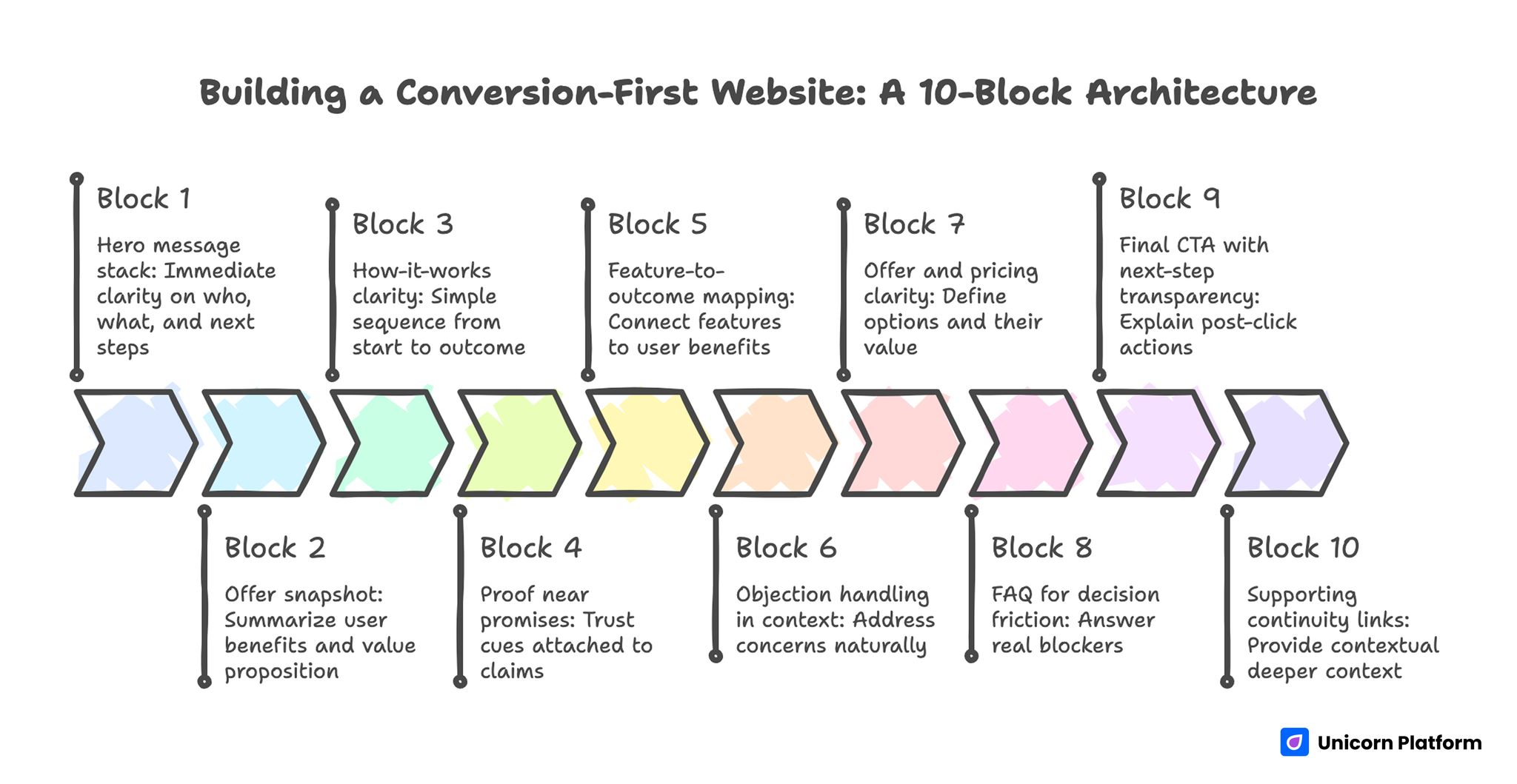
Complete 10-Block Architecture Guide for Custom No-Code Sites
If you want a dependable baseline, start from a proven site builder workflow and adapt each block to your audience, offer, and conversion objective. This keeps production fast while preserving strategic clarity.
Block 1: Hero message stack
Your hero should answer three questions immediately: who this is for, what outcome it creates, and what to do next. Use concrete language and avoid abstract positioning that could describe any brand.
Include one primary CTA and one optional secondary action only if it supports a real exploratory intent. Too many equal-priority actions usually reduce completion quality.
Block 2: Offer snapshot
Directly under the hero, summarize what users get and why it matters now. Add high-impact details that reduce uncertainty, such as implementation speed, support scope, or setup expectations.
This block prevents users from searching the page for basic context. Faster orientation generally improves both time-on-page and action rate.
Block 3: How-it-works clarity
Show the path from starting point to outcome in a simple sequence. Most visitors want to understand process effort before they commit.
Clear process explanation improves confidence and reduces low-fit conversions. It also lowers support load because users arrive with clearer expectations.
Block 4: Proof near promises
Attach trust cues to major claims. Evidence can include customer context, outcome snippets, process transparency, or practical case references.
Distributed proof usually outperforms a single large testimonial section. Buyers validate trust in stages, so proof should meet them at each stage.
Block 5: Feature-to-outcome mapping
Do not list features in isolation. Connect each feature to user benefit and decision relevance. This helps visitors evaluate practical value quickly.
Feature lists convert better when tied to real use scenarios. Scenario framing helps users map features to their own workflows quickly.
Block 6: Objection handling in context
Address likely concerns where they appear naturally in the flow. For example, handle setup questions near process sections and handle risk concerns near CTA sections.
Contextual reassurance feels useful, while generic reassurance feels forced. Relevance in placement is often more important than reassurance volume.
Block 7: Offer and pricing clarity
If you have multiple options, define who each option fits and what each one unlocks. Avoid naming structures that look clean visually but are hard to compare.
Simple comparison logic often improves both conversion and lead quality. Users who understand option differences early make better downstream decisions.
Block 8: FAQ for decision friction
Use FAQ to answer real blockers: implementation time, technical requirements, support model, pricing logic, and cancellation terms where relevant. A good FAQ should remove hesitation, not repeat marketing language.
Keep answers concise first, then expand only where extra context is needed. This preserves scan speed while still supporting deeper evaluation.
Block 9: Final CTA with next-step transparency
Your final action area should explain exactly what happens after click. Users should know confirmation flow, response expectations, and immediate next step.
Clear next-step framing reduces hesitation at the commitment point. Users should know exactly what happens after click.
Block 10: Supporting continuity links
Internal links should appear where readers genuinely need deeper context. For example, when discussing visual polish versus functional clarity, a practical reference like how to create a stunning website quickly can help readers improve design choices without losing structural discipline.
Place links contextually and keep one internal link maximum per paragraph. This keeps reading flow natural and avoids forced link clustering.
Copy Frameworks That Improve No-Code Website Performance
Framework 1: Audience-first headline model
Lead with audience and outcome before brand claims. Visitors care about whether your offer fits their situation, not how your team describes itself.
A strong formula is: audience + desired result + confidence or speed qualifier. This structure helps teams avoid vague claims that do not differentiate.
Framework 2: Subheadline clarity audit
Before publishing, run a four-point audit. This takes only a few minutes and prevents expensive weak launches:
- Is the audience explicit?
- Is the value outcome explicit?
- Is the mechanism believable?
- Is the effort expectation realistic?
If one answer is weak, rewrite before launch. The top stack has outsized influence on conversion quality.
Framework 3: CTA progression logic
Use lighter CTA language early for exploratory users and stronger CTA language later for decision-ready users. This progression aligns action intensity with confidence level.
When every CTA demands equal commitment, conversion quality often drops. Match CTA intensity to user confidence stage instead.
Framework 4: Decision-grade specificity
Replace broad language with observable details. Specificity shortens trust-building and attracts users who are more likely to complete and stay satisfied.
This also reduces support burden caused by unclear expectations. Better pre-click clarity usually means better post-click satisfaction.
Framework 5: Objection microcopy
Add short reassurance near forms and decision points, such as setup time, security, support timing, or cancellation policy. These small details often unblock hesitant high-intent users.
Small microcopy improvements frequently create meaningful lift without major redesign effort. They are a high-ROI optimization path for lean teams.
Design Rules for No-Code Sites That Need to Convert
Visual quality matters, but conversion depends on comprehension speed. A page can look premium and still underperform if users cannot identify value and next action quickly.
Use hierarchy intentionally: prominent headlines, clear section boundaries, consistent spacing, and obvious CTA priority. Each block should guide attention forward.
Avoid stacking too many visual focal points in one view. Competing emphasis weakens decision momentum and increases bounce risk.
If animation is used, keep it functional. Effects should improve understanding, not slow it.
Mobile-First Execution Standards
A significant share of website traffic now starts on mobile, especially from social and referral channels. Desktop-perfect layouts do not guarantee mobile conversion quality.
Ensure headline readability without zooming, visible CTA access near early scroll depth, clean spacing around key sections, and predictable form behavior on mobile keyboards. Mobile usability should be validated on real devices, not only browser previews.
Mobile patterns matter not only for usability but for real outcomes: industry UX frameworks such as the Google UX Playbooks emphasize thumb‑reach placement for CTAs, spacing for touch targets, and stacking logic that supports fast comprehension on small screens.
Remove heavy elements that delay first meaningful paint. Slow perceived load can undermine strong messaging before users even evaluate content.
Make mobile QA a standard part of each release cycle, not a final checklist step. Early validation prevents avoidable performance loss.
Operating Model: Who Owns What
No-code websites perform best when ownership is explicit. Assign one owner for message quality, one for trust and proof updates, and one for release QA. Even in very small teams, these roles can be shared as long as accountability is clear.
Document the release workflow in a lightweight format: what changed, why it changed, and which metric should move. This creates a reliable learning trail and reduces repetitive internal debate about future edits.
When ownership and documentation are missing, performance usually drifts even if the page started strong. A simple operating model keeps momentum and quality aligned over time.
Integration and Tracking: Turning a Website Into an Engine
No-code websites perform best when connected to the operating stack. At minimum, configure form capture, CRM routing, email automation, and analytics events for core actions.
Track behavior at decision points, not only final conversions. CTA clicks, form starts, section drop-off, and device-level differences reveal where confidence breaks.
A website without measurement cannot improve systematically. Integration is part of conversion architecture.
30-Day Build and Optimization Plan
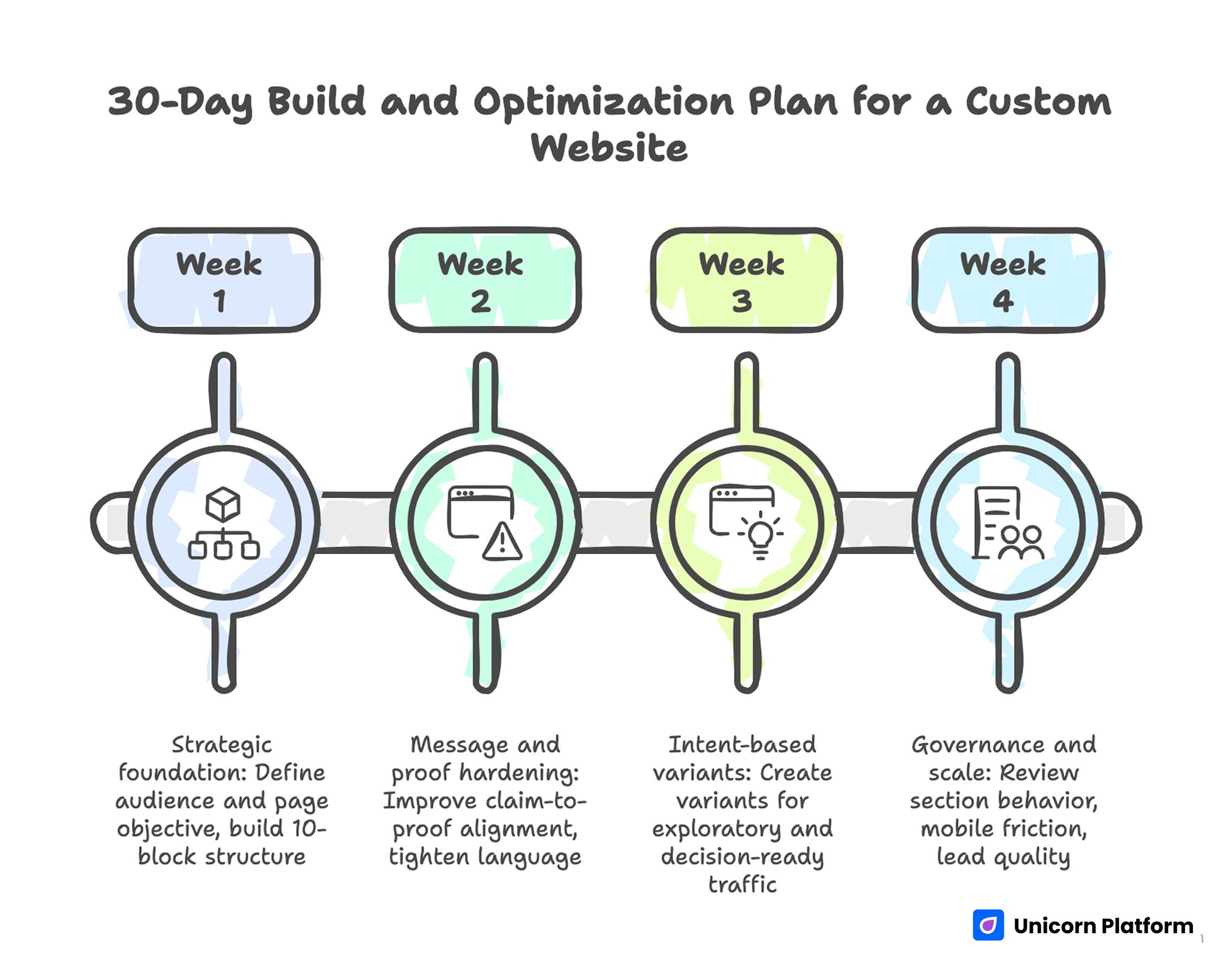
30-day Build and Optimization Plan for a Custom Website
Week 1: Strategic foundation
Define one primary audience and one primary page objective. Build the 10-block structure in Unicorn Platform and complete first-pass mobile checks.
By week end, ship a coherent version with clear top-stack messaging, trust placement, and a focused CTA path. Do not delay release waiting for perfect polish.
Week 2: Message and proof hardening
Improve claim-to-proof alignment, tighten feature-to-outcome language, and strengthen objection handling near key decisions. Remove blocks that add length but not decision value.
Run one controlled test on headline or subheadline while keeping structure stable. Single-variable tests produce cleaner and faster learning.
Week 3: Intent-based variants
Create at least two variants by traffic intent: exploratory and decision-ready. Adjust CTA intensity, proof depth, and section emphasis to match each audience type.
Measure conversion quality, not only conversion count. Volume without quality can hide serious positioning issues.
Week 4: Governance and scale
Review section-level behavior, mobile friction points, and downstream lead quality. Promote winning patterns into your base template and archive reusable rules.
Assign clear ownership for copy freshness, trust updates, and release QA. Ongoing accountability is what keeps gains from reversing.
Applied Scenarios for Real No-Code Teams
Founder-led startup launch
Use a concise value narrative and process clarity over broad brand language. Founders often over-explain vision while under-explaining user outcomes, so keep early copy anchored to specific user change.
Consultant lead-generation site
Prioritize service clarity, result framing, and trust evidence near booking CTA. Avoid portfolio overload that distracts from primary action, and make consultation expectations clear before form submission.
Creator or newsletter website
Emphasize value promise and cadence expectations in top sections. Visitors should know what they get and why subscription is worth attention before they hit the signup form.
B2B product pre-sales page
Use mechanism explanation and buyer-role relevance early. B2B visitors need decision context faster than decorative storytelling, especially when multiple stakeholders are involved.
Local service business
Surface geographic fit, response timing, and service scope near top blocks. Local buyers prioritize practical confidence over abstract positioning, so add nearby social proof from similar regions or customer types.
Multi-offer agency website
Use clear routing to service paths and avoid combining unrelated offers in one narrative. Structured routing improves both conversion and lead qualification because each visitor reaches a page aligned to actual intent.
Early-stage SaaS waitlist
Focus on problem clarity and first-value timeline. Users join waitlists when expected outcome feels concrete and near-term, so avoid vague future-state promises.
Portfolio-to-sales transition
If the site evolved from portfolio intent to lead-gen intent, rework section jobs around decisions and outcomes. Visual proof alone rarely closes action gaps unless the page clearly asks for the next commercial step.
Campaign-specific landing page
Build with narrow intent and one clear CTA. Campaign pages perform best when they avoid full-site complexity and keep message continuity with the acquisition source.
Team with limited production bandwidth
Ship disciplined minimum versions and iterate weekly. Structured small updates outperform delayed comprehensive redesigns and usually produce better learning quality under tight timelines.
Productized service with tiered plans
If your team sells packaged plans, compare plan differences in plain-language outcome terms instead of internal labels. Users decide faster when they can map each plan to a clear business need.
International traffic with mixed intent
When users arrive from multiple countries, clarify timezone, support windows, and onboarding expectations near core CTA blocks. These operational details reduce uncertainty and protect conversion quality for global audiences.
Execution Checklists That Keep Quality High
Pre-publish checklist
Before any release, confirm top-stack clarity, proof adjacency, mobile readability, and form behavior across common devices. This short checklist catches high-impact issues before traffic is exposed to them.
Weekly optimization checklist
Run one hypothesis per cycle, track one primary metric plus one quality metric, and publish a clear learning note after each test. This prevents chaotic changes and gives the team reusable guidance for future pages.
Monthly governance checklist
Review stale proof, outdated claims, and performance drift by device and source. Governance work is rarely glamorous, but it keeps high-performing pages from quietly decaying.
Common Failure Modes and Fixes
Failure mode 1: Template left mostly unchanged
Customize top-stack message, offer framing, and proof placement first. These are usually the highest-leverage updates because they control first impression and early confidence.
Failure mode 2: Strong design, weak value clarity
Rewrite headlines and subheadlines around user outcomes and practical relevance. Clarity fixes often outperform design changes because users decide with language before they admire layout.
Failure mode 3: Trust appears too late
Move credibility cues nearer to major claims and CTA decisions. Early trust placement reduces drop-off and improves lead quality at the same time.
Failure mode 4: Too many competing CTAs
Consolidate primary action paths and reduce decision overload. One dominant action improves completion consistency and simplifies analysis of what users actually want.
Failure mode 5: Mobile friction ignored
Prioritize mobile readability, spacing, and form flow in each release cycle. Mobile friction can silently cap overall performance even when desktop dashboards look healthy.
Failure mode 6: No test cadence
Adopt weekly, one-variable experiments with clear hypotheses. This creates measurable learning instead of random edits and helps stakeholders trust optimization decisions.
Failure mode 7: No owner for site quality
Assign accountability for messaging, proof freshness, and QA. Ownership is required for long-term performance stability because unattended pages almost always drift.
Failure mode 8: Traffic-quality mismatch
If conversion volume rises but downstream quality falls, tighten audience fit language and form qualification logic. High volume only matters when it maps to meaningful business outcomes.
Failure mode 9: Offer complexity hidden in fine print
When terms are buried, users hesitate or churn later. Bring key constraints and expectations into main flow near the decision points where they matter.
FAQ: Building a Custom Website Without Coding
What makes a no-code website truly custom?
A no-code website is truly custom when structure, messaging, and conversion flow are tailored to your audience and offer, not when visuals are changed alone. Visual style supports trust, but conversion logic comes from relevance and decision clarity.
Can a no-code site look professional enough for serious business use?
Yes. Professional quality comes from clear hierarchy, strong copy, trust signals, and consistent design logic more than from custom code itself. Many high-performing business pages are built with no-code systems and strong editorial standards.
How long should a no-code business page be?
Length should match decision complexity. Simple offers can convert on shorter pages, while higher-consideration offers usually need deeper proof and objection handling with clearer section sequencing.
Should we build one page for all traffic sources?
A shared base page can work, but source-specific variants often perform better when user intent differs significantly. Keep architecture stable and adapt messaging emphasis per source.
What should we test first after launch?
Start with first-screen message clarity and CTA wording. These changes often produce the fastest signal on fit and intent quality before deeper structural experiments.
How many CTAs should we place on one page?
Use one primary CTA and one optional secondary CTA in early sections, then increase commitment strength only as confidence builds. Too many equal-priority actions usually reduce overall completion.
Where should testimonials appear?
Place testimonials near claims and near conversion decisions, not only in one isolated section. Contextual proof is usually more persuasive than clustered proof.
How important is mobile optimization for no-code sites?
It is critical. Mobile usability often determines whether paid and social traffic can convert efficiently, especially for first-time visitors from short-form content channels. Small mobile friction points can quietly erase campaign ROI.
Can no-code workflows support advanced optimization?
Yes, if teams use structured testing, clear QA, and disciplined release cycles rather than one-time publishing. The tool enables speed, but process discipline produces durable gains.
What is the fastest way to improve an underperforming no-code page?
Tighten first-screen relevance, reposition trust cues, and simplify action paths. These three changes often generate the quickest lift while creating a stronger foundation for future tests.
Final Takeaway
Building a custom website without coding is not about skipping quality. It is about removing unnecessary production friction so your team can focus on decisions that move results: relevance, clarity, trust, and action flow.
Unicorn Platform gives teams the speed to publish and iterate quickly. The performance advantage comes from pairing that speed with structured architecture, disciplined QA, and ongoing optimization.
Start with a strong first version, connect measurement, and improve in focused cycles. That is how a no-code website becomes a dependable growth system, not just a fast launch artifact.