Table of Contents
- The Four Lifespan Clocks You Should Track
- What Actually Wears GPUs Down Faster
- Scenario Playbooks by User Type
- Unicorn Platform Blueprint for Hardware Guide Pages
- FAQ
Most people ask this question when a card starts feeling slower, louder, or less predictable. The real issue is rarely age alone. The issue is whether the card still meets your target outcomes at an acceptable operating cost.
A GPU (graphics processing unit) can stay useful for years, but useful does not always mean optimal. For many setups, a 3-5 year planning horizon is still the most practical baseline. What changed in recent years is not only hardware speed, but workload patterns: longer AI sessions, heavier creator pipelines, and stricter uptime expectations.
This guide updates a classic lifespan view with a modern execution model. You will get concrete checks for stability, throughput, and thermal health, plus a clear way to decide whether to keep, tune, or replace.
sbb-itb-bf47c9b
Key Takeaways
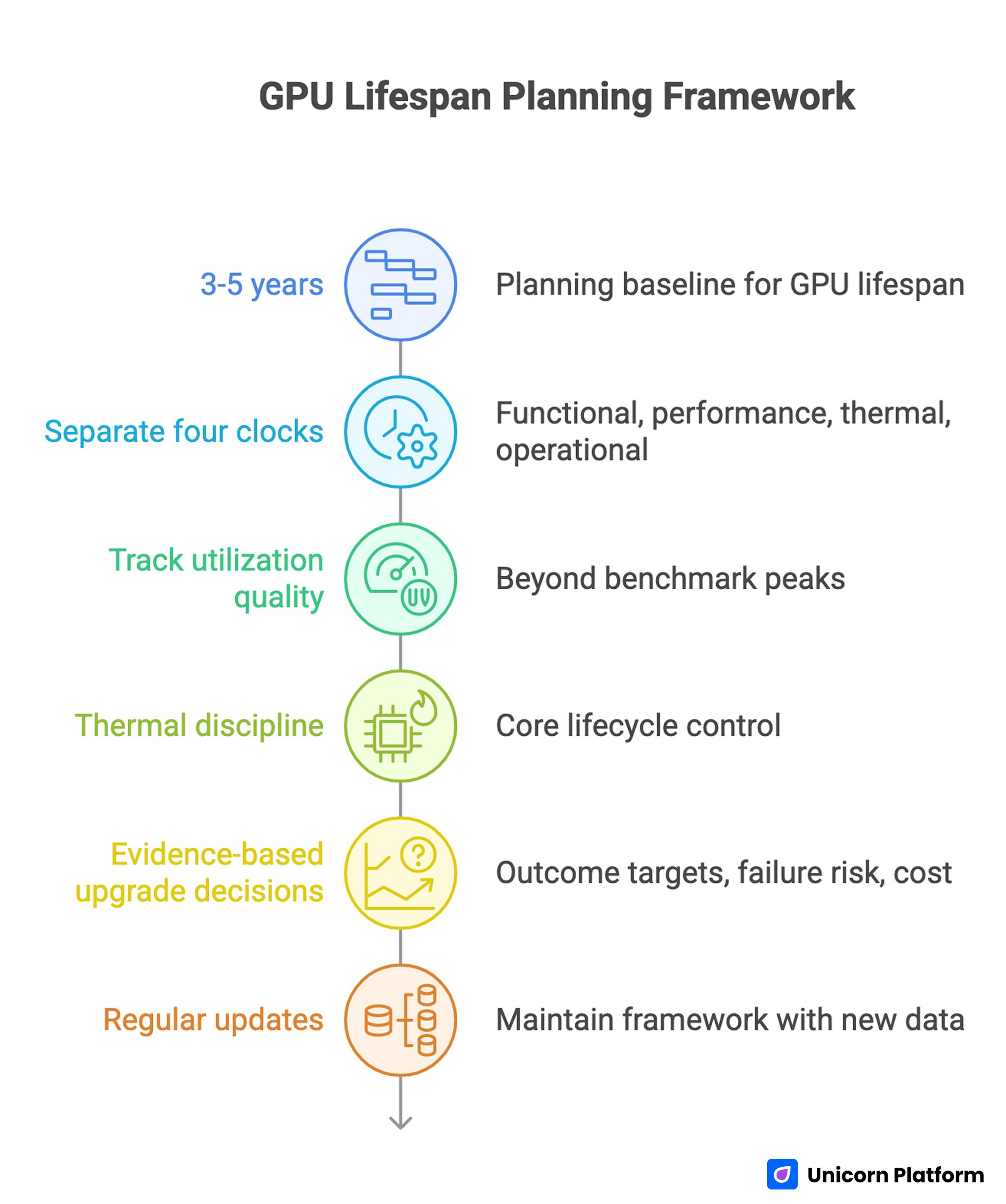
GPU Lifespan Planning Framework
- Use 3-5 years as a planning baseline, then adjust by workload intensity and reliability demands.
- Separate four clocks: functional life, performance life, thermal life, and operational life.
- Track utilization quality, not only benchmark peaks. Idle gaps and data bottlenecks often hide the real problem.
- Treat thermal discipline as a core lifecycle control, not an afterthought.
- Make upgrade decisions from evidence: outcome targets, failure risk, and total operating cost.
- If you publish technical content on Unicorn Platform, maintain this as a living framework with regular update blocks.
Why the 3-5 Year Rule Still Works
The old article baseline around 3-5 years remains directionally correct, and that is still a useful starting point. Most users see their best value in years 1-3, then enter a mixed period where performance is acceptable but margins shrink. By years 4-5, many cards continue to function, yet tradeoffs become visible in heat, noise, stability, or output speed.
The mistake is treating this window like a fixed expiration date. A card can stay functional past five years, but lifecycle decisions are about outcomes, not survival. If the card still serves your targets with low friction, keep it. If delivery speed, reliability, or operational confidence drops, plan replacement before failure forces it.
The Four Lifespan Clocks You Should Track
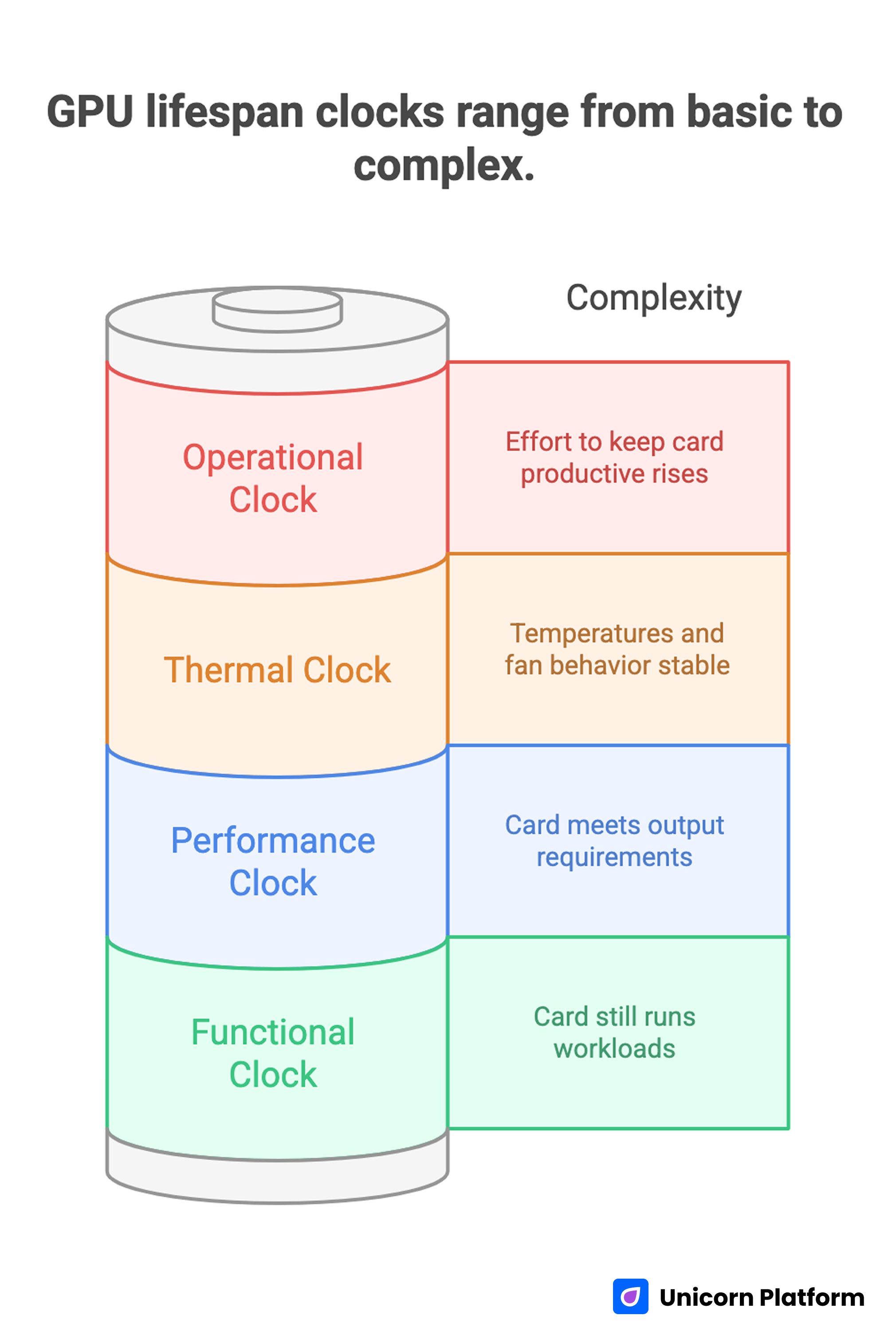
GPU Lifespan Clocks Range from Basic to Complex
A single "lifespan" number hides useful signals. Track these clocks separately so decisions stay rational.
Functional clock
Does the card still run workloads without hard failure? This is the simplest measure and usually the least useful by itself.
Performance clock
Does the card still meet your required output? That could mean frame consistency, export time, inference latency, or batch throughput.
Thermal clock
Are temperatures and fan behavior stable over time? Rising heat under unchanged workloads often signals cooling deterioration or airflow problems.
Operational clock
How much effort is required to keep the card productive? If troubleshooting, tuning, and workaround time keeps rising, operational life may be ending even if the hardware still powers on.
When these clocks diverge, lifecycle decisions become clearer. A card can be functionally alive but operationally expensive. Another card can be thermally healthy but performance-limited for newer workloads.
What Modern Workloads Changed
Older lifespan discussions focused mostly on gaming frame rates. That is too narrow now. Creator pipelines, local AI tasks, and mixed workloads changed the stress profile.
Long inference sessions and repeated high-memory operations can expose weaknesses that short benchmarks miss. Burst-heavy pipelines can also make hardware look weak when the real issue is orchestration overhead, data movement delay, or poor cache behavior. This is why lifecycle planning should include utilization quality, not just raw peak numbers.
A card that looks fine in quick tests may still fail your real production rhythm if sustained sessions trigger thermal throttling, VRAM pressure, or unstable boost behavior. Use session-based measurements, not one-pass synthetic results.
Utilization Quality: The Missing Lifespan Signal
A helpful modernization from infrastructure practice is splitting utilization into layers. You can pay for capacity while receiving less output than expected if work arrives in bursts, waits on data, or loses time between tasks.
Allocation-level efficiency
How much of paid hardware time is spent doing useful work? If GPUs sit idle during setup, transfer, or queue delays, hardware may appear underused regardless of theoretical power.
Kernel and compute efficiency
When work does run, how effectively is compute bandwidth used? Low effective throughput under heavy load can point to pipeline design issues, not immediate hardware replacement needs.
Pipeline efficiency
How much time is lost before and after GPU execution? Slow storage, weak preprocessing paths, and poor batching strategies can reduce real throughput more than moderate hardware differences.
For lifespan planning, this matters because poor utilization quality can mimic aging. Fixing pipeline losses can extend useful life without buying new hardware.
What Actually Wears GPUs Down Faster
Sustained high thermal exposure
Repeated long sessions near thermal limits accelerate wear pressure across cooling systems and electrical components. Short spikes are usually less damaging than sustained heat without recovery.
Airflow decay over time
Dust buildup, filter neglect, and blocked intake paths gradually reduce cooling efficiency. Many "sudden" stability problems are slow airflow decline that went untracked.
Aggressive tuning without guardrails
High overclocks with unstable voltage and weak cooling may look good in short runs but increase long-run instability risk. For lifecycle value, stable output is worth more than occasional benchmark gains.
Mechanical cooling wear
Fans and interface materials age. If temperatures creep up while workload stays constant, cooling subsystem deterioration may be the primary issue.
Mismatch between duty cycle and setup
Always-on workloads create a different stress profile than occasional use. Lifecycle plans must reflect actual duty cycle, not generic calendar assumptions.
Keep, Tune, or Replace: A Practical Decision Framework
Use this framework monthly and at each quarter boundary.
Keep
Stay on current hardware when all three are true: outcome targets are met, thermals are stable, and incident rate is low. Continue routine maintenance and trend monitoring.
Tune
Tune when outcomes are close to target but margins are shrinking. Prioritize airflow cleanup, conservative voltage behavior, fan curve balance, and workload optimization before hardware replacement.
Replace
Replace when reliability risk rises or core targets cannot be met without repeated compromises. If uptime and delivery confidence matter, planned replacement is usually cheaper than reactive replacement.
This framework prevents both common errors: replacing too soon because of launch noise, and replacing too late after reliability has already degraded.
A Monthly GPU Health Scorecard
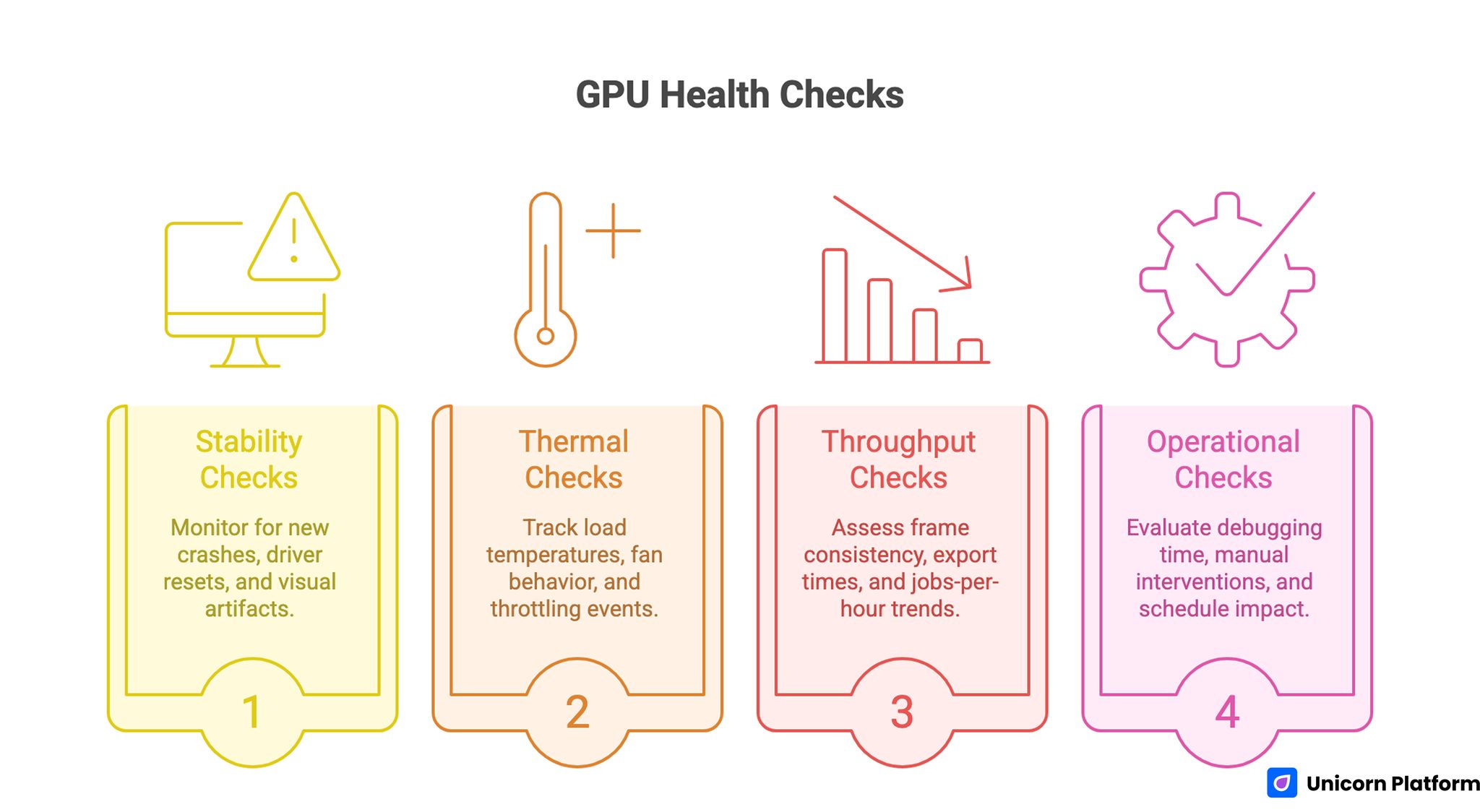
GPU Health Checks
Use the same checklist every month so trend changes are visible.
Stability checks
- New crashes in previously stable workflows
- Driver resets or black-screen incidents
- Persistent visual artifacts under known-good workloads
Thermal checks
- Load temperatures vs historical baseline
- Fan behavior drift (more time at high RPM)
- Throttling events under unchanged load
Throughput checks
- Frame consistency or latency target achievement
- Export or inference time drift
- Jobs-per-hour trend over comparable sessions
Operational checks
- Time spent debugging and retuning
- Number of manual interventions per week
- Schedule impact from hardware-related slowdowns
If two categories worsen for two consecutive checks, start an upgrade plan instead of waiting for an outage.
Bottleneck Validation Before You Buy New Hardware
Many unnecessary upgrades happen because teams skip bottleneck diagnostics. Validate these first.
Data path
Confirm storage and memory flow are not starving workloads. Slow reads, weak cache locality, and RAM pressure can suppress GPU output.
CPU-side orchestration
Check preprocessing, dispatch, plugin overhead, and task batching. Poor orchestration can produce idle gaps that look like GPU limitations.
Session consistency
Compare identical workload slices across time. Inconsistent test conditions create false upgrade signals and wasted budget.
If bottlenecks live outside the GPU path, replacement will not solve the root cause.
Economic Timing: Replacement as a Cost-Control Decision
Hardware lifecycle is a financial decision, not only a technical one.
Estimate stay-cost
Include lost throughput, delayed delivery, and ongoing troubleshooting labor. This cost is often hidden but real.
Estimate replace-cost
Include hardware purchase, migration time, tuning time, and realistic resale value of current hardware.
Compare decision horizon
Run 3-month and 6-month comparisons. If stay-cost approaches replace-cost inside your horizon, delaying replacement is usually false economy.
This model keeps decisions grounded and reduces emotionally driven upgrades.
How to Apply This in Unicorn Platform
Here is the simple version.
If your site is built on Unicorn Platform and you write about hardware, this guide should help readers answer one practical question: should they keep their current GPU, tune it, or replace it soon.
A good setup is to place a short "decision block" near the top of your page. Keep it very direct:
- Current goal (for example: stable 60 FPS, export under 10 minutes, or inference under target latency)
- Current GPU status (stable / warning / unstable)
- Recommended action right now (keep / tune / replace)
Then update this block once per month using three signals from this article:
- Thermal trend
- Stability incidents
- Throughput trend
If two of those signals worsen for two months in a row, move the recommendation from "keep" to "plan upgrade." This makes the page useful because readers get a clear next step, not just theory.
For teams, keep one owner for updates. That person only needs to do a short monthly pass and one deeper quarterly pass. The monthly pass updates status and action. The quarterly pass reviews the full framework and FAQ.
In Unicorn Platform, you can keep this easy by separating content into simple blocks:
- Main guide block (explains the method)
- Quick checklist block (fast decision tool)
- Latest update block (what changed and when)
This way, readers can scan quickly, and your team can update only the part that changed instead of rewriting everything.
Common Mistakes That Reduce Lifecycle Value
Treating age as the only signal
Age matters, but outcome fit and reliability matter more. Calendar age without context leads to poor timing.
Ignoring thermal drift until failure signs appear
By the time severe throttling shows up, lifecycle value has often been leaking for months.
Confusing poor utilization with hardware limits
Underused or bursty pipelines can make healthy hardware look weak. Diagnose utilization layers before spending.
Tuning for screenshots, not stability
Short benchmark wins can hide long-run instability and maintenance cost.
Running without checkpoints
No monthly or quarterly review means decisions become reactive. Reactive decisions cost more.
90-Day Lifecycle Reset Plan
Use this when hardware state is unclear or team confidence is low.
Days 1-30: Baseline and hygiene
Capture thermal, stability, and throughput baselines under normal workload sessions. Clean airflow paths, filters, and internal dust zones. Re-test with identical workload slices.
Days 31-60: Stability-first optimization
Apply conservative tuning and workflow optimizations. Remove any profile that introduces instability. Measure throughput and incident rate against baseline.
Days 61-90: Decision and roadmap
Choose keep, tune, or replace from evidence. If replacing, define a planned migration window and rollback path. If keeping, lock the next quarterly review with explicit target metrics.
This cycle builds decision confidence and reduces unplanned downtime.
Scenario Playbooks by User Type
The same hardware advice does not apply equally to every reader. Unicorn Platform users often publish for mixed audiences, so scenario-specific guidance improves usefulness and engagement.
Solo builder with a single workstation
If one machine handles product work, design, and occasional AI tasks, reliability is usually more valuable than peak speed. In this scenario, a stable 3-5 year plan works well when paired with monthly thermal checks and conservative tuning.
The upgrade trigger should be practical: repeated schedule delays, unstable sessions, or consistent inability to meet your target output. A single workstation setup has low redundancy, so planned replacement timing matters more than squeezing every final benchmark point.
Small product team running local AI workflows
For teams serving demos, prototypes, or local inference, utilization quality is often the limiting factor. If preprocessing pipelines, data transfer, or job scheduling create idle GPU time, the card may look weak while the real issue is workflow design.
In this scenario, run bottleneck diagnostics before purchase decisions. If optimization closes the gap, you extend lifecycle value. If target latency still fails after workflow improvements, replacement can be justified with confidence.
Creative studio with deadline-driven exports
Studios should prioritize predictable export windows over theoretical peak performance. A card can be acceptable on average but still risky if long jobs intermittently fail or miss delivery deadlines.
For this scenario, define a hard reliability threshold: if incident frequency or export variance crosses that threshold for two review cycles, move to planned replacement. This avoids last-minute failures in client-critical periods.
Agency operating multiple heterogeneous systems
Agencies often accumulate mixed hardware generations, which creates inconsistent outputs and support overhead. The biggest gain here usually comes from standard lifecycle governance rather than isolated hardware tuning.
Use one shared review cadence, one scorecard format, and one decision protocol across all systems. Standardization reduces support noise and makes replacement planning easier to forecast.
Unicorn Platform Blueprint for Hardware Guide Pages
To keep this topic useful over time, page architecture matters as much as writing quality. Unicorn Platform makes it practical to maintain a structured publishing model without engineering bottlenecks.
Recommended page set
Use three connected pages:
- Main guide page: full lifecycle framework, scorecards, and decision rules
- Quick checklist page: short keep/tune/replace flow for fast decisions
- Update-log page: monthly revisions, new insights, and policy changes
This structure serves both quick readers and deep readers. It also makes updates faster because only affected blocks need revision.
Block-level structure for the main guide
Use repeatable blocks in this order:
- Outcome-focused intro
- Key takeaways
- Lifecycle model
- Diagnostics and checks
- Decision framework
- Scenario playbooks
- FAQ
- Final action guidance
When blocks are reused across related content, recommendation quality stays consistent even with multiple contributors.
Editorial ownership model
Assign one content owner and one technical reviewer. The content owner keeps the narrative clear; the technical reviewer validates operational guidance and risk language.
In Unicorn Platform workflows, this simple role split prevents drift between editorial tone and technical accuracy. It also speeds updates because responsibilities are explicit.
Update cadence model
Use monthly light updates and quarterly deep updates.
Monthly:
- refresh operational signals and checklist language
- revise sections where reader questions cluster
Quarterly:
- review full decision framework
- revise scenario playbooks
- confirm that FAQ still reflects real user pain points
This cadence keeps pages fresh without constant rewrites.
Incident Response When GPU Reliability Drops Mid-Cycle
Lifespan plans should include response procedures, not just preventive advice. When instability appears during active work, teams need a simple operational protocol.
Phase 1: Stabilize
- Freeze risky tuning profiles
- Reduce workload stress temporarily
- Capture temperature and incident logs for repeatable diagnosis
The goal is to restore predictable behavior quickly while preserving enough evidence to identify root causes.
Phase 2: Diagnose
- Reproduce failures with controlled workload slices
- Isolate cooling, software, and workflow variables one by one
- Confirm whether instability is thermal, configuration, or hardware-origin
Avoid making multiple major changes at once. That makes diagnosis ambiguous and increases recovery time.
Phase 3: Decide
If stability returns under sustainable settings, continue with tightened monitoring. If instability persists under controlled conditions, move to replacement planning and preserve fallback capacity for critical tasks.
A response protocol like this protects delivery timelines better than ad hoc trial-and-error fixes.
Quarterly Review Template for Teams
Use this short review model each quarter to keep lifecycle decisions objective.
Section A: Outcome fit
- Are current workloads meeting defined output targets?
- Are delivery windows stable enough for business requirements?
Section B: Reliability and risk
- Incident trend over the last 90 days
- Severity of unresolved instability events
Section C: Cost and capacity
- Estimated stay-cost for next quarter
- Estimated replace-cost and migration overhead
Section D: Decision
- Keep with current policy
- Tune with explicit optimization plan
- Replace with planned migration timeline
Recording this decision every quarter creates institutional memory and prevents repeated debates based on anecdotal impressions.
FAQ
How long can a modern GPU stay useful?
For many setups, a 3-5 year window is a practical planning baseline. Useful life can extend further if targets remain met and reliability stays stable.
Can I keep using a card after five years?
Yes, if outcome targets and reliability still hold. The key test is operating value, not just whether the card still turns on.
What is the clearest sign I should replace soon?
Repeated instability plus missed performance targets under controlled settings is a strong replacement signal.
Should I upgrade immediately when frame rates drop?
Not always. First validate thermals, pipeline overhead, and settings drift. Many drops can be mitigated without replacement.
Does conservative undervolting help lifecycle value?
It can, when done carefully and validated for stability. The objective is predictable output with lower heat stress.
Are AI workloads harder on GPUs than gaming?
Long sustained AI sessions can create heavy thermal and memory pressure. Stress level depends on duty cycle and workload design.
How often should I run lifecycle checks?
Run a monthly scorecard and a quarterly decision review. That cadence catches drift early without overloading operations.
What if my card is stable but throughput is too low?
That is usually a performance-lifecycle issue, not a failure-lifecycle issue. Use economic timing and target fit to decide replacement.
How can Unicorn Platform users keep this topic fresh?
Use a guide-plus-checklist-plus-update-log page structure and refresh key blocks monthly. This keeps content relevant and actionable.
What helps avoid emergency hardware swaps?
Planned checkpoints, stability-first tuning, and evidence-based replacement windows reduce failure-driven decisions.
Final Takeaway
A strong GPU lifecycle strategy is not about guessing a magic expiration date. It is about tracking outcome fit, utilization quality, thermal behavior, and operational cost over time.
For Unicorn Platform users, the practical advantage is execution speed: you can keep this guidance current through structured monthly updates instead of sporadic full rewrites. That is how a hardware guide stays useful, interesting, and trusted.