Table of Contents
- What “Beautiful” Should Mean for No-Code Websites
- SEO for Beautiful No-Code Websites
- 30-Day Build Plan
- Common Mistakes and Fast Fixes
- FAQ
Building a website without coding is no longer unusual. The challenge now is building one that looks credible, communicates clearly, and drives outcomes instead of just existing online.
Many non-technical teams publish quickly but struggle with weak trust signals, vague messaging, and low conversion quality. The page may look acceptable, yet users still leave because they cannot understand relevance or next steps in the first moments.
A beautiful website in 2026 should combine visual quality with decision clarity. It should help users answer three questions fast: what this offer is, why it matters, and what action to take now.
This guide gives you a full no-code system for that outcome. You will learn how to choose tools, structure pages, write clearer copy, establish visual consistency, and run optimization loops that improve performance over time.
sbb-itb-bf47c9b
Key Takeaways
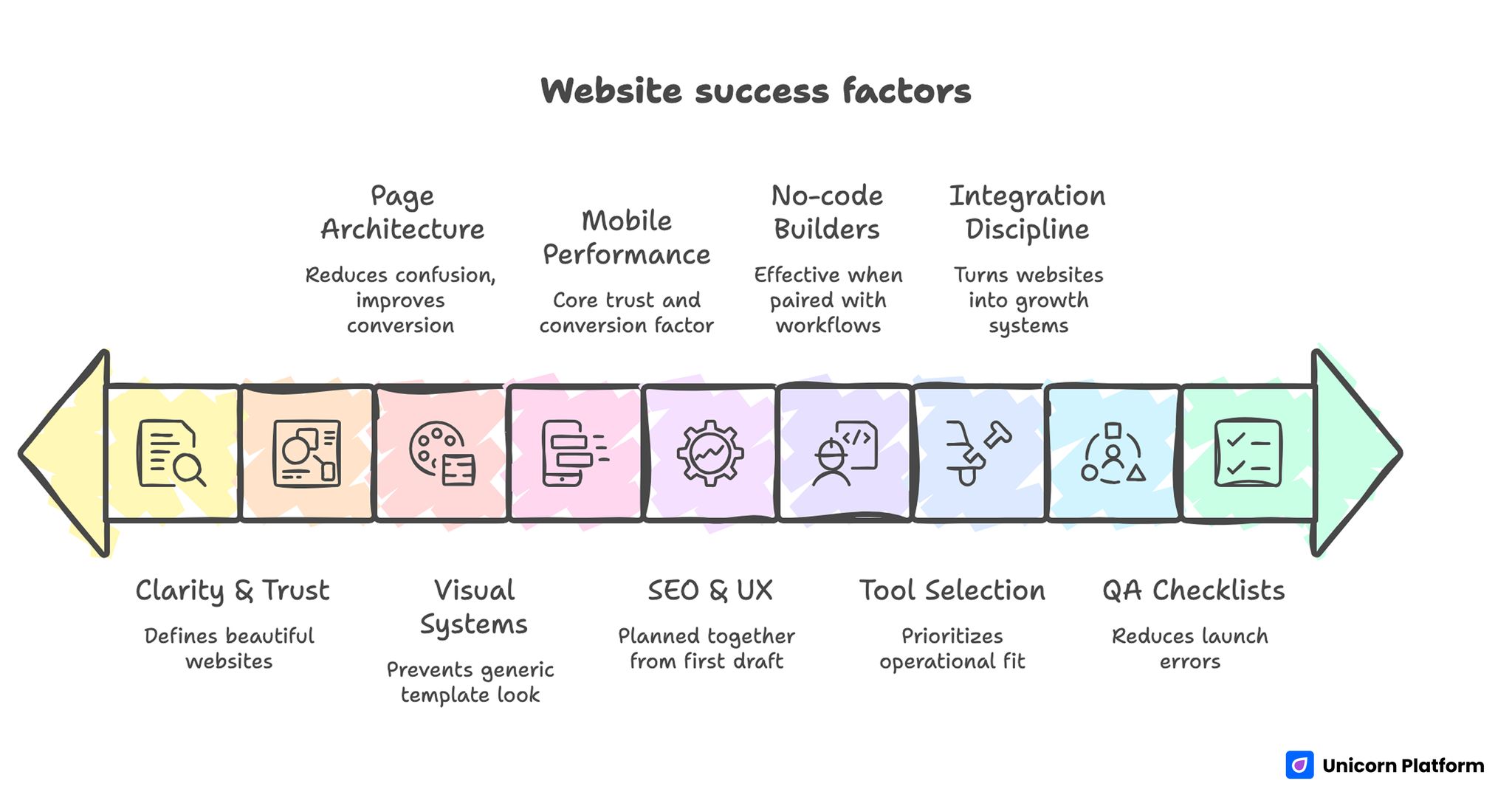
Website Success Factors
- Beautiful websites are defined by clarity and trust, not only style.
- No-code builders are most effective when paired with repeatable workflows.
- Tool selection should prioritize operational fit over design demos.
- Strong page architecture reduces confusion and improves conversion intent.
- Visual systems prevent template-looking pages from feeling generic.
- Mobile performance is a core trust and conversion factor.
- SEO and UX should be planned together from the first draft.
- Integration discipline turns websites into active growth systems.
- QA checklists reduce avoidable launch errors.
- Weekly, focused experiments create compounding improvement.
What “Beautiful” Should Mean for No-Code Websites
Visual style matters, but design quality is only one layer of performance. A page that looks polished but leaves users uncertain is not successful.
A high-performing no-code website combines:
- clear content hierarchy
- readable visual rhythm
- specific value messaging
- trust evidence near decision points
- low-friction action paths
When these elements are aligned, users move through the page with confidence. When they are missing, the page can still look modern while underperforming commercially.
Why No-Code Is a Strategic Advantage in 2026
No-code is not just a convenience toolset. It is a speed advantage for teams that need to adapt quickly to market changes.
Campaigns shift, offers evolve, and user objections change over time. Teams that can update pages quickly without technical bottlenecks improve faster than teams waiting on development cycles for each edit.
The strongest no-code teams treat publishing as an operating system. They plan releases, track behavior, and iterate in short cycles using reusable modules.
This approach creates both velocity and consistency, which is hard to match with fragmented one-off page builds.
Research from the MIT Sloan Management Review highlights how no‑code tools enable organizations to accelerate digital transformation by empowering business teams to build and modify solutions without heavy reliance on IT, resulting in faster time‑to‑market and greater responsiveness to changing customer needs.
Choosing the Right No-Code Builder
Most tool comparisons over-index on visual templates. Operational fit matters more for long-term performance.
Evaluate each builder on practical criteria:
- editing speed for non-technical contributors
- template quality for conversion structure
- mobile editing and preview reliability
- SEO control depth
- integration coverage (analytics, forms, CRM, email, payments)
- publishing workflow and team collaboration
- long-term maintainability
Score each category using your business goals as weighting factors. This prevents decisions based on aesthetics alone.
A practical baseline for comparing no-code publishing workflows is build your custom website without coding, especially if your team is choosing between speed, flexibility, and growth readiness.
Strategy First: Decide Before You Design
Weak pages usually start with design decisions before strategic decisions. A better process starts with clarity on audience, intent stage, and primary action.
Define these five inputs before selecting a template:
- Primary audience segment
- Core problem or goal
- Desired outcome promise
- Trust proof type
- Primary call to action
Once those inputs are locked, template and styling choices become much easier. The page starts as a decision flow, not a design collage.
Essential Page Architecture for Non-Coders
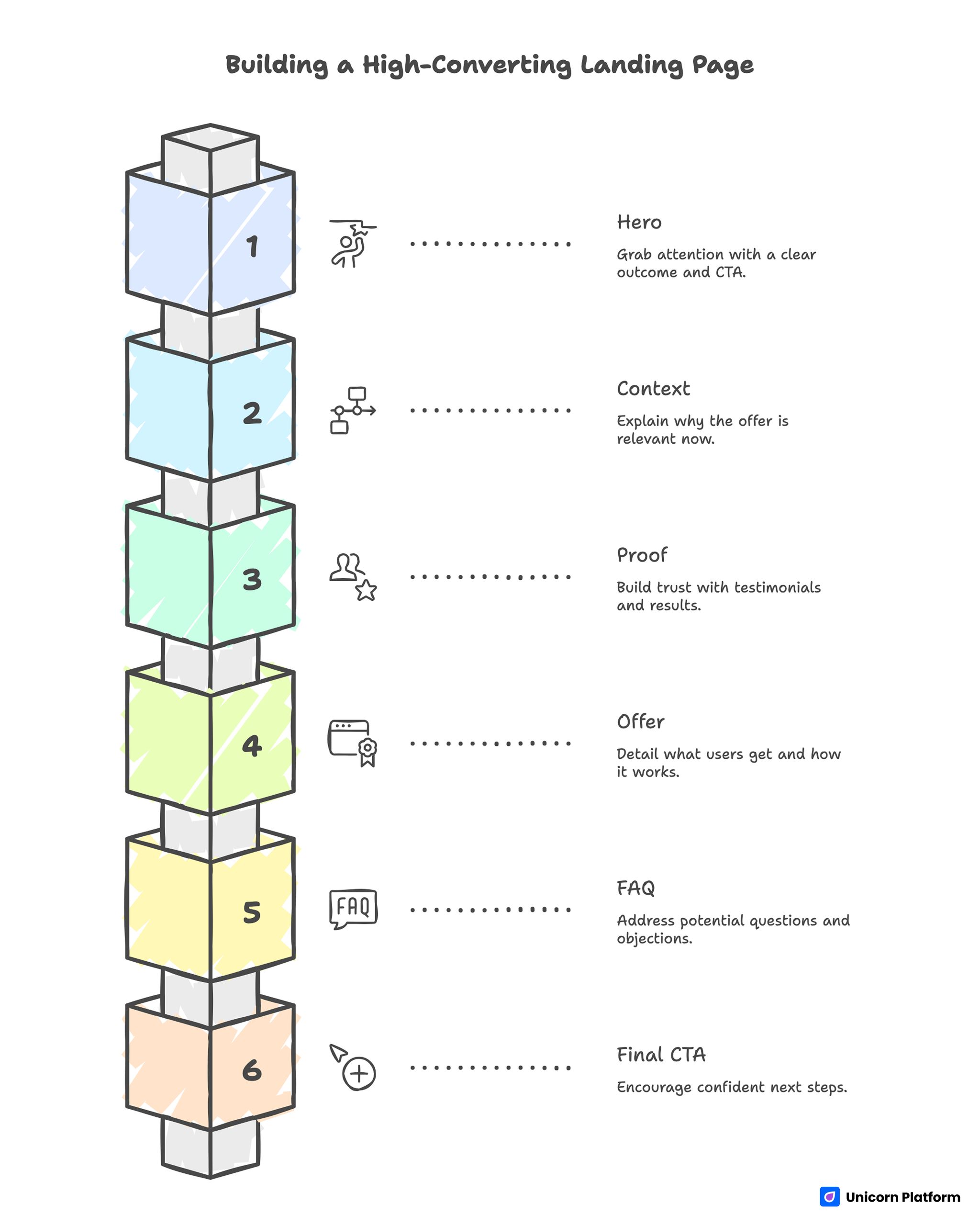
Essential Page Architecture for Non-Coders
A simple architecture makes no-code execution faster and easier to optimize. If you need a deep structural model, the sequencing in a step-by-step guide to a high-converting landing page structure works across most no-code use cases.
A practical section sequence is:
- Hero: audience fit + clear outcome + primary CTA
- Context: why this matters now
- Proof: testimonials, results, or use-case evidence
- Offer: what users get and how it works
- FAQ: friction and objection handling
- Final CTA: confident next step
Each section should have one specific job. If multiple sections try to do everything, page clarity drops quickly.
Visual Design System for No-Code Teams
A design system keeps pages consistent even when multiple contributors edit content.
Define standards for:
- headline sizes and spacing
- body text width and line height
- section padding rhythm
- card styles for proof and features
- CTA button hierarchy
- color and contrast usage
Consistency makes pages feel premium. It also reduces editing errors and helps new team members ship faster.
Avoid overloading designs with effects. Smooth rhythm and readable hierarchy usually outperform heavy visual decoration.
Writing Copy That Feels Clear, Not Generic
No-code tools remove technical friction, but conversion still depends on language quality.
Most weak pages fail because copy is broad and abstract. Users do not understand practical value.
Use a simple messaging model:
- Problem: what friction exists now
- Promise: what result users can expect
- Proof: why they should trust the claim
- Path: what to do next
Example:
Generic: "Modern platform for your online presence."
Stronger: "Launch a conversion-ready website in days, test your messaging weekly, and improve lead quality without developer bottlenecks."
Specific language reduces doubt and improves action intent.
Trust Design for Service and Local Business Pages
Trust is one of the biggest reasons users convert or leave, especially for service and local business websites.
High-performing trust design usually includes:
- role-specific testimonials
- measurable outcomes or case snippets
- process transparency
- clear response expectations
- visible contact paths
These principles are especially effective in real estate and advisory categories where users evaluate credibility before inquiry. Teams building local-trust pages can adapt patterns from real estate website design made simple and apply them to other service markets.
The core idea is universal: claims must be close to supporting evidence.
Mobile-First Performance and Usability
Most no-code sites now receive a majority of visits from mobile devices. Mobile quality is therefore a conversion requirement, not a later polish step.
Focus on:
- first-screen readability
- visible CTA without excessive scrolling
- touch-friendly spacing
- compressed media with clear detail
- short, easy-to-complete forms
Run checks on real devices, not only browser simulation. Real-device testing catches load and interaction issues that mock previews often miss.
If mobile behavior is weak, visual beauty on desktop will not rescue conversion results.
SEO for Beautiful No-Code Websites
Good design and good SEO are not competing goals. Both depend on structure clarity.
Start with clean intent mapping:
- one main search intent per page
- semantically related subtopics in supporting sections
- logical heading hierarchy
- metadata aligned with user goals
Add internal links where they genuinely help users continue decision-making. Link placement should feel like guidance, not keyword strategy.
For prioritizing which sections to optimize first, combine search analysis with behavioral patterns from user behavior tips to optimize landing pages.
SEO works best when it is built into content architecture from the start instead of patched in after launch.
According to the concept of iterative design, products that are continually tested, refined, and updated based on feedback achieve better user satisfaction and quality over time, while early problem detection reduces costly late‑stage rework (Iterative design – Wikipedia)
Integrations That Turn a Website Into a Growth System
A no-code website should connect directly to your business workflow.
Minimum integration stack:
- analytics for behavior and attribution
- CRM for lead routing and follow-up
- email automation for nurture and confirmation
- scheduling or booking tools when relevant
- payment or checkout tools for transaction pages
Define naming conventions for events and sources before launch. Consistent tracking prevents reporting noise and improves decision speed.
Without integration discipline, teams collect surface metrics but fail to improve actual outcomes.
Reusable Page Archetypes for Fast Execution
Most non-coders do not need dozens of custom layouts. Three archetypes handle most needs.
Lead capture page
Use for services, agencies, and consultation offers.
Core blocks: pain point, solution, proof, form, FAQ, CTA.
Product or app landing page
Use for trials, installs, or demos.
Core blocks: hero promise, capability-to-benefit mapping, product visuals, trust section, action path.
Event or webinar registration page
Use for workshops and time-bound sessions.
Core blocks: event outcome, presenter credibility, agenda value, urgency cues, signup form.
Event-focused teams can improve section flow by adapting patterns from meetup and calendar landing pages.
With archetypes in place, teams can launch faster and avoid redesigning from scratch for every campaign.
Launch QA Checklist for Small Teams
Fast publishing should still follow strict QA. A ten-minute checklist can prevent weeks of conversion loss.
Pre-publish checklist:
- first screen matches campaign intent
- one primary CTA is visible and working
- trust proof appears before deep scroll sections
- forms and links are validated on mobile and desktop
- key analytics events fire correctly
- follow-up automation is connected
- load speed is acceptable on mobile data
Assign one launch owner for each release. Shared responsibility without clear ownership causes avoidable failures.
Track repeated support questions after launch. Recurring confusion usually points to a copy or UX section that needs immediate revision.
30-Day Build Plan
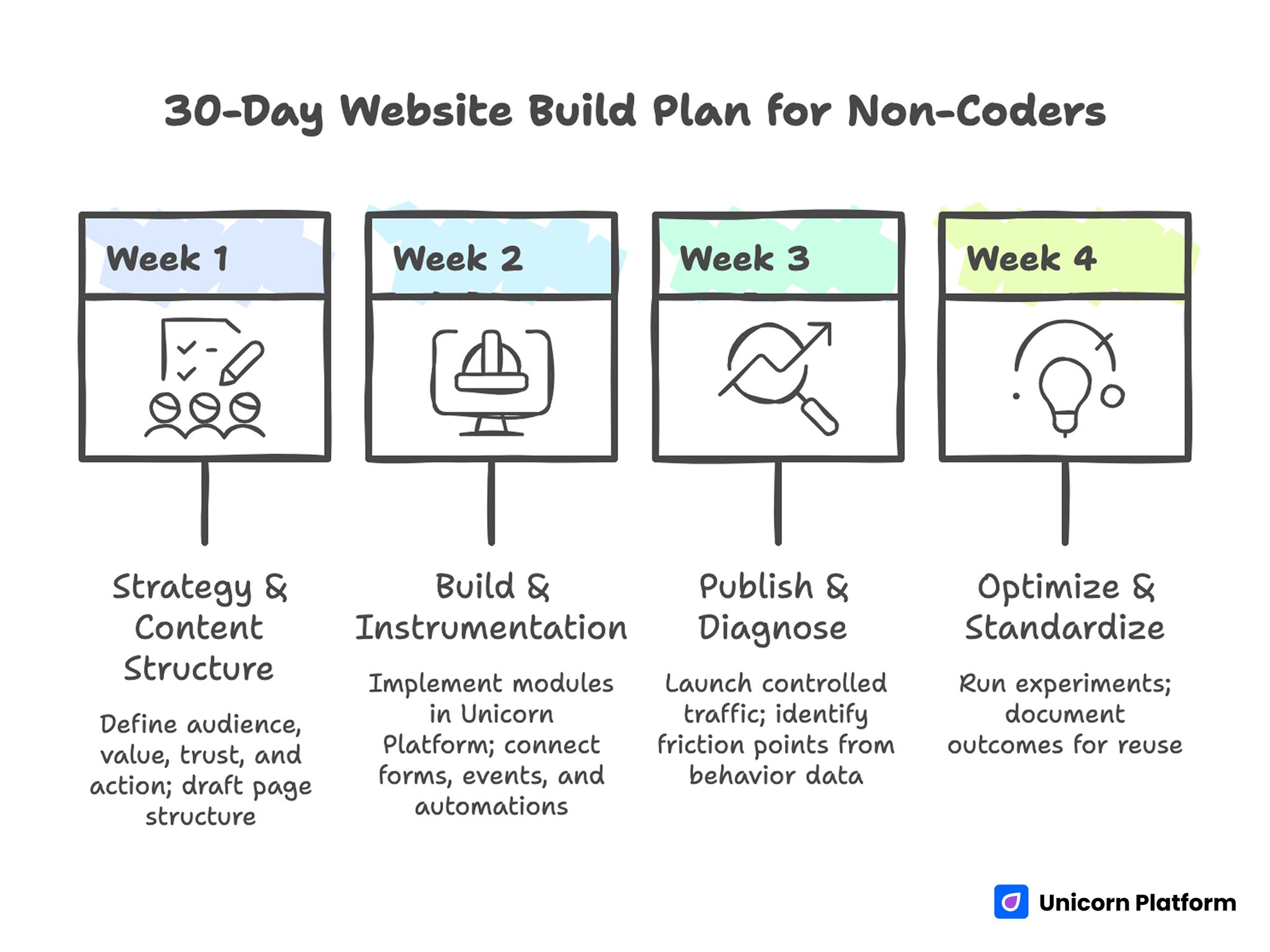
30-Day Website Build Plan for Non-Coders
Week 1: Strategy and content structure
Define audience, value promise, trust inputs, and primary action. Draft page structure and section jobs.
Week 2: Build and instrumentation
Implement modules in Unicorn Platform, then connect forms, events, and core automations.
Week 3: Publish and diagnose
Launch controlled traffic and identify top friction points from behavior data.
Week 4: Optimize and standardize
Run two focused experiments and document outcomes for reuse on future pages.
This four-week loop creates a repeatable build process instead of one-time launch behavior.
60-Day Optimization Roadmap
First-month improvements usually address clarity and trust. Second-month improvements should focus on conversion efficiency and segment relevance.
Days 1 to 20:
- test headline angle
- test CTA wording
- refine first-screen clarity
Days 21 to 40:
- test trust block placement
- test proof type (testimonial vs case snapshot)
- improve form friction points
Days 41 to 60:
- create one segment-specific page variant
- compare conversion quality by source
- standardize winning section modules
Limit active experiments to one major hypothesis at a time. Clean tests produce better learning than broad simultaneous changes.
At the end of each cycle, document wins and non-wins. A simple experiment log becomes a long-term asset for new campaigns.
As maturity grows, treat each winning module as a reusable asset with version notes. That documentation helps future pages launch with proven structure instead of restarting from blank templates, and it reduces quality drift when multiple contributors are publishing in parallel.
Content System for Ongoing Growth
Most no-code websites start strong and then stagnate because updates happen only when a campaign is launched. A better model is to run a lightweight content system that keeps pages relevant, useful, and aligned with changing user needs.
You do not need a large editorial team to do this well. You need a practical cadence and clear ownership.
Start with three content streams:
- evergreen decision guides that answer persistent buyer questions
- tactical implementation pieces tied to current offers
- short updates based on real customer objections and support trends
Each stream should have a conversion purpose. Evergreen guides can route readers to deeper service or product pages. Tactical pieces can support active campaigns with stronger relevance. Objection-focused updates can reduce friction in late-stage decision moments.
Tie this system to your core page archetypes. If your site has a lead-capture page, publish supporting content that explains outcomes, process, and expected results. If your site promotes products, publish comparisons, use-case walkthroughs, and implementation tips that reduce purchase uncertainty.
Consistency matters more than volume. One high-quality update each week often outperforms irregular bursts of generic content. Regular publishing also keeps your team closer to real audience language, which improves conversion copy across the site.
Track content impact beyond traffic totals. Useful indicators include:
- assisted conversions from informational pages
- click-through rate from content to primary offer pages
- return visitor rate by content category
- time-to-action after first content interaction
When these metrics improve, your content system is supporting business outcomes, not just producing activity.
Content updates should also feed page optimization directly. If one objection appears repeatedly in comments, support chats, or calls, add it to your FAQ and trust sections. If a content topic attracts qualified visitors, build a dedicated landing variation around that topic intent.
Over time, this feedback loop turns your site into a living knowledge and conversion asset instead of a static brochure.
90-Day Scaling Model for No-Code Teams
After the first 60 days, teams usually know which messages and sections perform best. The next step is controlled scaling, not random expansion.
Days 61 to 90 should focus on multiplying proven patterns while preserving clarity and quality.
Phase 1: Standardize winners (Days 61-70)
Identify page elements that consistently improved outcomes in earlier tests. These might include:
- one headline format that lifts first-screen engagement
- one trust block layout that improves conversion rate
- one form structure that increases qualified submissions
Turn these into reusable modules. Standardization reduces execution variance and lets teams launch faster without repeating solved problems.
Phase 2: Expand by audience segment (Days 71-80)
Use standardized modules to create one or two additional segment pages. Keep architecture stable and change only the parts that drive relevance: promise framing, proof examples, and objection order.
This approach scales with less risk than full redesigns because it preserves what is already validated.
Phase 3: Improve funnel continuity (Days 81-90)
Many teams optimize single pages while ignoring handoff quality between pages and follow-up systems. In this phase, audit the full journey:
- ad or referral message to first-screen match
- page CTA to form flow continuity
- form completion to confirmation clarity
- confirmation to follow-up response timing
Small improvements in these handoffs often produce larger gains than cosmetic page edits.
Set one decision dashboard for this phase. Include channel-level conversion quality, time-to-response, and downstream outcomes such as qualified calls or purchases. Shared visibility keeps marketing and operations aligned as volume grows.
Scaling should not increase complexity unnecessarily. The strongest no-code teams keep a short experiment queue, release in predictable cycles, and keep documentation current after every meaningful change.
When these habits are in place, growth becomes more stable because your website system can absorb higher traffic and broader audience coverage without quality collapse.
Common Mistakes and Fast Fixes
1. Choosing tools by visuals only
Fix: use weighted operational scoring and pilot one real page.
2. Vague hero messaging
Fix: rewrite first screen around audience-specific outcome.
3. Too many CTA options
Fix: keep one dominant action and demote secondary choices.
4. Trust proof too late
Fix: move trust cues closer to early claims and CTA sections.
5. Desktop-first mindset
Fix: validate mobile readability and interaction from day one.
6. Missing measurement discipline
Fix: define event taxonomy and source tagging before launch.
7. Launch-and-forget behavior
Fix: run weekly optimization with one focused change per cycle.
FAQ: Building Beautiful Websites Without Coding
Can non-coders build websites that look premium and convert well?
Yes. Quality depends on structure clarity, trust design, and iteration discipline more than coding background.
What should I prioritize first: design or copy?
Start with strategy and copy direction, then build design around those decisions.
How many pages do I need for a first launch?
A focused launch often works with a homepage or landing page plus one or two support pages.
Are free no-code plans enough to start?
Often yes for validation. Upgrade when you need advanced integrations, branding control, or scale features.
How do I avoid a generic template look?
Use a consistent design system, specific copy, and clear section roles tied to user decisions.
What metrics matter most in month one?
Track first-screen engagement, CTA progression, form completion, and source-level conversion quality.
Should I create segment-specific landing pages early?
If audience intent differs significantly, one variant page can create meaningful conversion improvement quickly.
How often should I update the site after launch?
Weekly review cycles with focused changes generally outperform occasional full redesigns.
What is the fastest improvement for weak conversions?
Improve headline relevance and place stronger trust cues near action points.
Can AI handle all copywriting for me?
AI can accelerate drafting, but final clarity and credibility still require human editing.
Final Takeaway
Building beautiful websites without coding is not a technical problem anymore. It is an execution problem: clear strategy, strong structure, and disciplined iteration.
No-code tools provide speed. A reliable framework turns that speed into measurable growth. Build with purpose, validate with QA, and optimize in short cycles until your results compound.