A .AI domain is the country-code extension for Anguilla, but for most startup buyers it functions as something else: a fast category signal for AI products, tools, and software brands. That signal can help people understand the company faster, but it does not automatically make the brand stronger, the page more trusted, or the site rank better.
The real question is not just What is a .AI domain? It is whether a .AI domain is worth the cost, whether it fits the product you are building, and whether it is a better long-term decision than a .com or another extension.
This guide answers that directly. It explains what a .AI domain is, how pricing and renewals work, whether it helps SEO, when startups should choose it, when they should avoid it, and how to validate the name before launch.
Quick Answer
A .AI domain is often a strong choice for AI-native startups because it makes category fit clearer and can improve click interpretation when the rest of the branding is strong. It does not create a direct SEO ranking boost, and it is usually more expensive than .com, especially at renewal. For many startups, the best decision comes down to three things: category fit, long-term cost, and whether .AI or .com makes the product easier to trust.
sbb-itb-bf47c9b
Key Takeaways
-
A
.AIdomain is Anguilla’s country-code extension, but Google treats it like a generic top-level domain for search targeting. -
A
.AIdomain can support branding clarity, but it does not improve rankings by itself. - Renewal cost matters as much as first-year price, and premium names can become expensive fast.
-
.AIis usually strongest for AI-native products, startups, and tools where category signaling helps. -
.comis often better when the brand needs broader mainstream trust or long-term flexibility beyond the AI label. -
The best way to decide is to test the name in a real launch-page context before rollout.
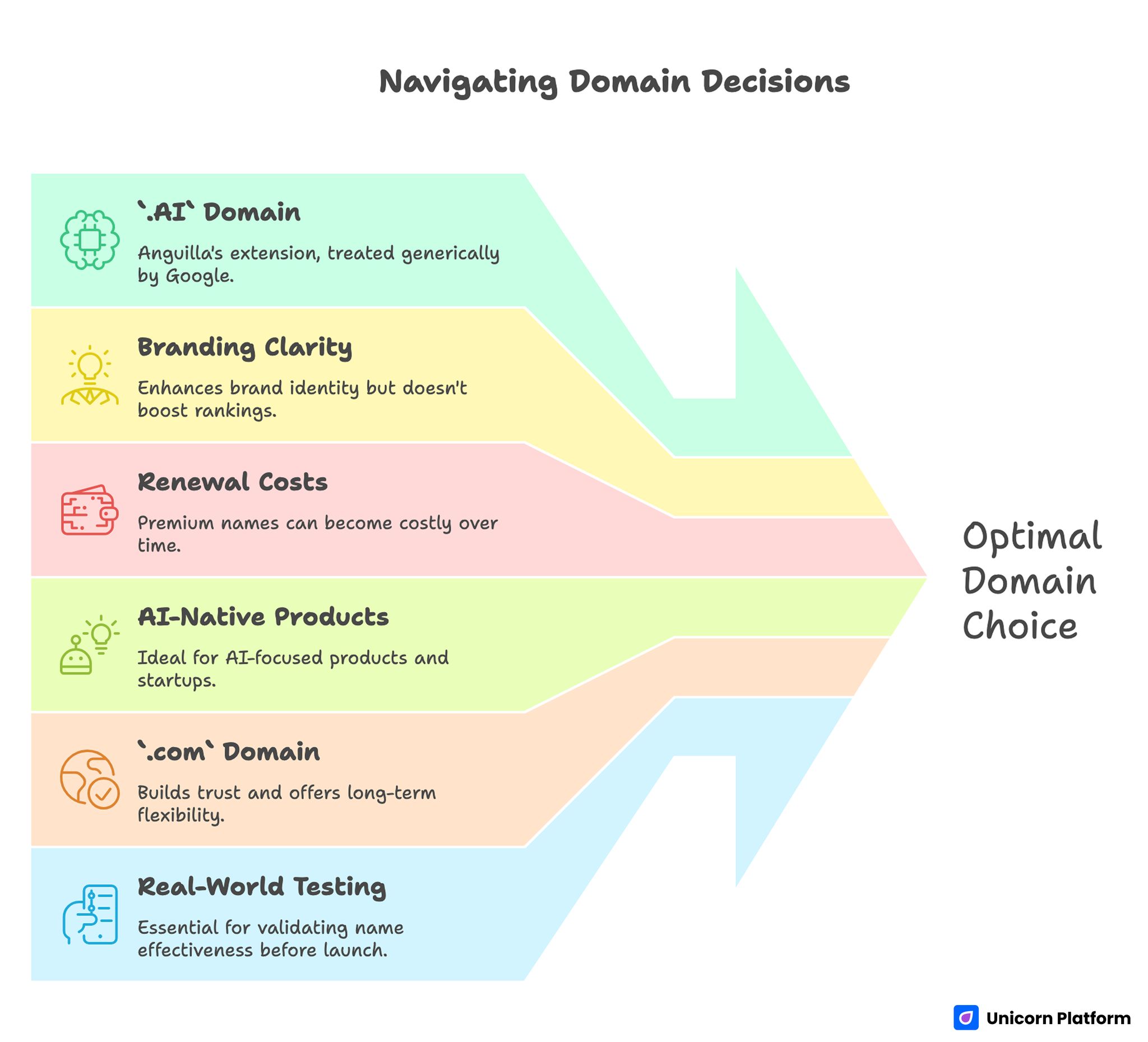
Navigating Domain Decisions
Decision Summary: .AI vs .COM
If the product is clearly AI-led and the .AI name is short, memorable, and affordable over multiple years, .AI can be the better launch decision.
If the product is broader, likely to expand beyond AI branding, or depends on mainstream familiarity and lower long-term cost, .com is often the safer choice.
A useful rule is this:
-
choose
.AIwhen the extension makes the offer easier to understand -
choose
.comwhen the extension would add trend signaling but not real clarity
What Is a .AI Domain?
A .AI domain is the ccTLD, or country-code top-level domain, assigned to Anguilla. In startup and software markets, though, it is widely used as a branding extension because the letters AI map naturally to artificial intelligence.
That is why the extension has become so visible in:
- AI tools
- AI startups
- product launches
- model wrappers
- automation software
- technical communities
The branding advantage is easy to understand. When someone sees a company ending in .ai, they often recognize the category faster than they would from a neutral or broader extension.
That can help in:
- search results
- social profiles
- product directories
- newsletters
- podcast mentions
- outbound links and referrals
But category signaling is not the same thing as quality. A .AI domain can help people understand what kind of company you are likely to be. It cannot make a weak product name stronger on its own.
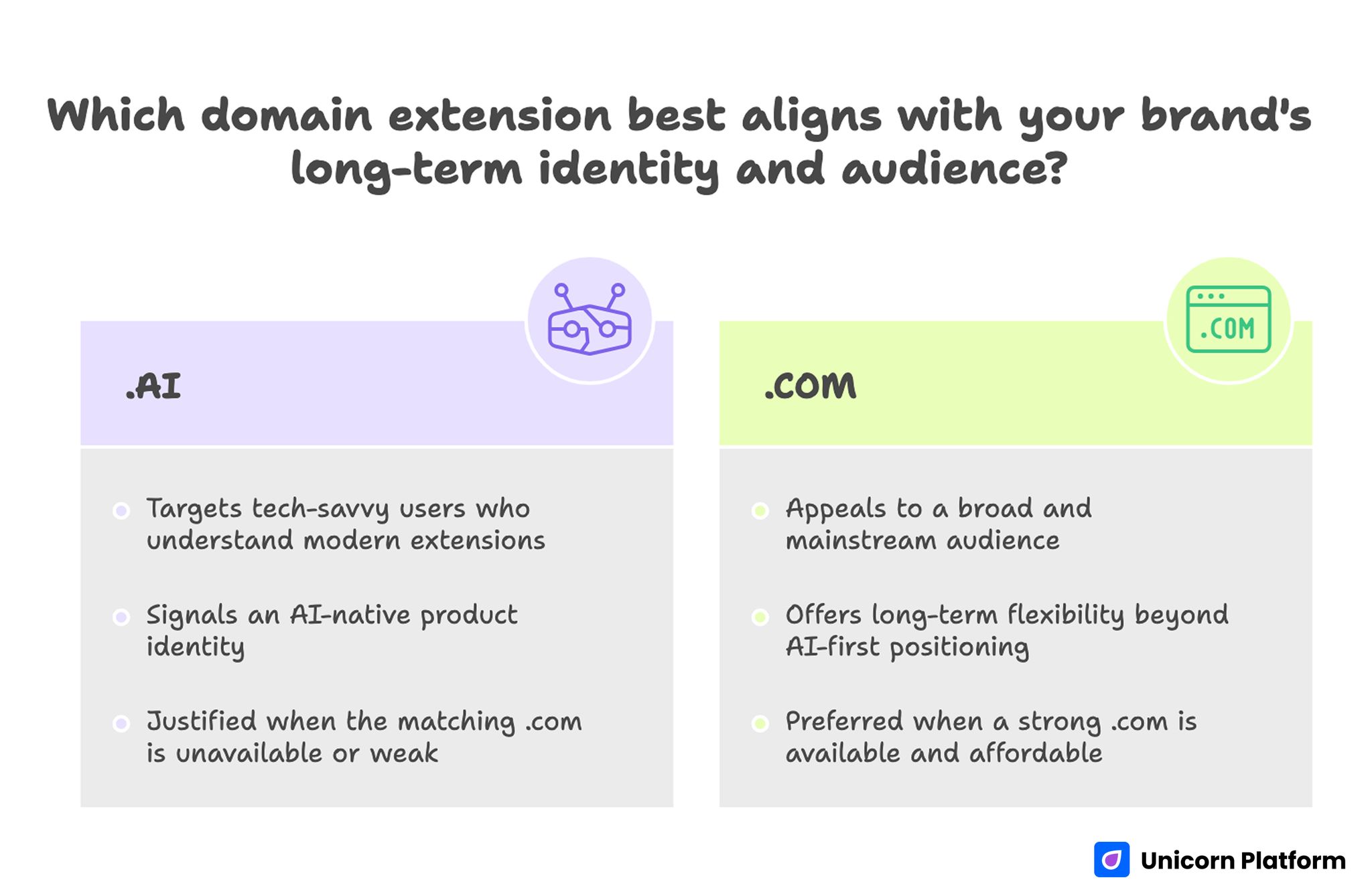
Which Domain Extension Best Aligns with your Brand’s Long-Term Identity and Audience?
How Much Does a .AI Domain Cost?
Price is one of the biggest practical reasons founders hesitate, and that hesitation is usually justified. .AI domains are often more expensive than standard .com domains, and the real cost is not only the signup price.
When evaluating .AI domain cost, check these separately:
- first-year registration
- renewal price
- transfer price
- premium-name markup
- bundled privacy, DNS, or security features
- account controls and ownership protections
For most startups, renewal cost matters more than launch-week pricing. A domain that looks fine at checkout can feel frustrating later if the renewal cost is much higher than expected.
Premium pricing matters too. Short, obvious, and highly brandable .AI names can become much more expensive than standard registrations. Availability is not the same as affordability.
Practical cost rule
Evaluate the decision over a three-year ownership window, not a one-day checkout moment.
A useful test is:
- if we use this name for the next three years, will the cost still feel easy to justify relative to the clarity it creates?
Is a .AI Domain Good for SEO?
A AI domain can be good for SEO only in the indirect way a strong, relevant brand choice can be good for SEO. It can make the result easier to interpret when the searcher expects an AI product. But the extension itself does not create a ranking boost.
Search performance still depends on the fundamentals:
- page quality
- query match
- useful content
- internal linking
- technical health
- backlink strength
- brand trust
- site experience
What .AI can help with
A .AI domain can improve category recognition when the rest of the page reinforces the same message. If the title, meta description, URL, hero copy, and product proof all point in the same direction, the result may feel easier to understand.
That can support:
- better click confidence
- clearer product interpretation
- more coherent branding
What .AI does not do
A .AI domain does not:
- fix weak content
- fix poor page structure
- create rankings automatically
- rescue confusing messaging
- replace strong SEO work
So the honest answer is simple: .AI can support relevance and branding, but not rankings by itself.
.AI vs .COM: When Each Makes More Sense
This is one of the most important decisions in the whole article, and it should be visible early because it is often what searchers really want answered.
.AI is often the better choice when
- the product is clearly AI-native
- the audience already understands newer tech extensions
- faster category recognition matters
-
the matching
.comis unavailable, awkward, or weak - the team can justify the renewal cost
- the extension makes the brand clearer rather than trendier
.COM is often the better choice when
- the audience is broad and mainstream
- long-term flexibility matters more than AI signaling
- the product may expand beyond AI-first positioning
-
the
.AIname is expensive or overly narrow -
a strong
.comis available and fits the brand well
Practical decision rule
If .AI removes confusion and strengthens the product story, it can be the better launch choice.
If .AI mostly adds fashion or category decoration without improving clarity, .com is usually the safer long-term decision.
When Startups Should Choose .AI
A .AI domain is often the right choice when the product is genuinely AI-native and the audience expects that language already.
It is usually a strong fit when:
- the product’s core promise is clearly AI-led
- the target audience is technical, startup-oriented, or AI-aware
- category recognition matters in search and social
-
the
.comis unavailable, misleading, or overloaded with filler words -
the team wants to launch quickly without waiting for a perfect
.com
This matters because an ai domain decision is often really a go-to-market decision. Founders are trying to decide whether the name helps new users understand the product faster.
A clean .AI name can be better than a compromised .com if the .com version requires:
- extra filler words
- awkward spelling
- a hyphen
- a meaning that does not match the product well
In those cases, .AI is not just trendy. It is functionally helping the brand say more in less space.
When Startups Should Avoid .AI
There are many cases where .AI is not the best answer, even if the company uses AI internally.
A startup should be more cautious when:
- the audience is very broad or non-technical
- the company may outgrow AI-first positioning quickly
- the extension feels more like a signal of trendiness than product truth
- the renewal or premium costs strain the brand budget
-
the stronger long-term brand option is a clean
.com
Domains often outlive product narratives. A company may start with a very visible AI angle, then later grow into a broader software platform. If the extension locks the brand too tightly to a label it may outgrow, that matters.
How To Choose a Strong AI Domain Name
The strongest .AI domains are not chosen by taste alone. They are chosen by removing the names that sound clever in a brainstorm but fail in real use.
1. Start with clarity
A strong name should make the offer easier to understand, not harder. It does not need to describe the full product, but it should feel compatible with what the company actually does.
2. Test spelling and pronunciation
Say the name out loud. Ask someone else to type it from memory. If they misspell it, ask for repetition, or confuse it with another word, that friction will show up later.
3. Check category fit
A .AI extension works best when the product genuinely belongs in that category. If the extension is only there because it feels modern, the branding may feel cosmetic rather than helpful.
4. Pressure-test future flexibility
Ask whether the name still works if the company broadens its positioning, expands upmarket, or adds new product layers.
5. Run legal checks early
Trademark and availability review should not be a final admin task. A name with legal risk can create expensive rework after design and launch planning are already moving.
6. Use a weighted scorecard
A simple scorecard reduces emotional decision-making. Score each candidate on:
- clarity
- recall
- spelling ease
- category fit
- trust profile
- legal safety
- cost
- future flexibility
A name that performs well across these factors usually beats a name that wins only on novelty.
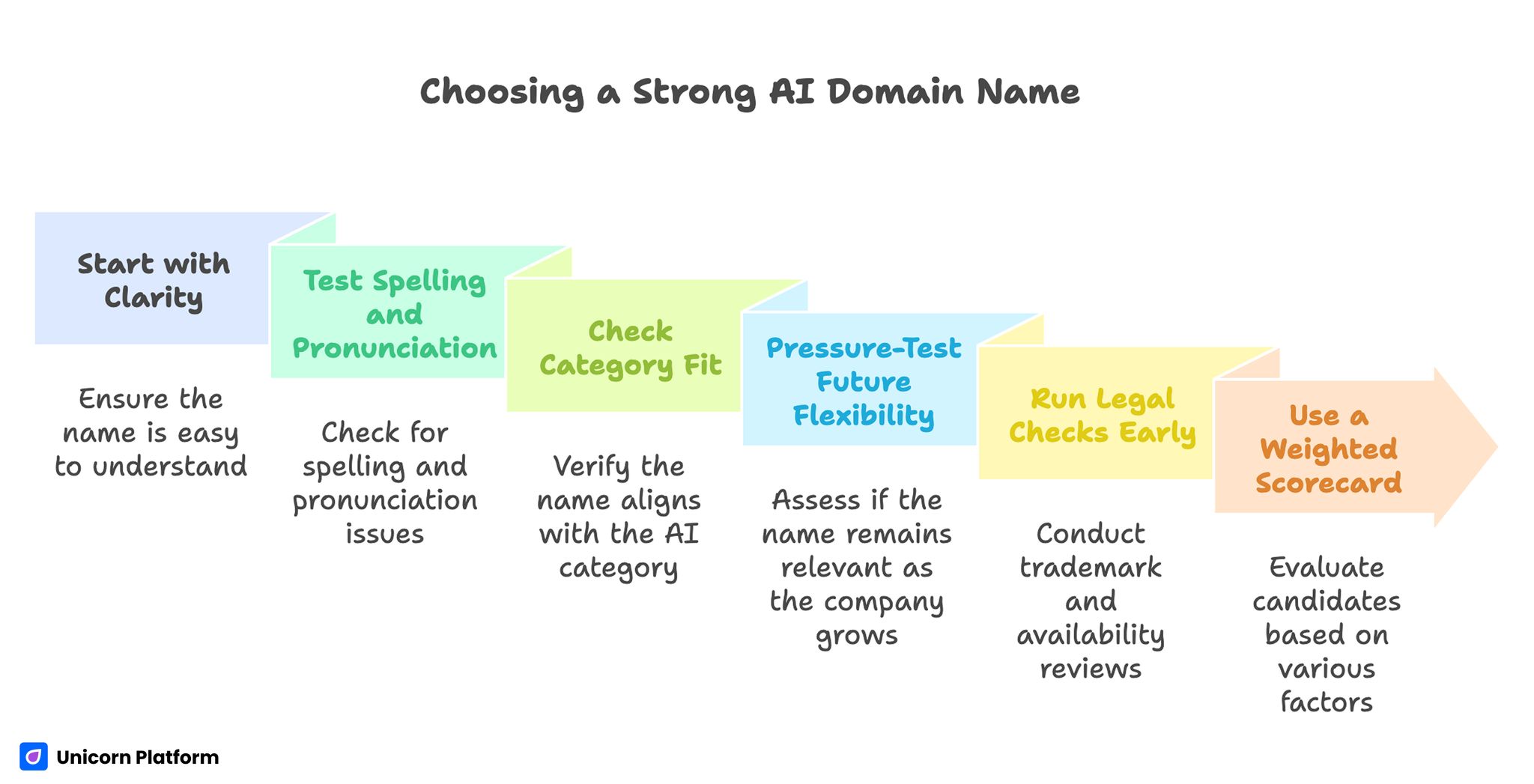
Choosing a Strong AI Domain Name
Light Market Context: Why .AI Matters Right Now
The .AI extension matters more now than it did a few years ago because the market has normalized it. Searchers, startup buyers, and technical audiences recognize it much faster than before.
That does not mean every AI company should use it. It means .AI has moved from a niche curiosity to a real naming option with enough market familiarity to work at scale.
A small amount of context helps here because it explains why founders keep asking about .AI domain decisions in the first place:
- the category is more visible
- competition for strong names is higher
- cost and renewal questions matter more
- branding speed matters in crowded markets
Use that market context lightly. It should support the decision, not replace it.
Best Places To Buy a .AI Domain
The best place to buy a .AI domain is not always the registrar with the lowest first-year price. It is the one that gives you:
- transparent renewal pricing
- clean DNS controls
- strong account security
- reasonable transfer rules
- clear premium-domain handling
- support that is useful when launch is blocked
This is why the best buying workflow is shortlist-based. Compare one exact candidate domain across a few providers and look at:
- registration price
- renewal price
- premium markup
- account controls
- checkout friction
That tells you much more than general marketing claims.
How To Validate the Name Before Launch
The smartest domain decisions are tested in page context, not only in naming docs. The real question is whether the domain helps someone understand the product when they land on the page.
A simple validation flow looks like this:
- create a fast launch-page draft with the candidate domain in headline context
- write a one-sentence hero explanation of the product
- add one or two trust cues that explain audience and outcome
- check whether a new visitor understands the offer in the first screen
- compare two or three names against the same page structure
This works because domains are judged alongside:
- the headline
- the subhead
- the CTA
- the first visual impression
- the proof on the page
A domain that looks strong in isolation can still feel vague when paired with real product copy.
How to apply this in Unicorn Platform
Keep the page structure stable and only change the branding layer. That makes it much easier to compare whether one name creates faster understanding than another.
If the team also needs to refine the first screen while testing names, this guide on creating an AI landing page is a useful companion.
Common Mistakes With .AI Domains
The most common mistake is choosing the extension first and the brand second. That usually creates names that feel fashionable but weak.
A second mistake is ignoring renewal economics. Teams focus on registration price, then later discover that long-term ownership is more expensive than expected.
A third mistake is overestimating the SEO value of the extension. The domain can help category interpretation, but it will not replace good content, good links, or good product-market fit.
Another mistake is skipping real-user testing. Internal teams already know what the product does, so they often believe the name is clearer than it actually is.
The last major mistake is choosing .AI when the company is already broadening beyond AI-first positioning. In that case, the extension can become a narrowing signal instead of a helpful one.
FAQ
What is a .AI domain used for?
It is widely used by AI startups, AI tools, and software brands that want fast category signaling in the URL. Administratively it belongs to Anguilla, but in practice it functions globally as a branding choice.
Is a .AI domain better than a .COM?
Not automatically. .AI can be better when the product is strongly AI-native and the audience expects that signal. .com can be better when broader trust, flexibility, or lower long-term cost matters more.
Does a .AI domain help SEO?
Not directly. It does not create a ranking boost by itself. SEO results still depend on content quality, site structure, links, technical health, and real search-intent match.
Are .AI domains expensive?
They are often more expensive than common .com domains, especially at renewal. The exact cost depends on the registrar and whether the name has premium pricing.
Should I buy both the .AI and the .COM?
Sometimes yes, especially if the .com is available at a reasonable price and defensive ownership reduces brand risk. But it is not always necessary.
Can a non-AI company use a .AI domain?
Yes, but it should be done carefully. If the product does not clearly feel AI-related, the extension can create confusion or make the brand feel more trend-driven than trustworthy.
What should I check before buying a .AI domain?
Check category fit, total cost, renewal price, legal safety, spelling, trust profile, and whether the name still works if the company evolves.
Final Takeaway
A .AI domain can be a strong startup choice when it improves clarity, fits the product honestly, and stays affordable over time.
It is not an SEO shortcut, and it is not automatically better than .com. The right decision comes from how well the name matches the product, how sustainable the ownership cost is, and whether the extension makes the launch easier to understand.
The best .AI domain is not the trendiest one. It is the one that reduces explanation work, supports trust, and still feels right when the company grows.


