Table of Contents
- Why Accessibility Work Breaks in Growing Startups
- Public Communication and Trust Signaling
- 30-60-90 Day Implementation Plan
- Common Failure Patterns and Fixes
- FAQ
Accessibility decisions shape product quality, conversion quality, and brand trust at the same time. Teams that delay this work often discover the cost later through support burden, inconsistent UX, legal risk, and weaker advocacy momentum.
The core challenge is operational, not philosophical. A startup can agree that inclusion matters and still ship inaccessible flows if ownership is unclear, third-party widgets are unmanaged, or release QA does not include practical accessibility checks.
A durable approach treats accessibility as a product system with standards, release gates, and measurable outcomes. That system can scale with traffic growth instead of becoming a periodic cleanup project.
Unicorn Platform is useful in this model because teams can update pages quickly when problems are found. Fast publishing alone is not enough, but it makes corrective action realistic when governance is already defined.
sbb-itb-bf47c9b
Quick Takeaways
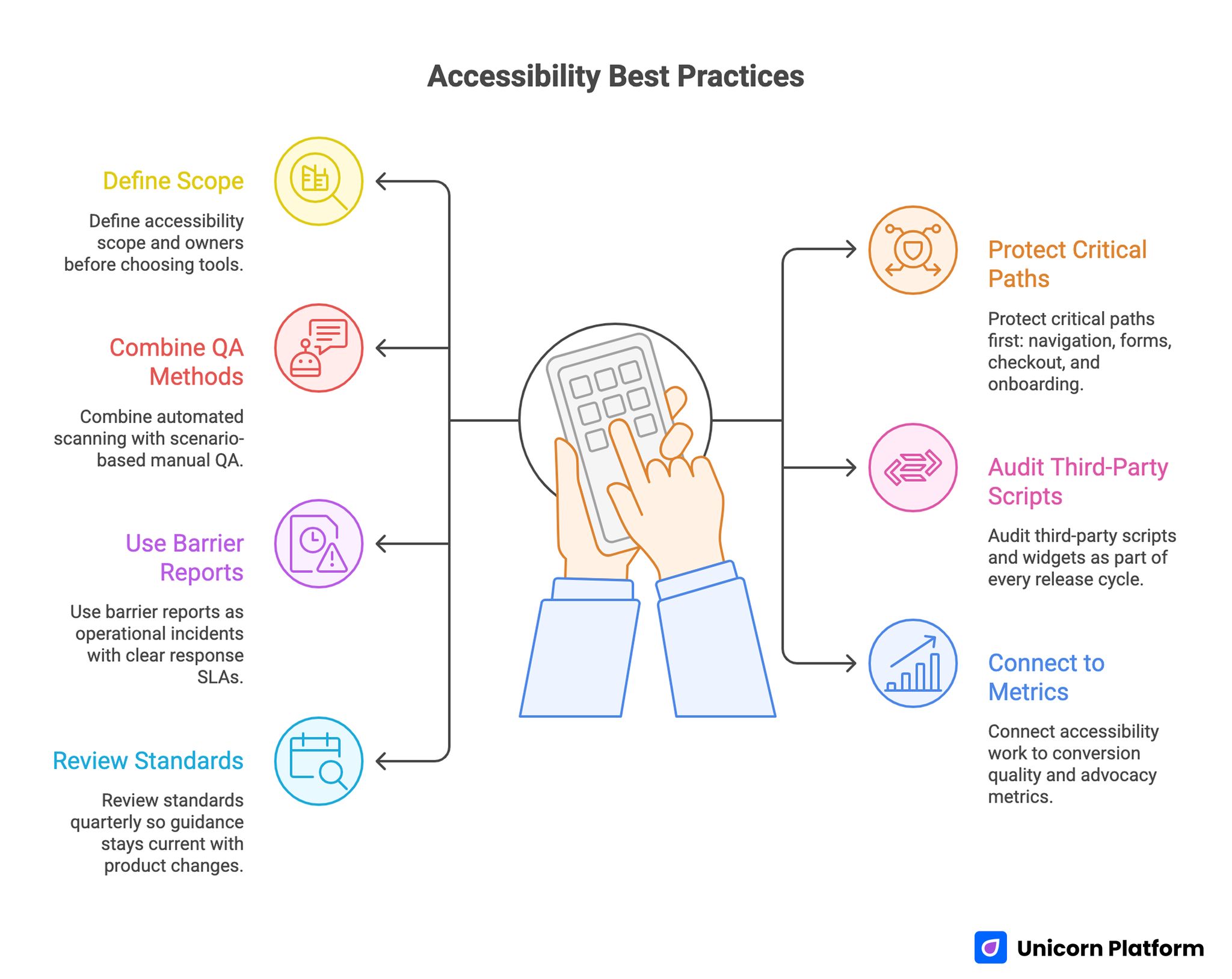
Accessibility Best Practices
- Define accessibility scope and owners before choosing tools.
- Protect critical paths first: navigation, forms, checkout, and onboarding.
- Combine automated scanning with scenario-based manual QA.
- Audit third-party scripts and widgets as part of every release cycle.
- Use barrier reports as operational incidents with clear response SLAs.
- Connect accessibility work to conversion quality and advocacy metrics.
- Review standards quarterly so guidance stays current with product changes.
Why Accessibility Work Breaks in Growing Startups
Most failures come from sequencing mistakes. Teams launch features rapidly, then try to retrofit inclusive behavior after templates, components, and campaign pages have already multiplied.
Ownership ambiguity is the second failure point. Designers assume engineering will enforce standards, engineering assumes content teams will follow patterns, and content teams assume tooling will catch everything automatically.
The third failure point is measurement bias. Teams track issue counts from automated tools but do not track whether real users can complete important tasks without friction.
Stack Selection Without Overpromising
Tooling helps, but no single layer solves accessibility end to end. Selection should evaluate coverage depth, override flexibility, reporting clarity, and maintenance burden over time.
A practical procurement model starts with required outcomes instead of vendor feature lists. If your core risk is form abandonment caused by usability friction, prioritize controls and QA support for forms before broader cosmetic checks.
Early-stage teams often combine accessibility improvements with growth loops and referral systems. If that is your operating model, the execution logic in firstpromoter for startup growth is helpful when aligning user trust with advocacy programs.
Scope Map Before Any Integration
Before enabling any accessibility layer, build a page and component inventory. Include templates, shared UI blocks, campaign variants, checkout sequences, support flows, and embedded external tools.
Then classify each item by business criticality and user impact. Critical flows should receive stricter QA thresholds and faster response targets than low-impact informational routes.
This scope map prevents partial remediation where visible pages improve while high-value conversion paths remain fragile.
Baseline Standards for Critical Paths
A baseline should be explicit and short enough to enforce. Typical standards include heading structure integrity, keyboard navigability, visible focus states, meaningful link text, contrast adequacy, and form label clarity.
Error handling deserves special attention. Ambiguous validation messages, hidden focus jumps, and non-descriptive alerts create abandonment across all user groups, not only users with recognized accessibility needs.
Teams should also define acceptance criteria for mobile interaction. Smaller screens amplify readability and focus-order issues that desktop tests may miss.
Automation Plus Manual Verification
Automated checks are essential for scale but insufficient for confidence. They catch repeated structural patterns and regressions quickly, yet they cannot fully evaluate context quality in real workflows.
Manual verification should cover task-based scenarios on critical routes. Example scenarios include account creation, form correction after validation failure, and checkout with interrupted steps.
A hybrid model works best when both layers are scheduled and owned. Automation can run on every release, while manual scenario checks run on high-impact changes and periodic cadence.
Managing Third-Party Accessibility Risk
External widgets are one of the largest hidden risk sources. Chat modules, popups, booking tools, personalization overlays, and embedded media can bypass internal standards and introduce new barriers.
Every third-party component should have a lightweight acceptance checklist. Keyboard behavior, focus control, announcement clarity, mobile interaction, and dismissal behavior are common minimum checks.
Sites that also integrate assistant-style interactions should evaluate those flows with the same rigor. The operational guidance in how to enhance your website with AI assistants is useful when layering conversational tools onto accessibility-sensitive routes.
Forms as Accessibility and Conversion Infrastructure
Forms are often where accessibility and revenue impact intersect. If labels are unclear, error states are hard to recover from, or tab order breaks, completion quality drops for everyone.
Design form standards around completion resilience. Users should always know what failed, why it failed, and how to recover without losing context.
Form improvements should be measured in both issue closure and funnel quality. Accessibility fixes that reduce confusion frequently improve lead quality and lower support follow-up load.
Navigation, Landmarks, and Orientation
Users need predictable orientation to build trust quickly. Heading hierarchy, landmark consistency, and skip-path behavior should support fast comprehension, especially on long pages.
Navigation clarity is not only a technical concern. It influences decision speed, content consumption depth, and user confidence during evaluation journeys.
Teams can improve orientation quality by validating key pages with keyboard-only passes and assistive workflow simulation at each major release.
Content Operations Standards for Non-Engineers
Accessibility quality degrades when only engineers own the rules. Content teams and marketers also need practical standards they can apply during routine page updates.
A concise editorial standard should define heading usage, alt text expectations, descriptive link wording, and plain-language guidance for critical instructions.
Enablement works better with examples than policy prose. Small before-and-after examples reduce interpretation variance across contributors.
Mobile-First Accessibility Execution
Mobile behavior deserves dedicated testing because responsive adjustments can alter spacing, focus flow, and interaction hierarchy. A layout that is compliant on desktop can still fail user tasks on phones.
Test critical actions on real devices, not only emulators. Touch target reachability, dynamic keyboard behavior, and orientation changes can reveal hidden blockers.
Mobile checks should be integrated into standard release QA, not treated as an optional final pass.
Release Gates and Regression Prevention
A sustainable program uses release gates with defined pass/fail rules. If a route fails high-priority checks, release should pause until remediation is complete.
Regression prevention depends on consistency. Gate policies should apply to net-new pages, template edits, campaign variants, and component-level changes.
Teams move faster when gate logic is predictable. Contributors know expectations early and avoid last-minute rework cycles.
Incident Response for Barrier Reports
Barrier reports should be treated as operational incidents with triage, SLA targets, and status ownership. A slow or unclear response can damage trust more than the original issue.
A simple response flow includes intake classification, severity assignment, workaround communication, fix deployment, and closure confirmation.
Clear communication during incident handling is essential. Users should know what is happening, what alternatives exist, and when to expect updates.
Feedback Loops With Advocates and Power Users
Advocates and experienced users often surface practical friction earlier than broad analytics. Structured feedback loops can identify usability blind spots before they become public trust issues.
The strongest loops ask focused questions tied to specific tasks rather than open-ended sentiment prompts. This produces actionable feedback that can enter sprint planning directly.
If your team uses testimonial and advocacy workflows, Famewall testimonial collection workflows can be combined with usability feedback prompts so social proof and quality improvement reinforce each other.
Public Communication and Trust Signaling
Many teams improve accessibility silently and miss trust benefits from transparent communication. Practical progress notes can strengthen confidence when they are specific and non-defensive.
Message quality matters. Explain what changed, why it matters for users, and where to report remaining barriers.
Trust signaling should remain factual. Overstated claims create expectation risk and can undermine credibility quickly.
Legal and Policy Operating Readiness
Tooling does not replace policy readiness. Teams still need ownership for accessibility statements, issue escalation pathways, and documentation practices that support ongoing compliance expectations.
Policy readiness should align with product operations. If reporting channels are hard to find or updates are infrequent, legal posture weakens even when technical progress exists.
Quarterly policy review with product and legal stakeholders helps keep content and operations aligned.
Metrics That Show Real Progress
Issue counts alone do not capture user impact. A stronger scorecard combines technical indicators, behavior indicators, and business indicators.
Technical indicators can include high-severity barrier closure time and regression frequency. Behavior indicators can include completion recovery after form errors and navigation success in critical flows. Business indicators can include support load reduction and conversion quality movement on remediated routes.
Metrics should guide action, not just reporting. Every monthly review should end with explicit priority decisions and owner assignments.
Team Model and Ownership
Small teams can run high-quality programs when roles are explicit. Assign one standards owner, one release QA owner, one incident communication owner, and one analytics owner.
Ownership should include decision rights. If nobody can approve fixes quickly, barrier resolution slows and trust cost rises.
Documentation should be lightweight and usable. Decision logs, known issue lists, and playbooks need to support daily operations, not become archival artifacts.
Quarterly Maturity Review
Monthly cycles keep momentum, while quarterly reviews assess whether the operating model is improving. A maturity review should evaluate standards clarity, QA reliability, incident response quality, and user trust outcomes.
Each review should produce concrete upgrades. Examples include new gate checks for recurring regressions, revised training examples for content teams, or tighter third-party acceptance criteria.
Maturity scoring helps teams avoid repeating tactical fixes without structural improvement.
30-60-90 Day Implementation Plan
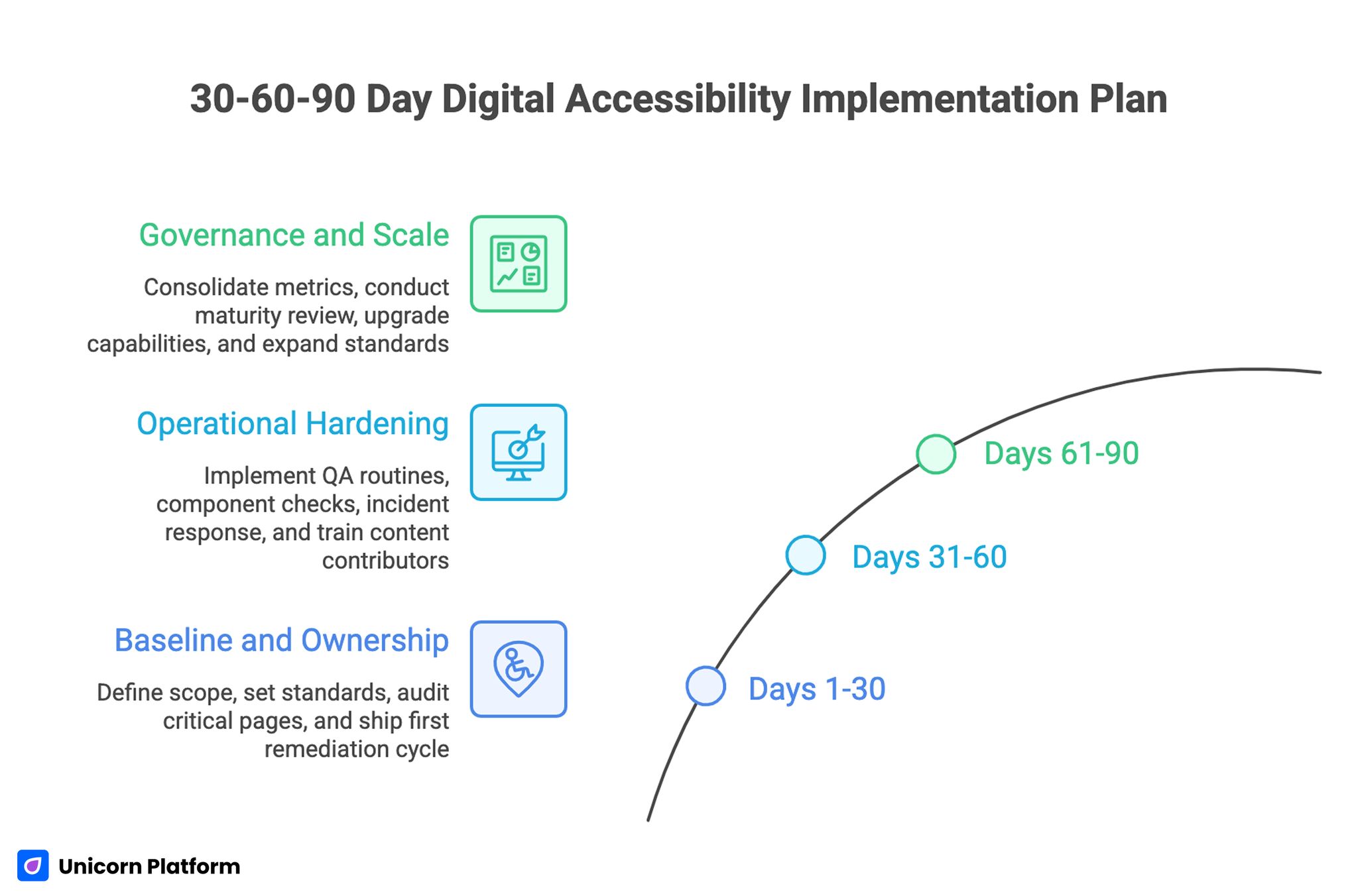
30-60-90 Day Digital Accessibility Implementation Plan
Days 1-30: Baseline and Ownership
Create scope map, define baseline standards, and assign role ownership. Run critical-route audit and prioritize fixes by business impact.
Ship first remediation cycle on high-friction pages and establish release gate policy for new updates.
Days 31-60: Operational Hardening
Add hybrid QA routines, third-party component checks, and incident response workflow. Train content contributors on practical editorial standards.
Launch feedback loop with advocates and power users to capture early friction in updated routes.
Days 61-90: Governance and Scale
Consolidate metrics into one monthly decision scorecard. Run first quarterly maturity review and implement top capability upgrades.
Expand standards from core routes to long-tail campaign pages while maintaining the same gate discipline.
Common Failure Patterns and Fixes
Failure: Tool-Only Strategy
Teams assume software will solve everything and skip process design. Fix this with explicit ownership, QA cadence, and incident workflow.
Failure: Late Accessibility Adoption
Problems are addressed after scale when remediation cost is high. Fix this by integrating standards into template and release processes early.
Failure: Third-Party Blind Spots
External widgets bypass internal checks. Fix this with component acceptance checklists and recurring vendor review.
Failure: Metrics Without Decisions
Dashboards grow while priorities stay unclear. Fix this by requiring decision outcomes and owner assignments in every review.
Failure: Incident Silence
Barrier reports are handled slowly or privately without clear updates. Fix this with communication templates and response SLAs.
Failure: Policy Drift
Statements and workflows become outdated as product changes. Fix this with quarterly policy alignment and clear accountability.
Executive Scorecard and Budget Prioritization
Accessibility work is easier to sustain when leadership can see impact in operational terms. A monthly scorecard should connect technical quality, user behavior, and commercial outcomes in one view rather than separate dashboards owned by different teams.
A practical scorecard can use three layers. The first layer tracks quality operations, such as high-severity issue closure time, regression frequency, and release-gate pass rate. The second layer tracks user behavior outcomes, such as completion rates in remediated flows and support-contact reduction on pages that received targeted fixes. The third layer tracks business signals, such as improved qualified conversion quality and stronger advocate confidence after major accessibility updates.
Budget decisions should follow explicit triggers. If regression frequency stays high for two cycles, investment should move toward template hardening and contributor training before adding new campaign work. If issue closure is fast but conversion quality does not improve, teams should investigate whether content clarity and interaction design need deeper revision. If both quality and business signals improve, teams can scale improvements to lower-priority page groups with less risk.
This approach turns accessibility from a compliance cost center into a measurable quality program. Leadership can allocate resources based on evidence of reduced friction and stronger trust outcomes instead of relying on anecdotal status reports.
FAQ: Digital Accessibility Operations
1) Can a small startup run strong accessibility operations?
Yes. Start with critical-path standards, explicit ownership, and hybrid QA. Scale depth over time as processes stabilize.
2) Should accessibility work wait until product-market fit?
No. Early integration costs less and prevents structural debt that is expensive to unwind after growth.
3) What should be fixed first?
Prioritize user-blocking issues in navigation, forms, and conversion-critical flows where failure has the highest business impact.
4) Are automated scans enough?
No. They are necessary for scale, but manual scenario testing is needed for real workflow reliability.
5) How often should teams review third-party tools?
Review at onboarding, after major vendor updates, and on a recurring quarterly cadence.
6) How can accessibility support conversion performance?
Clearer structure, recoverable forms, and better interaction design reduce friction for all users, which often improves quality outcomes.
7) What is a practical response SLA for reported barriers?
Acknowledge quickly, provide workaround when possible, and communicate remediation timeline based on severity.
8) Should teams publicly communicate accessibility updates?
Yes, when updates are concrete and accurate. Transparent progress communication strengthens trust.
9) How do we prevent regressions after initial fixes?
Use release gates, template-level standards, and recurring QA checks tied to ownership.
10) What proves the program is working long term?
Lower regression rates, faster incident closure, improved completion quality, and stronger advocacy confidence are reliable indicators.
Long-term strength also appears in operational consistency across teams. When content, engineering, and growth owners use the same standards and release gates for multiple quarters, accessibility improvements stop depending on individual champions and become part of normal delivery quality. That consistency is one of the clearest signs that the program can scale safely as page volume and campaign complexity increase.
It also improves planning confidence because teams can forecast remediation effort and release impact with far less uncertainty.
Final Takeaway
Accessibility performance in 2026 depends on operational discipline, not one-time audits. Teams that combine clear standards, release controls, incident readiness, and feedback loops build inclusive experiences that scale with growth.
With structured execution in Unicorn Platform, accessibility work can move from reactive cleanup to durable product-quality infrastructure.
Related Blog Posts
- Website Essentials: The 10 Things Every Startup Needs
- Keyboard Navigation for Startup Websites: Accessibility Guide
- Best Website Builder for Startups: How to Choose, Launch, and Scale Without Rebuilding Every Month
- Building AI Applications in 2026: A Practical Guide to Product Utility and Conversion Readiness