Table of Contents
- A Practical Evaluation Scorecard for Builder Selection
- How to Match Builder Choice to Business Model
- The Production Workflow That Keeps Quality Stable
- Quality Gates That Protect Output at Scale
- Common Failure Modes and Practical Fixes
- FAQ
AI-assisted site creation moved from novelty to daily workflow. The market is crowded, launch speeds are faster, and almost every tool claims it can design, write, and publish complete pages in minutes. Speed is real, but consistency is still the hard part.
The common failure pattern is simple: teams adopt a builder because the first demo looks impressive, then they hit production friction. Messaging becomes generic, proof is thin, conversion quality drops, and nobody can explain why one page works while another misses.
The upside is still huge when execution is disciplined. Teams that treat AI builders like operating systems, not magic generators, can publish faster and learn faster without sacrificing trust. That is the point of this guide.
This article gives a practical framework for selecting and running AI builder workflows inside Unicorn Platform. You will get decision criteria, rollout plans, quality gates, and optimization loops you can apply immediately.
sbb-itb-bf47c9b
Quick Takeaways
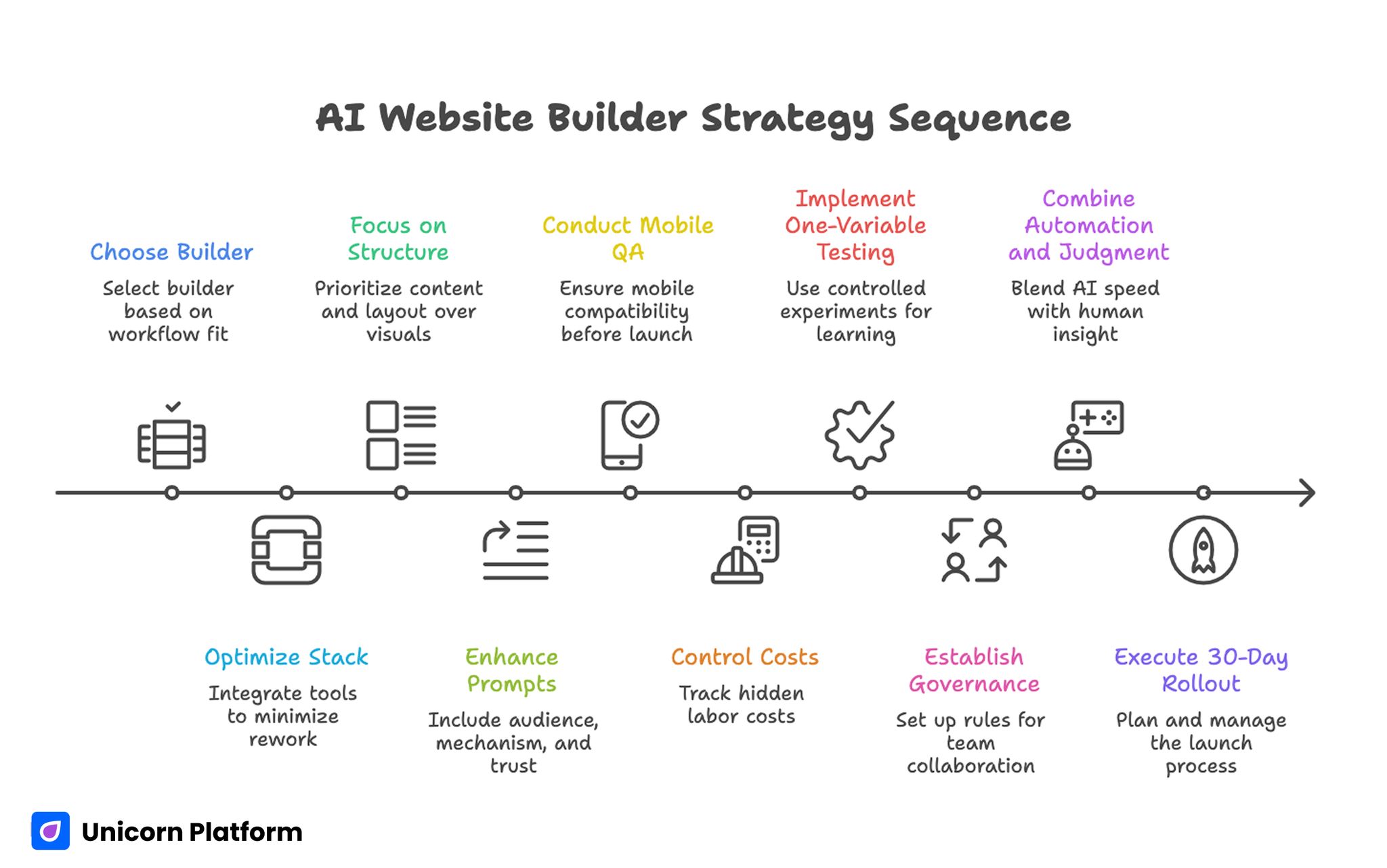
AI Website Builder Strategy Sequence
- Builder choice should follow workflow fit, not feature hype.
- The best stack reduces rework after first draft generation.
- Conversion performance depends more on structure and proof than visual novelty.
- AI output quality rises when prompts include audience, mechanism, and trust constraints.
- Mobile QA must be a release gate, not a post-publish task.
- Cost control requires tracking hidden labor, not subscription price alone.
- One-variable testing beats broad redesign cycles for reliable learning.
- Governance is a growth lever for multi-person teams.
- Strong pages combine automation speed with editorial judgment.
- A 30-day rollout with clear ownership outperforms ad hoc experimentation.
Why AI Builder Selection Is Harder Than It Looks
Most tools can generate a good-looking first draft. That means visual quality is no longer a strong differentiator at the top of the funnel. The real differences appear in second-order workflows: editing precision, reusable components, analytics setup, and team collaboration under deadlines.
Another challenge is role mismatch. Founders, marketers, designers, and product teams often evaluate builders with different success criteria. A founder may want fastest launch speed, while a growth team needs experimentation control, and a product team needs integration flexibility.
Procurement pressure can also create poor decisions. Teams rush to pick a stack after a single demo because they want quick wins, then spend weeks fixing copy drift, layout inconsistency, and broken handoffs. Those costs usually exceed the savings from faster generation.
A stronger approach is to evaluate tools through actual production scenarios. Run one real campaign page, one update cycle, one QA pass, and one post-launch iteration. The builder that handles those loops cleanly is usually the right long-term choice.
What an AI Builder Should Actually Do for Your Team
An effective platform should not only generate content and sections. It should help your team run repeatable decision flow from brief to publish to optimization.
Use this simple capability model when assessing tools. Score each dimension from 1 to 5 so decisions are easier to defend when stakeholders disagree.
- Draft generation quality under real constraints.
- Editing control for messaging and layout precision.
- Template reusability across campaigns.
- Conversion instrumentation with clean analytics.
- Governance support for roles, approvals, and version history.
When one capability is weak, downstream work slows. A builder that generates quickly but edits poorly often creates more total labor than a slightly slower tool with better control.
A Practical Evaluation Scorecard for Builder Selection
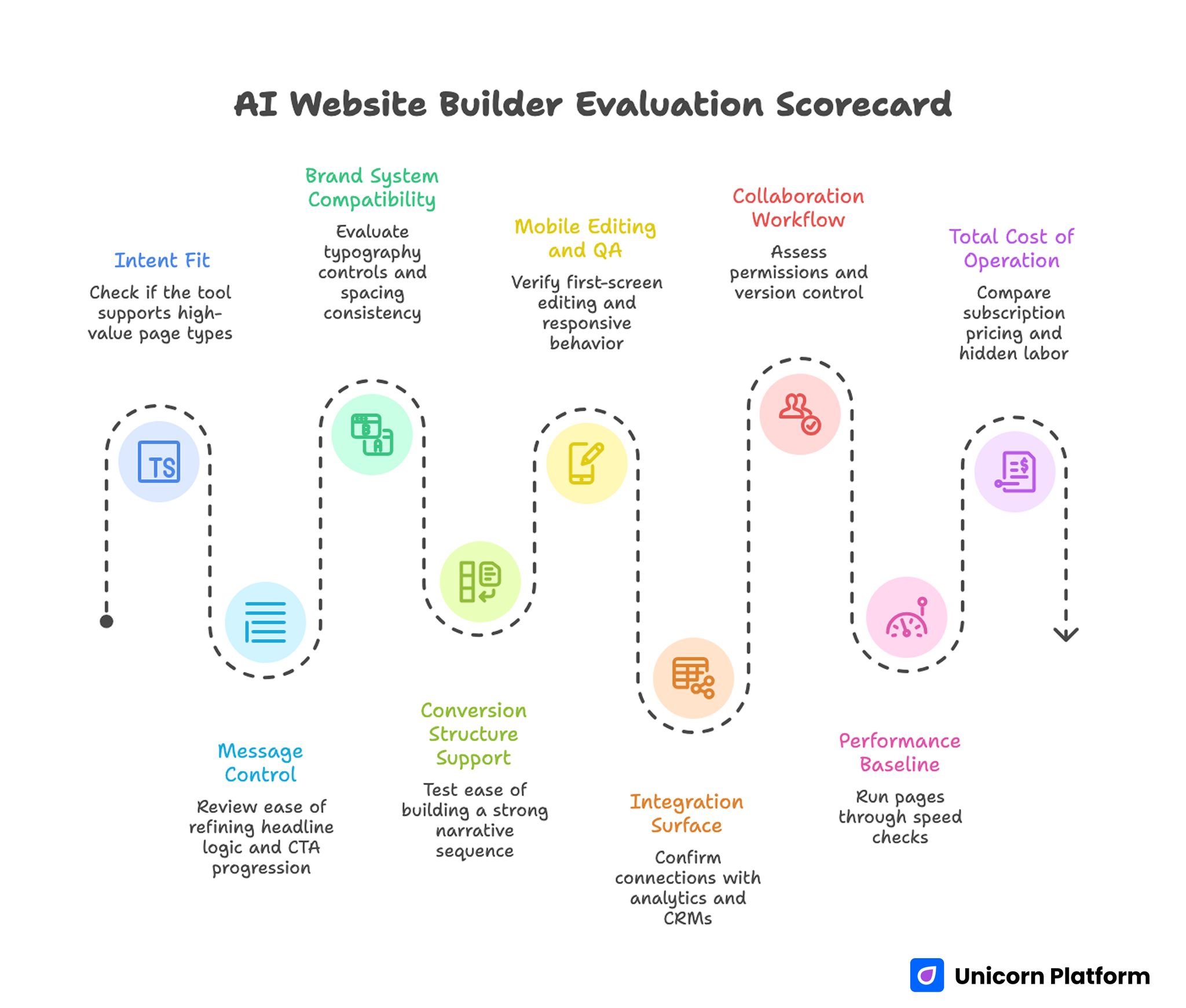
AI Website Builder Evaluation Scorecard
A short scorecard prevents opinion-driven decisions and keeps everyone aligned on business outcomes. It also makes procurement conversations faster because tradeoffs are visible in one place.
1. Intent Fit
Check whether the tool can support your highest-value page types: lead capture, product explanation, signup funnels, or webinar registration. Some builders are excellent for simple pages and weaker for complex intent flows.
2. Message Control
Review how easily your team can refine headline logic, evidence placement, and CTA progression after generation. Small edits should not trigger layout instability or forced rewrites.
3. Brand System Compatibility
Evaluate typography controls, spacing consistency, color tokens, and reusable components. If system alignment is weak, visual drift grows with every new page.
4. Conversion Structure Support
Test whether the platform makes it easy to build a strong narrative sequence from relevance to mechanism to proof to action. Builders that force shallow section ordering usually underperform at scale.
If your team needs deeper guidance on section sequencing decisions, use this reference on high-converting landing page structure when planning templates. Apply those sequencing rules during template design, not only during final copy edits.
5. Mobile Editing and QA
Verify first-screen editing, responsive behavior, interaction comfort, and form usability on small devices. Mobile should be easy to review and reliable to ship.
6. Integration Surface
Confirm how the builder connects with analytics, CRMs, automation tools, and product events. Integration work should be predictable, not a custom engineering project for every launch.
7. Collaboration Workflow
Assess permissions, reviewer notes, version control, and rollback options. Quality drops fast when teams cannot track who changed what and why.
8. Performance Baseline
Run pages through practical speed checks and verify script discipline. Performance debt compounds when teams publish quickly without baseline limits.
9. Total Cost of Operation
Compare subscription pricing plus hidden labor: editing time, QA overhead, design cleanup, and failed experiments. The cheapest plan is often the most expensive workflow.
Builder Categories and Where They Win
Not every team needs the same kind of tool. Category fit is often more important than brand preference.
Design-led builders
These tools are strong for teams that need visual precision and animation control. They are useful for brand-led launches and polished marketing experiences. The tradeoff is that non-design contributors may need more guidance to keep pages consistent.
Marketing-led builders
These platforms prioritize speed, section blocks, and funnel setup. They usually work well for fast campaign launches and iterative growth testing. The downside can be limited flexibility for unusual layout requirements.
Product-led builders
Product-focused tools are better for teams that need dynamic behavior, app-like interactions, or integration-heavy workflows. They often require clearer technical ownership but provide stronger long-term flexibility.
General-purpose builders
Broad platforms cover many use cases and support mixed teams. They are often easier to adopt quickly but can become noisy when your requirements become specialized.
Category-first selection reduces churn. Choose the class that matches your workflow, then compare individual tools inside that class.
How to Match Builder Choice to Business Model
A strong selection process starts from revenue model and buyer journey, not from visual preferences. When intent and monetization are clear, builder decisions become much more consistent.
Service businesses
Service pages need fast trust construction and clear action pathways. Prioritize tools that support proof blocks, qualification forms, and rapid content updates. Your bottleneck is usually credibility, not animation complexity.
SaaS and product-led offers
Software pages need mechanism clarity, objection handling, and staged CTAs across awareness levels. Choose builders with modular section patterns and strong experiment workflows.
Ecommerce and catalog-heavy teams
Catalog contexts need reliable templates, consistent product messaging, and smooth integration with commerce systems. Fast generation helps, but operational consistency matters more.
Agencies and multi-client teams
Agency workflows require reusable systems across clients without style bleed. Role permissions, template governance, and approval history become central requirements.
Solo operators and early founders
Early teams need speed and low operational burden. Pick a builder that can ship quickly while still allowing clear copy control and basic measurement hygiene.
Positioning Before Building: The Missing Step
Most teams open a builder too early. Positioning and naming should be decided before generation, or output will feel generic regardless of tool quality.
Start with one audience segment, one urgent problem, and one believable outcome. This creates a sharper prompt base and reduces rewrite cycles later.
Domain and positioning alignment should be handled early as well. This framework for AI domain strategy can help teams connect brand direction with acquisition intent before page production begins.
Once positioning is clear, your prompts become more useful and your tests become easier to interpret. This single step often cuts avoidable rewrite rounds in half.
Prompt Design for Better First Drafts
High-quality output starts with better instructions. Generic requests produce generic copy, even in expensive tools.
Include six elements in every primary prompt. Missing any one of them usually creates avoidable ambiguity in generated output.
- Audience profile and context.
- Problem framing in plain language.
- Mechanism summary with realistic boundaries.
- Trust evidence available right now.
- Desired section sequence.
- Action goal and form friction level.
Prompting should also include exclusions. Ask the system to avoid vague superlatives, unsupported claims, and repetitive phrasing. This saves editing time and improves credibility.
A useful practice is prompt versioning. Keep a small library of proven prompt structures by page type so contributors can start from validated patterns instead of improvising every time.
The Production Workflow That Keeps Quality Stable
Builder speed is only valuable if the whole workflow is controlled. Use this seven-stage process for repeatable output.
Stage 1: Brief
Create a short brief with objective, audience, mechanism, trust assets, and success metric. Keep it concise but specific enough to drive clear decisions.
Stage 2: Draft generation
Generate multiple direction options, then select one strategic path. Do not merge too many directions at once, because mixed narratives usually reduce clarity.
Stage 3: Editorial merge
Human editor refines sequence, removes generic language, tightens relevance, and aligns section transitions. This stage usually determines final quality.
Stage 4: Trust mapping
Place evidence near high-stakes claims. Reviews, outcomes, screenshots, and credibility indicators should appear where uncertainty is highest.
Stage 5: UX and mobile QA
Check readability, spacing, tap comfort, and form behavior under real device conditions. Weak mobile experience can erase gains from strong copy.
If your team needs implementation depth for small-screen conversion work, this guide on creating a high-converting mobile app landing page gives practical patterns. Use those checks as release criteria rather than optional polish tasks.
Stage 6: Instrumentation
Confirm analytics events, funnel steps, and post-conversion routing before release. Measurement issues discovered after launch usually create ambiguous results.
Stage 7: Publish and iterate
Ship with one primary hypothesis and one guardrail metric. Controlled experiments produce clearer learning than broad simultaneous changes.
Conversion Architecture for AI-Generated Pages
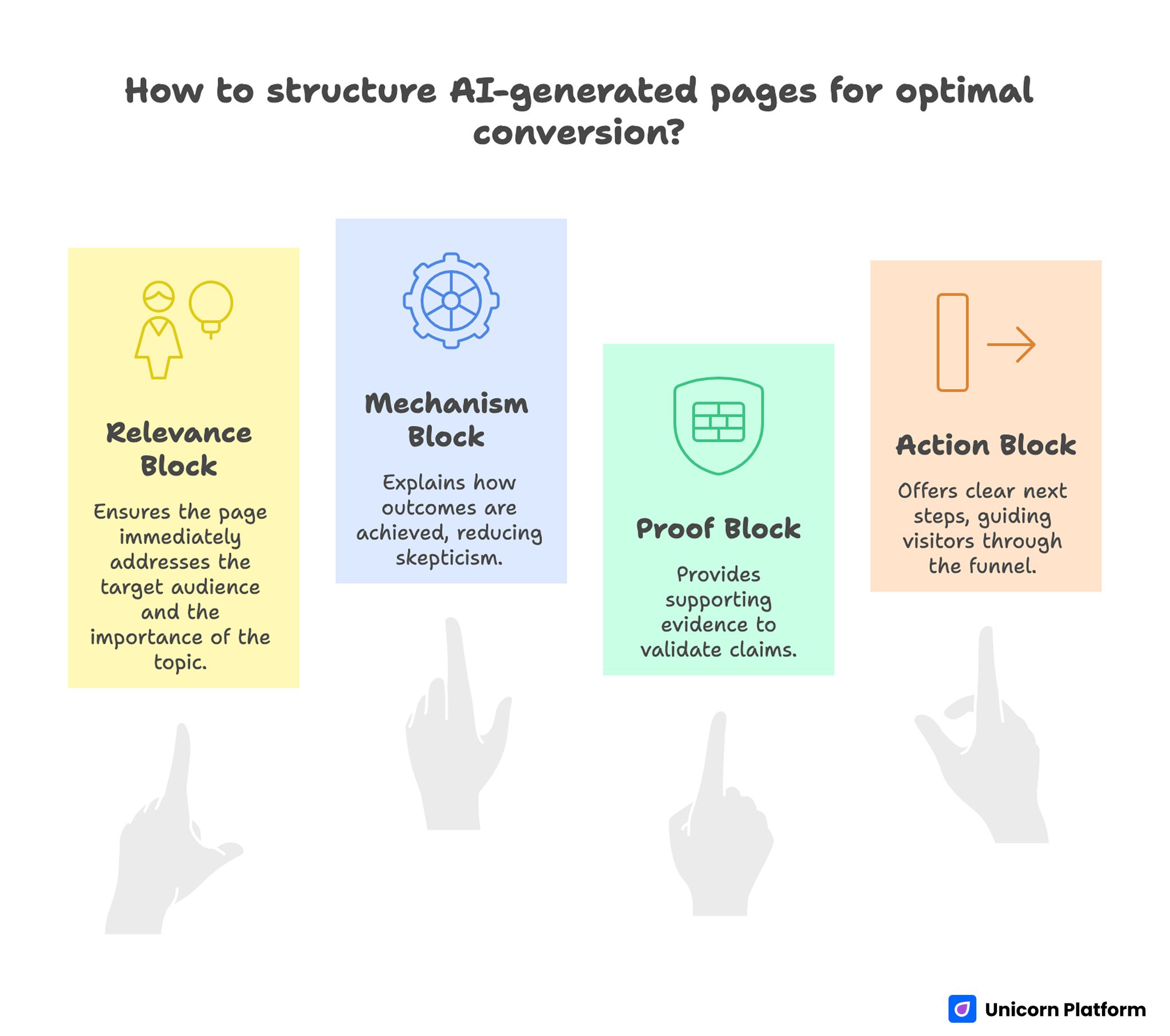
Conversion-Focused Structure for AI-generated Pages
Many builder-generated pages underperform because they emphasize surface design over decision flow. A stronger page follows predictable conversion logic.
Relevance block
The first screen should answer who this is for and why the topic matters now. Ambiguous opening copy causes early drop-off even when layout quality is strong.
Mechanism block
After relevance, explain how outcomes happen. Mechanism clarity reduces skepticism and helps qualified visitors continue scanning.
Proof block
Place supporting evidence where claims become bold. Proof timing is as important as proof quality.
Action block
Offer one primary next step and one lower-friction secondary path. Avoid multiple competing CTAs in the same viewport.
Internal behavior patterns matter when refining these blocks. Teams can source experiment ideas from user behavior tips to optimize landing pages and adapt them to current funnel stage.
Quality Gates That Protect Output at Scale
As page volume increases, quality slips unless release gates are explicit. Add non-negotiable checks before publish.
Editorial gate
- No generic filler statements.
- No unsupported outcomes language.
- No repetitive CTA phrasing.
- Clear audience relevance in opening section.
UX gate
- Readable heading hierarchy.
- Predictable spacing and visual rhythm.
- Form clarity and error handling.
- Accessible interaction states.
Technical gate
- Core events are firing correctly.
- No broken integrations in primary path.
- Performance baseline within limits.
- Tracking naming conventions consistent.
Trust gate
- Claims have nearby evidence.
- Limitations are transparent where needed.
- Contact or support path is visible.
- Privacy expectations are not ambiguous.
Release speed is only useful when these gates are enforced consistently. Otherwise, output volume rises while trust and conversion quality quietly decline.
Internal Linking and Topic Depth Strategy
Topical authority improves when related material is connected at the moment a reader needs implementation depth. Links should act like guided handoffs, not navigation clutter.
For example, when a section introduces interactive qualification or conversational guidance, it is useful to connect readers to practical patterns for enhancing websites with AI assistants. That handoff works best when the surrounding paragraph already explains user intent.
After that handoff, continue with core narrative instead of stacking more links in the same local area. Readers should feel momentum, not interruption.
Later in the article, when discussing product workflows and feature delivery alignment, bring in implementation context from AI app development only where it deepens the current decision. Link placement should follow the reader's next practical question, not editorial habit.
This spacing model improves user flow and keeps internal links genuinely useful. It also prevents sections from feeling like promotion blocks.
Measurement Framework for Builder Programs
Publishing more pages does not guarantee better business outcomes. Measurement should connect production activity to qualified results.
Use four layers. Keep definitions stable over time so trend analysis remains trustworthy.
- Clarity layer: first-screen engagement and mechanism interaction.
- Progress layer: movement through proof and action sections.
- Conversion layer: qualified submissions or starts.
- Business layer: downstream activation, revenue fit, or retention.
Each release should define one primary success signal and one quality guardrail. A common guardrail is qualification quality relative to submission volume.
Review cadence matters too. Weekly reviews are good for active experiments, while monthly pattern reviews are better for template-level decisions.
Cost Modeling: The Numbers Teams Forget
Builder pricing pages rarely capture total operating cost. Most overruns come from hidden work after generation.
Track these cost drivers. Monitoring only subscription fees will hide the real cost profile.
- Editorial correction time per page.
- QA time across desktop and mobile.
- Integration setup and troubleshooting.
- Experiment cycles required to hit baseline goals.
- Rework from inconsistent templates.
A practical way to compare tools is cost per qualified outcome, not cost per seat. This reveals whether faster generation actually translates into valuable pipeline progress.
Cheaper subscriptions can still produce higher total cost if editing and QA burden is heavy. More expensive tools can be efficient when they reduce post-draft rework.
Security, Privacy, and Compliance in AI Builder Workflows
Security and compliance should be built into the workflow, not bolted on before launch. Last-minute legal and privacy fixes are expensive and often delay campaigns.
Security baseline
Verify HTTPS enforcement, dependable hosting posture, backup policies, and account-level access controls. Teams should also define minimal standards for contributor permissions and credential hygiene.
Data privacy practice
Document what user data is collected, where it moves, and how long it is retained. Make consent behavior clear for regions that require explicit controls.
Accessibility expectations
AI-generated layouts can still fail accessibility requirements if headings, contrast, and interaction patterns are not reviewed. Include accessibility checks in your release gate.
Legal clarity
For transactional flows, confirm policy visibility and acceptable payment handling patterns. When in doubt, legal review should happen before traffic scaling.
Security is not only a legal concern. It directly affects trust and conversion confidence.
Common Failure Modes and Practical Fixes
Failure mode 1: Fast launch, weak conversion
Symptoms include high page visits and low qualified action. Usually the problem is relevance and mechanism clarity in the first half of the page.
Fix by tightening audience framing, simplifying value logic, and placing proof earlier. Then rerun the page with a single hypothesis so improvement can be measured clearly.
Failure mode 2: Strong copy, poor mobile results
Desktop reviews can hide mobile friction. Tap targets, form layouts, and content density often create hidden drop-off on smaller screens.
Fix by running mobile-first QA and reducing above-the-fold cognitive load. Focus first on readability, tap comfort, and form progression.
Failure mode 3: Rising volume, falling consistency
As teams scale, templates drift and brand logic fragments. This often happens when ownership is undefined.
Fix with template governance, role-based approvals, and version control discipline. Shared ownership without rules usually leads to contradictory edits.
Failure mode 4: More leads, lower quality
High submission volume can mask weak qualification. Generic CTAs and broad promises attract low-fit traffic.
Fix with clearer value boundaries, stronger expectations in CTA language, and one early fit qualifier. This usually lowers raw volume slightly but improves downstream quality.
Failure mode 5: Endless redesign loops
When teams redesign full pages repeatedly, learning quality drops because causality is unclear. Mixed changes make it almost impossible to attribute outcomes correctly.
Fix with one-variable testing and release notes that track expected versus observed impact. Small, controlled changes produce faster compounding gains.
30-Day Rollout Plan for New Builder Adoption
Week 1: Alignment and pilot setup
Define objective, audience, and success metric for one pilot page. Build a scorecard and agree on role ownership before production starts.
Week 2: Build and gate creation
Generate draft variations, choose one direction, and complete editorial and trust mapping passes. Establish mandatory release checks for mobile, measurement, and quality.
Week 3: Launch and first optimization cycle
Publish one controlled variant with clear hypothesis. Review performance at day 7 and run one focused improvement pass.
Week 4: Standardization
Document what worked, archive weak patterns, and create reusable template instructions. Expand only after one page family shows stable quality.
This timeline balances speed with control and keeps decision quality high during adoption. It also creates enough documented evidence to guide broader rollout decisions.
90-Day Optimization Plan for Teams Already Shipping
Month 1: Stabilize foundations
Audit active templates, remove low-performing structures, and normalize trust placement rules. Ensure every page family follows the same core narrative sequence.
Month 2: Deepen experimentation
Run structured tests on headlines, proof order, and CTA progression with consistent measurement. Keep each test scoped to one primary variable.
Month 3: Scale proven systems
Expand high-performing patterns into adjacent campaigns, train contributors on proven prompt libraries, and retire workflows that create recurring rework. Scale should follow validated systems, not only stakeholder urgency.
At this stage, teams usually see more predictable conversion movement and lower per-page production cost. Reliability improves because fewer edits are wasted on unstructured experiments.
Advanced Team Operations for Multi-Contributor Workflows
Single-author workflows can rely on informal judgment. Multi-contributor programs need explicit systems.
Define four core roles. In smaller teams, one person can hold multiple roles, but the responsibilities should stay explicit.
- Strategy owner: audience, intent, and offer logic.
- Editorial owner: narrative quality and trust boundaries.
- Analytics owner: measurement integrity and reporting.
- Release owner: final QA and publication control.
Role clarity reduces bottlenecks and limits contradictory edits. It also shortens review cycles because decision ownership is visible.
A short operational note should exist for each active template family. Keep audience definition, approved proof assets, CTA hierarchy rules, and experiment history in one place.
Finally, schedule recurring calibration. Monthly review of prompts, templates, and quality outcomes prevents slow drift and preserves compounding gains.
Future Direction: Where AI Builder Workflows Are Going
Expect the next wave of gains to come from tighter orchestration, not bigger generation models alone. Process quality is becoming a stronger advantage than raw model novelty.
More context-aware generation
Builders are improving at reading brand context, past edits, and conversion history. This will reduce cleanup work when teams maintain clean inputs and governance.
Better predictive QA
Tools are starting to flag potential issues earlier, including readability risks, weak hierarchy, and mobile friction indicators. Human review remains critical, but pre-release signals will improve.
Integration-led workflows
As AI pages connect more deeply with product data and lifecycle automation, teams will treat pages as active system components, not static assets. That shift increases the value of strong instrumentation and governance.
Stronger trust requirements
Users are becoming better at spotting vague generated language. Pages that win will combine speed with sharper proof, clearer boundaries, and more transparent claims.
FAQ: AI Website Builders
How should a team start evaluating AI website builders?
Start with one live pilot tied to a real business goal. Test generation quality, editing control, mobile behavior, and analytics setup in a full workflow. A practical pilot reveals more than any feature checklist.
What matters more: design quality or messaging quality?
Both matter, but messaging quality usually drives performance first. Beautiful layouts cannot compensate for weak relevance, unclear mechanism, or missing proof. Prioritize narrative clarity, then polish visual depth.
Can small teams compete with larger teams using AI builders?
Yes, if they focus on operational discipline. Small teams can move faster when they use tight prompts, clear templates, and lightweight QA gates. Consistency often beats raw output volume.
How many tools should be in the builder stack?
Fewer is usually better. A compact stack with clear ownership reduces integration failures and edit conflicts. Add tools only when they solve a recurring constraint that cannot be handled in current workflow.
How can teams avoid generic AI-sounding copy?
Feed better inputs and enforce editorial cleanup. Use audience-specific details, practical mechanism language, and direct trust evidence. Remove vague superlatives and repeated filler during review.
Is a full redesign usually the best way to improve conversion?
Rarely. Incremental, hypothesis-driven testing is more reliable and easier to learn from. Full redesigns can hide causality and delay progress.
How often should teams update AI-generated pages?
Update cadence depends on traffic and campaign velocity, but monthly structural reviews and weekly performance checks are common for active pages. High-volume programs may need more frequent iterations.
What is the most common post-launch mistake?
Skipping quality review after publish. Teams often launch quickly, then move to new builds without diagnosing drop-off zones, weak proof placement, or qualification issues.
Do AI builders reduce the need for human editors?
They reduce drafting labor, not editorial responsibility. Human oversight remains necessary for positioning, trust boundaries, legal clarity, and conversion strategy.
How should teams define success in the first 90 days?
Track faster launch cycles, lower rework time, and better qualified conversion trends. Success is not just more published pages; it is predictable improvement in business-relevant outcomes.
Final Takeaway
AI builders are now strong enough to become core production infrastructure, but results depend on operational quality. Teams that combine structured prompts, clear conversion architecture, disciplined QA, and focused experimentation can ship faster without sacrificing trust.
Unicorn Platform becomes most valuable when used as a controlled system for learning, not a shortcut for unchecked automation. Pick a stack that fits your workflow, enforce clear release gates, and scale only what proves repeatable in real traffic.