Table of Contents
- A Four-Layer Operating Model for Beginner Teams
- The 30-Day Beginner Adoption Plan
- From Draft to High-Quality Page: A Production Workflow
- Use-Case Patterns Beginners Can Apply Immediately
- Common Beginner Mistakes and How to Fix Them
- FAQ
AI tools can now draft copy, generate layouts, suggest code, and speed up production across the full website lifecycle. That progress is real, but many teams still miss the core point: speed only matters when it improves outcomes. If your pages launch faster but stay generic, confusing, or untrustworthy, velocity becomes expensive noise.
Most beginner mistakes happen before the first prompt is written. Teams skip audience clarity, pick random tools, and ask AI for polished output without a conversion plan. They then publish quickly, measure almost nothing, and conclude that "AI content does not work" when the real issue is execution design.
The better approach is operational. Treat AI as a system for reducing repetitive work while increasing strategic focus. Let models help with draft generation, variant exploration, and formatting consistency. Keep humans responsible for message-market fit, factual integrity, proof quality, and decisions that influence trust.
This guide breaks down how to do that in practice. You will get frameworks, checklists, implementation rhythms, and failure-mode fixes that make beginner AI adoption useful from week one.
sbb-itb-bf47c9b
Quick Takeaways Before You Start
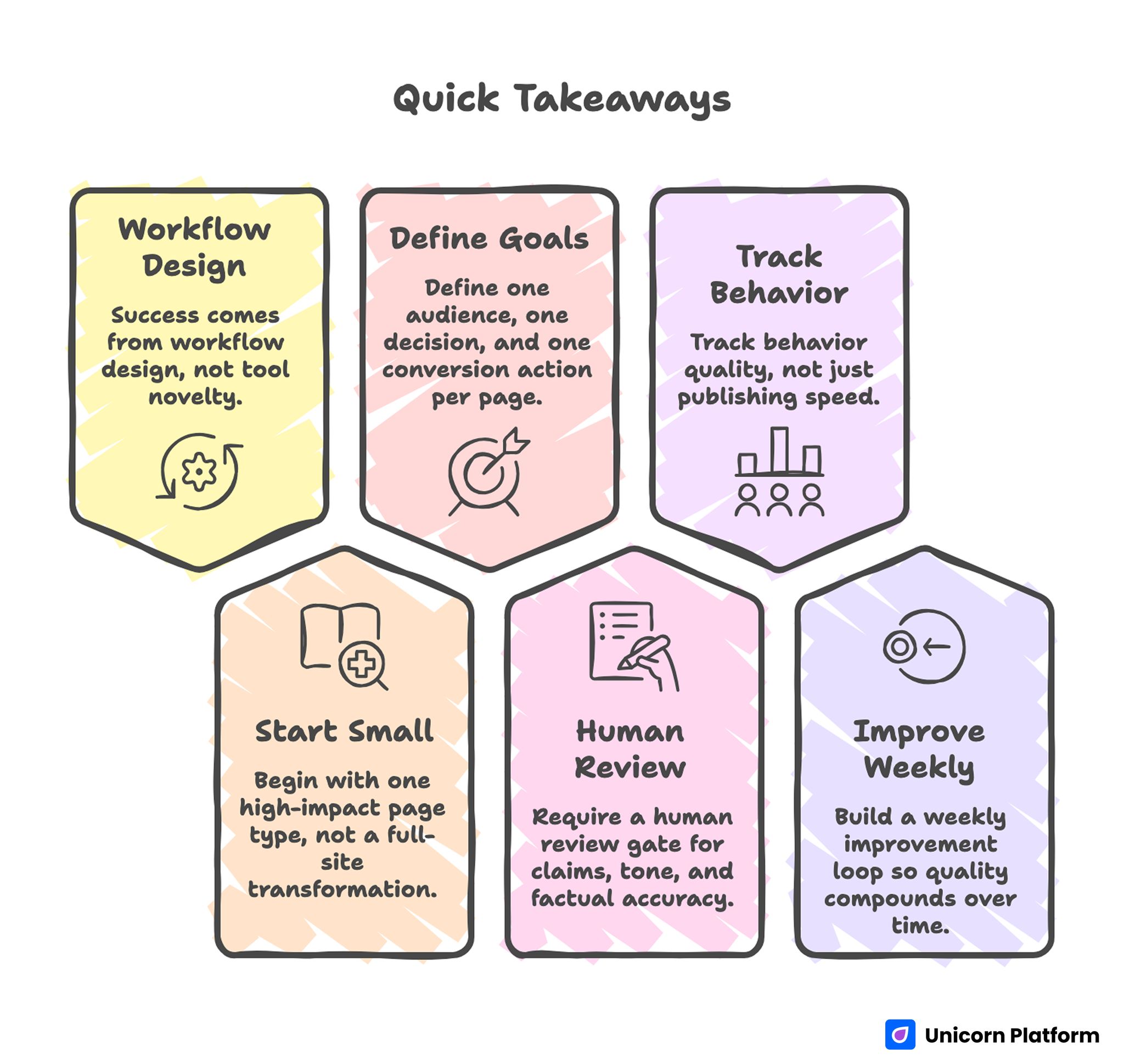
AI Web Development Quick Takeaways
- Success comes from workflow design, not tool novelty.
- Begin with one high-impact page type, not a full-site transformation.
- Define one audience, one decision, and one conversion action per page.
- Require a human review gate for claims, tone, and factual accuracy.
- Track behavior quality, not just publishing speed.
- Build a weekly improvement loop so quality compounds over time.
What AI Actually Changes in Web Work
AI does not replace web strategy. It compresses repetitive tasks so teams can spend more effort on judgment and differentiation. Beginners usually see the first gains in four places: content drafting, layout iteration, testing support, and operational consistency.
In drafting, models help you produce useful first versions quickly, especially when you provide audience context and clear section jobs. In layout planning, AI can suggest structure options that are easier to test than blank-page ideation. During optimization, AI can propose hypotheses for weak sections and summarize behavior patterns from analytics notes.
The shift is less about one "magic" feature and more about cycle time. A task that used to take five days can become a one-day loop with better review controls. That is the strategic advantage: more learning cycles per month.
A Four-Layer Operating Model for Beginner Teams
A reliable AI workflow in web projects usually has four layers. Skipping any layer creates quality debt.
Layer 1: Strategy and Intent Mapping
Define audience, problem, decision stage, and desired action before generating any page copy. If the brief is vague, AI will produce polished but interchangeable text. A focused brief forces specificity.
This is where many teams should align website work with product scope and offer clarity first. If you need a practical way to connect product narrative and launch execution, this AI app development guide is a useful planning reference.
Layer 2: Page Architecture and Message Flow
Structure decisions should come before sentence polishing. Decide what users must understand first, what proof they need next, and what objection should be handled before the CTA.
A strong sequence often looks like this: context, value mechanism, proof, differentiation, risk handling, and action. AI can generate section drafts for each block, but it should not choose your business priorities.
Layer 3: Production and QA
Once structure is locked, generate and refine section copy with strict constraints: tone, claims policy, vocabulary boundaries, and prohibited phrasing. This keeps drafts consistent across contributors and reduces clean-up time.
Editorial QA is non-negotiable. Every publish candidate should pass factual checks, clarity checks, readability checks, and conversion logic checks.
Layer 4: Learning and Iteration
Publishing is the midpoint, not the endpoint. Monitor user behavior by section, diagnose weak points, update prompts, and retest quickly.
Without this loop, AI adoption plateaus. With it, quality improves every cycle because your process learns.
The 30-Day Beginner Adoption Plan
The easiest way to fail is to transform everything at once. A better path is a narrow 30-day sprint with explicit boundaries.
Week 1: Choose One Page Type and Define Standards
Select one page category with clear business impact, such as signup, demo request, waitlist, or product overview. Set quality standards in writing: tone rules, proof requirements, CTA rules, and compliance constraints.
Build a one-page rubric your team can score quickly. If a draft cannot pass the rubric, do not publish it.
Week 2: Generate First Drafts and Build Review Rhythm
Run AI-assisted drafts for three versions of the same page intent, then review them against your rubric. Keep the strongest structure and merge best-performing sections.
For early draft velocity, many teams test workflows similar to this generate landing pages instantly with AI approach, then harden the output with manual review before launch. The key is treating fast generation as draft acceleration, not as automatic publish approval.
Week 3: Launch One Controlled Experiment
Test one structural variable and one messaging variable. Do not test seven things at once. Beginners need interpretable results, not noisy experiments.
Examples: move proof above the fold, simplify CTA copy, tighten objection handling, or shorten first-screen text. Keep measurement windows consistent.
Week 4: Review Performance and Update System Assets
Archive what worked, what failed, and what remains unclear. Update prompt templates, section defaults, and QA checklists based on observed behavior.
This documentation step is where compounding begins. Teams that write down decisions improve faster than teams that rely on memory.
Prompt Design That Produces Publishable Output
Generic prompts produce generic pages. The goal is not longer prompts; it is better constraints.
A strong prompt frame includes these fields. Each field reduces ambiguity and makes revisions faster when multiple people touch the same page.
- Audience definition and decision stage.
- Core problem and desired outcome.
- Offer details and proof requirements.
- Tone and vocabulary boundaries.
- Section order and CTA behavior.
- Disallowed claims and prohibited wording.
When these constraints are explicit, AI output becomes easier to edit and safer to publish. When they are missing, you get clean-looking drafts with weak relevance.
A practical template that works for many teams is below. Keep it short enough to reuse quickly and strict enough to protect quality.
Role: Senior conversion copy editor.
Audience: [specific user profile].
Goal: Help the visitor decide [primary action].
Offer: [product/service description].
Required sections: [ordered list].
Proof requirements: [customer evidence, benchmark type, or feature evidence].
Tone: [e.g., direct, practical, no hype].
Do not: [forbidden claims, forbidden words, compliance limits].
Output format: concise H2/H3 structure with action-oriented copy.
Prompt quality should be versioned just like product work. Save templates, annotate outcomes, and keep only versions that produce consistent editorial quality.
From Draft to High-Quality Page: A Production Workflow
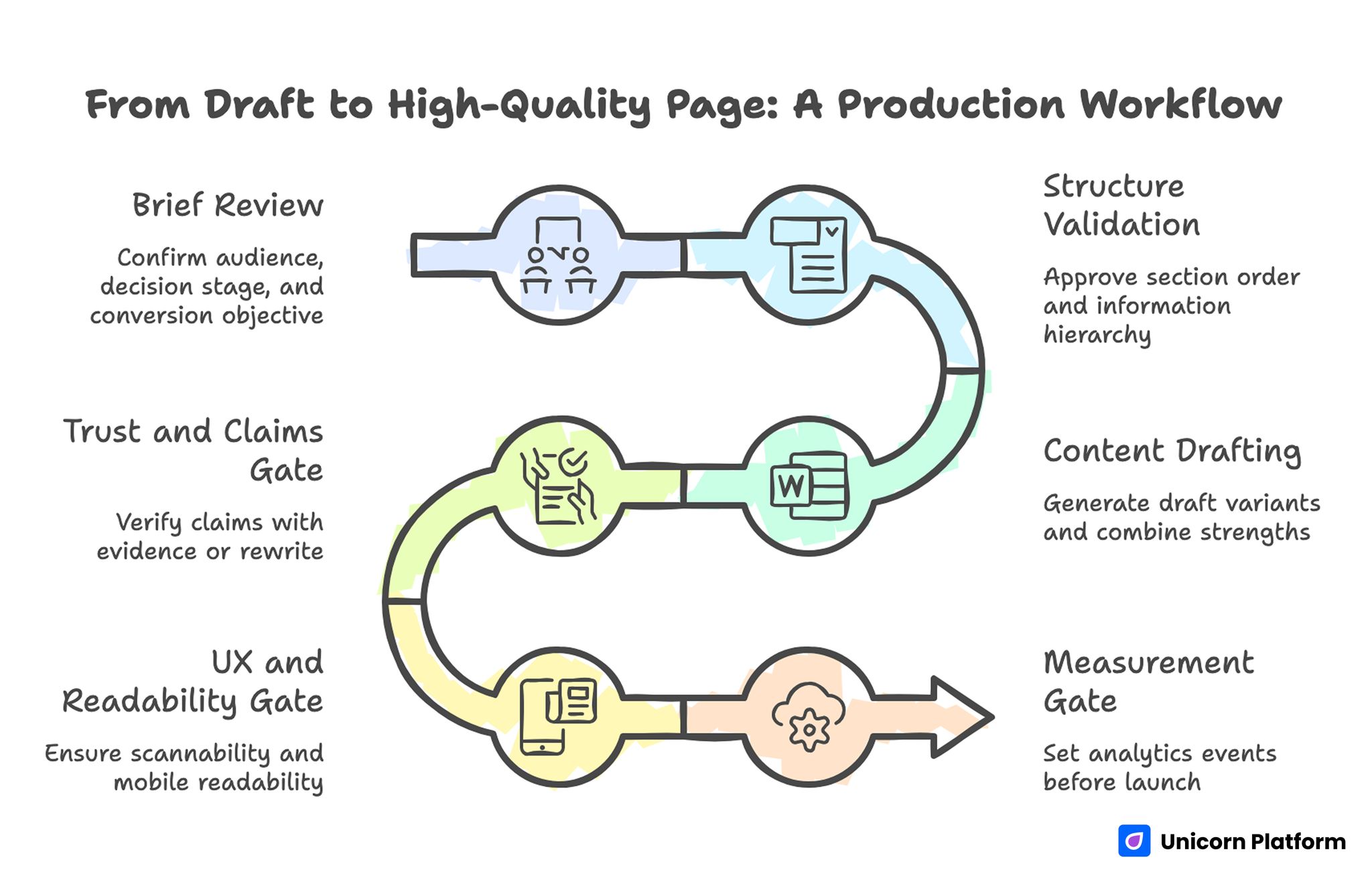
From Draft to High-Quality Page: A Production Workflow
A publishable page usually moves through six checkpoints. Skipping checkpoints is the fastest way to ship weak content at scale.
Checkpoint 1: Brief Review
Confirm audience, decision stage, and conversion objective. If reviewers disagree on these basics, stop and align before writing.
Checkpoint 2: Structure Validation
Approve section order and information hierarchy before editing sentences. This prevents wasted copy cycles on the wrong framework.
Checkpoint 3: Content Drafting
Generate draft variants for major sections, then combine strengths into one coherent narrative. Keep section intent clear and avoid repeating the same value claim in different words.
Checkpoint 4: Trust and Claims Gate
Every claim that could influence purchase decisions needs evidence or a safer rewrite. Remove absolute language unless proof is robust and current.
Checkpoint 5: UX and Readability Gate
Verify scannability, paragraph cadence, mobile readability, and CTA visibility. A technically correct page can still fail if it is hard to consume.
Checkpoint 6: Measurement Gate
Set analytics events before launch. If you cannot observe first-screen behavior, scroll depth, CTA interaction, and form completion, optimization becomes guesswork.
Use-Case Patterns Beginners Can Apply Immediately
Most teams benefit from concrete scenarios more than abstract principles. The three patterns below are practical starting points.
Pattern 1: Founder-Led SaaS Launch Page
Problem: founder can explain product deeply in conversation but struggles to communicate value quickly on-page. This usually leads to feature-heavy pages that bury the real buying decision.
Approach: use AI for first-pass positioning options, then select one core narrative and map proof to objections. Keep the first screen focused on user outcome, not feature inventory.
Result: faster path from broad idea to clear offer framing, with fewer rewrites caused by unclear positioning. Teams also spend less time debating copy because section intent is explicit.
Pattern 2: Agency Team Managing Multiple Client Pages
Problem: output quality varies by writer and project manager, causing inconsistent client outcomes. That inconsistency creates avoidable revision cycles and weakens client trust.
Approach: standardize prompt templates by intent type and enforce one QA rubric across accounts. Use AI to speed up initial drafts, but keep final sign-off human.
Result: better consistency, faster turnaround, and easier onboarding for new contributors. Quality also becomes easier to explain because review criteria stay stable across projects.
Pattern 3: Small Team Running Recurring Campaign Pages
Problem: campaign pages are launched quickly but decay over time because no one owns refresh cycles. Teams gradually accumulate outdated proof, old offers, and mismatched CTAs.
Approach: assign monthly freshness reviews and tie each page to a measurable objective. Use AI to propose updates when behavior metrics decline.
Result: stronger long-term conversion quality and reduced content entropy. The refresh process also prevents sudden performance drops after product or pricing changes.
UX, Design, and Interaction: Where AI Helps and Where It Doesn't
Design suggestions from AI can accelerate ideation, but they often default to safe, generic patterns. Beginners should treat these suggestions as options, not decisions.
The highest-impact design decisions are still human: visual hierarchy by intent, proof emphasis by audience skepticism, and CTA style by commitment level. AI can draft options, but strategic fit requires context.
When experimenting with design and structure, this AI landing page generator walkthrough is helpful as a rapid prototyping reference. Use it for draft speed, then refine the narrative and interaction details manually.
Interaction quality matters just as much as layout aesthetics. Test clarity of microcopy, form friction, and error states across devices. AI-generated structure is not a substitute for usability discipline.
Tool Selection Without Workflow Chaos
Beginner teams often lose momentum because they adopt too many AI tools at once. A crowded stack creates duplicate work, unclear ownership, and constant context switching. Start with one drafting workflow, one publishing environment, and one analytics source, then expand only when a clear bottleneck appears.
A useful decision filter is simple: does this tool improve speed, quality, or observability in a measurable way? If the answer is unclear, postpone adoption. Teams usually get better outcomes from tighter process design than from adding another generator.
Assign one owner for each core function: prompt library, editorial QA, analytics interpretation, and release governance. Ownership prevents the "everyone assumed someone else checked it" problem that causes most avoidable quality issues.
Review tool performance monthly using practical criteria: time saved per iteration, reduction in revision rounds, and lift in qualified conversion behavior. This keeps decisions operational and avoids chasing trends that do not improve outcomes.
Risk Controls: Accuracy, Privacy, and Compliance
AI adoption without governance creates trust risk. That risk usually comes from subtle errors, unsupported claims, and weak handling of sensitive details.
A practical control system has three parts. First, define claim classes and required proof levels. Second, list prohibited statements for regulated contexts. Third, assign clear approval owners.
Privacy risk also increases when teams paste user data into external tools without policy guardrails. Establish rules for data handling, redaction, and storage access before scaling AI workflows.
If your team is evaluating broader AI website ecosystems and wants context on implementation directions, this overview of the AI Commons website landscape can help frame opportunities and constraints. Use that context to shape priorities, then return to your own audience and workflow constraints.
Optimization That Improves Outcomes, Not Just Output
Many teams track the wrong metrics in early AI projects. They celebrate faster publishing while ignoring whether visitors understand, trust, and act.
A stronger measurement stack includes the signals below. Together, they help teams optimize for business impact instead of raw output volume.
- First-screen comprehension indicators (quick exits, rapid scroll abandon).
- Section engagement signals (scroll progression by block).
- Primary action quality (qualified submissions, not just total submissions).
- Downstream outcomes (demo attendance, sales acceptance, activation quality).
When performance drops, diagnose section-level causes before rewriting entire pages. Sometimes a single weak proof block or unclear CTA transition is the bottleneck.
Optimization should also include prompt performance tracking. If one prompt version consistently yields cleaner first drafts, promote it to default and retire weaker templates.
Common Beginner Mistakes and How to Fix Them
Mistake 1: Treating AI Output as Final Copy
Fix: require structured editorial review before publishing. AI can reduce drafting time, but quality still depends on judgment and verification.
Mistake 2: Overloading Pages With Features
Fix: anchor each page around one primary decision and support it with focused proof. Move secondary details below the main conversion path.
Mistake 3: Running Too Many Experiments at Once
Fix: isolate one structural and one messaging variable per test window. Preserve clean baselines so results are interpretable.
Mistake 4: Ignoring Cross-Functional Input
Fix: pull insights from support, sales, and product teams into prompt updates. They each see different user friction that marketing alone may miss.
Mistake 5: No Maintenance Ownership
Fix: assign recurring freshness reviews and explicit page owners. A fast launch process without update ownership creates long-term performance decay.
The Beginner-to-Operator Maturity Ladder
Most teams move through four maturity stages when adopting AI in web operations. Knowing your stage helps you pick realistic next improvements instead of copying advanced systems too early.
Stage 1: Experimental
Output is quick but inconsistent. Prompts vary by person, and review standards are unclear.
Stage 2: Structured
Core templates emerge, and QA becomes repeatable. Publish quality becomes more predictable.
Stage 3: Measurable
Team decisions are driven by section-level behavior and conversion quality, not subjective preference. Debates become shorter because data clarifies which sections deserve rework.
Stage 4: Compounding
Prompt libraries, review systems, and measurement logic are documented and continuously improved. Team performance becomes less dependent on individual heroics.
Moving from one stage to the next is mostly about process clarity, not advanced tooling. Better prompts and better review gates usually outperform expensive tool switching.
Building Team Rhythm: Weekly and Monthly Cadence
A simple operating rhythm keeps AI work practical. Consistent cadence matters more than occasional large rewrites.
- Weekly: review one underperforming page, run one focused experiment, update one prompt template.
- Monthly: run content freshness checks, retire weak variants, and document decision patterns.
This rhythm protects against "launch and forget" behavior. It also creates a steady learning loop where strategy and execution stay aligned.
Teams that need practical context for website generation workflows can review this GPT-based implementation guide on how GPT-4 can help create a website, then adapt the method to their own QA standards. The important part is not copying steps blindly but translating them into your own operating constraints.
FAQ: AI in Web Development for Beginners
1. Is AI in web work useful for beginners without a technical background?
Yes, if the workflow is constrained and review standards are clear. Non-technical teams can get strong results when they focus on structured prompts, page intent clarity, and disciplined editorial QA.
2. Should I use AI for full-site generation on day one?
No. Start with one page type and one measurable goal. Expanding too early usually multiplies inconsistencies and makes debugging difficult.
3. How many tools do I need to start?
One generation workflow and one measurement stack are enough for early wins. Tool sprawl adds operational overhead before fundamentals are stable.
4. What should humans always review before publishing?
Review claims, tone, and message precision. Anything that affects trust, legal risk, or purchase decisions should never bypass human approval.
5. How do I avoid generic AI copy?
Use audience-specific briefs, concrete proof requirements, and strict section jobs. Generic prompts produce generic language; constrained prompts produce usable drafts.
6. What are the best first metrics to track?
Track first-screen exits, section engagement, primary CTA quality, and downstream lead quality. These metrics connect page quality to business outcomes.
7. How often should AI-generated pages be updated?
Run a monthly freshness review as a baseline, then add event-driven updates when products, pricing, or audience priorities change. This keeps pages aligned with reality and prevents silent quality decay.
8. Can AI improve design decisions too, or only copy?
AI helps generate design options and speed ideation, but strategic fit still requires human judgment. Treat AI output as hypotheses that need testing.
9. What is the biggest risk in beginner adoption?
The largest risk is publishing fast without governance. Weak claim control and unclear ownership can damage trust faster than slow execution.
10. How do I know when my team is ready to scale AI workflows?
Scale when your team can repeatedly ship pages that pass QA and improve key outcomes. Consistency is a better readiness signal than output volume.
Final Takeaway
Beginner success with AI is not about finding the perfect model. It is about building a system where strategy, drafting, QA, and optimization reinforce each other. Start narrow, set clear standards, measure what matters, and improve the process every cycle.
When teams run this approach consistently, they publish faster while improving clarity, trust, and conversion performance at the same time. Over time, those gains compound because each cycle improves both the content and the workflow behind it.


